TheGrint | Golf Handicap & GPS
- 1.22K
- 4.7
- Installs
- 1.00M
- Price
- Free

Screenshots
Analysis by Reviewed
I see TheGrint as a golf companion for players who want more than a digital scorecard. Its strongest case is the way it brings course GPS, round tracking and handicap tools together, so a golfer can use one place to follow both the day’s play and longer-term progress. That combination is genuinely useful, though it also means the app makes most sense when you’re willing to record rounds consistently.
A practical toolkit, not just a scorecard
Developed by Grint LLC, this free sports app has been around since March 4, 2013. It has a 4.7 average from around 5,100 ratings and more than a million installs, which suggests it has become a familiar option for golfers who want digital help on the course. I’d describe its central appeal as continuity: the distance check, score entry and handicap record can all support the same playing routine.
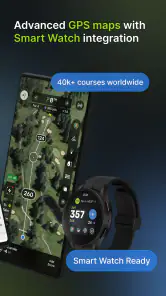
The course coverage is a useful starting point. The app’s GPS tools are available for over 40,000 courses, which is a broad base for golfers who travel or rotate among different local tracks. Before relying on it for an important round, I’d search for the specific course and confirm that the layout is available. That small check is more useful than discovering at the first tee that your chosen course isn’t in your expected list.
GPS is most valuable when it helps answer a quick practical question: how far am I from a relevant point, and what shot is sensible from here? I wouldn’t treat a distance as an instruction. Wind, lie, elevation, hazards and your own reliable carry distances still matter, and a phone-based tool is best used as one input in that decision rather than as a substitute for course judgment.
Keeping a round and a handicap in context
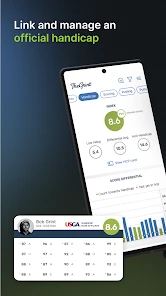
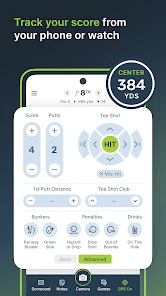
Score tracking becomes more worthwhile when it’s consistent. Logging rounds in the same app gives you a record to revisit instead of relying on memory or a stack of paper cards. The handicap tools make that history more meaningful for golfers who want an official handicap, while the stats can help turn a vague sense of “I’m missing too many greens” into something you can look at across rounds.
That doesn’t mean the app can tell you exactly what to practice. A stat is a clue, not a coaching plan: the value comes from noticing a repeat pattern and deciding whether it reflects technique, course management or simply a difficult stretch of play. I’d review those details after a round, when there’s time to think, instead of trying to interpret every number between shots.
A useful workflow is to record the round with as little fuss as possible, then look through the results later. If you’re playing with friends, a shared card can keep everyone’s scores in one place; if the group would rather chat and walk, you can keep the focus on your own entries. Either way, I’d avoid letting the phone become the center of the round. The best tracking routine is one you can maintain without holding up your group.
More From Our News Desk

Clash of Clans Is Won Between the Battles

Android Auto Makes the Case for Quieter Car Software

MobiOffice: Transforming Mobile Productivity with Seamless Integration

EA SPORTS FC™ Mobile Soccer: Redefining Mobile Sports Gaming

How Microsoft OneDrive Became a Mobile Productivity Giant

How Google Translate Breaks Language Barriers Effortlessly
Where the social side helps
The social tools give regular playing partners a reason to keep using the same service. Following friends, sharing scores and setting up friendly challenges can make results more engaging between rounds, particularly when your group enjoys a little competition. It’s a different kind of value from GPS: instead of helping with an immediate shot decision, it gives your rounds a connection to the people you play with.
That feature set is less persuasive if your friends don’t want to log scores or you prefer to keep golf private. You can still use the app for your own tracking, but the shared side naturally has less to offer when nobody else joins in. I’d think of social features as a bonus for an established golf group, not a reason by themselves to change how you play.
What a typical round might look like
Imagine meeting friends for a weekend round at a course you haven’t played recently. Before teeing off, you can check that the course is covered and decide whether you’re keeping only your own score or recording a group card. During play, a GPS check can help you choose a club, while score entry captures the result without relying on a fading memory later. After the round, the stats and handicap history give you a more useful review than simply remembering whether the day felt good or bad.
The trade-off is attention. Checking a screen before every shot can interrupt your rhythm and distract playing partners, so I’d use the tools selectively: consult a distance when it changes a decision, enter scores at a natural pause, and save detailed analysis for afterward. If the GPS position takes a moment to settle, don’t keep tapping through screens while others are ready to play. A course marker or a familiar yardage reference can serve as a backup.
Who should choose it—and who may not need it
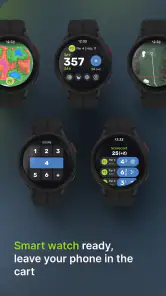
I think the best fit is a golfer who plays regularly, wants a handicap record, and likes having useful round data gathered in one place. It can also suit a player who travels between courses and would rather check a phone than carry a separate rangefinder, provided phone use feels comfortable during play. The watch app is another option for someone who wants golf information available without handling a phone as often, although I’d still consider whether a watch fits your preferred routine.
By contrast, a golfer who plays only occasionally and has no interest in handicaps, stats or tracking may get more from a paper card or a very simple scorekeeping tool. A dedicated GPS device may be a better match if you want a purpose-built display and prefer not to depend on your phone during a round. TheGrint’s breadth is a strength when its pieces serve your habits; if you only want one basic function, that breadth may feel unnecessary.
It is also worth being realistic about the limits of phone GPS. Reception and location updates can occasionally feel slow, and the phone has to be accessible when you need it. I’d make sure your usual way of carrying it doesn’t make quick checks awkward, and I wouldn’t plan a shot around a reading that seems out of step with the course. For golfers who value speed and simplicity above all, a physical rangefinder or course markers may feel more dependable in the moment.
Trying it before spending more
The app is free to download, is rated for Everyone, and offers in-app purchases ranging from $0.99 to $99.99 per item. I’d start with the free experience and use it over several rounds before paying for anything. That gives you time to find out whether you actually enter scores, revisit stats and use the extra tools—or whether the basic routine is enough.
For a new user, the most useful test is not whether every feature looks appealing on day one. It’s whether the app fits your real round. Can you enter scores without slowing down? Do you find the GPS handy on courses you play? Does reviewing your history change what you work on? If the answer is yes, more advanced options may be worth considering; if not, there’s little reason to pay simply because those options exist.
Unpacking the Features
The moment you fire up TheGrint, you're welcomed with a sleek and intuitive interface. It’s not just about keeping your score; it’s about enhancing your entire golf experience. The app provides a comprehensive GPS rangefinder that covers more than 37,000 golf courses worldwide. So, say goodbye to guessing distances and hello to precision play.
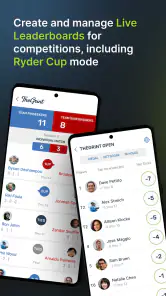
One of my favorite features is the live score tracking. You can keep track of not just your score, but also your buddies'. It’s like having a live leaderboard in your pocket. Plus, the app’s handicap calculator is spot on. It automatically syncs with the USGA/GHIN system, so your handicap index is always up to date.
Social Networking for Golfers
Who would’ve thought golf could get more social? TheGrint brings a social twist by allowing you to connect with fellow golfers. You can share your scores, follow friends, and even set up friendly challenges. It’s a fantastic way to keep the competitive spirit alive, even when you’re not on the course.
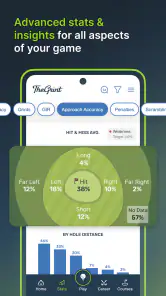
Another cool aspect is the stats tracking. The app digs deep into your game, giving you insights into your performance. It breaks down your strengths and weaknesses, helping you to understand where you need improvement. Trust me, it’s like having a personal coach analyzing every swing.
Putting It to Work on Course
A useful way to approach a round is to settle the basics before the first tee: check that the course is available, decide whether you want to track only your own score or keep a group card, and make sure your phone is accessible without slowing down play. That small bit of preparation matters because GPS and score entry are most helpful when they fit naturally into your routine, rather than turning every hole into a screen session.
For example, on a weekend round with friends, I’d use the scorecard to keep everyone’s numbers together, then look at performance patterns after the round instead of trying to analyze each shot while walking. That keeps the social part of golf intact and makes the stats more useful: they can guide what to practice next time, rather than distract you from the shot in front of you. If you only want a quick distance check, you can keep your use lighter and avoid treating every available feature as a task.
Who Gets the Most From It
I think the strongest fit is a golfer who plays often enough to care about a reliable record of rounds, wants an official handicap, or enjoys comparing results with a regular group. TheGrint LLC has built a sports app around the details that tend to matter over time: course positioning, scoring, handicap tracking and a record of how your game changes. It has a 4.7 average from around 5,100 ratings, and more than a million installs, so it has clearly found an audience beyond a handful of golf obsessives.
It is less compelling if you rarely play, dislike using a phone during a round, or only need a basic paper scorecard. A dedicated GPS device may suit someone who wants a purpose-built screen and fewer phone interactions, while a simple scorekeeping app may be enough for a casual group that has no interest in handicap tracking or stats. TheGrint’s breadth is a strength only if you will actually use those connected pieces.
What’s the Catch?
While TheGrint offers a free version, there’s also a premium subscription that unlocks more advanced features. If you’re serious about your game, the upgrade is worth every penny. You’ll get advanced stats breakdowns, live tournaments, and even a shot tracker feature. However, for casual players, the free version is more than sufficient.
Another thing worth mentioning is the occasional GPS lag. It doesn’t happen often, but when it does, it can be slightly annoying. However, the developers are pretty active with updates, so I’m hopeful this will be ironed out soon.
Everyday Trade-Offs and Practical Questions
GPS distance is a useful reference, not a substitute for judgment. I’d still account for the lie, wind, elevation and the club I can confidently hit, rather than choosing a shot from a number alone. If the signal feels slow, I would avoid repeatedly checking the screen; give the location a moment to settle, and use course markers or your own familiar routine as a backup. That is a sensible trade-off for any phone-based rangefinder, especially when a quick pace matters.
One practical question is whether the app makes sense for a player who mainly wants a handicap rather than a social feed. It can, because score history and handicap tools are central to its appeal, but the experience is richer if your playing partners also record rounds and you enjoy seeing shared results. If they prefer paper, you can still use it for your own game, though group features naturally become less useful.
Cost is another consideration before committing to more than the basics. The app is free to download, is rated for Everyone, and includes in-app purchases priced from $0.99 to $99.99 per item. I’d start with the free experience and decide after a few rounds whether the additional tools solve a real problem for you. Since the app first arrived on March 4, 2013, it has had a long presence in golf software, but that alone is not a reason to pay; your own habits should make the decision.
The Final Putt
In a nutshell, TheGrint is a must-have for any golf lover. It’s not just an app; it’s a community, a tool, and a coach all rolled into one. Whether you’re a seasoned pro or a weekend warrior, this app will undoubtedly enhance your golfing experience. So, give it a swing, and you might just find yourself shaving strokes off your game.
Ready to tee off with TheGrint? Head to your app store and grab it today. Trust me, you won’t regret it.
TheGrint | Golf Handicap & GPS Frequently Asked Questions
Can I use TheGrint on a smartwatch during a round?
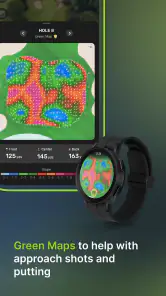
Yes. TheGrint includes a watch app, which can make it easier to check golf information while you are playing instead of relying on your phone for every glance. The app’s GPS coverage and score-tracking tools are intended to support an on-course experience, while the watch option adds another way to use it during a round.
What should I know about the app’s cost before downloading it?
TheGrint is free to download, and it also offers in-app purchases. Its free version includes basic tools such as score tracking and limited statistics, while a premium membership unlocks advanced features, including the full GPS rangefinder and more detailed analytics. This gives you the option to try the app first and decide whether the additional tools suit your golfing needs.
Is TheGrint suitable for golfers of different experience levels?
TheGrint is designed for golfers who want to track scores, review performance, and use GPS information on the course. Its combination of score tracking, handicap tools, and game statistics can be useful whether you are learning the basics or already play regularly. The features also make it possible to focus on the parts of your game you most want to monitor.
What is TheGrint and how does it improve my golf experience?
TheGrint is a comprehensive golf app that enhances your golfing experience by providing a USGA-compliant handicap tracker and GPS rangefinder. It offers detailed statistics on your game, allowing you to analyze your strengths and weaknesses. The app also enables score tracking and course reviews, making it an essential tool for both amateur and professional golfers alike.
How does the GPS feature work in TheGrint app?
TheGrint provides a GPS rangefinder with coverage for over 40,000 golf courses. It offers yardages to the front, middle, and back of the green, as well as hazards and targets. This feature allows golfers to make informed decisions on the course, improving their strategic play and overall performance.
Pros
- Accurate GPS distance tracking.
- Simple and intuitive user interface.
- Comprehensive golf statistics.
- Supports multiple golf courses.
- Easy handicap calculation.
Cons
- Requires internet for full features.
- Premium features are paid.
- Occasional GPS signal loss.
- Limited offline capabilities.
- Ads in free version can be intrusive.

- Category
- Sports
- Version
- Varies with device