

The Short Years Baby Book
- 316.00
- 4.7
- Installs
- 50.00K
- Price
- Free

Screenshots

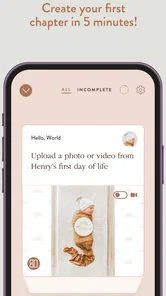






Analysis by Reviewed
When I first opened The Short Years Baby Book, I understood the appeal almost immediately: it is a parenting app built around making a baby book without turning the process into another large project. The idea is simple, but the useful part is the rhythm. Instead of waiting for a quiet weekend to sort hundreds of photos, I could treat memory keeping as a small habit that fits around feeding, naps, work, and the general unpredictability of life with a young child.
That makes it different from a traditional printed baby album or a phone gallery. A gallery stores everything, but it does not necessarily tell a story. A physical album can look wonderful, but preparing one often requires time, decisions, and a level of organization that new parents may not have. This app sits between those options. It is a free parenting app from Unbound Applications, with optional in-app purchases priced at $7.99 per item, and its main purpose is to help turn selected moments into a more intentional record.
I would especially recommend trying it if you take many photos but rarely do anything with them afterward. The app is also a good fit for parents who want something personal without learning complicated design software. It is less suitable for someone who wants complete control over every page, an advanced scrapbook editor, or a fully hands-off automatic archive. Its strength is guided simplicity, not unlimited customization.
What to expect before you begin
The Short Years Baby Book is aimed at an everyday parenting problem: meaningful moments disappear into a camera roll because choosing, arranging, and writing about them feels like work. The app encourages a smaller commitment, built around returning regularly rather than completing an entire book in one sitting. That approach matters because the best memory system is usually the one a tired parent can actually maintain.
In practical terms, I would approach it as a private routine rather than a one-time creative task. After taking photos during the week, set aside a short moment to choose the images that genuinely say something about your child’s life. That might be a new expression, a messy meal, a visit with relatives, or an ordinary morning that you know you will want to remember later. The ordinary images are often more valuable than the polished ones, and the app’s format makes room for that kind of record.
The app has an Everyone content rating, so it is presented as a family-friendly experience rather than something aimed at older users. It is available for devices running Android 6.0 or later. The current version is 9.20, which is useful to know before installing because older phones may not meet the minimum system requirement. The app has passed 50K+ installs and holds a 4.7 average from 386 ratings, with 316 written reviews, so it has attracted a meaningful group of parents while remaining more specialized than a general photo service.
One important expectation to set is that this is not simply a second camera roll. If you only want to keep every photo exactly as captured, your phone’s gallery or a cloud backup is still the more direct tool. A baby book requires selection. That small amount of effort is also what gives the result more meaning, but it means the app works best when you are willing to make choices instead of importing everything without looking.
More From Our News Desk

 Gmail
GmailGmail in a Busy Inbox: Who Benefits Most?
From first account to crowded workday, Gmail earns its place through dependable search and flexible sorting—but its best fit depends on how much inbox maintenance you can tolerate.

 Prime Video
Switching to Prime Video: What Changes in Your Viewing Routine
Prime Video can make a compelling second home for streaming, but switching means learning a different catalog, rental layer, and route from browsing to playback.

 Universal TV Remote Control
Universal TV Remote Control Works Best as a Reliable Backup
A phone remote earns its place through quick setup and reliable habits. Here is how to get more from Universal TV Remote Control—and where its limits show.

 Weather - By Xiaomi
Weather by Xiaomi Review: Clear at a Glance, Less Clear Up Close
Xiaomi’s weather app makes everyday forecasts quick to scan, but its calm surface can leave useful details and recovery paths harder to find than they should be.

 X
XX Under Pressure: Can It Recover When Posting Goes Wrong?
A resilience-focused review of X, examining setup, mistaken posts, interruptions, weak connections, and the gaps that matter when recovery needs to be dependable.

 Clash of Clans
Clash of Clans Is Won Between the Battles
Its raids are quick; its community is a long-term project of coordination, teaching, rivalry, and shared responsibility—with all the friction that entails.
Latest News



How I would handle the first setup
After installing, I would start with one clear goal: create a manageable beginning rather than trying to reconstruct the entire past. New parents often have months of photos already waiting on their phones, and that backlog can make any memory project feel impossible. Choosing a recent week or a single event gives you a much better chance of reaching a finished first entry quickly.
I would also decide in advance whose perspective the book should represent. It can be tempting to include every family member’s favorite photo, but a coherent book benefits from a consistent point of view. You might focus on your child’s changing expressions, the small routines at home, or the people who are present during this stage. This is not a technical setting; it is an editorial choice that makes later selections faster.
Before adding images, it helps to do a quick camera-roll pass. Mark a small group of candidates instead of scrolling endlessly while inside the app. Look for variety: one close-up, one wider scene, one picture with another loved one, and one ordinary detail. That mix usually tells a fuller story than several nearly identical portraits. It also reduces the common problem of spending the whole weekly session comparing tiny differences between similar shots.
If you are sharing parenting duties, agree on a simple division of work. One person can choose photos while the other adds context, or you can alternate weeks. The app becomes much easier to keep up with when it is treated as a shared ritual rather than an invisible task assigned to the parent who happens to notice it first. Even if only one person edits, showing the finished pages to the other parent can turn the book into a conversation rather than a solitary archive.
The free price makes it easy to test this routine without committing money at the start. At the same time, the presence of optional purchases means I would look carefully at what is included before deciding whether to pay for anything. I would not begin by buying extras simply because the idea feels sentimental. First, use the free experience long enough to see whether the weekly habit fits your household. If you do not return to it, additional purchases will not solve the real problem.
The first meaningful success
For a first session, I would define success very narrowly: finish one small, honest section that you would be happy to revisit. Do not aim for a complete childhood record. Choose a handful of images from a recent moment, arrange them with enough variety to suggest what happened, and add only the details you are likely to appreciate later. A short note such as where you were, what your child had just learned, or what made the day unusual can be more useful than a long description written under pressure.
This is where the app’s promise becomes realistic. A few minutes of attention can produce something more valuable than a folder full of unexamined images, but only if the task remains small. I would set a recurring reminder outside the app if necessary, preferably at a time when the child is settled and your phone is already nearby. The goal is not to create a perfect creative atmosphere. It is to make the action easy enough that you repeat it.
A useful trick is to write from the future reader’s point of view. Ask yourself what you would want to know years from now that the photo cannot explain. A picture of a first trip may need the reason the trip mattered. A picture of a favorite toy may need the funny habit connected to it. A picture of a family meal may be memorable because someone was visiting, not because the food looked special. These details are the difference between an attractive collection and a personal history.
I would also resist correcting every imperfect image. Slightly blurry photos, awkward expressions, and cluttered backgrounds can carry more emotional truth than carefully posed portraits. The app is most useful when it preserves the texture of family life, not when it pushes you to produce a polished portfolio. If you remove everything that looks untidy, the finished book may be beautiful but less recognizable as your actual experience.
Once the first section is complete, stop. That pause is deliberate. Parents often lose momentum by immediately planning a much larger project. Seeing one finished result gives you a reference for future entries and lets you decide whether the app’s pace, presentation, and amount of involvement suit you. A successful first action should leave you feeling that continuing is possible, not that you have created another obligation.
Where new users may get confused
The biggest source of friction is likely to be the difference between preserving memories and collecting media. If you expect the app to do all the sorting for you, the selection process may feel slower than a normal backup. That is not necessarily a flaw; it is the trade-off behind a curated baby book. The app asks you to decide what deserves context, while a gallery asks only where to store the file.
Another common mistake is waiting until you have enough material for a “proper” entry. That standard is too high for the first year of parenting. A week with no major milestone can still contain valuable information: a new food, a changing bedtime routine, a favorite sound, or the way your child interacted with a familiar person. If you wait for dramatic events, you will create gaps in the story and make the habit harder to maintain.
It is also easy to over-write. Parents understandably want to explain everything, but long notes can turn a quick weekly task into a writing assignment. I prefer short observations that identify the moment and preserve your voice. If a memory needs more space, add it; otherwise, a few specific words are enough to help the image speak later.
Families should think about ownership and participation before building a long-term routine. If one parent is the only person who knows how the book is organized, the project can become fragile when that person is busy, changes phones, or simply needs a break. Share the routine and the purpose, even if only one person does most of the editing. A baby book should feel like a family record, not a hidden personal workload.
There is also a practical emotional limitation: a memory app cannot decide what your family will value in the future. Its structure may encourage consistency, but it cannot replace judgment. Some parents will enjoy choosing and writing; others will find even a short weekly session tiring. If you know you avoid any system that requires regular curation, automatic photo backup may be a better primary solution, with this app used only for occasional highlights.
Likewise, people who want a highly designed scrapbook may outgrow the experience. Dedicated album and design tools usually offer finer control over typography, layouts, decorations, and printing workflows. That flexibility comes with more decisions and more time. The Short Years Baby Book makes more sense when you value a repeatable process over artistic control.
Small habits that make the book better
My first practical tip is to separate choosing from writing. On a busy day, select the images only. Add the words during a quieter moment, while the memory is still fresh but the immediate parenting task has passed. Trying to make every decision at once creates unnecessary friction, especially when you are tired.
My second tip is to keep a running note outside the app for details that are easy to forget. You do not need to write a diary every day. A few words in your phone’s notes can capture a new phrase, a funny reaction, or an unexpected change. When you return to the baby book, those fragments help you add meaning to photos that might otherwise look ordinary.
Third, include people and places, not only the child. A record made entirely of isolated baby portraits can lose the environment that shaped the period. Include the kitchen, the stroller, a grandparent’s hands, or the room where a routine happened. Those surrounding details may seem unimportant now, but they often become the strongest reminder of how family life actually felt.
Fourth, use a “good enough” rule. If you have a suitable image and a clear sentence, finish the entry. Do not reopen it repeatedly looking for the perfect alternative. The value of this app comes from continuity. A completed, imperfect record is more useful than an ideal entry that remains unfinished.
Finally, review older entries occasionally rather than only adding new ones. This helps you notice patterns and prevents the book from becoming a one-way stream of updates. You may discover that a small behavior you thought was temporary appeared repeatedly, or that a photo you nearly rejected explains a stage better than the most attractive image. Reviewing also gives the routine an emotional reward, which makes it easier to continue.
Who should use it and who should skip it
I think this app is strongest for first-time parents who want a guided way to preserve the early years but do not want to manage a complicated creative project. It is also appealing for grandparents or relatives who want a focused family record rather than access to an entire camera roll. Couples can use it as a shared storytelling project, especially when one person takes most of the photos and the other remembers the surrounding details.
It is a weaker match for professional photographers, scrapbook enthusiasts, or anyone who wants precise control over every visual element. Those users may prefer a dedicated design application or a traditional album workflow. It may also disappoint parents looking for a completely automatic service that quietly imports and organizes everything. The app’s meaningful result depends on participation, and that is both its advantage and its main demand.
If your phone is older, check compatibility before planning your routine because Android 6.0 is the minimum operating system requirement. The app itself is free to start, while optional items cost $7.99 each, so I would treat purchases as a later decision based on actual use. The Everyone rating makes it approachable for a broad family audience, but parents should still make their own choices about which personal photos and details they want to preserve in any digital service.
My next-step recommendation
I would install The Short Years Baby Book when I had a recent, manageable set of family photos ready, not when I was staring at an enormous backlog. Start with one week or one small event. Choose a varied group of images, add a few details that the pictures cannot explain, and finish before the session becomes tiring. That first completed section will tell you much more than browsing the concept in the abstract.
After that, give the routine a fair trial. Return regularly, but keep the standard realistic. Some weeks will produce a rich story; others may need only a couple of images and a sentence. The app does not need to replace your photo backup, printed albums, or personal journal. It can serve as the curated layer between them: a place where selected moments become a coherent account of family life.
My overall impression is positive because the app focuses on a problem parents genuinely have: too many photos and too little time to turn them into memories. Its 4.7 average and more than 50K+ installs suggest that the approach has resonated with many users, but the real test is personal. If a short, repeatable session feels manageable, this can become a thoughtful record you will value later. If even that small commitment feels like pressure, keep your camera backup simple and choose a less structured alternative.
The best reason to try it is not the promise of a perfect baby book; it is the chance to make remembering part of ordinary family life. Begin small, do not wait for milestone days, and let the finished record reflect your real household rather than an idealized version of it. That is where this parenting app feels most useful, and where I would recommend it to a friend.
The Short Years Baby Book Frequently Asked Questions
What devices and operating systems support The Short Years Baby Book?
The Short Years Baby Book is available for Android and iOS, making it an option for parents who want to keep family memories on a phone or tablet. On Android, it requires version 6.0 or later. Before installing, check that your device meets the requirement and that you have enough room for the app and the photos you plan to add.
Who develops The Short Years Baby Book, and is it suitable for families?
The Short Years Baby Book is a parenting app developed by Unbound Applications. Its content rating is Everyone, and its focus is helping parents collect memories from a child’s early years in one organized place. It has a 4.7 average from around 386 ratings, which can offer a useful snapshot of user sentiment, though individual experiences with memory-keeping apps can vary.
What is The Short Years Baby Book?
The Short Years Baby Book is a digital memory book designed to help parents record and preserve important moments from a child’s early years. It typically provides guided prompts for milestones, family memories, photographs, and personal notes, making it easier to create a meaningful keepsake without having to design every page from scratch. The app’s summary also presents it as a way to create a baby book in about five minutes per week.
How does The Short Years Baby Book work?
After setting up a child’s profile, parents can add memories, photos, dates, stories, and milestone details as they happen. The app organizes this information into a structured baby book, allowing users to build the record gradually rather than completing everything at once. Its guided format is especially useful for busy parents who want a simple, consistent way to document childhood.
Can I add photos and personal stories to the baby book?
Yes, the main purpose of The Short Years Baby Book is to combine visual memories with written reflections. You can generally add photographs alongside captions, stories, milestone notes, and other personal details. Before downloading, check the app’s current storage and media limits, as available features, supported image formats, and account requirements may vary between Android and iOS versions.
Pros
- Simple layout makes milestones and memories easy to organize.
- Includes space for photos
- notes
- and important baby details.
- Useful prompts help parents remember special moments.
- Can become a meaningful keepsake for the whole family.
- Suitable for documenting everyday memories
- not just major events.
Cons
- Some features may require in-app purchases or premium access.
- Limited customization may not suit parents wanting a unique design.
- Data entry can feel time-consuming during busy parenting days.
- Photo storage options may depend on device space or permissions.
- The app may offer limited value once the baby book is complete.











