

The Official MTA App
- 2.51K
- 3.1
- Installs
- 1.00M
- Price
- Free

Screenshots
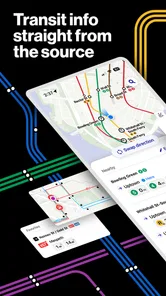
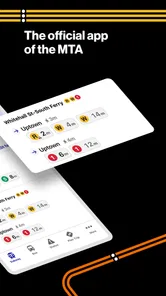
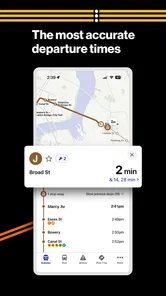
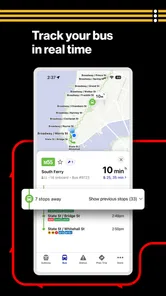
Analysis by Reviewed
When I plan a trip around New York, I want to know more than which subway line gets me close. I also need to know whether the service is changing, whether another MTA option might make more sense, and how much route detail I can comfortably work out on my phone. The Official MTA App is a free travel app from the Metropolitan Transportation Authority, and its value is that it brings several parts of the region’s transit system into one agency-focused tool. I find it most useful as a way to prepare and make decisions, rather than as a promise that every journey will be simple.
Readability and finding your way
The app is a travel tool from the Metropolitan Transportation Authority, and its broad remit is useful when a trip does not fit neatly into a subway-only plan. The MTA also runs buses, LIRR and Metro-North, so having its services together can make it easier to start with one place when you are deciding how to cross the city or travel beyond it. It is free, has an Everyone age rating, and is aimed at both regular riders and people who only need transit help occasionally.
For someone new to New York, a route map is more than a reference image: it can help make the system feel less abstract before you head underground. I would use it at home to identify the station nearest my destination, then check the route again before leaving rather than trying to work everything out on a crowded platform. That small bit of preparation is especially helpful if you are changing lines or meeting someone at a station you do not know.
One useful way to make the map less overwhelming is to work backwards from the destination. I first look for the station or line that gets me closest, then trace only the transfers I actually need. That is easier than trying to memorize the whole network at once, and it gives me a concrete question to check against service information: is this route still sensible today? For visitors, this approach can also help distinguish a familiar station name from a familiar neighborhood; the two are not always interchangeable when you are planning the last part of a walk.
Getting Started with the Official MTA App
First things first, downloading and setting up the Official MTA App is a breeze. Available on both Android and iOS platforms, it’s a quick download away from transforming your commuting experience. Once installed, the app greets you with a clean, intuitive interface that makes navigating through its features a walk in the park. I was pleasantly surprised by how user-friendly it was, even for someone who's not particularly tech-savvy.
For a first-time user, I would spend a few minutes exploring before the trip rather than learning the layout under pressure. Decide what information you are trying to find—your route, a line’s status, or a wider service option—and use the app with that purpose in mind. This keeps the first visit practical. It also helps you notice whether the way information is organized works for you, since “easy to use” can mean different things when you are browsing at home and when you are trying to make a quick choice in a station.
Features That Stand Out
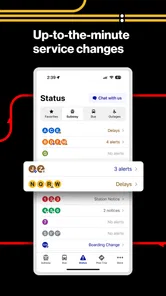
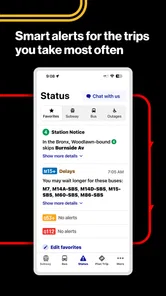
One of the standout features of the app is its real-time train tracking. No more guessing games about when the next train will arrive! With just a few taps, you can access up-to-the-minute updates on train schedules, service changes, and even delays. This feature alone has saved me from countless commuting nightmares.
More From Our News Desk

 Weather - By Xiaomi
Weather by Xiaomi Review: Clear at a Glance, Less Clear Up Close
Xiaomi’s weather app makes everyday forecasts quick to scan, but its calm surface can leave useful details and recovery paths harder to find than they should be.

 X
XX Under Pressure: Can It Recover When Posting Goes Wrong?
A resilience-focused review of X, examining setup, mistaken posts, interruptions, weak connections, and the gaps that matter when recovery needs to be dependable.

 Clash of Clans
Clash of Clans Is Won Between the Battles
Its raids are quick; its community is a long-term project of coordination, teaching, rivalry, and shared responsibility—with all the friction that entails.

 Android Auto
Android Auto Makes the Case for Quieter Car Software
The car interface is no longer judged by how much it can do, but by how quietly it helps. Android Auto shows what drivers now expect—and what still gets in the way.

 MobiOffice: Word, Sheets, PDF
MobiOffice: Transforming Mobile Productivity with Seamless Integration
MobiOffice: Word, Sheets, PDF is redefining mobile productivity with a surprising blend of functionality and innovation.

 EA SPORTS FC Soccer Mobile 26
EA SPORTS FC™ Mobile Soccer: Redefining Mobile Sports Gaming
Dive into EA SPORTS FC™ Mobile Soccer, where immersive gameplay and strategic depth transform mobile sports gaming.
Latest News



Another noteworthy feature is the built-in map. It’s not just any map; it’s an interactive, zoomable, and scrollable map that provides detailed information about all subway lines and stations. Whether you're a local or a tourist, this map is your best friend in the concrete jungle.
For me, the important trade-off is between a quick arrival check and a more deliberate route check. A train estimate can help answer whether it is worth heading to the platform now, but it is not the same as deciding whether the whole journey remains a good choice. I try to look at the planned route and service conditions together, especially if I have a transfer. That small distinction helps avoid treating one reassuring piece of information as a guarantee for every leg of the trip.
Planning around changes and comparing options
A useful habit is to check service information before you commit to a route, then check again if a delay appears while you are travelling. For example, if I were heading across town after work and a train disruption changed my preferred line, I would use the app to reassess the subway option before deciding whether a bus or another service makes more sense. The practical benefit is not that every trip becomes effortless; it is that I can make a more informed choice before walking to a station or waiting on a platform.
Compared with a general-purpose map app, the MTA app has a clearer role when the question is specifically about MTA service and subway information. A broader navigation app may be better if I need walking directions from a station to an unfamiliar address or want to compare transit with driving and other travel modes. I would keep the MTA app for the transit details and use a general map when the journey involves more than the MTA network. Neither replaces the other in every situation.
This division of labor is particularly helpful for trips with a final destination that is not right beside a station. I use the MTA app to understand the transit portion, then switch to a general map if I need to judge the walk at the other end or orient myself around a street address. If I am travelling beyond the subway, the agency’s wider services make it a sensible starting point, but I would still compare the full journey in a broader planner when timing, walking, or a non-MTA connection is central to the decision.
User Experience and Performance
The app performs smoothly without any noticeable lag, even during peak hours when you’d expect a bit of a slowdown. This reliability is crucial, especially when you're trying to make that last-minute dash to catch a train. The developers have done a commendable job in ensuring that the app remains stable and responsive under heavy usage.
For a realistic everyday use, imagine leaving work and needing to meet a friend on the other side of the city. I would check the train information before setting off, look at the map to confirm the route, and use any service-change details to decide whether my original plan still works. If the journey is time-sensitive, I would avoid relying on a single glance: transit conditions can change, so checking again before a transfer is a sensible precaution. This is a stronger use case than opening the app only after reaching the platform, when there is less time to rethink the trip.
Another useful situation is an unfamiliar trip with a flexible arrival time. I would check the route at home, note the transfer points, and keep the app available for a service check before leaving. If a change appears, I can compare options while I still have space and time to think. For a tight appointment, I would build in room for uncertainty instead of interpreting an estimate as a guarantee. The app helps me make a better-informed plan, but the judgment about how much time to allow is still mine.
Motor, sensory, and situational access
Another aspect worth mentioning is the app’s accessibility features. It supports voice-over functionalities, making it a valuable tool for users with visual impairments. This inclusivity is a step in the right direction, making public transport accessible to everyone.
VoiceOver support can matter most when a rider cannot comfortably inspect a screen, but it does not remove every barrier. A person who has difficulty with precise taps may still find it easier to plan before reaching a busy station, rather than trying to explore menus while standing in a moving crowd. Likewise, anyone sensitive to visual clutter may prefer to make route decisions in a quieter setting and use the phone only for a quick check during the trip. I would treat these as practical ways to reduce friction, not as a guarantee that every part of the journey or interface will suit every access need.
Context changes what “usable” means. At a kitchen table, there is time to zoom and inspect the map; on a platform, a rider may have only a moment to confirm a line or notice a change. Someone with limited dexterity may find fewer, purposeful checks more manageable than repeatedly navigating the app, while a person who relies on spoken feedback may want to test the route-planning steps before depending on them during a trip. I would do that testing in a calm setting, where it is easier to learn the sequence without the pressure of a departure.
Remaining barriers and who should choose it
The app is most useful if your travel regularly involves MTA services, especially subway journeys where current service information can affect the route you choose. Visitors can use it to become familiar with the line layout before travelling, while commuters may value having the agency’s service information close at hand. The MTA’s app has a 4.6 average from around 6,500 ratings, and it has been installed over a million times; those figures suggest it is widely used, though they cannot tell you whether its navigation style fits your own needs.
There are trade-offs. A central transit app can be less convenient if your journey depends on services outside the MTA network, and a map alone does not make a complicated transfer physically easy. Riders who need detailed step-free route planning should check the specific station and journey information they rely on before travelling, rather than assuming a route that looks simple on a map will suit them in practice. The app is also not the right single tool for someone seeking door-to-door directions across every mode of transport; a general navigation app may be a better companion for that broader task.
I would also be cautious about assuming that a route which looks direct is automatically the best route for a particular rider. A transfer can be straightforward for one person and tiring or difficult for another, and a station’s position on a map does not explain the effort involved in reaching a platform or changing trains. If a journey depends on a specific access requirement, I would verify the details that matter before setting out and keep an alternative plan in mind. The app is useful for transit decisions, but it cannot make those personal trade-offs on the rider’s behalf.
For a visitor staying in the city for a short time, this is a good companion if the priority is understanding MTA routes and checking service changes without treating a large network map as a puzzle to solve from scratch. For a regular commuter, its value is more routine: a quick check before leaving can catch a change that affects the usual trip. I would be less likely to recommend it as the only travel app to someone whose plans regularly involve other operators, detailed door-to-door walking directions, or a route that must meet particular physical-access needs.
User Experience and Performance
The app was released in July 2018, and version 3.24.0 is the current version. It requires Android 8.0 or later, a detail worth checking if you are installing it on an older device. Its rating and adoption are encouraging, but I would judge it by whether it makes your own MTA trips easier: for an occasional visitor, the map and service checks may be enough, while a frequent rider can make a habit of consulting it before leaving and during disruptions.
Because it is an agency-specific tool, I would not expect it to answer every question that comes up during a trip. It is a strong choice when the question is about MTA routes or service; a general map is the better second screen when I need to navigate streets, compare non-MTA options, or work out the walk after leaving a station. Keeping those roles clear is more useful than trying to force one app to cover every part of a complicated journey.
Final Thoughts
In conclusion, the Official MTA App is a must-have for anyone navigating the NYC subway system. Its combination of real-time updates, interactive maps, and user-friendly interface makes it an indispensable tool for both daily commuters and occasional travelers. While there’s always room for improvement, especially in expanding its features to include buses and other forms of transport, the app already offers significant value.
So, if you haven't already, give it a try. You might just find it to be the key to unlocking a smoother, more efficient commuting experience in the bustling city of New York. Happy travels!
My practical recommendation is to install it if you use MTA services often, or if an upcoming visit will involve several subway trips and you want to get familiar with the network in advance. Start by checking a route when you are not rushed, then use service information as a reason to reconsider a plan rather than as a promise that a trip will run exactly as expected. That approach makes the app useful without asking it to do more than a transit guide can.
My inclusive verdict
I would recommend it to anyone who wants MTA-specific information in one place and is comfortable using a phone as part of trip planning. The best approach is to use it before travelling for orientation, then return to it when service conditions could change your decision. It is a helpful aid, not a substitute for checking whether a particular route works for your mobility, sensory, or navigation needs. For a local rider, that distinction makes the app more useful, not less: it sets realistic expectations and leaves room to choose another tool when the journey calls for one.
The Official MTA App Frequently Asked Questions
What services can I find in The Official MTA App?
The Official MTA App brings information about MTA services together in one place, covering the subway, bus, LIRR, Metro-North, and more. It is a travel and local app for people who want a single starting point for navigating the transit network. The broad service coverage makes it useful to commuters and visitors deciding which MTA option fits their journey.
Is The Official MTA App suitable for visitors as well as regular commuters?
Yes. The Official MTA App can be useful whether you travel around New York regularly or are visiting and need help finding your way through the city’s transit system. Its focus on multiple MTA services gives different kinds of travelers a place to check transit information and organize a trip. The app is free and has an Everyone content rating.
What is the primary function of The Official MTA App?
The Official MTA App is designed to facilitate public transportation in New York City by providing real-time updates for buses, subways, and trains. Users can access schedules, service changes, and plan their routes efficiently. Additionally, the app offers alerts for delays and disruptions, making commuting more predictable and manageable for daily travelers.
Is The Official MTA App available for both Android and iOS devices?
Yes, The Official MTA App is available for download on both Android and iOS platforms. Users can find the app in the Google Play Store for Android devices and the Apple App Store for iOS devices. This dual availability ensures that most smartphone users can easily access and benefit from the app's features and updates.
Does The Official MTA App provide real-time updates and alerts?
Absolutely, the app offers real-time updates on the status of public transportation, including trains, buses, and subways. It notifies users about delays, service changes, and any disruptions that might affect their commute. This feature is critical for planning timely and efficient routes across the city, especially during peak hours.
Pros
- Easy navigation through the city
- Real-time train and bus updates
- User-friendly interface design
- Customizable notifications
- Offline maps available
Cons
- Occasional inaccurate data
- Limited features without internet
- Battery consumption is high
- No dark mode option
- Frequent app updates required












