MTA TrainTime
- 2.27K
- 4.8
- Installs
- 1.00M
- Price
- Free

Screenshots

Analysis by Reviewed
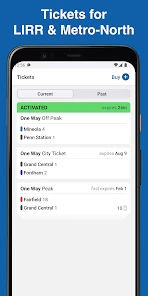
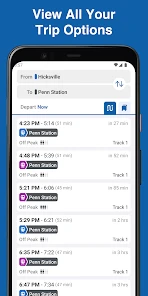
For a first trip, MTA TrainTime has an immediate appeal: it brings train planning and ticketing into one MTA app, so I can check the journey and handle the ticket without starting in several places. The MTA, or Metropolitan Transportation Authority, makes it for LIRR and Metro-North riders. If those rail services are part of your routine, that focused purpose is more useful than a general map app that treats trains as just one layer among many.
What feels useful in the first week
When I’m learning an unfamiliar station or route, I want clear, practical information more than a crowded screen of options. TrainTime’s central job is easy to understand: use it to plan a rail trip and manage a ticket. That focus can make the first few journeys less fiddly, especially if I’m traveling occasionally and don’t yet have a familiar routine to fall back on.
A realistic use is leaving work with a connection to make. I can check the rail trip before heading to the station, then use the app to keep the ticket part of the same workflow. That won’t remove every uncertainty from travel, but it can reduce the mental juggling of switching between a route planner and a separate ticketing tool. I’d still check station information and allow time for changes rather than treating any app as a guarantee that a connection will work out.
Where the recurring value comes from
The strongest reason to keep it installed is repeated use, not novelty. If I take LIRR or Metro-North regularly, returning to one familiar place for tickets and trips can save small amounts of effort each time. Those savings are modest on a single ride, but they matter more when the same decisions come around every workday or weekend visit.
It is less compelling for someone whose travel is mostly by subway, bus, or other rail operators. In that case, a broader navigation app may be a more useful everyday starting point, while TrainTime serves only the portion of a journey involving its rail network. I see it as a focused companion rather than a replacement for every map or transit tool.
Habits, upkeep, and trade-offs
There is little setup needed to understand the app’s purpose, and its value depends more on remembering to use it than on maintaining a complicated personal system. I’d make it part of my pre-departure check: confirm the trip, take care of the ticket, and then pay attention to station announcements as well. Keeping that habit is more useful than opening the app only after a disruption has already caused confusion.
The trade-off is that a dedicated rail app naturally has a narrower scope than a citywide map. For a trip involving several transport modes, I may still want another planner to compare walking, bus, subway, and rail options together. And even with a convenient digital ticket workflow, I would avoid leaving everything until the last moment; a low battery or a rushed platform change can make any phone-based travel plan less comfortable.
More From Our News Desk

Clash of Clans Is Won Between the Battles

Android Auto Makes the Case for Quieter Car Software

MobiOffice: Transforming Mobile Productivity with Seamless Integration

EA SPORTS FC™ Mobile Soccer: Redefining Mobile Sports Gaming

How Microsoft OneDrive Became a Mobile Productivity Giant

How Google Translate Breaks Language Barriers Effortlessly
Who should keep it
TrainTime is a sensible choice for regular LIRR and Metro-North passengers, and it can also help occasional riders who want trip planning and tickets in one place. It is free, rated for Everyone, and has a strong 4.8 average from around 27,000 ratings, with over a million installs. Its current version is 9.14.0, and it runs on Android 7.0 or later. Those figures suggest a well-established audience, though my reason to recommend it is simpler: it fits a particular rail routine without asking me to learn a complicated tool.
If I were helping a visitor, I’d suggest opening it before travel rather than waiting until they are on the platform. They can get familiar with the trip flow and ticket area while they have a moment to think. For a traveler who wants one app to cover every city transport option, I’d pair it with a general-purpose planner instead of expecting this app to do everything.
Getting to Know MTA TrainTime
First things first, let’s chat about what MTA TrainTime is all about. This app is designed to make your commuting life easier by offering real-time updates on train schedules, delays, and even track changes. Available for both Android and iOS, it’s an essential tool for anyone who frequently travels on the MTA network.
Easy Navigation and User-Friendly Interface
Upon launching the app, you’re greeted with a sleek and intuitive interface. The menus are straightforward, and it’s incredibly easy to find the information you need. Whether you're a tech-savvy individual or someone who struggles with apps, you'll find this one a breeze to use.
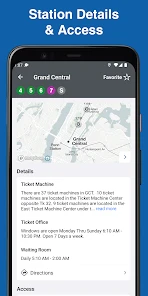
One of my favorite features is the ability to favorite your regular routes. This means you can get quick updates on your usual train lines without having to search every single time. It’s these little touches that really make the app stand out.
Real-Time Updates and Alerts
Here’s where the app truly shines. With real-time updates, you can get notifications about delays or schedule changes as they happen. Imagine being able to grab a coffee or finish that last-minute task without the anxiety of missing your train. The app sends alerts that are precise and timely, keeping you informed and stress-free.
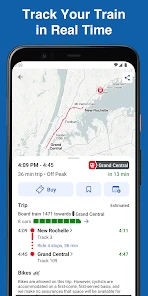
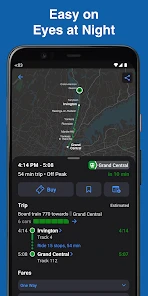
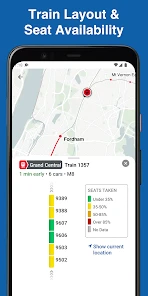
Moreover, the GPS tracking feature allows you to see exactly where your train is at any given moment. It’s like having a bird’s eye view of your commute, giving you the power to plan accordingly.
Additional Perks and Features
Beyond the basics, MTA TrainTime offers some nifty extras. The app provides detailed train car layouts, so you can pick a spot with available seating or proximity to exits. This is perfect for those peak hours when finding a seat can feel like winning the lottery.
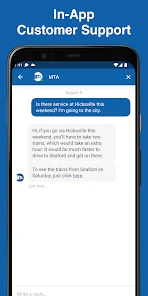
Another handy feature is the in-app chat support. If you encounter any issues or have questions, help is just a message away. The support team is responsive and helpful, making sure you’re never left stranded.
For someone who’s always on the move, knowing I have a reliable tool that keeps me updated on my train schedule is invaluable. It’s a game-changer for daily commuters and occasional travelers alike.
Final Thoughts
All in all, the MTA TrainTime app is a must-have for anyone navigating the hustle and bustle of the city’s transit system. It’s packed with practical features, boasts a user-friendly design, and offers peace of mind with every journey. If you haven’t already, hop on board and give it a try. Your future self will thank you!
How I’d make it part of a routine
The useful test comes after the first few trips: does opening the app become a small, dependable habit rather than another thing to remember? For a commuter, I’d check the day’s trip before leaving home, then revisit the app when plans change. Favoriting a regular route, as the original experience describes, can cut down repeat searching; for occasional travel, I’d still confirm the selected route each time instead of assuming the last trip is the right one.
For a weekend visit, the app’s value is different. I might use it to sort out the rail leg before setting off, while relying on a broader map for the walk to the station or onward local connections. That division of labor is practical: TrainTime is most useful when the journey is actually on the LIRR or Metro-North, while a citywide planner is better for comparing multiple transport modes in one view.
What to keep in mind on travel day
Live information is helpful, but I wouldn’t plan a tight connection around an alert arriving at exactly the right moment. Phone reception, a busy station, or a last-minute change can all make it wise to check the app early and stay aware of announcements. A good approach is to use notifications as another source of guidance, not as permission to stop paying attention to the platform.
The ticket workflow is also easiest when handled before a rushed boarding moment. I’d open the app while I still have time to confirm the trip and find the ticket area, rather than trying to learn the interface in a crowd. That small habit matters particularly for visitors who don’t yet know the station layout or which service they need.
Does it earn a permanent place?
For the right rider, yes. The app is free, and its recurring value comes from making LIRR and Metro-North travel easier to organize, not from offering a reason to open it every day when no rail trip is planned. The developer is MTA, and a focused official tool is a sensible choice when those services are central to your commute. If your journeys span many operators or you mainly need walking and local transit directions, I’d keep a general navigation app as the main planner and use TrainTime only when its network is involved.
Choosing it for the journey you actually take
The practical question is whether the rail portion of your trip is important enough to justify a dedicated app. For someone commuting between home and work on LIRR or Metro-North, the answer is often yes: the routine repeats, and trip planning and ticket handling belong close together. For a visitor taking one rail journey as part of a day filled with subway transfers, buses, and walking, I’d start with a citywide map to understand the whole route, then use TrainTime for the MTA rail segment. That division avoids asking either tool to solve a problem it was not built around.
I also wouldn’t treat a route favorite as a substitute for checking the details of today’s trip. Favorites help reduce repeated searching, but the useful habit is to confirm the direction and departure you need before committing to a plan. That small pause can prevent a familiar commute from creating a false sense of certainty, especially when your destination or schedule differs from the usual pattern.
Small decisions that make travel smoother
When I’m traveling with someone who doesn’t know the area, I’d use the app together before leaving rather than handing over a phone at the station. We could agree on the rail leg and ticket plan while there’s room to ask questions, then use a broader map for the walk or onward connection. This is especially helpful when one person is handling directions and another is keeping an eye on time: splitting those tasks is less stressful than trying to decide everything at the platform.
The train-car layouts can also be useful as a planning aid, but I’d treat them as a preference rather than a promise. If I have luggage, want to be nearer an exit, or hope to find a seat, looking ahead may help me choose where to board. Actual crowding can vary, so I wouldn’t build a tight transfer around landing in a particular spot. The feature is most valuable when it helps me make a better-informed choice without turning a simple trip into a precise seating strategy.
When convenience has limits
Keeping tickets and journey planning on a phone makes the process more compact, but it also makes the phone part of the travel plan. I’d check that I can access what I need before boarding and avoid relying on a nearly drained battery. If my device is unavailable, the convenience of an app cannot help in that moment, so sensible preparation still matters. This is not a special flaw of TrainTime; it is the trade-off that comes with phone-based ticketing.
Likewise, alerts and train location can help me respond to changing conditions, but they don’t make every decision for me. If a delay affects a connection, I still need to assess how much time I have and whether the rest of my route remains realistic. I value live updates most when they give me a chance to reconsider early, not when I expect them to guarantee a smooth journey.
How it holds up after the novelty
After the first week, the app’s appeal becomes less about exploring features and more about removing friction from a familiar task. I don’t need to open it just to browse; I need it when a rail trip is coming up, when I’m checking a regular route, or when a change makes me reconsider the plan. That makes its recurring value practical rather than entertaining, which is exactly what I want from a transport tool.
There is no need to create an elaborate maintenance routine around it. I’d keep it available, use favorites where they genuinely save time, and check the trip again whenever the day’s plan changes. If I stop using LIRR or Metro-North, the reason to keep it fades too. That is a fair limitation for a specialist app: its usefulness tracks the routes I ride, rather than trying to manufacture daily engagement.
My lasting recommendation
For riders who depend on LIRR or Metro-North, TrainTime earns space on my phone because it brings the rail trip and ticket workflow into a focused place. Its strongest advantage is not that it replaces every navigation tool, but that it is easier to return to when I know which rail network I need. The app has a 2.3K review community, and it was released on June 6, 2016; its continued relevance comes down to whether those specific trains are part of your life.
I’d skip it as my main travel app if most of my journeys involve other operators, or if I need one screen to compare several modes from door to door. But if LIRR or Metro-North is a regular part of the week, I’d install it, learn the ticket flow before a hurried trip, and keep a general map alongside it for the rest of the journey. That combination feels more dependable than expecting one app to cover every kind of travel equally well.
MTA TrainTime Frequently Asked Questions
Can MTA TrainTime help me buy tickets as well as plan a trip?
Yes. MTA TrainTime is intended for both LIRR and Metro-North tickets and trips, so it brings those two parts of rail travel together in one app. That makes it relevant if you want to organize a journey and handle ticket-related tasks from your phone, rather than use an app focused only on maps or general directions.
Which rail services can I use with MTA TrainTime?
MTA TrainTime focuses on the Long Island Rail Road (LIRR) and Metro-North. It is designed for people whose trips involve these services, whether they travel regularly or only occasionally. If your usual journey does not use LIRR or Metro-North, the app may not be the right fit for planning that trip.
Who is MTA TrainTime intended for?
MTA TrainTime is aimed at people planning journeys on the Long Island Rail Road (LIRR) and Metro-North. Its focus is train trips and tickets, making it useful for regular commuters as well as occasional travelers who want an app centered on these MTA services. It is a maps and navigation app, and its content rating is Everyone.
What is MTA TrainTime and how does it work?
MTA TrainTime is a mobile application designed to help commuters and travelers easily access real-time information about train schedules, delays, and service changes for the Metropolitan Transportation Authority (MTA) in New York. The app provides users with live updates, allowing them to plan their journeys more efficiently and avoid unexpected disruptions. Users can also receive notifications about their favorite routes and stations.
Is MTA TrainTime available for both Android and iOS devices?
Yes, MTA TrainTime is available for both Android and iOS devices. Users can download the app for free from the Google Play Store for Android devices and the Apple App Store for iOS devices. This ensures that a wide range of users can benefit from the app's features, regardless of their smartphone's operating system.
Pros
- User-friendly interface
- Real-time train tracking
- Customizable notifications
- Offline schedule access
- Multi-language support
Cons
- Limited to MTA service area
- Occasional app crashes
- Battery consumption issues
- Ads in free version
- Requires internet for updates
- Category
- Maps & Navigation
- Version
- 9.14.0












