The Knot Wedding Planner
- 15.86K
- 4.8
- Installs
- 1.00M
- Price
- Free

Screenshots


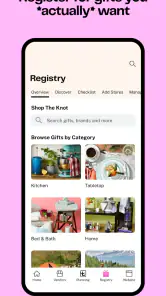
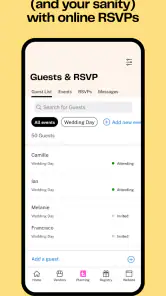
Analysis by Reviewed
Wedding planning tends to scatter across notes, spreadsheets, messages, and half-remembered conversations. The The Knot Wedding Planner app aims to bring many of those moving parts together, and I think its strongest appeal is practical: it gives couples a place to organize the work while they are away from a computer. Its checklist, budget tools, vendor browsing, and guest tracking make it a useful starting point, though I would treat it as a planning hub rather than a substitute for every conversation and decision a wedding requires.
A useful home base for the moving parts
The Knot is an events app from The Knot, built specifically around wedding planning. It is free, available for Android and iOS, and rated for Everyone. Its current version is 4.35.2, and it has been available since September 28, 2014. The app has a 4.8 average from around 57,000 ratings, with more than 1 million installs. Those figures suggest it has found a large audience, but what matters most is whether its tools fit the way you and your partner actually plan.
For me, the key benefit is having a running place to check what needs attention instead of relying on memory. A phone-based planner is especially handy when a thought comes up during a commute or while discussing plans over dinner. You can capture the next task while it is fresh, then return to the bigger decisions when you have time to think them through.
One useful way to start is to treat the checklist as a conversation prompt, not a set of orders. Look through the tasks together, mark what applies to your plans, and agree on who will handle each next step. This avoids the common trap of assuming that a task is “in progress” simply because one person has thought about it. The checklist is most valuable when both partners use it to make responsibilities visible.
Planning tools that work best together
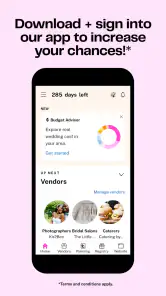
First things first, downloading the The Knot Wedding Planner app is a breeze, available on both Android and iOS. Once installed, I was greeted with a sleek and user-friendly interface that made navigating through the myriad of wedding planning options a delight. I felt like I had my own personal assistant just a tap away.
Features That Stand Out
One of the standout features of this app is its wedding checklist. It breaks down everything you need to do into manageable tasks, so you never feel overwhelmed. From booking a venue to sending out invitations, it’s all laid out in a timeline that you can customize to fit your schedule. I mean, who doesn’t love checking things off a list?
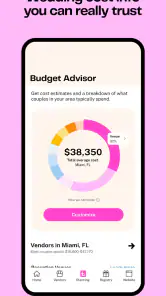
Another feature I absolutely loved is the budget tracker. Weddings can be a financial minefield, but with this tool, I was able to keep track of expenses effortlessly. It even suggests budget allocations based on your total budget, which is a lifesaver when trying to avoid overspending.
More From Our News Desk

Weather by Xiaomi Review: Clear at a Glance, Less Clear Up Close

X Under Pressure: Can It Recover When Posting Goes Wrong?

Clash of Clans Is Won Between the Battles

Android Auto Makes the Case for Quieter Car Software

MobiOffice: Transforming Mobile Productivity with Seamless Integration

EA SPORTS FC™ Mobile Soccer: Redefining Mobile Sports Gaming
A practical budgeting tip is to enter costs as soon as you have a real estimate or commitment, rather than waiting until you have every quote. That makes the tracker more useful as a running picture of decisions already made. I would still keep the original vendor agreements and payment details somewhere easy to find; a budget overview helps you see the shape of your spending, while the documents are what you will need when checking exact terms.
Vendor Listings & Inspiration Galore
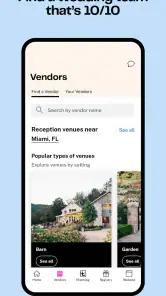
The app also provides a comprehensive list of vendors, complete with reviews and contact details. It’s like having a little black book of wedding experts right in your pocket. I found this incredibly helpful, especially when trying to find a florist who understood my vision.
If you’re in need of inspiration, the app doesn’t disappoint. With endless galleries of wedding dresses, decor ideas, and real wedding stories, it’s a veritable treasure trove of ideas. Many a night was spent scrolling through the dreamy photos, getting ideas for my big day.
There is a trade-off here: inspiration can clarify your taste, but browsing can also create more options than you need. I would save a small set of images that share a clear detail—such as color, shape, or mood—then use that collection when talking with a vendor. That turns scrolling into a useful brief instead of an ever-growing list of things to consider.
Vendor discovery is also only the beginning of choosing someone. I would use the listings to build a shortlist, then compare availability, communication, and fit directly before making a decision. Reviews can help you spot patterns and prepare questions, but they cannot tell you whether a particular vendor understands your priorities or works within your plans.
Personalization and Connectivity
What truly sets this app apart is how it personalizes your experience. By simply answering a few questions about your style and preferences, the app tailors recommendations specifically for you. It’s like having a wedding planner who just gets you.
And let’s not forget the guest list manager. Keeping track of RSVPs and meal preferences is usually a headache, but this feature made it surprisingly stress-free. Plus, you can sync your guest list across devices, ensuring you’re always up to date.
For a realistic use case, imagine checking the guest list after a family member mentions a dietary preference, then revisiting the budget before confirming a related choice. Keeping those details within the same planning routine can make follow-up easier than searching through separate notes. I would still agree with your partner on who is responsible for changing guest information, so two people do not accidentally maintain different versions in their own messages or notebooks.
Making the tools work in real life
The app is most useful when I give each visit a small purpose. A quick check-in might be only to see which checklist item is due next; a longer sit-down could be for reviewing expenses or narrowing a vendor shortlist. That distinction matters because wedding planning can easily become an open-ended scroll. If I open the app without a question in mind, inspiration and tasks can pull me in several directions without actually helping me finish anything.
A practical routine is to use the checklist to identify the next decision, then use the related tools to prepare for it. If the task is to compare venues, I would note what matters most before browsing—location, capacity, or the kind of atmosphere we want—rather than trying to judge every option against a moving target. After a conversation or visit, I would capture the next action while the details are still fresh. The app can help keep a decision moving, but the couple still has to decide what “good enough” looks like.
It also helps to separate a plan from a confirmed arrangement. A vendor on a shortlist is not the same as a vendor booked, and an expected expense is not the same as a final amount. I would use clear wording in any notes I add, so a partner can tell whether something is merely being considered or needs a follow-up. This small habit reduces the risk of treating an early estimate as settled or assuming someone else has completed a call.
Where it fits—and where it may not
Compared with a spreadsheet, the app feels more guided: the checklist offers a sequence, and the wedding-focused tools keep guest, budget, and vendor work close together. A spreadsheet can be better if you want complete control over columns, formulas, or a highly unusual planning process. A notebook may feel less fussy for a small celebration with only a few decisions. I would choose The Knot when I want structure and wedding-specific prompts, not when I need a blank canvas or a shared system designed around unrelated projects.
The app is a particularly good fit for couples who are coordinating many decisions themselves, want to plan in short sessions, or need a shared reference point while comparing vendors and tracking guests. It is less compelling if a professional planner already manages the schedule and details, or if you dislike guided checklists and prefer to build every process from scratch. Even with a central app, some decisions still need direct conversation, and no checklist can settle a disagreement about priorities.
There is another useful distinction when choosing between this and a general task manager: The Knot’s wedding focus can save setup time, but a broad project app may suit people who already have a reliable system and want to keep wedding work alongside other shared responsibilities. Neither approach is automatically better. If both partners already check the same calendar and spreadsheet, adding a dedicated planner could create duplicate tasks. If planning currently lives in scattered private notes, a focused wedding hub is more likely to bring order than another blank list.
One question people often have is whether they can use it without paying: the app itself is free. Another is whether it is suitable for a broad range of users; its Everyone content rating makes that clear, although the planning tools are naturally aimed at people organizing a wedding. On device choice, it is offered for both Android and iOS, so couples using different platforms can still access it. For the best results, I would decide together which details belong in the app and which records—such as important confirmations—you want to keep separately.
For couples planning from different places, the phone format is especially convenient for checking a detail during a call or updating a task after a quick conversation. Still, I would not assume that convenience means every record is safely documented in the way a contract or confirmation needs to be. Keep the authoritative version of important arrangements where you can retrieve it, and use the planner to remember the next step or keep the broader picture visible. That division lets the app do what it is good at without asking it to replace careful record-keeping.
Who will get the most out of it
I would recommend trying it if you and your partner are planning without a coordinator, have several categories of decisions to manage, and appreciate prompts that turn a vague project into smaller actions. It can also help when one person is more naturally organized than the other: a shared list gives you something concrete to discuss instead of relying on one partner to remember and relay every detail. Used kindly, it can make responsibilities clearer without turning the planning process into a scorecard.
On the other hand, it may not be the right center of operations for a couple with a very small, informal celebration and only a handful of arrangements. In that situation, a simple note or calendar may be quicker and easier to maintain. The same goes for people who want fine-grained control over every field, formula, and workflow. A spreadsheet asks for more setup, but that effort can pay off when your planning has unusual requirements or you need a custom budget model.
It is also worth considering how your guests and family prefer to communicate. The planner can help you keep your own work organized, but it does not remove the need to confirm details with people directly. I would avoid making the app the only place where a time-sensitive request or important change exists. A quick message to the relevant person, followed by an update to your planning notes, is a safer habit than assuming that a shared task automatically communicates itself.
My verdict for couples planning on the go
In conclusion, the The Knot Wedding Planner app is not just another wedding planning tool; it’s a game-changer. Whether you’re a meticulous planner or someone who tends to procrastinate, this app simplifies the entire process and lets you enjoy the journey to your special day. It’s like having a fairy godmother with a smartphone. So, if you’re tying the knot soon, do yourself a favor and make this app your first download.
That enthusiasm comes with one qualification: I would not expect any single app to replace careful judgment, clear conversations, or records of important arrangements. But if you want a convenient place to keep the planning process moving between those bigger discussions, this is an easy option to try. I would recommend it to couples who value prompts and organization, while suggesting that spreadsheet-minded planners and couples already working closely with a coordinator compare their existing systems before adding another one.
My clearest advice is to begin with the parts that solve an immediate problem for you, rather than trying to make every tool part of your routine from day one. If tasks are slipping, start with the checklist; if costs feel hard to see at a glance, begin with the budget; if guest information is scattered, focus on getting that list into a shared routine. Once one part is working, you can decide whether the rest belongs in the same place. That keeps the planner useful without making setup feel like another major wedding task.
Ultimately, I see its value less in promising a perfectly smooth wedding and more in making ordinary planning work easier to pick up again. A couple can check what needs attention, keep useful context close, and return to their day without expecting to remember every loose end. For people who want a guided, wedding-specific place to organize that process, it is a sensible choice. For people who already have a system they trust, the best decision may be to keep that system and borrow only the habits that genuinely make planning clearer.
The Knot Wedding Planner Frequently Asked Questions
Can I keep using The Knot Wedding Planner if my partner and I plan on different schedules?
The Knot Wedding Planner brings several planning tools together in one app, including checklists, budgeting, vendor search, and a wedding website. That can make it useful when you and your partner need to keep track of decisions and planning tasks as they come up. You can use the tools that fit your process and return to the app as your plans develop.
Can The Knot Wedding Planner help me keep wedding spending organized?
Yes. Budgeting is one of the planning tools highlighted for The Knot Wedding Planner. It can give you a place to organize wedding costs alongside other tasks, such as finding vendors and working through your checklist. If you are comparing options or adjusting plans, having budgeting tools in the same app can make it easier to keep the financial side connected to the rest of your planning.
Can I use The Knot Wedding Planner to share wedding details with guests?
The app includes a wedding website, which gives couples a way to bring wedding information together for guests. It can be part of your planning setup alongside the checklist, budget tools, and vendor search. If you want a central place to present details as your plans take shape, the website feature is a useful reason to explore the app before deciding how you want to organize your wedding information.
Does The Knot Wedding Planner include a checklist to help me stay on track?
Yes. The Knot Wedding Planner includes a wedding checklist, one of its core planning tools. A checklist can help you break a large project into tasks and return to outstanding items as you make decisions. It is available alongside budgeting, vendor search, and a wedding website, so you can use several parts of the app together rather than relying on a separate planning tool for every step.
Can I use The Knot Wedding Planner if I only want help with one part of planning?
You can start with whichever tools are most useful to you. The Knot Wedding Planner brings together checklists, budget tools, vendor search, and a wedding website, but you do not have to approach every part of planning at once. If you only need help getting organized or exploring vendors, you can focus on that and use other features later as your plans become more settled.
Pros
- Comprehensive wedding planning tools.
- User-friendly interface.
- Budget tracking feature.
- Integrated guest list management.
- Customizable wedding website.
Cons
- Limited free features.
- In-app ads can be intrusive.
- Requires internet connection.
- Occasional app crashes.
- Premium version is pricey.
- Category
- Events
- Version
- 4.35.2