Tennis Channel
- 969.00
- 2.8
- Installs
- 100.00K
- Price
- Free

Screenshots


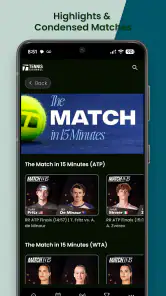
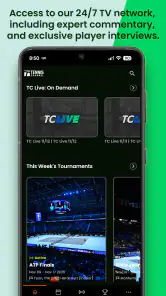
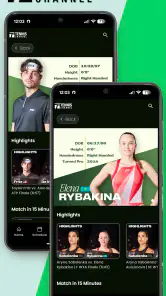
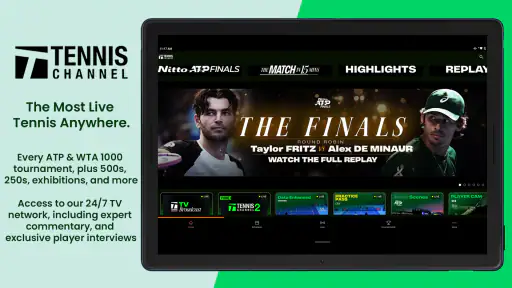
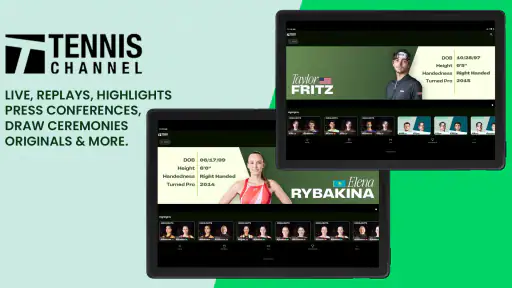
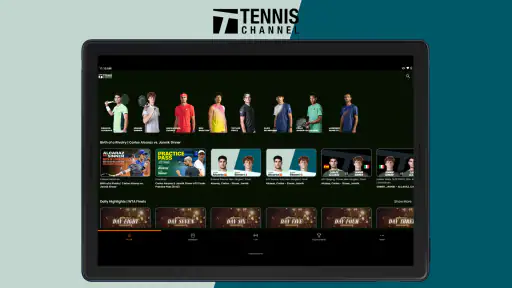
Analysis by Reviewed
I keep coming back to Tennis Channel for one main reason: it puts WTA and ATP tennis in the same place, with matches available to watch live or on demand. That sounds straightforward, but it changes how I follow the sport. Instead of checking separate services, schedules, and clips, I can open one sports app when I want to see what is happening now or catch up with a match I missed.
My experience is not completely positive, though. The app has a clear purpose and can be genuinely useful for committed tennis fans, but the relatively modest average rating of 2.8 from around 1.9 thousand ratings suggests that the experience does not work equally well for everyone. I understand that reaction. The value depends heavily on how often you watch professional tennis, how smoothly the app behaves on your device, and whether you are comfortable with optional paid access inside an otherwise free download.
One place for live and on-demand tennis
The central capability is the combination of live WTA and ATP coverage with replay-style viewing. I see this as more important than a long list of secondary functions because tennis is difficult to follow on a fixed schedule. Matches can last much longer than expected, start at inconvenient times, or overlap with work, school, travel, and family plans. Having both current and on-demand viewing gives the app a practical role beyond simply showing a television stream.
When I have time to watch, the live side is the obvious starting point. I can use the app as a dedicated destination for tennis rather than opening a general sports platform and searching through football, basketball, news, and unrelated events. That narrower focus is its strongest identity. If tennis is the sport I want at that moment, the app feels more direct than a broad streaming service.
The on-demand side matters just as much in daily use. I do not always want to watch an entire match at the moment it takes place. A replay lets me fit tennis around my own day, which is especially useful when a match begins late, takes place across a time zone, or conflicts with another commitment. I can also approach the app with a specific goal: watch a missed match, continue something I started earlier, or spend a quiet evening catching up.
That flexibility is the real effect of the app's main feature. It turns tennis from a scheduled appointment into something I can revisit. I would not describe it as a replacement for every sports service, but for someone who regularly follows both tours, the single-sport focus removes some of the searching and switching that usually gets in the way.
What I do before pressing play
I find the best results come from treating the app as a viewing hub rather than opening it only when a match is already underway. Before an important day, I check what I want to watch and decide whether I am looking for a live event or something already available to view. This small habit makes the experience less frustrating because I am not trying to discover the entire schedule while also rushing to watch the opening games.
More From Our News Desk

Clash of Clans Is Won Between the Battles

Android Auto Makes the Case for Quieter Car Software

MobiOffice: Transforming Mobile Productivity with Seamless Integration

EA SPORTS FC™ Mobile Soccer: Redefining Mobile Sports Gaming

How Microsoft OneDrive Became a Mobile Productivity Giant

How Google Translate Breaks Language Barriers Effortlessly
For casual use, I might open it when I suddenly have half an hour free. In that situation, on-demand access is more useful than live coverage because I can choose something that fits the time I have. For a planned viewing session, I prefer to decide in advance which match deserves my attention. Tennis often rewards patience, but it is easier to give a match that patience when I have deliberately made room for it.
One useful trade-off is that the app's narrow focus can make it feel simpler than a general streaming platform, but it also means I am visiting it for a very specific reason. If I want a mixture of sports, news, or entertainment, I still need other apps. Tennis Channel works best when I accept that specialization instead of expecting it to become my complete television replacement.
A realistic evening with the app
Imagine I am commuting home and discover that a match I wanted to follow has already started. I may not be able to watch immediately, so the live option is no longer enough by itself. Later, after dinner, I open the app and look for the on-demand version. That is where the service earns its place: I can still make the match part of my evening instead of abandoning it because I missed the first part.
Another realistic situation is a weekend with several matches competing for my attention. I can watch one event live and use the on-demand side for another later. I would not assume that this removes every scheduling problem, but it gives me a better way to manage them. The app becomes especially useful when I follow players from both the women's and men's tours and do not want to choose one competition permanently.
I also like the idea of using it for deliberate viewing rather than background noise. Tennis depends on momentum, tactics, and changes in rhythm, so a replay is valuable when I want to concentrate. If I missed a turning point during a live broadcast, returning later can be more satisfying than relying on a short highlight. The app's strongest use case is therefore not merely “watch something,” but “keep a match in my personal viewing schedule.”
How the experience feels in practice
As an Android and iOS sports app, Tennis Channel is free to install, and its content rating is Everyone. That makes it approachable for households where different people may use the same device, and there is no purchase required simply to download it. The developer is Tennis Channel, which is reflected clearly in the app's single-sport purpose rather than in a broad collection of unrelated content.
The free entry point is helpful, but I would not confuse it with unlimited free viewing. The app includes in-app purchases ranging from $4.99 to $109.99 per item. For me, that means the sensible approach is to install it first, inspect the viewing options, and decide whether the available access fits my habits before spending money. A person who watches only the occasional major match may reach a different conclusion from someone who follows the tours throughout the season.
This is also where expectations matter. If I open the app assuming every match will automatically be available without any access decision, I may feel disappointed. If I see it as a free gateway to a dedicated tennis service, with paid choices for deeper viewing, the structure makes more sense. The price range is wide enough that I would think carefully about long-term value rather than selecting an option impulsively.
The app has been available since May 25, 2013, and has passed one hundred thousand installs. That gives it a long presence in the sports-app space, but longevity alone does not guarantee a perfect modern experience. I pay more attention to how well the current version fits my viewing routine: can I find the match I want, understand what access is required, and settle into watching without unnecessary confusion?
Where it beats a general sports app
Compared with a broad sports application, Tennis Channel has an advantage in focus. I do not have to filter through several sports before getting to tennis. That matters when I already know what I want and when I follow both ATP and WTA events. A general service may be better for someone who wants one subscription covering many sports, but that breadth can also make tennis feel like only one small part of the experience.
Compared with free social clips, the app offers a more complete way to follow matches. Short videos are useful for quick updates, but they do not replace the context of a full contest. I would use clips to see what happened and the app to spend time with the actual match when the result or performance matters to me.
Compared with ordinary television, the on-demand angle is the biggest practical difference. Traditional schedules work well when I am available at the right time, but they are less forgiving when my day changes. Tennis Channel gives me a better chance of keeping up without arranging my entire evening around a broadcast window.
There is a limit to this comparison. A general service can still be the better choice if my household already pays for it and includes the tennis I care about. Adding a specialist app may not be worthwhile for someone who watches only a few matches each year. The dedicated experience has value, but only when I use that dedication.
Small habits that make the service more useful
My first tip is to separate “I want tennis now” from “I want this particular match.” The first need points toward live viewing; the second may be better served by on-demand access. Confusing the two can lead to unnecessary searching or disappointment when I open the app at the wrong moment.
My second tip is to use the app as a catch-up tool after a busy day, not only as a live scoreboard substitute. The ability to watch later is most valuable when I plan around it. I might set aside a quiet block of time, avoid opening result notifications beforehand, and treat the replay as the main event rather than a consolation prize.
My third tip is to judge the paid option by frequency, not excitement. A single thrilling match can make any service feel essential for one evening. Before choosing an in-app purchase, I would ask how often I expect to watch WTA and ATP tennis over the coming weeks. That simple calculation protects against paying for access that I will rarely use.
A fourth useful habit is to keep expectations realistic on a smaller phone screen. Tennis is easy to follow visually, but long matches demand attention, and a phone can become tiring for extended viewing. When possible, I prefer a larger display or a comfortable stand. The app supplies the viewing destination; my setup still determines whether the session feels relaxing.
The trade-offs I noticed
The most obvious concern is the rating. An average of 2.8 is not a small warning sign, especially for an app whose main promise is straightforward viewing. I would not use that figure to dismiss the service automatically, because people rate apps for many reasons and device experiences can differ. Still, it tells me to approach with measured expectations rather than assuming a flawless streaming experience.
The paid structure is another important trade-off. Free installation lowers the barrier to trying the app, but the in-app purchase range means the total cost can become significant depending on the access selected. This is not necessarily a problem for a dedicated fan, yet it makes the app less attractive to someone who wants occasional, inexpensive tennis viewing.
I also see a commitment issue. A specialist service is excellent when tennis is the priority, but less convenient when my viewing interests change from day to day. If I want one application for many sports, Tennis Channel may feel too narrow. Its strength and weakness are the same thing: it stays focused on tennis.
Another trade-off is between completeness and time. Having live and on-demand viewing encourages me to follow more matches, but it can also create a backlog. I need to choose what deserves a full session instead of assuming I can watch everything. In that sense, the app gives me more control, not more free time.
I would also avoid choosing it solely because it is available on a familiar mobile platform. Android and iOS availability makes access convenient, but convenience does not automatically make a subscription worthwhile. My decision would depend on the tours, players, and matches I genuinely follow. Someone who mostly wants quick scores may find a lighter sports tracker more efficient.
Who will get the most from it?
I think the best match is a regular tennis viewer who follows both women's and men's professional events. For that person, the combined focus is not a minor detail. It reduces the need to jump between unrelated sports services and makes the app a natural place to begin whenever tennis is on the agenda.
It is also a good fit for people with uneven schedules. Shift workers, students, parents, and frequent travelers may appreciate being able to move between live and on-demand viewing. The app cannot make every match convenient, but it gives those viewers more opportunities to watch on their own terms.
It may also suit a fan who wants to build a more thoughtful viewing routine. Instead of consuming only short highlights, I can choose selected full matches and watch them when I have enough time to appreciate the tactical changes. That is a more specific benefit than simply having “sports content” available.
On the other hand, I would suggest skipping it if I watch tennis only occasionally, mainly need scores, or already have a broader service that covers the matches I care about. I would also hesitate if I am unwilling to consider in-app purchases. The free download is useful for exploring the app, but the real value depends on what viewing access I am prepared to choose.
Families should think about viewing habits as well. The Everyone rating makes the app broadly approachable, but the practical question is whether several people will actually watch enough tennis to justify keeping it in regular use. For one committed fan, the answer may be yes. For a household that rarely watches matches, a general service or free updates may be more sensible.
My final take after using it
Tennis Channel is most convincing when its live-and-on-demand combination solves a real scheduling problem. I like that I can treat professional tennis as something I can follow now or return to later, and I appreciate the focused experience compared with a crowded all-sports platform. That is the capability I would use to justify installing it.
At the same time, I would not recommend it blindly. The 2.8 average rating, the range of in-app purchase options, and the narrow tennis-only focus all deserve consideration. The app is not the obvious choice for a casual sports viewer, and it may not replace a broader subscription that already covers the right matches.
For me, the decision comes down to frequency. If I regularly follow ATP and WTA tennis and often miss live starts, this app has a clear practical advantage. I can plan viewing around my day instead of letting the schedule decide whether I see a match. If I only want occasional updates, I would choose a lighter alternative and keep my spending elsewhere.
My recommendation is therefore positive but specific: try Tennis Channel if professional tennis is a regular part of your week, explore how the live and on-demand options fit your routine, and consider the purchase carefully before committing. For the right viewer, it is a useful dedicated home for matches. For everyone else, its specialization may be more limitation than benefit.
Tennis Channel Frequently Asked Questions
How much storage space and mobile data should I allow for Tennis Channel?
Tennis Channel is a sports app for watching tennis streams and other video content, so viewing over a mobile connection can use more data than browsing schedules or reading news. If you plan to watch matches away from Wi-Fi, check your mobile plan and consider adjusting your viewing habits to avoid unexpected data use. Keep some free storage available for installing the app and its updates.
Is Tennis Channel free to download, and what might I have to pay for?
The Tennis Channel app is free to download, but some viewing options may require a paid subscription or an eligible television-provider login. In-app purchases range from around five dollars to around one hundred ten dollars per item, so check the purchase details before confirming anything. Review renewal terms and any trial conditions carefully, since the cost and access attached to a plan can vary.
What is Tennis Channel, and what can I watch on it?
Tennis Channel is a streaming and sports entertainment service focused primarily on tennis. Depending on your location and subscription, it may provide live tournament coverage, replays, highlights, interviews, analysis, documentaries, instructional programs, and tennis news. Available content can vary by region, broadcast rights, and the specific plan you choose, so checking the current schedule before subscribing is recommended.
Is a subscription required to use the Tennis Channel app?
Some Tennis Channel content may be available without a paid subscription, but full access to live matches and premium programming generally requires a subscription or an eligible television-provider login. The exact options can differ between countries and platforms. Before downloading, review the available plans, trial terms, renewal conditions, and whether your existing cable, satellite, or streaming provider supports authentication.
Which devices are compatible with Tennis Channel?
Tennis Channel is designed for use on supported Android and iOS mobile devices, although compatibility depends on the operating system version and the app release. It may also be available through selected smart TVs, streaming media players, web browsers, and television platforms. Because supported devices can change, users should confirm compatibility in the relevant Google Play Store or Apple App Store listing.
Pros
- Live coverage and replays keep fans updated on major tennis events.
- Match schedules and results are easy to find within the app.
- Video highlights offer a quick way to catch key points and moments.
- News and analysis provide useful context beyond live matches.
- Supports casting to compatible TVs for a more comfortable viewing experience.
Cons
- Many live streams require a paid TV provider or subscription.
- Content availability can vary by location and broadcasting rights.
- Some videos may load slowly on weaker mobile connections.
- Notifications can feel excessive unless carefully customized.
- The app may use significant data and battery during live streaming.
- Category
- Sports
- Version
- Varies with device





