

TenantCloud
- 128.00
- 4.1
- Installs
- 10.00K
- Price
- Free

Screenshots
Analysis by Reviewed
Managing a rental can become surprisingly scattered. A landlord sends a message in one place, a tenant checks another, and important details end up buried in email threads or notes. TenantCloud is designed to give tenants a more focused way to stay connected with their rental information, and after spending time with it, I see the appeal: it is less about adding another complicated tool and more about putting everyday tenant tasks into one mobile point of contact.
This is a free House & Home app from TenantCloud LLC, aimed specifically at tenants rather than property managers. It is available to everyone, runs on Android 9 or later, and currently appears as version 1.33.0. Its average rating is 4.1 from around 1.3 thousand ratings, with more than 10 thousand installs. Those figures suggest a modest but established user base, rather than a brand-new experiment that has barely been tested outside a small group.
My main focus here is practical: how quickly the app feels ready for ordinary tenant work, what happens when you use it during a busy rental problem, how dependable it seems as a daily tool, and where the phone itself may become the limiting factor. If you want a tenant-centered app instead of a general landlord platform, this is worth examining closely.
What using TenantCloud feels like day to day
The first thing I noticed is that the app makes more sense when treated as a rental workspace than as a general home-management app. That distinction matters. It is not trying to replace every communication method you already use, and it is not the same as a simple notes app where you manually record rent dates, repair requests, and messages. Its value comes from keeping tenant-related activity associated with the rental relationship.
That focus is useful for people who want less mental overhead. When something needs attention, the best workflow is usually to open the app, check the relevant area, and deal with the task while the details are still fresh. I would be more comfortable using it as a regular checkpoint than relying on memory or searching through old conversations.
There is also a subtle benefit for tenants who share a home. Even if only one person usually handles rental communication, having a dedicated place to review what is happening can make it easier to keep another household member informed. Instead of forwarding fragments from different services, you can refer back to the same rental-oriented context.
That said, the app’s usefulness depends on the surrounding TenantCloud setup and on how actively the property relationship is managed through it. A tenant cannot turn a disconnected landlord into a responsive one simply by installing an app. If your property owner or manager does not use the relevant TenantCloud workflow, the experience may feel limited compared with a direct conversation or the system already used for your building.
More From Our News Desk

 Gmail
GmailGmail in a Busy Inbox: Who Benefits Most?
From first account to crowded workday, Gmail earns its place through dependable search and flexible sorting—but its best fit depends on how much inbox maintenance you can tolerate.

 Prime Video
Switching to Prime Video: What Changes in Your Viewing Routine
Prime Video can make a compelling second home for streaming, but switching means learning a different catalog, rental layer, and route from browsing to playback.

 Universal TV Remote Control
Universal TV Remote Control Works Best as a Reliable Backup
A phone remote earns its place through quick setup and reliable habits. Here is how to get more from Universal TV Remote Control—and where its limits show.

 Weather - By Xiaomi
Weather by Xiaomi Review: Clear at a Glance, Less Clear Up Close
Xiaomi’s weather app makes everyday forecasts quick to scan, but its calm surface can leave useful details and recovery paths harder to find than they should be.

 X
XX Under Pressure: Can It Recover When Posting Goes Wrong?
A resilience-focused review of X, examining setup, mistaken posts, interruptions, weak connections, and the gaps that matter when recovery needs to be dependable.

 Clash of Clans
Clash of Clans Is Won Between the Battles
Its raids are quick; its community is a long-term project of coordination, teaching, rivalry, and shared responsibility—with all the friction that entails.
Latest News



Speed expectations before you rely on it
For a tenant app, speed is not only about opening quickly. It is also about reducing the number of steps between noticing a problem and recording it clearly. I judge TenantCloud by that standard. Its focused purpose should help it feel more direct than a broad property-management dashboard, because a tenant generally wants to check information or communicate about a specific rental matter rather than navigate a large administrative system.
I would still avoid treating it as an emergency channel. A slow-loading screen is frustrating when you are checking a routine item, but it becomes a real problem when a leak, lock issue, or heating failure needs immediate attention. In those situations, use the fastest available contact method first and use the app to keep the related record organized afterward.
One practical habit improves the experience: open the app when you have stable connectivity, review anything that needs attention, and prepare the details of a request before starting. A concise description, the room or area involved, and the time you noticed the issue are more useful than a rushed message written while switching between several apps.
I also recommend avoiding repeated taps when a screen seems slow to respond. On a busy phone, pressing the same control several times can create uncertainty about whether an action was accepted. Wait for the screen to update, then verify the result. That is ordinary mobile-app advice, but it is especially important for rental communication because duplicate requests can confuse the person handling them.
How it handles heavy-use moments
The most demanding real-life moment is not necessarily a long session. It is a cluster of small tasks arriving close together. Imagine coming home to find water near a cabinet, checking the rental app, trying to describe the problem, and then returning to review the message while also answering a call from a property manager. That is where clarity and recovery matter more than flashy presentation.
In that situation, I would use a deliberate sequence. First, document the visible problem in your own words. Next, submit or communicate through the appropriate TenantCloud area. Then return to confirm that the action appears to have completed. Finally, keep any follow-up information in the same context instead of creating a separate note that may be forgotten.
This workflow reveals an important trade-off. A dedicated tenant app can be easier to organize than email, but email remains more flexible when you need to include several people, attach a long explanation, or preserve a conversation outside the rental platform. I would not abandon email entirely. I would use TenantCloud for the rental-centered record and keep another channel available for urgent or unusually complex situations.
Heavy use can also mean checking the app repeatedly during a repair process. That is where unnecessary refreshes become tiring. Rather than reopening it every few minutes, decide when you genuinely need to check for an update. If the issue is urgent, direct contact is still the sensible choice; if it is routine, a few purposeful checks are less stressful than constant monitoring.
Reliability and recovering from interruptions
A reliable tenant app should make it obvious what happened after an interruption. Phones lose signal, notifications get dismissed, and people close apps accidentally. My advice is to treat every important action as incomplete until you can see a clear confirmation or the updated item in the app.
This is not a criticism unique to TenantCloud; it is a sensible safeguard for any service that records rental communication. The difference is that rental matters can have consequences later. If you report a maintenance concern and the app closes before you can verify it, note the time and use a second contact route if the issue is serious. That creates a practical backup without turning every minor task into paperwork.
I like the idea of using the app as a chronological reference point, but I would not use it as the only archive for legally important material. Keep copies of formal documents, agreements, payment confirmations, and significant correspondence in a place you control. A mobile app is convenient for access; it should not be your sole protection against a future disagreement.
Another recovery habit is to reopen the relevant area after changing networks. Moving from home Wi-Fi to mobile data can interrupt a request or leave a screen showing old information. A quick check after reconnecting helps distinguish a completed action from one that merely looked complete before the interruption.
Device limits and resource expectations
TenantCloud supports Android 9 and later, which gives it a reasonable reach across older and newer Android phones. That does not mean every device will feel identical. A newer phone with plenty of free storage and current system software will usually provide a smoother environment than an older handset already struggling with many installed apps.
I would not install it on a phone that is constantly short on storage or running too many background processes without first making room. Rental apps are not normally the kind of software that should dominate your device, but a crowded phone can make every app feel unreliable. Freeing storage, updating the operating system when appropriate, and closing genuinely unnecessary background apps are sensible preparation.
Battery impact is another area where expectations should remain realistic. Occasional tenant tasks should not require a powerful device, but repeatedly checking for changes, keeping several communication apps open, or using the camera and mobile data at the same time can increase demand on any phone. If you are documenting a maintenance issue away from a charger, take the necessary evidence first and then return to the app rather than leaving multiple screens active.
Older devices may also make typing and switching between screens feel more cumbersome. That is a reason to prepare a short, clear description before beginning a request. It reduces the time spent navigating on a small or slower display and makes the final communication more useful to the recipient.
Where it beats ordinary alternatives
The usual alternative is email, text messaging, or a landlord’s preferred portal. Email is excellent for searchable correspondence and broad flexibility, but it can mix rental matters with work, shopping, newsletters, and unrelated conversations. Text messages are fast, yet they are not always ideal for keeping a structured rental history. A general notes app gives you control, but all the organization is your responsibility.
TenantCloud’s strongest advantage is its tenant-specific context. You are not building the whole system from scratch, and you are less likely to forget which message belongs to which rental issue. That makes it a better fit for someone who wants a dedicated place to interact with a property relationship without maintaining a spreadsheet or a personal filing system.
The comparison changes when your building already uses a different portal. In that case, TenantCloud may create duplication rather than reduce it. You could end up checking two systems, wondering which one contains the current status, and repeating information. I would choose the platform your landlord or manager actively supports instead of installing several apps simply because each one sounds useful.
It is also not the right choice for someone who wants a broad home inventory, renovation planner, smart-home controller, or household budgeting tool. The House & Home category is broad, but this app’s tenant orientation is specific. That narrowness is a strength for renters who need rental communication and a weakness for anyone expecting a complete digital home command center.
Who will get the most from it
I think TenantCloud is especially suitable for renters who move between devices, manage several recurring rental responsibilities, or want a cleaner alternative to scattered messages. It can also help people who are new to renting and would rather have a dedicated place to check than invent their own tracking method.
It is less compelling for a tenant whose landlord communicates exclusively by phone, paper, or another established portal. In that case, the app may add another login and another place to look without solving the real problem. It is also a poor substitute for immediate emergency contact, formal legal advice, or careful personal record-keeping.
Before committing to it, ask yourself a simple question: will the people responsible for my rental actually use TenantCloud with me? If the answer is yes, the app has a clear role. If the answer is uncertain, install it only if you have a specific reason, such as access to a supported tenant workflow, rather than expecting the app alone to improve communication.
Three practical habits that make the app more useful
Verify every important submission. After sending a request or message, look for the resulting entry or confirmation before leaving the screen. This protects you from assuming an interrupted action went through.
Separate urgent action from documentation. Contact the appropriate emergency or direct support route first when safety or serious property damage is involved. Use TenantCloud to maintain the rental-related trail once the immediate risk is addressed.
Keep your own long-term copies. For agreements, formal notices, and significant financial records, save copies outside the app. Convenience and independent record-keeping serve different purposes.
These habits are more valuable than simply opening the app more often. They turn it from a passive place to check into a controlled part of your rental routine, while acknowledging that no mobile platform can remove the need for judgment.
My performance verdict
TenantCloud makes the most sense as a focused tenant companion: a free app that can bring rental-related activity closer to the person who actually lives in the property. Its current version, 1.33.0, and its support for Android 9 or later make it accessible to a wide range of Android users, while the Everyone age rating keeps the entry barrier low.
My overall impression is positive, with one important condition: its performance value comes from focus and workflow, not from replacing every other communication or record-keeping tool. It should feel manageable for ordinary tenant tasks, but I would still verify important actions, avoid depending on it alone during emergencies, and keep independent copies of critical documents.
The app is a good recommendation for a tenant whose landlord or property manager already works through TenantCloud and who wants a more organized alternative to scattered messages. I would skip it if your rental relationship has no connection to the platform, if you need a full household-management suite, or if you expect an app to solve slow human communication.
For the right renter, the best benefit is simple: fewer loose ends. Used with sensible backups and realistic expectations about speed, connectivity, and device condition, TenantCloud can become a practical daily checkpoint rather than another app that demands attention without giving much back.
TenantCloud Frequently Asked Questions
Can I use TenantCloud as a tenant without managing a property?
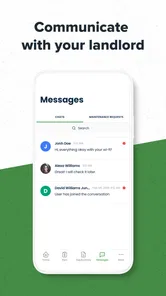
TenantCloud is designed to give tenants a way to handle rental-related tasks connected to their property. Your landlord or property manager generally needs to set up the relationship and enable the relevant tools for your account. Once access is available, the app can bring practical information and communication into one place, but what you can do depends on how the property’s account is configured.
Is TenantCloud free to download, and what devices can run it?
TenantCloud is a free app in the House & Home category, with an Everyone content rating. Its current version is 1.33.0, and it requires Android 9 or later. The app is published by TenantCloud LLC and is intended for tenants. Check that your device meets the operating-system requirement before downloading so you can install and use the app.
What is TenantCloud, and who is it designed for?
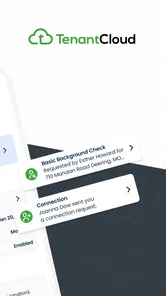
TenantCloud is a property management platform designed for landlords, property managers, tenants, and service professionals. It brings tasks such as listing vacancies, collecting rent, tracking maintenance requests, storing documents, and communicating with residents into one system. It can be useful for managing a single rental property or a larger portfolio, although the available tools and limits may depend on the selected subscription plan.
Can tenants pay rent and submit maintenance requests through TenantCloud?
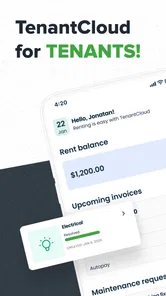
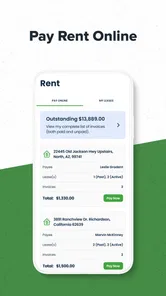
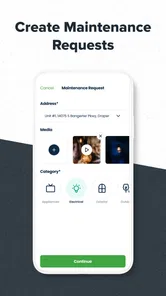
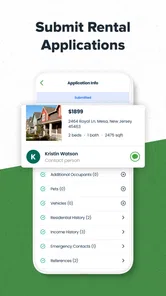
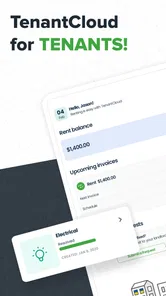
Yes, TenantCloud allows participating tenants to handle several rental-related tasks from the platform. Depending on how the landlord has configured the account, tenants may be able to pay rent online, view payment information, receive announcements, access lease documents, and submit maintenance requests with descriptions or photos. However, not every landlord enables every feature, so the experience can vary between properties.
Does TenantCloud charge fees for online rent payments?
Online payment fees may apply, depending on the payment method, account configuration, and the plan or policies used by the property manager. Before confirming a transaction, users should carefully review the payment screen for any processing charges, timing information, and available options. Landlords should also check current TenantCloud pricing and payment terms, since fees and included features can change over time.
Pros
- Online rent collection simplifies recurring payments.
- Maintenance requests can be tracked in one central place.
- Automated reminders help reduce missed deadlines.
- Document storage keeps leases and records easy to access.
- Available on web and mobile for flexible property management.
Cons
- Some useful features require a paid subscription.
- The interface may feel complex for first-time users.
- Payment processing fees can add to management costs.
- Support response times may vary by plan and issue.
- Advanced reporting may be excessive for small landlords.








