

Rentler
- 122.00
- 4.6
- Installs
- 100.00K
- Price
- Free

Screenshots
Analysis by Reviewed
Finding a rental is rarely difficult because there are no listings to browse. The harder part is turning a vague search into a practical shortlist, then moving from “this looks promising” to a real conversation with the person managing the property. I tested Rentler with that everyday problem in mind: I wanted a place that matched a budget and location, but I also wanted a search process that could keep me from wasting time on unsuitable homes.
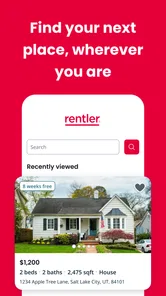
Rentler is a free House & Home app from TenantCloud LLC, built around helping people look for their next place while using a phone. It is available to everyone in its age-rating category, and its straightforward purpose makes more sense once you use it as part of a complete rental workflow rather than treating it as just another scrolling feed. The app has passed one hundred thousand installs and holds a 4.6 average from roughly a thousand ratings, which suggests that many users find the basic experience useful.
My overall impression is positive, with an important qualification: this is most helpful when I already know what kind of rental I am seeking and am willing to verify the details myself. It can make discovery more organized, but it does not remove the judgment, communication, and checking that come with renting a home.
From a vague housing need to a workable shortlist
I find it easier to search well once I turn a general need into a few clear rules: what I can spend, where I can realistically live, and which features are essential rather than merely appealing. In the next section, I’ll look at how that simple preparation makes browsing more purposeful and helps keep a promising listing from becoming an impulsive choice.
Start with the decision that matters most
The best way to begin is not by opening the app and tapping on every appealing photo. I first decide which requirements are absolute and which are negotiable. For example, a commute limit, a maximum monthly budget, or the need for a particular number of bedrooms should be treated differently from preferences such as updated finishes or a balcony. That distinction keeps the search useful when the number of possible homes starts to grow.
Rentler works well at this stage because its purpose is focused on rental discovery rather than general home ownership research. I can approach it with a specific question: “Which available places are worth contacting?” That is a better question than “Can I find something nice?” because it turns browsing into a filtering exercise.
I also recommend preparing a small checklist before contacting anyone. I would include the total expected monthly cost, the earliest possible move-in date, the location I can realistically accept, and questions about rules or included services. The app can help me find candidates, but the checklist prevents an attractive listing from taking over the decision before I understand whether it actually fits.
More From Our News Desk

 Gmail
GmailGmail in a Busy Inbox: Who Benefits Most?
From first account to crowded workday, Gmail earns its place through dependable search and flexible sorting—but its best fit depends on how much inbox maintenance you can tolerate.

 Prime Video
Switching to Prime Video: What Changes in Your Viewing Routine
Prime Video can make a compelling second home for streaming, but switching means learning a different catalog, rental layer, and route from browsing to playback.

 Universal TV Remote Control
Universal TV Remote Control Works Best as a Reliable Backup
A phone remote earns its place through quick setup and reliable habits. Here is how to get more from Universal TV Remote Control—and where its limits show.

 Weather - By Xiaomi
Weather by Xiaomi Review: Clear at a Glance, Less Clear Up Close
Xiaomi’s weather app makes everyday forecasts quick to scan, but its calm surface can leave useful details and recovery paths harder to find than they should be.

 X
XX Under Pressure: Can It Recover When Posting Goes Wrong?
A resilience-focused review of X, examining setup, mistaken posts, interruptions, weak connections, and the gaps that matter when recovery needs to be dependable.

 Clash of Clans
Clash of Clans Is Won Between the Battles
Its raids are quick; its community is a long-term project of coordination, teaching, rivalry, and shared responsibility—with all the friction that entails.
Latest News



Use the phone as a first-pass research tool
The mobile format is particularly convenient when I am checking options during a lunch break, between errands, or while traveling through a neighborhood. I can move from casual interest to a more deliberate review without needing to sit at a computer. That matters because rental searches often happen in short bursts, and a useful app should support those small sessions.
My advice is to avoid making a decision from the first image or the headline details. I open a promising option, read the available information carefully, and compare it with my checklist. A listing that appears affordable may still be impractical if its location adds a long commute. Another may look ideal until I notice that an important question has not been answered. Rentler is valuable here as a place to organize attention, not as a substitute for reading closely.
One practical habit is to separate “interesting” from “ready to contact.” I keep the first group broad while exploring, then reduce it to a smaller set of homes that meet the non-negotiable requirements. This prevents the common mistake of sending messages to too many people before I know which properties deserve serious consideration.
Why a shortlist is more useful than endless browsing
Rental platforms can encourage passive scrolling because every new listing feels like a possible improvement. I found the experience more productive when I treated each listing as a candidate that had to earn a place on my shortlist. The goal was not to collect attractive homes; it was to create a manageable group for comparison and follow-up.
For each candidate, I would record the questions that remained open. Is the location practical at the time I would normally travel? Does the layout suit my furniture and daily routine? Are there restrictions that affect pets, guests, parking, or working from home? These are not glamorous questions, but they are the ones that decide whether a rental remains appealing after the first conversation.
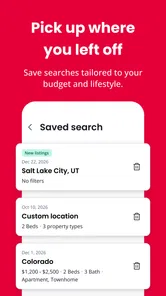
The strongest use of Rentler is turning scattered browsing into a repeatable search routine. Open the app, check new possibilities, remove obvious mismatches, and reserve direct communication for the few that survive the first review. That workflow saves more time than simply having another place to browse.
The handoff from listing to conversation
The important transition happens when I stop evaluating a listing privately and need information from the person responsible for it. This is where expectations have to be managed. A listing can give me a starting picture, but the owner or manager is the source for current availability, application steps, viewing arrangements, and property-specific rules.
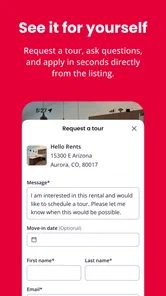
Before reaching out, I make my message easy to answer. I briefly identify the property I am asking about, state what I want to know, and avoid sending a long personal history in the first contact. A concise message is more practical than a generic “Is this available?” because it shows that I have actually reviewed the listing and gives the recipient a clear next step.
I also keep a record of which property each conversation concerns. This sounds obvious, but it becomes important when several homes have similar photos or descriptions. A simple note with the address or listing name, the date of contact, and unanswered questions helps prevent confusion when replies arrive at different times.
Rentler’s role in this handoff is to get me close to the relevant rental opportunity. It should not be treated as proof that a property is still available or that every detail is final. Availability can change, and the conversation may reveal conditions that were not central to the original presentation. That is normal in a rental search, but it means I need to stay attentive after tapping the contact option.
What to verify before moving forward
Once a response arrives, I would confirm the practical basics before arranging the rest of the process. I want to know whether the home is still available, what the full recurring cost is, what is included, and what the next step involves. I would also ask whether the information shown in the listing is current. These questions are especially useful when I have found the property outside normal business hours and cannot immediately inspect it.
A useful, non-obvious step is to compare the written answers with the original listing rather than relying on memory. If the reply changes an important detail, I note the difference and ask for clarification. This protects me from building a decision around an assumption that came from an old photo, a shortened description, or my own interpretation.
I would never send sensitive personal documents or money simply because a listing looks convincing. The app helps begin the rental conversation, but ordinary caution still applies: confirm who I am dealing with, understand the requested process, and inspect the home through appropriate arrangements before committing. That is not a criticism unique to Rentler; it is a necessary boundary for any rental marketplace.
A realistic everyday scenario
Imagine I have to move within the same general area and can only search in short sessions after work. I open Rentler during the week, review places that appear to fit my location and budget, and immediately discard those that fail a basic requirement. Instead of contacting every remaining option, I choose a small group and write down one or two questions for each.
On the next day, I revisit the shortlist and check whether the homes still make sense when I consider travel time, space, and timing. I contact the strongest candidates with specific messages. When replies come in, I update my notes, remove properties that no longer fit, and arrange the next step for the ones that remain credible. The app has not found the home by itself; it has helped me keep the process from becoming a pile of open browser tabs and half-remembered details.
This workflow is especially helpful for someone moving from another neighborhood or searching while busy. It is less valuable for someone who already has a direct relationship with a landlord or who needs a highly specialized housing search that requires detailed professional guidance.
Where Rentler compares well with usual alternatives
The usual alternative is a general classifieds site, a social media group, or simply searching the web. Those options can produce leads, but they often mix rental opportunities with unrelated posts and make it harder to maintain a consistent process. Rentler feels more purposeful because the app is centered on finding a place to rent rather than asking me to sort through a broad collection of local content.
Another alternative is contacting property managers directly. That can be better when I already know the neighborhood, building, or management company I want. Direct contact may provide a clearer route for current availability and building-specific questions. On the other hand, it limits discovery. Rentler is more useful at the beginning, when I need to see what kinds of options exist before choosing whom to contact.
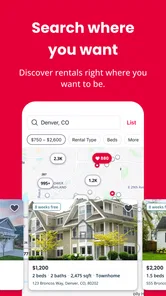
Compared with a desktop-first search, the phone app is more convenient for quick checks and location changes. The trade-off is that a smaller screen can make comparison less comfortable, especially when I want to keep several details visible at once. I would use the app for discovery and follow-up, then move to a more deliberate review when a property becomes a serious possibility.
Who will get the most from it
I think Rentler is a good fit for renters who want a focused starting point, prefer handling early research on a phone, and are comfortable taking responsibility for verification. It suits a person who is moving soon but still needs to explore neighborhoods, compare several possibilities, and make contact without committing to the first attractive option.
It can also help people who dislike unstructured searching. The app gives the process a natural sequence: discover a rental, inspect the information, decide whether it belongs on the shortlist, and begin a conversation. That sequence is simple, but it is more useful than repeatedly opening random listings without a clear decision rule.
I would be more cautious about recommending it as the only tool for someone with very strict accessibility, legal, financial, or housing-support needs. In those situations, a specialist service or direct assistance may be more appropriate. Likewise, someone who expects every rental detail to be fully settled inside one app may find the handoff to owners or managers less convenient than expected.
Where the flow breaks down
The biggest friction is the boundary between discovery and reality. A listing can start the process, but it cannot guarantee that a home will remain available, that the presentation answers every question, or that the property will suit me in person. I still have to communicate clearly, verify important details, and make a responsible decision.
There is also a risk of spending too much time browsing. Because the app makes searching easy to start, I need to impose my own limits. If I keep expanding the search area or relaxing requirements without noticing, the tool becomes a source of distraction rather than progress. My solution is to define a shortlist size and a review schedule before I begin.
Another limitation is that the app cannot replace a viewing or a careful conversation. Photos and brief descriptions rarely tell me how noisy a street feels, how natural the light is, how storage works in practice, or whether the layout supports my routine. I use Rentler to decide which homes deserve those next steps, not to make the final choice from the screen.
Version, access, and everyday practicality
The current version is 2.9.1, and the app runs on Android six and later. That makes it accessible to people using many older Android phones, although the quality of the experience will still depend on the device, screen, and connection. It is free to install, so trying it as an initial search tool does not require a purchase decision.
The Everyone content rating also makes it uncomplicated from an age-access perspective. I would still treat the rental conversations themselves as serious adult transactions, particularly when money, identity documents, or agreements enter the picture. The app’s accessible presentation should not be confused with a guarantee that every interaction is risk-free.
TenantCloud LLC is the developer behind the app. Its strong average rating and more than one hundred thousand installs make it a credible option to test, but I would judge it by whether it improves my own search rather than by popularity alone. A rental tool succeeds when it helps me reach a suitable next step with less confusion.
My recommendation after following the full workflow
I would recommend Rentler to a friend who is beginning a rental search and wants a focused mobile place to discover options. I would tell that friend to use it with a written checklist, a shortlist, and a habit of verifying every important detail before making arrangements. Used that way, it is more than a stream of property cards: it becomes the first stage of a sensible process from need, to research, to contact, to viewing.
I would not recommend relying on it alone when the search requires specialized support, highly detailed comparison, or a direct relationship with a particular property manager. In those cases, a specialist service or direct contact may be the better route. Even then, Rentler can still be useful for seeing what else is available before narrowing the decision.
My final view is that the app earns its place as a practical starting point, not as a complete rental transaction. It helps me move from “I need a place” to a smaller set of real possibilities, and that is the part of the journey where many searches become disorganized. The result depends on what I do after that handoff, but Rentler gives the early search a clear, usable shape without charging for access.
Rentler Frequently Asked Questions
What devices can run Rentler?
Rentler is available for Android devices running version 6.0 or later, making it worth checking your phone’s operating system before downloading. The app is designed to help you look for a place while you are on the go, and its store age rating is Everyone. If you are using an iPhone or iPad, check the relevant app store for current compatibility details before installing.
Who develops Rentler, and what do users think of it?
Rentler is developed by TenantCloud LLC and is a House & Home app focused on rental searches. It has a 4.6 average rating based on around 981 ratings, with 122 written reviews, giving prospective renters a sense of how other users have responded. Individual experiences can differ, so consider whether the app’s rental-search tools suit the way you prefer to find a home.
What is Rentler, and what can I use it for?
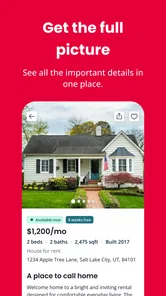
Rentler is a rental marketplace and property management platform designed to connect renters with available homes and landlords or property managers. From the app or website, you can search for apartments, houses, rooms, and other rental options, review listing details, contact advertisers, and in some cases submit applications or manage rental-related tasks. Availability and features may vary by location.
Is Rentler free for renters to download and use?
Rentler is free to download, and renters can generally browse available rental listings and contact property advertisers without paying a subscription. However, certain services may involve separate charges, such as application fees, background or screening reports, credit-related services, deposits, or other landlord-requested costs. Before submitting information or making a payment, carefully review the fee details and confirm who is charging you.
How can I tell whether a Rentler listing is legitimate?
As with any online rental marketplace, you should independently verify a property and the person advertising it before sending money or sensitive documents. Check whether the rent is realistic for the area, request an in-person or verified virtual tour, confirm the address, ask for a written lease, and avoid wire transfers, gift cards, cryptocurrency, or pressure to pay immediately. Never assume a listing is safe solely because it appears in the app.
Pros
- Searches rentals
- roommates
- and homes in one convenient app.
- Direct communication with landlords can speed up the rental process.
- Listing details often include useful fees
- amenities
- and availability information.
- Application tools help organize the rental process in one place.
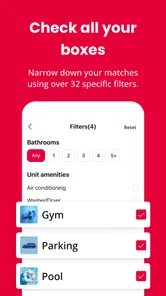
- Useful filters make it easier to narrow results by location and budget.
Cons
- Coverage and listing quality can vary significantly by city.
- Some listings may become outdated before they are removed.
- Not every landlord or property manager responds quickly.
- Application and screening fees may apply depending on the property.
- Users should verify listings carefully to avoid scams or misleading information.








