TeamReach - Your Team App
- 991.00
- 4.4
- Installs
- 1.00M
- Price
- Free

Screenshots
Analysis by Reviewed
For a team, the hardest part of organizing is often not planning the activity but making sure everyone has the same information. I find TeamReach - Your Team App most useful when a coach, parent, or organizer needs one shared place to coordinate a sports group rather than relying on scattered messages. It is a sports app from TeamReach LLC, and its focus is practical: helping a group stay connected around its activities.
What free access means in practice
The app is free to download and use, with in-app purchases listed at $2.99 to $9.99 per item. I would treat that as a low-friction way to try the core experience, not as a reason to assume every option is included at no cost. If you are comparing tools, check the purchase details in the app before deciding whether any paid item is worthwhile for your group; the listed range alone does not say what each purchase unlocks.
That distinction matters for a volunteer-run team. If your immediate need is a common channel for updates and event planning, free access makes it easier to see whether members will actually adopt a dedicated app. If you need a particular paid option, weigh it against the problem it solves rather than assuming a purchase is necessary for basic coordination.
First Impressions and Setup
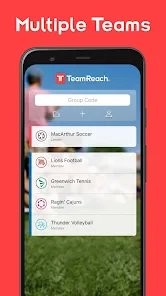
Upon downloading TeamReach, I was instantly impressed by its user-friendly interface. The app is designed to be intuitive, so even if you’re not tech-savvy, you’ll find it easy to navigate. Setting up a team is a breeze. You simply create a team code and share it with your members. Once they enter the code, they’re in! No complex processes or confusing steps. This simplicity is a huge plus for those who want to focus more on the game rather than fiddling with technology.
Features That Stand Out
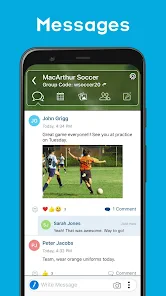
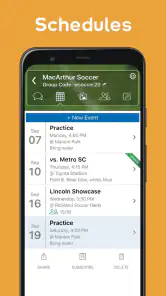
One of the features I absolutely love is the messaging capability. The app allows for both private and group messages, ensuring that everyone stays in the loop, whether you’re discussing practice times or last-minute changes. Plus, the calendar feature is a game-changer. You can schedule games, practices, and events, and all members get notified instantly. No more excuses for missing a game because someone didn’t check their email!
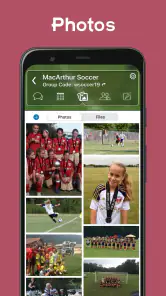
Another standout feature is the ability to share photos and files. Whether you’ve captured a great moment during a game or need to distribute important documents, TeamReach makes it simple to share these with the entire team. The app also integrates polls, which are fantastic for making group decisions. Need to decide on a new team jersey? Just create a poll and let your team vote.
Turning a busy week into a clear plan
A useful way to put those tools together is to treat the calendar as the source of truth and messages as the place for discussion. For example, a coach can post a practice time, use a poll to settle between two suitable options before confirming it, then keep any later change tied to the event rather than buried in a long chat. That simple habit reduces the chance that a member acts on an old message.
More From Our News Desk

Clash of Clans Is Won Between the Battles

Android Auto Makes the Case for Quieter Car Software

MobiOffice: Transforming Mobile Productivity with Seamless Integration

EA SPORTS FC™ Mobile Soccer: Redefining Mobile Sports Gaming

How Microsoft OneDrive Became a Mobile Productivity Giant

How Google Translate Breaks Language Barriers Effortlessly
For a family managing a child’s sports schedule, the same arrangement can make a rainy-day cancellation less chaotic: one update can reach the group, while members can check the event details instead of asking several people whether practice is still on. I would still encourage teams to agree on who is responsible for posting final decisions. A shared app cannot resolve conflicting instructions if several people announce different plans.
Seamless Communication
Communication is key in team sports, and this app nails it. The notifications are prompt, ensuring that every member is updated in real-time. This is particularly useful for last-minute changes or quick reminders. I’ve found that this feature alone saves a lot of hassle compared to traditional methods of communication like emails or text messages.
Where a dedicated team app helps—and where it doesn’t
Compared with email, a team space makes it easier to keep activity-related conversation together instead of searching an inbox. Compared with an ordinary group text, the calendar and polls give the group more structure than a stream of replies. That advantage is most noticeable when the same people need to coordinate repeatedly; for a one-off gathering, a simple message thread may be faster and easier for everyone.
The trade-off is that people must join the team and pay attention to another communication channel. If some members do not install or check the app, an urgent update may not reach them in practice, however useful notifications are for those who do. I would keep a clear fallback for genuinely time-sensitive messages until the whole group is comfortable using the app, and avoid assuming that a notification replaces a confirmed response.
Who is likely to get the most value
I would recommend trying it for a coach or organizer who regularly handles attendance questions, schedule changes, and group decisions, especially when parents and players need the same information. Clubs and recurring activity groups may benefit for the same reason: a team code gives members a straightforward route into the shared space, while messages, events, and polls cover different coordination tasks.
It is less compelling if your group already communicates reliably in one place and rarely needs schedules or decisions organized. It may also be the wrong fit for a group that wants a broad project-management setup rather than a sports-oriented team hub. For a tiny group that meets once, creating a dedicated space can be more process than the event deserves.
Making the shared space work for different members
A team can include people who have very different habits: a coach who checks plans throughout the day, a parent who only looks when a reminder arrives, and a player who follows the conversation but misses details in a busy chat. I would make the first post in a new team especially clear: what the group is for, who can post official schedule changes, and where members should ask questions. That small bit of housekeeping helps the calendar and messages serve distinct purposes instead of becoming competing sources of truth.
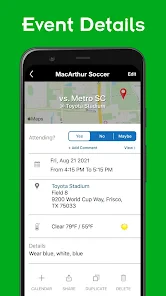
For a weekend tournament, for instance, an organizer could put the known event details in the calendar, use a message for a packing reminder, and keep discussion about transport in the conversation. If a detail changes, the key action is to update the event as well as explain the change in a message. The extra step is worthwhile because someone checking later can find the current plan without reconstructing it from replies.
Useful habits and practical limits
Polls are most useful when the group is choosing among options that are genuinely open, such as selecting between two practice times. I would not use a poll to make a decision that the coach or organizer has already made; doing so can create the impression that the result is binding when it is not. State whether a poll is a final vote or just a quick temperature check, and then post the decision plainly.
Photos and files can also help keep team material close to the relevant group conversation, but they do not replace a clear explanation. A document shared without a note about what members should do with it can still leave parents asking the same questions. For important instructions, I would pair the file with a short message explaining its purpose and any action required. This is a useful discipline in any shared space, and it prevents the app from turning into another pile of unlabelled material.
One practical question is whether every member needs to participate actively. In my view, no: the app can still be useful if most people mainly read event details and occasional announcements. But the organizer should not interpret silence as confirmation that everyone has seen an urgent change. For anything that affects attendance or safety, ask for a direct acknowledgment or use the group’s agreed backup method until people have established a reliable routine.
Overall Experience
Using the app for a few weeks now, I can confidently say that TeamReach has enhanced our team’s coordination and communication significantly. It’s like having a personal assistant dedicated to managing our team’s logistics. The ease of use, combined with robust features, makes it an indispensable tool for any team leader.
It is aimed at a broad audience, with an Everyone content rating, and the current version is 9.54. Its average rating is 4.4 from around 2.6 thousand ratings, with over 1 million installs. Those figures suggest that it has found an audience, but they cannot tell you whether your own team will adopt it; the real test is whether members check the shared space and keep their plans current.
Choosing it over familiar alternatives
For a group already using email effectively, moving everything to a new app may not be worthwhile unless messages are getting lost or event details are hard to track. Email remains convenient for longer explanations and people who prefer not to follow a live chat, while a group text can be the quicker option for a small circle that only needs occasional coordination. TeamReach makes more sense when the group has recurring events and wants a common place for calendar entries, discussion, polls, and shared materials.
It is not a substitute for every kind of club administration. If your main challenge is managing a large program’s finances, registration, or formal records, you should look for a tool built around those jobs rather than expecting a team communication app to cover them. I would choose based on the most frequent source of confusion: if it is missed messages and shifting practice plans, this app is a plausible fit; if it is administrative tracking beyond communication, another specialized system may be better.
My buy-or-skip verdict
Because the app is free to download, I think it is reasonable to try before committing your group to a new routine. I would start with one team, add the next few events, and agree that schedule changes go through the app. Then you can judge whether the shared calendar and conversations actually reduce missed updates. The optional purchase range is worth keeping in mind, but I would not spend money simply because the option exists.
In conclusion, whether you’re organizing a sports team, a club, or any group activity, TeamReach - Your Team App is a must-have. It simplifies management tasks and ensures everyone is on the same page, making team activities more enjoyable and less stressful. So, if you’re tired of juggling between emails, texts, and phone calls, give TeamReach a try. Trust me, you’ll wonder how you ever managed without it!
TeamReach - Your Team App Frequently Asked Questions
Is TeamReach free to download, and are there optional purchases?
TeamReach is free to download, so you can try the app without paying an upfront price. In-app purchases are available, with listed items ranging from $2.99 to $9.99 each. Before buying anything, consider whether the free features meet your group’s needs and review the purchase details shown in the app store.
What is TeamReach and what features does it offer?
TeamReach is a comprehensive team management app designed to simplify communication and coordination among team members. It offers features like event scheduling, messaging, and notifications to keep everyone informed. Users can create events, send group messages, and receive instant updates about any changes, ensuring seamless team collaboration.
Is TeamReach suitable for all types of teams?
Yes, TeamReach is designed to cater to various types of teams, whether they're sports teams, workgroups, or social clubs. Its versatile features make it adaptable for any group requiring coordinated communication and organization. The app allows for customization to fit the specific needs of different teams, making it a valuable tool for team management.
How user-friendly is the TeamReach app for new users?
TeamReach is designed with user-friendliness in mind, making it accessible for users of all technical levels. Its intuitive interface allows new users to navigate the app with ease, quickly setting up their teams and managing events. The app provides clear instructions and support to help users get started without any hassle.
Is TeamReach available on both Android and iOS platforms?
Yes, TeamReach is available for download on both Android and iOS platforms, making it easily accessible for users regardless of their device preference. The app can be found on the Google Play Store for Android users and the Apple App Store for iOS users, ensuring wide accessibility for all team members.
Pros
- Intuitive user interface for easy navigation.
- Real-time updates for team schedules.
- Secure messaging for team communication.
- Customizable notifications for events.
- Supports multiple sports and activities.
Cons
- Limited features in free version.
- Occasional sync issues with calendar.
- Ads present in free version.
- No offline mode available.
- Requires internet for full functionality.
- Category
- Sports
- Version
- 9.54