TCGScan - Poke Card Scanner
- 21.00
- 4.4
- Installs
- 100.00K
- Price
- Free
Screenshots
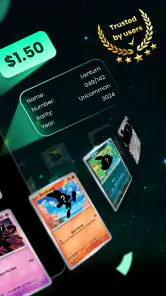
Analysis by Reviewed
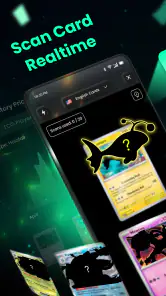
I downloaded TCGScan because checking a pile of Pokémon cards one by one is exactly the sort of job that sounds enjoyable until the pile is actually in front of you. This free sports app from PIXELDRILL is built around a simple routine: point your phone at a card, identify it, look at its value, and keep an eye on prices as your collection grows. That basic loop is immediately appealing, especially when you have inherited cards, returned to collecting after years away, or want a faster way to sort cards before deciding what deserves a sleeve.
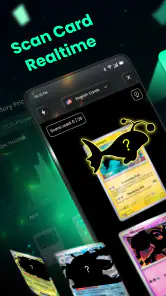
My first impression was that the app makes the beginning of a collection feel more manageable. Instead of opening several browser tabs and typing card names manually, I could use the camera as the starting point. That matters most when the card name is hard to read, the set symbol is unfamiliar, or the collection contains cards from different eras. The experience is not magic, and I would still check important results carefully, but the time saved during an initial sorting session is the main reason to try it.
From quick scans to a collection habit
Why the first week feels useful
The strongest part of TCGScan is its immediate usefulness. A new collector can take a box of mixed Pokémon cards and turn an intimidating sorting task into a series of smaller decisions. Scan a card, inspect the result, decide whether to keep it with the main collection, separate it for closer review, and move on. That workflow feels much less tiring than searching every card from scratch.
I found the scanner most helpful when I treated it as a first pass rather than a final authority. A camera-based result can point me toward the likely card and its market context, but condition, language, printing, rarity, and exact set details still deserve attention. A card that looks similar to another one may not have the same value. The practical lesson is simple: use the scan to narrow the search, then slow down before making a selling or trading decision.
That distinction also makes the app suitable for different kinds of users. Someone cleaning out a drawer may only need a rough idea of what is worth investigating. A serious collector may use the same scan as the opening step in a more careful verification process. Parents can use it with children as a way to identify cards together, while casual players can check whether a forgotten binder contains anything interesting without learning every set symbol first.
The app is free to install and is rated for Everyone, which makes the entry point comfortable for households where collecting is shared. It has reached over 100 thousand installs and holds a 4.4 average from around 1.9 thousand ratings, so it is not an obscure experiment with no visible user base. I would still judge it by the quality of my own scans and the usefulness of its tracking tools rather than by popularity alone.
A realistic sorting session
Imagine finding a storage box after moving house. The cards are not organized by set, the sleeves are mixed, and some cards have been handled heavily. I would begin by separating obvious duplicates and damaged cards, then scan the remaining cards in batches. When TCGScan recognizes a card, I would record it in the collection rather than immediately assuming the displayed value is what I could receive from a buyer. That approach keeps the app useful without turning an estimate into a promise.
More From Our News Desk

Clash of Clans Is Won Between the Battles

Android Auto Makes the Case for Quieter Car Software

MobiOffice: Transforming Mobile Productivity with Seamless Integration

EA SPORTS FC™ Mobile Soccer: Redefining Mobile Sports Gaming

How Microsoft OneDrive Became a Mobile Productivity Giant

How Google Translate Breaks Language Barriers Effortlessly
The same workflow works after a trade or a local purchase. Scan the incoming cards while they are still separate from the main binder, compare the identification with the physical card, and only then file them. This small habit prevents a common problem: forgetting which cards were added recently and losing track of duplicates. It also gives the price-tracking side of the app a reason to exist beyond the excitement of the first scan.
One tip that made the process less frustrating was to prepare the cards before using the camera. Flat cards with clear surfaces are easier to inspect than cards inside reflective sleeves or stacked on top of one another. I would remove glare where possible, keep the card centered, and avoid rushing through a large pile. The scanner can make identification faster, but it cannot compensate for a card that is partly hidden or difficult to distinguish.
What makes the app more than a novelty
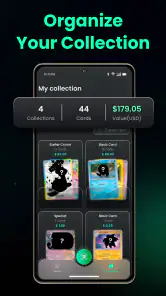
A scanner alone is entertaining for an afternoon. The more lasting idea here is the combination of scanning, collection organization, and price awareness. Those pieces support different moments in a collector’s routine. Identification helps when cards are new to you, collection tracking helps after the cards are sorted, and price checks become useful when you are deciding what to protect, trade, or research further.
That combination is also where I see the app fitting better than a normal web search. A search engine is flexible and often better for deep research, but it requires more typing and more judgment before you even reach the relevant result. A spreadsheet gives excellent control over custom fields, but it depends on manual entry. A dedicated card database may offer deeper catalog information, while TCGScan’s advantage is the quicker path from physical card to a usable record.
The trade-off is that convenience should not be confused with completeness. I would choose a specialist database or manual research when I needed detailed historical information, careful condition comparisons, or a fully customized inventory. TCGScan is strongest as a practical bridge between the cards on my desk and the information I need to decide what to do next.
Month-to-month value depends on a routine
After the first week, the novelty naturally fades. I no longer want to scan cards merely because the camera is available. The app earns space on my phone only if it reduces work I would otherwise repeat. In my view, its recurring value comes from using it at specific moments: after buying a lot, after completing a trade, before reorganizing a binder, and when checking whether a card deserves extra protection.
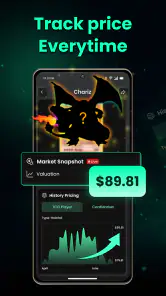
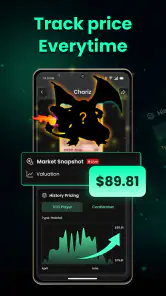
Price tracking can be useful here, but it needs a calm interpretation. Card prices move, and the number shown in an app is not automatically the amount a local buyer, marketplace, or trading partner will offer. Condition and demand affect the real outcome. I would use the feature to notice changes and prioritize research, not to treat every movement as a reason to buy or sell immediately.
A good monthly routine would be deliberately small. I might review newly added cards, remove obvious duplicates from the active collection, and revisit cards that had attracted attention because of their value. This keeps the inventory meaningful without turning collecting into administration. If I had to enter every minor detail for every low-value card, the maintenance burden would quickly outweigh the benefit.
This is an important distinction for long-term use. TCGScan is more valuable when it helps me make decisions than when it becomes another chore demanding perfect records. I would track cards that matter to my collection, cards I may trade, and cards whose prices I want to follow. I would not feel obligated to catalog every common card unless completing the inventory itself was part of my hobby.
Keeping the collection useful without over-maintaining it
Any collection app becomes less helpful when its records fall behind reality. Cards get traded, sold, moved into different binders, or discovered in forgotten boxes. If the app is used only once and then abandoned, the saved collection may stop reflecting what I actually own. That is not a flaw unique to this product, but it is the central test of whether it deserves lasting space.
My advice is to connect scanning with an existing action. When a card enters the collection, scan it before putting it away. When it leaves, update the record at the same time. This is easier than scheduling a large cleanup later. It also makes the app feel like part of the collecting process rather than a separate project.
There is another useful trade-off: precision versus speed. For a large batch, I would move quickly through identification and save detailed checking for cards that appear important. For a small group of valuable or sentimental cards, I would take more time with the physical condition and the exact match. This two-level workflow prevents the scanner from making a simple collection feel like a full-time accounting task.
The current version is 2.9, and the app requires Android 8.0 or later. That makes it accessible to many Android users, although anyone with an older device should check compatibility before planning a scanning session. I also noticed that the free entry point does not necessarily mean every possible capability is free: in-app purchases range from $3.99 to $39.99 per item. I would start with the free experience and only consider paying after I knew that the app fit my collection habits.
Where fatigue begins
The first source of fatigue is imperfect recognition. Camera scanning is fastest when the card is clear, flat, and easy to distinguish. Older cards, unusual layouts, glare, protective sleeves, and similar-looking versions can all make the process slower. When that happens, the app stops being a shortcut and becomes one more step before manual checking. I would not recommend relying on it alone for a high-value sale or trade.
The second source is repetitive handling. Scanning a handful of cards is satisfying; scanning a large collection can become mechanical. If the app requires too much correction or if I feel compelled to record every inexpensive duplicate, the session loses its advantage. The best way around that is to work in short batches and decide in advance which cards are worth tracking in detail.
Price information can create a different kind of tiredness: emotional overreaction. A rising figure can make a collector want to chase every card, while a falling figure can make a binder feel disappointing. I prefer to treat prices as context, not as the purpose of the collection. Sentimental cards, playable cards, and cards kept for artwork may have value that a market view does not capture.
There is also a privacy and comfort question whenever a camera is involved, even though the actual experience depends on how each person chooses to use the phone. I would scan in a well-lit, private place and avoid making the process more complicated than necessary. For collectors who dislike camera-based tools or who prefer complete manual control, a spreadsheet may remain the better choice despite the extra typing.
Who should use it, and who should skip it?
I would recommend TCGScan to casual Pokémon collectors, people sorting inherited cards, parents helping children identify cards, and hobbyists who want a quicker starting point than manual searches. It is particularly useful when the collection is disorganized and the immediate problem is identification rather than advanced analysis. The app gives those users a practical path from a physical pile to a more understandable collection.
I would be more cautious about recommending it to professional sellers who need highly precise grading workflows, detailed sales records, or a custom inventory system. Those users may prefer a specialist platform designed around listings, accounting, or comprehensive catalog control. Likewise, collectors who already maintain a carefully structured spreadsheet may gain little unless scanning genuinely saves them time.
It may also be the wrong choice for someone who wants a purely offline, manual hobby experience. The appeal here is convenience and information access. If that convenience feels like it distracts from collecting, sorting cards by hand and keeping a simple notebook may be more enjoyable. An app should remove friction, not replace the part of the hobby you actually like.
My long-term verdict
After the initial excitement, I think TCGScan can earn a permanent place on an Android phone, but only when used selectively. Its lasting value is not that it makes every card instantly valuable or eliminates the need for judgment. Its value is that it shortens the distance between discovering a card and deciding what deserves attention.
I would keep it for collection intake, occasional price checks, and quick organization after trades or purchases. I would not use it as my only source for valuation, condition assessment, or major selling decisions. That balanced role gives the app a realistic purpose: it is a convenient companion for the early and middle stages of collecting, while deeper research remains better handled elsewhere.
PIXELDRILL has made a focused sports app for a very specific task, and the focus is its main strength. The free starting point, Everyone age rating, broad Android compatibility, and established user interest make it easy to try. The paid items mean I would watch the boundary between useful convenience and unnecessary spending, especially if I only scan cards occasionally.
My recommendation is to install it if you regularly sort, trade, or expand a Pokémon card collection. Give it a week of real use rather than judging it by a few novelty scans. If it helps you maintain a manageable inventory and identify cards worth further research, it has recurring value. If you only want definitive valuations or a fully customizable professional database, choose a more specialized alternative. For everyone in between, TCGScan is a sensible first tool, provided you keep your own judgment in charge.
TCGScan - Poke Card Scanner Frequently Asked Questions
Is TCGScan - Poke Card Scanner suitable for beginners who are new to collecting Pokémon cards?
It can be a useful starting point for new collectors because scanning is intended to make card identification and price research quicker. The app is in the Sports category and is rated for Everyone. Treat its results as a guide rather than a substitute for learning how sets, editions, condition, and special printings affect a card’s identity and value.
What is TCGScan - Poke Card Scanner used for?
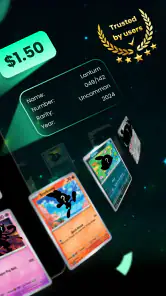
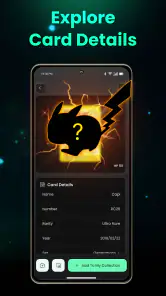
TCGScan - Poke Card Scanner is designed to help Pokémon Trading Card Game collectors identify cards by using a phone camera. After scanning a card, the app can typically display matching card information, including the set, name, number, rarity, and estimated market value when data is available. It is useful for organizing collections, checking cards quickly, and getting a general idea of current prices, although results should be verified before buying or selling.
How accurately does TCGScan recognize Pokémon cards?
Recognition accuracy depends on the card’s condition, lighting, camera focus, language, and how clearly the artwork and text are visible. Cards with heavy wear, sleeves, glare, unusual layouts, or limited database coverage may be identified incorrectly or not recognized at all. In our experience, scanning works best on a flat, well-lit surface. Always compare the detected set symbol, card number, language, and printing with the physical card.
Does TCGScan show the real market value of a Pokémon card?
The app may provide price estimates based on available marketplace or database information, but these figures should not be treated as guaranteed selling prices. Pokémon card values change frequently according to condition, demand, language, edition, grading, and marketplace fees. A scan can help you research a card, but it is wise to compare several current listings and confirm whether the price refers to a raw, graded, or special-condition copy.
Can TCGScan help organize and manage a card collection?
Depending on the version and available features, TCGScan can make collection management faster by identifying cards and helping users keep track of what they own. This can be especially convenient for large binders or bulk purchases. Before relying on it as your only inventory, check whether the app supports exporting, backups, duplicates, quantities, and different languages or printings. Manual corrections may still be necessary after scanning.
Pros
- Quickly identifies Pokémon cards using the phone camera.
- Useful for checking approximate market prices while trading.
- Supports collection tracking for cards you already own.
- Helps spot valuable cards that may need closer inspection.
- Convenient reference tool for Pokémon TCG collectors on the go.
Cons
- Recognition may fail with damaged
- sleeved
- or poorly lit cards.
- Price estimates can vary by condition
- set
- language
- and marketplace.
- Some features may require an account or in-app purchases.
- Scanning large collections can be slow and require repeated corrections.
- Market data may not always reflect the latest prices or regional values.
- Category
- Sports
- Version
- 2.9





