

Tattoo Studio Pro
- 13.00
- 3.7
- Installs
- 10.00K
- Price
- Free

Screenshots
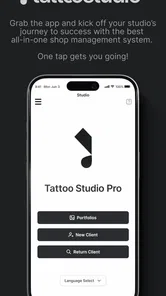
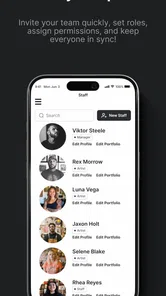
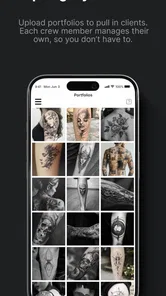
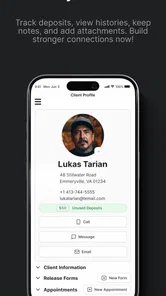
Analysis by Reviewed
Running a tattoo or piercing studio involves much more than creating good designs. Appointments, client details, artist availability, service information, and day-to-day decisions can quickly become scattered across notebooks, messaging apps, spreadsheets, and memory. Tattoo Studio Pro is built for that particular business problem. I found it most interesting as a focused management tool for body art studios rather than as a general business package with tattoo-related wording added afterward.
Developed by Zadie Studio, this free Business app is aimed at tattoo and piercing professionals. It has a 3.7 average from around 41 ratings and has passed 10K installs, so it has a modest but real user base. The app is rated for Everyone, runs on Android 8.0 and later, and its current version is 4.3.16. Those details matter because this is not a design app for clients choosing artwork; it is a practical workspace for the people organizing the studio behind the scenes.
The best way to approach Tattoo Studio Pro is as a repeatable studio routine, not as a magic replacement for every tool you already use. When I treated it as the central place for operational information, it made more sense. When I expected a full accounting platform, a marketing suite, or a complete client communication system, its boundaries became much clearer.
How the everyday studio workflow fits together
I’d use this section to connect the small, repeatable choices that make a studio schedule dependable: agreeing on clear labels, updating a booking as soon as plans change, and checking the next day with a purpose. That routine helps the team treat the app as a shared reference rather than another place to leave notes. It also sets up a closer look at which configuration decisions are worth making before the schedule gets busy.
Starting with the working day
A sensible first step is to make the app reflect how the studio actually operates. Instead of entering information randomly, I would begin by defining the services the studio offers, identifying the artists who work there, and establishing a consistent way to record appointments and client-related details. That preparation is less exciting than opening the app and immediately adding bookings, but it prevents the calendar from becoming a collection of vague notes.
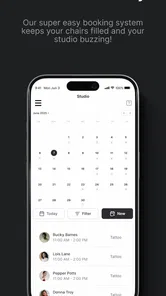
For a small studio, this can create a straightforward daily rhythm. A booking is recorded with enough context to understand what the client expects, the relevant artist is associated with the appointment, and the schedule becomes the place to check before accepting another commitment. A manager can then review the day without searching through separate conversations for every detail.
I would not use the app as a substitute for careful consultation. Tattoo and piercing work often requires discussion about placement, size, style, health considerations, and preparation. A management app can help organize that process, but it cannot make a professional judgement on behalf of the artist. The useful division is simple: use Tattoo Studio Pro to keep the business workflow orderly, and use direct professional communication for decisions that need nuance.
More From Our News Desk

 Gmail
GmailGmail in a Busy Inbox: Who Benefits Most?
From first account to crowded workday, Gmail earns its place through dependable search and flexible sorting—but its best fit depends on how much inbox maintenance you can tolerate.

 Prime Video
Switching to Prime Video: What Changes in Your Viewing Routine
Prime Video can make a compelling second home for streaming, but switching means learning a different catalog, rental layer, and route from browsing to playback.

 Universal TV Remote Control
Universal TV Remote Control Works Best as a Reliable Backup
A phone remote earns its place through quick setup and reliable habits. Here is how to get more from Universal TV Remote Control—and where its limits show.

 Weather - By Xiaomi
Weather by Xiaomi Review: Clear at a Glance, Less Clear Up Close
Xiaomi’s weather app makes everyday forecasts quick to scan, but its calm surface can leave useful details and recovery paths harder to find than they should be.

 X
XX Under Pressure: Can It Recover When Posting Goes Wrong?
A resilience-focused review of X, examining setup, mistaken posts, interruptions, weak connections, and the gaps that matter when recovery needs to be dependable.

 Clash of Clans
Clash of Clans Is Won Between the Battles
Its raids are quick; its community is a long-term project of coordination, teaching, rivalry, and shared responsibility—with all the friction that entails.
Latest News



A realistic appointment example
Imagine a studio with two artists and a piercing specialist. A client contacts the studio about a small tattoo, while another person wants a piercing later that afternoon. The manager can use the app to keep the appointments associated with the appropriate person and service instead of relying on a shared paper diary. If the tattoo client later changes the idea, the record can serve as a reminder to update the booking rather than leaving an outdated note in a chat thread.
The benefit is not dramatic automation. It is reduced mental load. The person answering messages has one operational view to consult, and the artist can start the day with a clearer understanding of what is expected. That becomes particularly useful when several people share responsibility for scheduling.
My practical advice is to agree on naming habits before the whole team starts using the system. Use the same style for artist names, service labels, and appointment notes. Avoid writing one booking as “full day tattoo” and another as “big piece” if the team needs to understand the difference quickly. Consistent wording is a small discipline, but it makes any management app easier to search and interpret.
Keeping client information useful rather than excessive
A studio management tool is only helpful when the information inside it can be trusted. I would record what the team genuinely needs for running the appointment and avoid turning every client entry into an unstructured diary. Short, clear notes are easier to review than long paragraphs written in a hurry.
This is also where staff habits matter. If one artist updates a booking immediately after a call while another waits until the end of the day, the schedule can become unreliable. A good studio rule is to update the record at the moment a change is agreed. That habit is more valuable than any shortcut because it protects the schedule from old information.
For a solo artist, the workflow can be lighter. The app may serve as a central organizer for appointments and studio tasks without requiring a complicated team process. For a larger operation, the value depends more heavily on everyone entering information in the same way. Tattoo Studio Pro can support a shared routine, but it cannot enforce good administration by itself.
Where it sits beside familiar alternatives
The usual alternative for a small studio is a combination of a paper calendar, a phone calendar, messaging apps, and a spreadsheet. That combination can be inexpensive and flexible, but it spreads information across places. Tattoo Studio Pro is more appealing when the studio wants a single body-art-focused management environment instead of assembling a general calendar around custom notes.
A generic calendar may be better for people who only need time slots and reminders. A spreadsheet can be better for detailed financial analysis or custom reporting. A broad booking platform may be preferable for a studio that needs online customer self-booking, extensive payment handling, or a polished public-facing reservation experience. Tattoo Studio Pro makes the most sense when the priority is keeping tattoo and piercing operations organized without beginning with a large, general-purpose business system.
Settings worth checking before relying on it
I would spend time reviewing the studio’s basic configuration before inviting the whole team into the routine. Check that artists and services are represented clearly, that appointment descriptions follow one format, and that the working schedule matches real availability. The point is not to change every option immediately; it is to remove ambiguity before it reaches the calendar.
Version 4.3.16 is the current release, and the minimum requirement of Android 8.0 makes the app accessible on many older Android devices. That can be useful in a studio where not every staff member carries a recent phone. At the same time, an older compatible device should still be tested in the actual workspace. A calendar that is readable at a desk may feel cramped when someone is checking it quickly between clients.
I would also decide who is responsible for correcting mistakes. If a booking is duplicated or assigned to the wrong artist, leaving it unresolved is worse than having a simple process for fixing it. One person on each shift can take ownership of schedule cleanup, while artists confirm changes that affect their work. This is an operational setting in the broad sense: not a switch in the app, but a rule that determines whether the app remains dependable.
Another useful check is the difference between information that belongs in the management record and information that belongs in a separate professional or legal process. Do not assume that placing a note in a business app automatically makes it suitable for every sensitive consent or health-related requirement. Studios should follow their own professional obligations and choose the correct record-keeping method for those matters.
Faster patterns for experienced users
Once the basic workflow is stable, speed comes from reducing repeated decisions. I would create a small internal vocabulary for common services and appointment types. The exact wording is less important than consistency. When every person uses the same labels, scanning a busy day becomes faster and mistakes are easier to spot.
A second useful habit is to review the next working day at a fixed time rather than repeatedly checking the schedule without a purpose. During that review, confirm artist allocation, identify unclear notes, and contact the client if a detail needs clarification. This turns the app from a passive list into part of a predictable preparation routine.
For studios with recurring appointment patterns, templates outside the app can sometimes help staff remember what information to capture, even if the app itself is used for the final record. For example, a manager might keep a short internal checklist for a new tattoo booking: artist, service type, approximate duration, design status, and any agreed follow-up. The app remains the operational record, while the checklist protects the quality of entries.
I also recommend separating “needs action” from “already confirmed” in the way the team writes notes, if the available workflow allows that distinction. A booking that still needs a design discussion should not look identical to one that is fully prepared. Clear wording lets an artist prioritize the next task without opening every conversation.
These habits are not flashy, but they are the kind of improvements that make a focused studio app worthwhile. The gain comes from fewer searches, fewer repeated questions, and less dependence on one person remembering everything.
What the free price means in practice
Tattoo Studio Pro is free to download, which makes it easy for a small studio or solo professional to test the workflow without committing to an upfront purchase. That is a genuine advantage when the main question is whether a dedicated management approach fits the business.
There are in-app purchases ranging from $29.00 to $999.99 per item. I would therefore avoid treating the free download as the complete cost decision. Before building the studio around it, review which parts of the workflow are available without payment and whether any paid option matches the studio’s actual needs. The wide purchase range suggests that the financial commitment can vary substantially depending on what a user chooses.
My approach would be to start with a limited trial using real but carefully selected operational work. Test appointment entry, staff coordination, corrections, and the end-of-day review before migrating every historical record. That gives the owner a chance to judge the app’s value against the possible purchase cost instead of paying first and discovering later that the studio prefers a different system.
Advanced limits that affect the buying decision
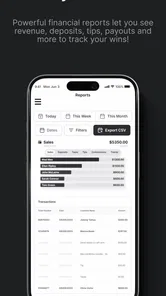
The app’s focused identity is both its strength and its limitation. A tattoo or piercing studio can understand the intended workflow more quickly than it might with a generic business platform, but specialized wording does not automatically mean the app covers every business requirement. If you need deep bookkeeping, inventory control, payroll, advanced customer marketing, or a sophisticated online booking experience, you may still need another solution beside it.
That does not make the app poor; it defines the type of problem it is suited to solve. A small studio that mainly needs better organization may benefit from focus. A multi-location business with complex reporting may outgrow a focused mobile manager and prefer a broader platform, even if that platform takes longer to configure.
Another limitation is the dependence on data quality. If staff forget to update cancellations, move appointments without recording the change, or use inconsistent labels, the app cannot produce a reliable picture of the day. This is especially important in body art, where timing and artist availability have direct effects on the client experience.
I would also be cautious about replacing every existing communication channel immediately. Clients may still prefer phone calls or messaging, and artists may need to exchange reference images or detailed design discussions elsewhere. The sensible setup is to let Tattoo Studio Pro hold the business-critical appointment structure while keeping communication tools for conversations that benefit from them.
Who should use it, and who should skip it?
I can recommend it most easily to independent tattoo artists, small tattoo studios, and piercing shops that are moving away from paper or scattered notes. It is also a reasonable candidate for a manager who wants a body-art-specific starting point rather than building a workflow from a blank spreadsheet.
It is less convincing for a person who only needs a personal calendar. A standard calendar may be quicker for a single artist with very few appointments and no need to track studio operations. It is also not my first choice for a business that already depends on a mature booking, payments, accounting, and customer relationship platform. Adding another system can create duplicate work unless the app clearly fills a gap.
Studios should also think about team size and working style. If everyone is comfortable following shared entry rules, the app can become a useful common reference. If the team resists updating records or expects every business function to be handled in one place, frustration is more likely.
My final view after looking at the complete workflow
Tattoo Studio Pro is most valuable when it becomes a calm, consistent home for studio administration. I would not choose it because it promises to solve every business problem. I would choose it because a tattoo or piercing studio has specific scheduling and organization needs, and a focused tool can be easier to shape around those needs than a generic app.
The 3.7 average shows a mixed reception rather than universal approval, so I would approach it with realistic expectations. Its free entry point makes testing practical, while the optional purchases mean the owner should examine the financial path before depending on advanced use. The Everyone rating and Android 8.0 compatibility also make it approachable for a broad range of Android users.
My recommended method is simple: configure the studio vocabulary, enter a small set of upcoming appointments, establish one update rule, and review the next day at a fixed time. After that, compare the effort with the current paper, calendar, or spreadsheet routine. If the app reduces scattered information without forcing the team into unnecessary complexity, it is doing its job.
In my opinion, this is a practical candidate for small body art businesses that need structure more than spectacle. It is not the right answer for every studio, especially one seeking a complete financial or customer-facing platform. But for a team willing to maintain clean records and build repeatable habits, Zadie Studio’s app can provide a focused management foundation that is easier to use well than a collection of disconnected tools.
Tattoo Studio Pro Frequently Asked Questions
Can Tattoo Studio Pro help me manage a tattoo or piercing studio?
Tattoo Studio Pro is a business app described as a management system for tattoo and piercing studios. It is aimed at studio operations rather than only at people exploring tattoo designs. If you run or work in a body art shop, consider whether its business tools suit the way your studio handles its day-to-day work before downloading.
Who develops Tattoo Studio Pro, and which devices can run it?
Tattoo Studio Pro is developed by Zadie Studio. Its listed current version is 4.3.16, and it requires Android 8.0 or later. The app is rated for Everyone, so its age classification is suitable for a broad audience. Check the store page on your device to confirm compatibility before installing, particularly if you are using an older operating system.
What is Tattoo Studio Pro and what can I do with it?
Tattoo Studio Pro is a mobile design app intended for people who want to experiment with tattoo ideas before committing to permanent ink. After testing its main tools, I found that it is most useful for placing artwork over a photo, trying different styles, and comparing possible locations on the body. It can help organize inspiration, although it should be treated as a visualization tool rather than a replacement for professional tattoo advice.
Is Tattoo Studio Pro suitable for beginners without tattoo design experience?
Yes, the app is generally approachable for beginners because its concept is based on selecting or importing artwork, positioning it, and adjusting its appearance on an image. You do not need drawing experience to explore basic ideas. However, creating a convincing final concept may require patience with sizing, rotation, transparency, and placement. Users looking for advanced illustration or professional stencil preparation may find the available tools more limited.
Can I use my own tattoo designs and photos in Tattoo Studio Pro?
In most cases, Tattoo Studio Pro is designed to let users work with personal images, which makes it more practical than relying only on a built-in gallery. You can typically choose a photo from your device and combine it with a tattoo design to preview how the result may look. Before importing private images, review the app’s permissions and privacy policy, especially if the application offers cloud storage, sharing, or online processing.
Pros
- Large design library with styles suitable for different tattoo preferences.
- Layer-based editing makes it easier to combine and adjust tattoo elements.
- High-resolution previews help assess placement and overall appearance.
- Useful color tools allow quick experimentation before making a final choice.
- Simple interface makes the app approachable for first-time users.
Cons
- Some advanced designs or tools may require in-app purchases.
- Results are only visual references and cannot replace professional tattoo advice.
- The app may need substantial storage if many design assets are downloaded.
- Realistic previews can vary depending on body shape
- lighting
- and skin tone.
- A stable internet connection may be needed for certain online features.











