

Tattoo Maker
- 27.00
- 3.7
- Installs
- 10.00K
- Price
- Free
Screenshots
Analysis by Reviewed
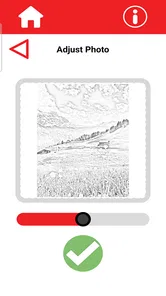
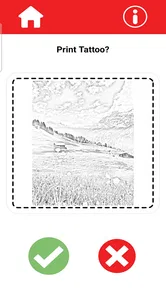
If you are curious about trying a tattoo design without committing to permanent ink, Tattoo Maker takes a pleasantly direct approach. I used it as a small design workspace rather than expecting a full professional illustration studio, and that distinction matters. Its main appeal is the ability to create a personal tattoo concept and prepare it for printing at home, which makes it useful for testing an idea before showing it to a tattoo artist or using it as temporary body art.
This is a free Art & Design app from HOTSALES GLOBAL TRADE LLC. It is aimed at everyday users, not only experienced digital artists, and its Everyone age rating makes that clear. The current release is version 1.0.5, and the app has reached over ten thousand installs with a 3.7 average from 56 ratings and 27 reviews. Those figures suggest a modest but real user base: enough interest to make the concept worthwhile, while also reminding me that this is a relatively young app rather than a mature design platform.
What I looked for before recommending it
My first question was not whether the app could produce a visually impressive tattoo in a few taps. It was whether it could help someone make a design decision. A useful tattoo tool should make it easy to explore an idea, judge whether the shape suits a particular placement, and create something clear enough to print or discuss with a professional. Tattoo Maker is most convincing when viewed through that practical lens.
I also considered how much effort it demands from a newcomer. Many art apps overwhelm casual users with brushes, layers, export panels, and technical controls. That depth can be valuable, but it also slows down the person who simply wants to sketch a symbol, arrange a few visual elements, or see whether an idea works on paper. Tattoo Maker feels better suited to that second group.
The final decision point is what happens after the design is made. A tattoo concept is rarely the finished tattoo. A professional artist may redraw it, adjust line weight, change proportions, or adapt it to the body. For that reason, I treat the app as a planning and visualization aid, not as a substitute for artistic consultation. That expectation keeps the experience useful and avoids asking the app to solve a problem it was not designed to solve.
A practical first session
My preferred workflow starts with a simple idea rather than an ambitious composition. I would begin with one central shape, keep the design readable at a small size, and resist adding decoration until the main silhouette feels right. This is especially important for tattoos, because details that look attractive on a bright phone screen can become confusing when reduced or printed in a different size.
After creating the basic concept, I would make several variations instead of trying to perfect the first attempt. One version can be compact, another more open, and a third can use fewer details. Comparing these versions side by side is more helpful than endlessly tweaking one design. It also gives a tattoo artist something concrete to react to, rather than forcing you to describe a vague idea.
More From Our News Desk

 Gmail
GmailGmail in a Busy Inbox: Who Benefits Most?
From first account to crowded workday, Gmail earns its place through dependable search and flexible sorting—but its best fit depends on how much inbox maintenance you can tolerate.

 Prime Video
Switching to Prime Video: What Changes in Your Viewing Routine
Prime Video can make a compelling second home for streaming, but switching means learning a different catalog, rental layer, and route from browsing to playback.

 Universal TV Remote Control
Universal TV Remote Control Works Best as a Reliable Backup
A phone remote earns its place through quick setup and reliable habits. Here is how to get more from Universal TV Remote Control—and where its limits show.

 Weather - By Xiaomi
Weather by Xiaomi Review: Clear at a Glance, Less Clear Up Close
Xiaomi’s weather app makes everyday forecasts quick to scan, but its calm surface can leave useful details and recovery paths harder to find than they should be.

 X
XX Under Pressure: Can It Recover When Posting Goes Wrong?
A resilience-focused review of X, examining setup, mistaken posts, interruptions, weak connections, and the gaps that matter when recovery needs to be dependable.

 Clash of Clans
Clash of Clans Is Won Between the Battles
Its raids are quick; its community is a long-term project of coordination, teaching, rivalry, and shared responsibility—with all the friction that entails.
Latest News



A useful, non-obvious habit is to print a draft at the approximate size you are considering. The screen can make a design appear sharper and more legible than it feels on paper. Printing also exposes spacing problems: narrow gaps may disappear, tiny decorative marks may become clutter, and a supposedly balanced design may look heavy on one side. Since the app specifically supports printing at home, this paper check is one of its most practical strengths.
Why the home-printing angle matters
Many tattoo design apps stop at the screen. Tattoo Maker is more interesting because it connects the creative step with a physical test. A printed draft can be held against an arm, shoulder, ankle, or another possible placement to judge scale and orientation. It is not a permanent result, but it turns an abstract idea into something you can discuss with another person.
I would use this feature before booking a tattoo appointment, especially for a first tattoo. A design that feels perfect as a phone image may look too large when placed on the body, while a delicate idea may become practically invisible at the intended size. Printing several sizes gives you a low-cost way to narrow the decision before asking an artist for a final stencil or redraw.
There is also a useful social workflow here. If a friend is helping you choose between two concepts, paper copies are easier to compare than passing a phone around. You can mark notes beside each version, identify which one feels more personal, and take the preferred draft to a professional. That makes the app valuable even if the final tattoo is drawn elsewhere.
Where Tattoo Maker wins
The biggest advantage is focus. Instead of presenting itself as a broad drawing environment, it centers the experience around tattoo ideas. That focus can reduce the distance between inspiration and a usable draft. I do not need to build a complete illustration workflow when my real goal is to explore a tattoo concept and get it onto paper.
It also suits people who are not confident artists. A beginner may know the subject they want but have no idea how to start in a general drawing app. A dedicated tattoo tool provides a more relevant context, so the user can think in terms of symbols, placement, size, and clarity rather than learning an entire digital art system first.
Its strongest use is turning a vague tattoo idea into a physical conversation piece. That is a more modest promise than creating a finished professional design, but it is a genuinely useful one. I can imagine using it to prepare for a consultation, collect several variations for a meaningful symbol, or make a temporary print for an event without spending money on a specialist design package.
Another strength is the free entry point. Because the app costs nothing, it is easy to test without treating the decision as a financial commitment. That matters for casual experimentation: someone can explore a concept, print a draft, and decide that the idea needs a different direction without having paid for a service they no longer want.
The Everyone rating also makes it approachable for families and younger users who want to experiment with visual ideas. Of course, a permanent tattoo still requires mature judgment and professional guidance, but the design stage itself can be treated as a creative exercise. I would especially recommend using it as a way to teach patience: make a draft, live with the idea, revise it, and only then consider permanent work.
Small workflow choices that improve the result
One practical tip is to prioritize contrast and silhouette before decoration. If the design is recognizable when viewed as a small dark shape, it has a stronger foundation. I would then inspect the printed version from a short distance, because tattoos are not normally viewed inches from the eyes. This simple test often reveals whether the central idea survives outside the editing screen.
A second tip is to create a version with fewer elements than you initially think you need. Tattoo concepts can become crowded when every meaningful detail is included. Removing one symbol or opening up the spacing may make the result more personal and easier to read. The app is most helpful when I use it to edit my ideas, not merely collect them.
A third trade-off concerns presentation. A printout can help communicate the concept, but it should be treated as a reference rather than an exact production template. Body contours, movement, skin texture, and long-term readability all affect the final result. I would bring the print to a tattoo artist and invite changes instead of insisting that the on-screen version be copied without adjustment.
Where another type of app may fit better
Tattoo Maker is not the right choice for every design task. If you already work comfortably in a full illustration app, you may prefer the greater control offered by a general drawing platform. Those tools are often better for complex shading, detailed lettering, layered compositions, or highly specific brushwork. The trade-off is that they can require more learning and may not keep the tattoo-printing workflow as central.
A photo-based body mockup tool may also be better if your main question is placement. Tattoo Maker is useful for developing the design itself, but someone deciding between the forearm and upper back may want an app focused on overlaying artwork onto a photograph. That category answers a different question: not “what should I draw?” but “how might this look on me?”
There is also a difference between designing a tattoo and finding inspiration. A gallery or image-search app may provide more visual references, while Tattoo Maker is more appropriate once you have an idea you want to shape. I would use inspiration tools at the beginning, then move into a dedicated design workflow when I wanted to create something personal rather than browse other people’s work.
For temporary tattoos, a specialized transfer-printing service may offer a more polished route if you need a finished product with professional materials. Tattoo Maker makes sense when you want to experiment at home and control the design process yourself. The cheaper route is also more hands-on: you need to judge the print, size, and appearance rather than expecting a ready-to-apply result.
Questions worth answering before you switch
One likely question is whether the app is suitable for a complete beginner. In my view, yes, if your goal is to explore a straightforward concept rather than produce intricate professional artwork. Start with a simple symbol or word, make a few versions, and print the clearest one. If you find yourself needing advanced illustration controls, that is a sign to move to a more powerful drawing app rather than forcing this tool to do everything.
Another question is whether the result can be taken directly to a tattoo appointment. It can serve as a helpful reference, but I would not treat it as the final authority. A tattoo artist may need to redraw the design for skin, adjust its proportions, or simplify details so it ages more gracefully. The app helps you communicate your intention; the professional still handles the technical and safety decisions.
You may also wonder whether printing at home is genuinely useful. I think it is, particularly when you are uncertain about scale. Print the same concept in more than one size, place the sheets against the intended area while wearing normal clothing, and look at them under ordinary room lighting. This reveals practical problems that a phone preview can hide.
For someone changing from a general art app, the cost of switching is mainly creative control. You may lose the familiar depth of a broad illustration tool and need to rebuild a design in a more focused environment. In return, you gain a workflow centered on tattoo concepts and physical drafts. I would switch when the design is still early and exploratory, not after spending hours refining a complex layered illustration elsewhere.
Privacy and permanence are also sensible considerations whenever an app handles personal creative work, but I would keep the decision practical: avoid putting sensitive personal information into a design, and keep your own copies of drafts that matter to you. The app is free, so there is little financial risk in testing it, but your time and original ideas are still worth protecting through ordinary backup habits.
Who should use it, and who should skip it
I would recommend Tattoo Maker to a first-time tattoo seeker, a casual creator who wants a simple design workspace, or anyone preparing a visual reference for a tattoo consultation. It is also a good fit for people who prefer to work with paper. The ability to print a draft changes the experience from passive screen editing into a more concrete decision process.
I would be less enthusiastic for a professional illustrator, a lettering specialist, or an artist building a highly detailed sleeve concept. Those users may quickly reach the limits of a focused beginner-oriented tool and feel more comfortable in software built around precision drawing. I would also skip it if your only goal is to preview a finished image on a realistic body photograph.
The app is best when the design question is still open. If you already possess a polished vector file and only need production-ready output, a dedicated design or print workflow may be more suitable. If you are still asking what the tattoo should look like, where it should sit, and whether the idea feels right at real size, Tattoo Maker has a clearer role.
My recommendation after using it
Tattoo Maker is a sensible free starting point for personal tattoo exploration. I like it because it encourages a useful sequence: create an idea, make variations, print them, and think before committing. That is more valuable than a flashy collection of options if the real decision involves something permanent.
Its limitations are part of the trade-off. This is not the app I would choose for advanced digital illustration, sophisticated body visualization, or a final professional tattoo file. But those are different needs. For a beginner-friendly design experiment and a home-printed reference, its focused purpose works in its favor.
With a 3.7 average and a growing install base, I would approach it as a practical young tool rather than an unquestioned standard. The free price makes that easy: try a small idea, print it, and see whether the workflow matches the way you think. If it helps you explain your concept and make a calmer decision, it has done its job.
My clear recommendation is to install it when you want to explore a tattoo before meeting an artist, especially if you value paper tests and simple experimentation. Keep your expectations realistic, use the printed design as a conversation starter, and let a qualified tattoo professional make the final adjustments. For that specific journey, Tattoo Maker is an approachable and useful first step rather than a replacement for the rest of the tattoo process.
Tattoo Maker Frequently Asked Questions
What devices and operating systems can run Tattoo Maker?
Tattoo Maker is an Art & Design app for creating tattoo concepts, and it requires Android 8.0 or later. Before downloading, check that your device meets this minimum so the app can install and run properly. The app is free, and its Everyone content rating makes it suitable for a broad audience interested in exploring tattoo ideas.
Who developed Tattoo Maker, and is it a well-established app?
Tattoo Maker is developed by HOTSALES GLOBAL TRADE LLC. It is a relatively new app, released on August 29, 2025, and its current version is 1.0.5. It has more than 10,000 installs, with an average rating of 3.7 from 56 ratings and 27 reviews. Those figures offer a useful snapshot of its reception, though individual experiences may differ.
What is Tattoo Maker and what can I do with it?
Tattoo Maker is a creative design app that lets you experiment with tattoo ideas before committing to permanent ink. You can usually choose from different tattoo styles, place designs on a body image or photo, adjust their size and position, and preview how they may look. It is useful for inspiration, planning, and sharing concepts with friends or a tattoo artist.
Is Tattoo Maker suitable for people with no tattoo design experience?
Yes. Tattoo Maker is designed to be accessible even if you have never created artwork before. Its tools generally rely on simple touch controls, templates, and visual previews rather than advanced drawing knowledge. Beginners can start with a ready-made design, customize its placement, and explore different ideas. However, the final tattoo should always be discussed with a professional tattoo artist.
Can I use my own photos or create a completely custom tattoo?
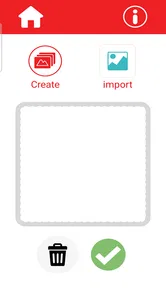
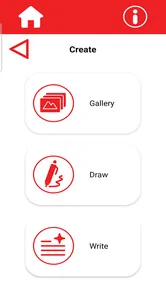
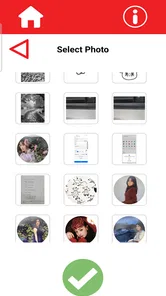
Depending on the version and device, Tattoo Maker may allow you to import a personal photo, use an image from your gallery, or work with built-in designs. Some versions focus mainly on templates and editing, while others include drawing or customization tools. Check the app’s current feature list before downloading if importing artwork or creating an original design is especially important to you.
Pros
- Easy-to-use tools for creating custom tattoo designs
- Large selection of tattoo styles
- symbols
- and decorative elements
- Useful for testing placement ideas before getting inked
- Allows users to save and share their finished designs
- Good creative option for beginners without drawing experience
Cons
- Some designs and features may require in-app purchases
- Editing can feel limited for highly detailed artwork
- Results may look less realistic than a professional tattoo preview
- Ads can interrupt the design process in the free version
- Requires careful checking of image quality before printing or sharing











