TalkingParents: Co-Parent App
- 1.83K
- 2.3
- Installs
- 100.00K
- Price
- Free

Screenshots

Analysis by Reviewed
When co-parenting conversations are scattered across texts, email, and calendar invites, even a simple pickup change can become hard to track. I see TalkingParents: Co-Parent App as a way to bring those practical exchanges into one shared place. Its appeal is clearest when both parents are willing to use it consistently; it is less useful if one person keeps moving the conversation back to ordinary messaging.
What feels useful in the first week
The first benefit I’d look for is less time searching through old threads. Messages, calls, payments, and calendar items sit within a parenting-focused app rather than being mixed into personal chats. For a typical school-day change, one parent can send the updated pickup plan, while the other can refer back to the same conversation instead of relying on memory or a screenshot.
That record-keeping focus is also the main difference from a shared calendar or a general messaging app. Those familiar tools can be simpler when communication is already easy, but they tend to split details across separate places. TalkingParents is designed around co-parenting communication, so it may suit parents who need a clearer shared history. I would not treat an app record as a substitute for legal advice or assume that using it resolves a disagreement.
A useful first-week habit is to keep one topic in one place: discuss a school pickup in the message thread, and use the calendar for the actual schedule. If plans change, putting the reason and the revised time together makes the calendar entry easier to understand later. This is a small workflow choice, but it can prevent a common problem with any shared system: seeing a changed event without knowing what prompted it.
I’d also agree on what counts as urgent before relying on the app for coordination. A message-based routine works better for details that can wait for a check-in than for a last-minute emergency. Parents can decide separately how to handle urgent calls, while keeping ordinary schedule adjustments and follow-up notes in the shared record. That boundary keeps the app useful without making either person feel expected to monitor it constantly.
Value that has to last
After the novelty wears off, the app’s value depends on whether it becomes part of a routine: check the calendar, keep schedule changes in the same conversation, and use the relevant in-app tools when needed. That habit can make recurring logistics easier to follow. It is not automatically valuable just because both parents install it; the benefit comes from agreeing on how and when to use it.
For families with repeating arrangements, the recurring value is less about opening the app every day and more about having a dependable place to check when something changes. A parent coordinating school breaks, appointments, and handoffs can use the shared record to prepare for the week without reconstructing decisions from several channels. If the schedule rarely changes and communication is already smooth, that benefit may be too modest to justify another routine.
More From Our News Desk

 Gmail
Gmail in a Busy Inbox: Who Benefits Most?
From first account to crowded workday, Gmail earns its place through dependable search and flexible sorting—but its best fit depends on how much inbox maintenance you can tolerate.

 Prime Video
Switching to Prime Video: What Changes in Your Viewing Routine
Prime Video can make a compelling second home for streaming, but switching means learning a different catalog, rental layer, and route from browsing to playback.

 Universal TV Remote Control
 Works Best as a Reliable Backup
A phone remote earns its place through quick setup and reliable habits. Here is how to get more from Universal TV Remote Control—and where its limits show.

 Weather - By Xiaomi
Weather by Xiaomi Review: Clear at a Glance, Less Clear Up Close
Xiaomi’s weather app makes everyday forecasts quick to scan, but its calm surface can leave useful details and recovery paths harder to find than they should be.

 X
X Under Pressure: Can It Recover When Posting Goes Wrong?
A resilience-focused review of X, examining setup, mistaken posts, interruptions, weak connections, and the gaps that matter when recovery needs to be dependable.

 Clash of Clans
 Is Won Between the Battles
Its raids are quick; its community is a long-term project of coordination, teaching, rivalry, and shared responsibility—with all the friction that entails.
Latest News



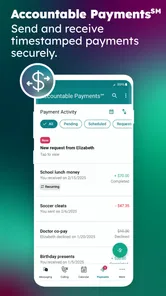
Payments are another area where a single shared channel may help, especially when a parent needs to connect a payment discussion with the parenting logistics around it. I would still keep personal financial records in the way that works for you and avoid assuming an in-app exchange replaces a receipt or other documentation you need. The practical advantage is organization; it does not remove the need for clear descriptions and careful follow-through.
One trade-off worth considering is how much detail to put in writing. A concise note that states the request, the relevant date, and the proposed next step is often easier to revisit than a long message that mixes several disagreements. This is not a magic communication fix, but using the app as a place for clear logistics rather than an outlet for every frustration can make its record more useful to both parents.
Maintenance and practical friction
TalkingParents is a free parenting app from Monitored Communications, LLC, with in-app purchases ranging from $12 to $249.99 per item. It is rated for Everyone and requires iOS 11 or later. The current version is 8.2.0. Its average rating is 2.7 from around 3,500 ratings, so I would go in with measured expectations rather than assuming the experience will suit every household.
The app has been available since June 3, 2016, and has more than 100,000 installs. Those figures suggest an established product, but they do not tell me whether its day-to-day flow will fit your family. I would first agree with the other parent on which conversations belong there, how quickly each person is expected to check messages, and whether calendar changes should also be mentioned in a message. Clear habits matter more than filling the app with every detail.
It is worth deciding who will maintain the shared calendar, too. If both parents make changes without a consistent approach, the calendar can become another place to reconcile rather than a source of clarity. A simple agreement—such as adding the event first and then sending a brief note when the change affects a handoff—helps keep the record understandable. This matters most when grandparents, school contacts, or other caregivers also need a separate update; the app should not be assumed to notify everyone involved in a child’s routine.
Before paying for anything, I’d map your actual needs to the free experience and check the current purchase details in the app. The listed purchase range is broad, and that makes it sensible to avoid assuming that every tool is included at no cost. If your main need is occasional schedule coordination, start with that rather than buying access based on features you may never use. If a particular paid function is essential, confirm its terms and whether both parents need access before building your routine around it.
When the record feels helpful—and when it feels heavy
Documented communication can be reassuring when the same practical disagreement keeps resurfacing: who agreed to a change, what time was proposed, or whether a payment was discussed. But a permanent-feeling written exchange can also make minor coordination feel formal. I would not recommend turning every ordinary parenting moment into a record. Use it for shared logistics and decisions that genuinely benefit from being easy to revisit, while leaving room for normal, relaxed interaction where that is comfortable and appropriate.
That distinction also helps with notification fatigue. If every thought becomes a message, both parents may start ignoring the channel or treating it as a running argument. I’d keep messages focused, group related details sensibly, and avoid sending repeated follow-ups simply to prompt an immediate reply. Agreeing on a reasonable response rhythm can make the app a calmer tool rather than a constant demand for attention.
For a family facing high conflict, the app may provide a more organized place for communication, but organization is not the same as agreement or safety. If direct contact itself is harmful, or if a parent’s circumstances make shared digital communication unsuitable, a different arrangement guided by an appropriate professional may be a better choice. I would treat the app as one practical channel, not as a mediator or a replacement for support tailored to the family’s situation.
Bridging Communication Gaps
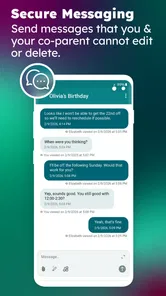
First off, let's talk about what the TalkingParents: Co-Parent App is all about. The essence of this app is communication, and boy, does it deliver! It provides a platform where co-parents can exchange messages, keeping them all in one place. The beauty of it is that everything is timestamped and unchangeable, making it super reliable if you need to reference past conversations. No more he-said-she-said drama!
Features that Stand Out
One of the standout features is the Secure Messaging. It’s like having a private chat room where everything is documented. Imagine everything neatly archived so you can easily scroll back to that conversation about who’s picking up the kids on Saturday.
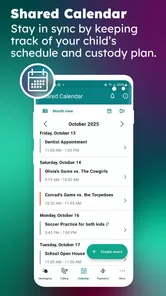
Another nifty feature is the Shared Calendar. It's like your family’s command center, where you can schedule events and ensure everyone’s on the same page. Plus, if you tend to forget appointments (who doesn’t?), the app sends reminders. How cool is that?
For a realistic handoff, I’d put the changed pickup time in the calendar, then send a short message saying which day it applies to and what the other parent needs to know. That way, the calendar answers “when?” while the conversation carries the context. If a school event shifts the plan again, updating both in a deliberate order makes it easier to spot the latest arrangement. The goal is not to create duplicate paperwork; it is to make the record readable when someone checks it in a hurry.
Parents who already use a shared calendar may wonder whether switching is worth the effort. I’d compare the tools by asking where misunderstandings actually happen. If the problem is simply forgetting dates, a familiar calendar may be enough. If the problem is that the date, the discussion, and related payment or call details are spread across unrelated apps, a dedicated co-parenting space has a stronger case. The app’s advantage is its focused context, while a general calendar is often easier to share with relatives and other caregivers.
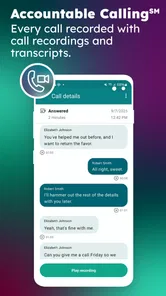
Call and Video Recording
Here's something that might pique your interest: the app also offers a feature for call and video recording. Whether it’s a serious talk or just a quick hello to the kids, it records everything for you. This can be a lifesaver if you need to revisit the conversation later.
Recording is the sort of function I’d approach thoughtfully rather than use by default. A record can help someone remember what was discussed, but it may also make a routine call feel less natural. Before using it, both parents should understand how the feature works and consider any rules or expectations that apply to their situation. For a quick, friendly check-in with the children, a relaxed conversation may matter more than preserving every exchange.
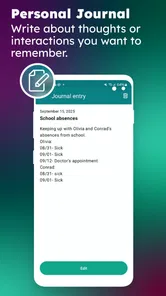
Journal Entries and Attachments
If you’re the type who likes to jot down notes, the Journal Entries feature will be your best friend. Plus, you can attach files directly in the app. So, if you have receipts or important documents to share, it's all streamlined within the app.
Attachments are most useful when they have a clear purpose: a receipt tied to a payment conversation, or a document that both parents need to refer to. I’d name or describe what is being shared in the accompanying message rather than expecting the other person to guess why a file matters. For journal notes, separating private reminders from information meant for the co-parent is equally important; before entering anything, check where that note will be visible and who can access it.
A common question is whether both parents need to participate for the app to be worthwhile. For the shared communication and calendar workflow, cooperation is plainly important: one parent cannot create a reliable two-way routine alone. If the other parent will not use it, it may still help one person organize their own notes, but it cannot replace the missing shared channel. In that situation, a neutral, agreed method that both people will actually check is usually more practical than insisting on a tool that one side ignores.
Another reasonable question is whether the app is suitable for every co-parenting arrangement. I see the best fit for parents who need an organized history of practical decisions and are willing to keep their exchanges focused. It is a weaker fit for people who want only a simple shared schedule, dislike written records, or need a broader family calendar that includes many caregivers. The right choice is the one that both parents can maintain without adding more stress than it removes.
Now, while these features are pretty solid, what truly makes this app shine is its user-friendly interface. It’s straightforward, which is exactly what you need when juggling parenting responsibilities.
Keeping it useful beyond the novelty
The long-term test is whether the app reduces small recurring hassles without becoming another household chore. I’d check it at natural points—when planning the coming week, confirming a handoff, or following up on a shared expense—rather than opening it out of habit when nothing needs attention. That makes the routine purposeful and limits the feeling that co-parenting has turned into a stream of administrative tasks.
Its overall store rating is a 2.7, based on around 3,500 ratings, while it has drawn about 1,800 written reviews. I would take that mixed response as a reason to try the workflow carefully, not as proof that it will or will not work for a particular family. The app is free to begin with, but purchases can range from $12 to $249.99 per item, so I’d make the decision about ongoing use separately from any decision to buy additional tools.
My Final Thoughts
In a nutshell, the TalkingParents: Co-Parent App feels like that trusty friend who’s always got your back. It simplifies the chaos that often comes with co-parenting, offering peace of mind with its robust features. While no app can solve all the challenges of co-parenting, this one certainly helps lighten the load.
Whether you're a seasoned co-parent or just starting out, giving this app a whirl could be a game-changer. It's not just about communicating; it's about making sure everyone is on the same page, and for that, it's worth every tap and swipe.
TalkingParents: Co-Parent App Frequently Asked Questions
Do both co-parents need to use TalkingParents?
TalkingParents is designed to support communication between co-parents, so it is most useful when both people are able to participate. Its messaging and shared-calendar tools give parents a place to coordinate conversations and schedules. Before downloading, consider whether the other parent is willing and able to use the service, since the app works best as a shared communication space.
What can I use TalkingParents for in day-to-day co-parenting?
The app brings several common co-parenting tasks into one place, including messages, calls, payments, and calendars. That can make it easier to keep practical discussions and schedule information together rather than scattered across separate conversations. It is intended for parenting coordination, so it may be useful when you want a dedicated channel for communicating about shared responsibilities.
What is TalkingParents and how does it work?
TalkingParents is a communication platform designed specifically for co-parents to facilitate seamless and documented communication. It offers features such as secure messaging, shared calendars, and a comprehensive records archive. The app ensures that all conversations are recorded and cannot be altered, which can be useful in legal situations. Users can access it via web or mobile apps for both Android and iOS.
Is TalkingParents free to use?
TalkingParents offers both free and premium versions. The free version provides basic features like messaging and a calendar. However, to access enhanced features such as video calling, unlimited storage for records, and ad-free experience, users need to opt for a paid subscription. In-app purchases range from around twelve dollars to around two hundred fifty dollars per item, so check the available options before choosing a plan.
How secure is my information on TalkingParents?
Security is a top priority for TalkingParents. The app uses encryption to protect data and ensures that all communications are securely stored. Users' information is kept private and is only accessible to the parties involved in the communication. The app also provides unalterable records, which can be used as evidence in legal proceedings if necessary.
Pros
- Facilitates clear communication.
- Keeps records of all interactions.
- Court-approved documentation.
- Easy to navigate interface.
- Includes expense tracking.
Cons
- Some features require payment.
- Limited free version functionality.
- Occasional login issues.
- No video calling option.
- Notifications can be delayed.