SwimTopia
- 187.00
- 4.3
- Installs
- 100.00K
- Price
- Free

Screenshots
Analysis by Reviewed
Joining a swim team can be exciting, but the practical side often becomes scattered across messages, meet details, team notices, and personal records. SwimTopia is a sports app from Team Topia Inc. built around bringing that information into one place for swimmers, families, and swim teams. I found its value less in flashy presentation and more in reducing the small bits of searching that can make a swim season feel disorganized.
The app is free to install and is suitable for Everyone, with optional in-app purchases ranging from $1.99 to $14.99 per item. It has reached over 100 thousand installs and holds a 4.3 average from around 700 ratings, which suggests that many users find it useful while still leaving room for different experiences depending on how actively a team uses the service.
Getting from installation to a useful swim-season routine
What to expect before you begin
The first thing I would clarify is what SwimTopia is and what it is not. It is not a swimming lesson app that teaches strokes through guided videos, and it is not a replacement for a coach standing on deck. Its role is organizational: it connects you with your swimmer’s team information, meet-related details, and personal swimming information in a way that is easier to revisit than a long message thread.
That distinction matters because the app becomes most helpful when your swim team already uses SwimTopia as part of its communication and event workflow. A parent looking for technique instruction alone may be better served by a coaching-focused app. A casual swimmer who does not belong to a participating team may also find less immediate value than a family preparing for regular practices and meets.
For a first-time user, I recommend opening it with one simple goal rather than trying to understand every area immediately. Your first useful target might be finding the next team event, checking information connected to your swimmer, or locating a result after a meet. That approach makes the app feel practical from the start instead of turning setup into another task.
The interface is best understood as a shared team workspace rather than a personal fitness tracker. That means the quality of your experience depends partly on how thoroughly the team maintains its information. If a team keeps schedules and meet details current, SwimTopia can become a dependable reference point. If your team still relies mainly on email, paper notices, or separate messaging groups, the app may feel quieter and less complete.
Setting up your account without creating confusion
After installing the app, I would begin by identifying the correct team or organization before spending time exploring individual sections. Swim families can easily encounter similar names, especially in areas with several clubs or seasonal teams. Choosing the right team is the foundation for seeing information that actually applies to your swimmer.
More From Our News Desk

Clash of Clans Is Won Between the Battles

Android Auto Makes the Case for Quieter Car Software

MobiOffice: Transforming Mobile Productivity with Seamless Integration

EA SPORTS FC™ Mobile Soccer: Redefining Mobile Sports Gaming

How Microsoft OneDrive Became a Mobile Productivity Giant

How Google Translate Breaks Language Barriers Effortlessly
Keep the swimmer’s information consistent with the way the team records it. Small differences in names or account details can make it harder to connect the right person to the right team information. If you are setting the app up for a child, it is worth checking the profile carefully instead of assuming that the first matching entry is correct.
A useful setup habit is to treat the app as a shared family reference. Decide who will check meet information, who will watch for team updates, and where the family will look first when plans change. This may sound simple, but it prevents the common situation in which one parent relies on the app while another continues searching through old messages.
I also suggest opening the important sections once during setup, even if you do not need them that day. Look for the areas connected with your swimmer, team activity, and meets. The point is not to memorize the layout; it is to learn where the information lives before you are standing in a busy pool area trying to find it quickly.
The app is available for Android devices running version 6.0 or later, and its current version is 7.2.0. That makes it accessible on many older phones as well as newer ones. Still, keeping the app updated is sensible because team-oriented apps depend on reliable synchronization and current interface behavior. I would not wait until the morning of a meet to install or update it.
The first meaningful success: finding one real answer
The best first action is not browsing every menu. It is answering a question you genuinely have. For example, if your team has an upcoming meet, use SwimTopia to locate the relevant event information and confirm that you are looking at the correct swimmer or team context. Once the app helps you answer that question, its purpose becomes clear.
For a parent, the first success might be checking whether a swimmer is connected to the family’s team information. For a swimmer, it might be finding personal meet information or reviewing something from a recent competition. For a team volunteer, the useful starting point may be understanding how the app organizes information that families need to consult repeatedly.
One practical workflow I liked is using the app before leaving home, rather than waiting until arrival at the pool. Check the event details, note anything that affects your plans, and then use the app later as a confirmation tool. This reduces the temptation to rely on memory or repeatedly ask the same question in a team chat.
After a meet, return to the app with a different purpose. Instead of treating it only as a schedule viewer, use it to review the information associated with the swimmer and the event. This creates a simple cycle: prepare before the meet, check details during the day, and review afterward. That cycle is more useful than opening the app only when someone sends a reminder.
A less obvious benefit is that this habit can make conversations with a coach more focused. If you can first check the available meet or swimmer information yourself, you can reserve questions for things that actually need a coach’s explanation, such as technique, training choices, or performance context. The app does not replace that conversation, but it can remove some administrative noise around it.
Where first-time users commonly get stuck
The biggest source of confusion is expecting every team to use the app in exactly the same way. SwimTopia provides the structure, but the information you see is connected to your team’s own use of that structure. Two swimmers may therefore have different experiences, not because one phone is malfunctioning, but because their teams organize and publish information differently.
Another common mistake is assuming that a missing item must be hidden somewhere in the interface. Before repeatedly searching, confirm that you are connected to the correct team and swimmer. If the context is wrong, exploring more menus will not solve the problem. I found it more efficient to verify the basic account relationship first, then look again.
It is also easy to confuse team information with personal training data. SwimTopia is strongest when you need team and meet organization. If your main goal is counting every workout, monitoring heart rate, or building an independent fitness history, a dedicated training tracker may be a better companion. Using the app for the job it is designed to handle keeps expectations realistic.
Families should also avoid treating the app as the only source of truth during an important event until they understand how their team maintains it. For a major meet, I would still read official team messages and pay attention to coach or organizer instructions. The app can make information easier to find, but real-world changes may still be communicated through the team’s established channels.
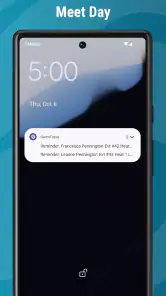
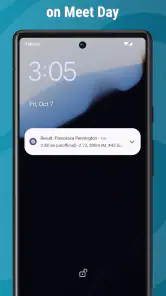
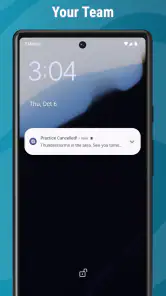
Notifications and timing can create another point of friction. A user may open the app expecting a new item to appear immediately after hearing about a change elsewhere. When that happens, check the team context and refresh your understanding of where the update should appear before assuming the entire service is unreliable. The app is a useful organizer, but it cannot display information that has not been entered or shared through the team’s process.
Using it beyond the first week
Once the initial setup is complete, the most effective way to use SwimTopia is to give it a regular place in your routine. I would check it at the beginning of a swim week, again before a meet, and afterward when reviewing the swimmer’s event information. This is more efficient than opening it constantly without a specific reason.
For families with more than one swimmer, organization becomes especially important. Make sure you are reading the information for the right child before acting on it. A quick profile check can prevent a parent from preparing for the wrong event or overlooking a detail that applies only to a sibling. This is one of those small habits that matters more as the family calendar becomes busier.
SwimTopia can also be useful for parents who share responsibility for transportation. Instead of forwarding every message manually, both adults can use the same team-centered reference point. That does not eliminate the need to communicate, but it reduces the chance that an old screenshot or incomplete message becomes the basis for a plan.
For swimmers who are becoming more independent, the app can support a gradual handoff of responsibility. A parent might initially check everything, then encourage the swimmer to look up the relevant information before asking for help. This works best when the swimmer understands that the app is for organization, while coaches remain the source for training guidance and competition advice.
One trade-off is that the app’s usefulness is tied to participation. If you are not attending meets, rarely need team information, or belong to a group that does not actively use the platform, the app may not earn a regular place on your phone. In that situation, ordinary email or a team messaging group might feel faster simply because that is where everyone already communicates.
How it compares with familiar alternatives
The usual alternative is a mixture of email, group messages, shared calendars, and paper notes. Those tools are flexible, but they spread information across several places. SwimTopia’s advantage is having a more focused home for swimming-related details, so you do not have to remember which conversation contained a particular meet item.
A general calendar can still be better for the whole family’s schedule. I would not replace a household calendar with a sports app, because school events, appointments, and transportation plans belong there too. Instead, I see SwimTopia as the swimming-specific layer: the place to consult for team and meet context, with the family calendar handling the larger day-to-day picture.
Messaging apps are often quicker for urgent conversation, especially when a coach or parent needs an immediate response. Their weakness is that useful information disappears into a stream of replies. SwimTopia is less conversational, but that can be an advantage when you need to retrieve organized information later rather than reconstruct it from chat history.
Dedicated swim-training apps are preferable for athletes who want detailed individual workouts, performance tracking, or broader fitness analysis. SwimTopia serves a different need. Its strength is connecting the swimmer with the team environment, not replacing a specialized training log. Choosing between them is not necessarily an either-or decision; serious swimmers may use a training tool for personal development and SwimTopia for team coordination.
Who will benefit most, and who should skip it
I think the app is a strong fit for parents and swimmers who participate in an organized swim team and regularly need event or team information. It is especially useful when a family is tired of searching through messages, when several adults share responsibilities, or when a swimmer wants to take more ownership of meet preparation.
It is also a sensible choice for someone joining a team that already expects families to use it. In that case, installing it early gives you time to learn the layout before the first busy competition. The free price makes trying it straightforward, although optional in-app purchases mean users should pay attention before confirming anything beyond the basic installation.
I would be more cautious if you are a casual swimmer, an independent open-water athlete, or someone looking for a coaching program rather than team administration. The Everyone age rating makes it broadly approachable, but suitability is not the same as usefulness: a family-oriented team app can still be unnecessary if your swimming life does not involve organized team information.
My overall impression is that SwimTopia succeeds when it is treated as a dependable reference point, not as an all-purpose swimming companion. It can make a season easier to manage, but it depends on accurate team participation and sensible user habits. The app will not solve every communication problem, and it should not be the only thing you rely on for urgent instructions.
The next step after installing
My recommendation is to install SwimTopia before you urgently need it, connect yourself with the correct team and swimmer, and immediately use it to answer one real question about an upcoming or recent swim activity. That first small success tells you whether your team is using the platform actively and shows you where the information you care about is located.
After that, build a simple routine around it: check before events, verify the correct swimmer, review information afterward, and keep general family scheduling in your normal calendar. Those habits bring out the app’s practical strengths without asking it to become something it is not.
For organized swim families, SwimTopia is worth trying because it turns scattered team details into a swimming-focused place to check first. I would recommend it to a friend whose child competes regularly, while also explaining the important limitation: the experience depends on the team’s own use of the platform. When that match is right, the app is a useful everyday organizer rather than just another icon on the phone.
With its free entry point, broad age rating, and support for older Android devices, it is easy to test without a complicated commitment. The developer, Team Topia Inc., has continued the app through version 7.2.0, and its established presence in the sports category gives it a reassuring starting point. Just approach it with a clear purpose, and let your actual swim-team routine determine how valuable it becomes.
SwimTopia Frequently Asked Questions
What devices and operating systems can run SwimTopia?
SwimTopia is a sports app for mobile devices, and compatibility is worth checking before installing it. The app requires Android 6.0 or later, so older Android devices may not be able to run it. Once installed, the features you can access depend on your team’s setup and your account connection, rather than on the app alone.
Who develops SwimTopia, and is it intended for all ages?
SwimTopia is developed by Team Topia Inc. and is rated Everyone, making it suitable for a broad audience. Its practical use is centered on swim teams, so families, swimmers, coaches, and administrators are the people most likely to benefit. A parent or guardian should still follow the team’s instructions when setting up or managing an account for a child.
What is SwimTopia, and who is the app designed for?
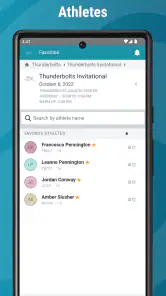
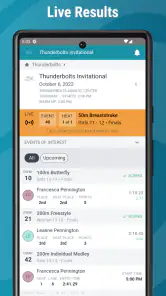
SwimTopia is a team-management app designed primarily for swimmers, parents, coaches, and administrators involved in recreational and competitive swim teams. It helps organize schedules, meet entries, volunteer assignments, team communication, results, and swimmer information in one place. The exact features available can vary depending on how the swimmer’s team has configured its SwimTopia account.
Can I use SwimTopia without joining a swim team?
Most of SwimTopia’s useful features depend on being connected to a participating swim team. Parents and swimmers typically receive an invitation or access instructions from their team administrator, then create or connect an account to view schedules, events, meet information, and assignments. If your team does not use SwimTopia, downloading the app alone may provide little practical functionality.
What can parents and swimmers do with SwimTopia?
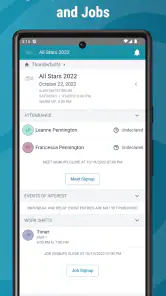
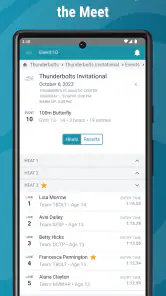
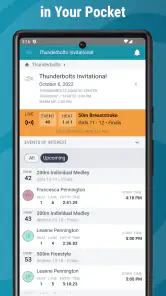
Parents and swimmers can use SwimTopia to review practice and meet schedules, respond to event invitations, declare swimmer availability, check heat sheets or meet details when published, and view results or team updates. Parents may also manage multiple swimmers from one account and sign up for volunteer duties. Available options depend on the team’s settings and subscription.
Pros
- Simplifies meet entries
- heat sheets
- and swimmer schedules for families.
- Provides timely updates on meet events
- results
- and team announcements.
- Supports team communication without relying entirely on email or paper notices.
- Useful roster and volunteer information helps coordinate busy swim meets.
- Clean layout makes essential team details easy to find on mobile devices.
Cons
- Most features are useful only if your swim team uses SwimTopia.
- Some information may be unavailable until team administrators publish it.
- Parents may need separate accounts or profiles for multiple swimmers.
- Notifications can become frequent during active meet and team periods.
- Advanced team management tools may feel unnecessary for casual users.
- Category
- Sports
- Version
- 7.2.0





