SupportPay: Split Expenses
- 178.00
- 4.2
- Installs
- 100.00K
- Price
- Free

Screenshots






Analysis by Reviewed
Shared expenses are rarely difficult because of the arithmetic; the awkward part is remembering who paid, what a charge covered, and whether everyone has seen the same information. I look for a tool that gives people a common place to keep track without turning ordinary family coordination into a bookkeeping project. SupportPay: Split Expenses is aimed at that kind of ongoing expense management, and its usefulness depends less on flashy features than on whether everyone involved is willing to use the same routine.
Decide whether a shared record is what you need
Before moving anything into an app, I’d ask how often expenses recur and how many people need to follow them. If you’re splitting one restaurant bill, a quick transfer and a short message are probably easier. If costs keep coming up between co-parents, relatives, or household members, a dedicated record can make it clearer what has been paid and what still needs attention.
That distinction matters because a shared expense app is not automatically a better fit than a spreadsheet or a banking app. A spreadsheet gives you flexibility, but someone has to maintain it and explain the entries. A banking app can show transactions, but a bank statement alone may not explain which child-related or household cost a payment was meant to cover. I’d choose SupportPay when the ongoing record and shared visibility are more important than keeping everything inside a general-purpose finance tool.
A New Way to Handle Shared Finances
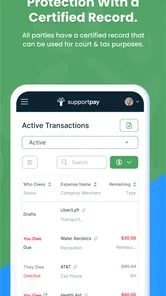
When I first downloaded SupportPay: Split Expenses, I was immediately impressed by its intuitive design. The app promises to make splitting expenses as simple as possible, and it certainly delivers on that front. Gone are the days of endless spreadsheets and confusing bank transfers. Instead, you're greeted with a clean, user-friendly interface that makes navigation a breeze.
Where the routine can pay off
SupportPay is a parenting app from SupportPay, which makes its shared-expense focus especially relevant to families coordinating costs across households. Imagine paying for a school-related purchase during a busy week: rather than relying on a receipt in a bag and a message that gets buried, the people involved can use a shared process to keep the expense visible. I’d still agree with the other person on what counts as a shared cost before logging anything. A clear record can reduce confusion, but it cannot settle a disagreement about the rules.
For that reason, I’d start with a small, predictable set of expenses and a simple naming habit. Label entries so their purpose is obvious later, and add supporting paperwork when it helps explain a charge. This makes the record more useful at review time than a long list of amounts with no context. It also gives both people a chance to catch misunderstandings while the purchase is still easy to remember.
Features That Stand Out
One of the standout features for me was the ability to set up recurring payments. Whether it’s monthly rent, utilities, or grocery bills, you can automate these transactions, so you never miss a payment. This feature is especially useful for those of us who tend to be a bit forgetful!
More From Our News Desk

 Gmail
Gmail in a Busy Inbox: Who Benefits Most?
From first account to crowded workday, Gmail earns its place through dependable search and flexible sorting—but its best fit depends on how much inbox maintenance you can tolerate.

 Prime Video
Switching to Prime Video: What Changes in Your Viewing Routine
Prime Video can make a compelling second home for streaming, but switching means learning a different catalog, rental layer, and route from browsing to playback.

 Universal TV Remote Control
 Works Best as a Reliable Backup
A phone remote earns its place through quick setup and reliable habits. Here is how to get more from Universal TV Remote Control—and where its limits show.

 Weather - By Xiaomi
Weather by Xiaomi Review: Clear at a Glance, Less Clear Up Close
Xiaomi’s weather app makes everyday forecasts quick to scan, but its calm surface can leave useful details and recovery paths harder to find than they should be.

 X
X Under Pressure: Can It Recover When Posting Goes Wrong?
A resilience-focused review of X, examining setup, mistaken posts, interruptions, weak connections, and the gaps that matter when recovery needs to be dependable.

 Clash of Clans
 Is Won Between the Battles
Its raids are quick; its community is a long-term project of coordination, teaching, rivalry, and shared responsibility—with all the friction that entails.
Latest News



Another nifty feature is the document storage option. You can upload and store receipt images directly within the app, making it easy to track spending and ensure everything is accounted for. It's like having a digital filing cabinet at your fingertips, which is perfect for those who love staying organized.
Make receipts and recurring items earn their place
There is a practical question behind both of these features: will they reduce follow-up, or simply create another place to maintain? I’d use a recurring entry for a predictable cost that both people already recognize, then check it when the amount or arrangement changes. For irregular purchases, I’d avoid forcing them into a repeated pattern just to make the record look tidy. The point is clarity, not a perfectly uniform ledger.
For receipts, a useful rule is to attach an image when the purchase might otherwise be hard to identify or remember. A clearly labeled school supply purchase may need less explanation than a larger or unusual charge. That selective approach keeps the record readable and avoids turning every small expense into a paperwork task. If a receipt is blurry or detached from its context, the image alone may not answer the question someone has later.
Useful detail, with a few trade-offs
Recurring entries are most helpful for expenses that genuinely stay stable; I would not treat them as a reason to stop checking the record. A bill can change, a shared arrangement can change, or a payment may need a note that the usual schedule does not capture. I’d review recurring items whenever circumstances shift, rather than letting an old pattern quietly become the assumed one.
Receipt images also work best as evidence attached to a clear explanation, not as a substitute for one. Before uploading, I’d make sure the image is readable and that the entry identifies what the purchase was for. That small habit can save time when someone looks back weeks later. If your household rarely needs to revisit receipts, keeping them in a normal photo folder may be enough; the value here is having them alongside the expense record.
Why It's a Game Changer
What makes SupportPay: Split Expenses truly unique is its focus on transparency and communication. The app provides a platform for all parties involved to view expenses, payments, and outstanding balances in real-time. This level of transparency is crucial for maintaining trust and accountability, especially in situations where finances can become a sensitive topic.
That shared view is also the main trade-off: everyone who needs to participate has to be comfortable with the process and keep their side current. If one person records purchases promptly while another waits until the end of the month, the account may still need a conversation to reconcile what happened. I’d introduce the app by agreeing on a check-in rhythm and what information belongs in each entry, instead of assuming the technology will establish those habits for you.
How it compares with other ways to split costs
A payment app is convenient when the only task is sending money, but the transfer itself may not explain why it was made or how it relates to other costs. A group bill-splitting tool can suit a trip or shared meal, where the group settles up and moves on. SupportPay is more compelling for costs that keep returning and need context between the same people. I would not replace a full budgeting system with it if I wanted to track every household category, savings goal, or personal transaction; those are broader jobs than coordinating shared expenses.
There is also a human difference between a private note and a shared record. A spreadsheet can be tailored exactly to an arrangement, but it depends on someone maintaining formulas, access, and consistent labels. Messages are easy to send, yet details become scattered across conversations. SupportPay’s appeal is the possibility of making the expense itself the center of the discussion. That only helps if both parties agree to check the same place rather than continuing to keep competing records.
A realistic week with shared costs
Consider a co-parent who pays for a school item on the way home, then has a separate appointment-related cost later in the week. The useful workflow is not simply entering two amounts: it is recording each while the details are fresh, giving each a recognizable description, and adding a receipt when it would help the other person understand the charge. At a later check-in, both can review what is pending without reconstructing the week from memory. I’d still keep the conversation focused on the agreed sharing rules, because a well-kept record cannot decide which costs qualify.
For a household with uneven schedules, this kind of routine can be more useful than waiting until a monthly conversation to compare bank statements. It can also expose a mismatch early: perhaps one person thought a charge was already settled, while the other still sees it as outstanding. A quick correction is easier when the purchase is recognizable. The best result is not a longer history of transactions, but fewer surprises when the people involved review their shared responsibilities.
Who should consider it—and who may not need it
The app is free, has an Everyone content rating, and is available for devices running Android 5.0 or later. It is on version 4.3, and its average rating is 4.2 from around 688 ratings, with over 100,000 installs. Those figures suggest it has found an audience, but I’d base my decision on whether its shared workflow fits the people who will actually use it.
I’d recommend trying it if you regularly coordinate parenting costs or another continuing set of shared expenses and want records, receipts, and payment status gathered in one place. I’d skip it if you only split occasional small purchases, if the other person will not participate, or if your existing system already gives everyone a clear, trusted record. A tool cannot make a reluctant co-user update information, so agreeing on the routine matters as much as installing the app.
Questions to settle before relying on it
Will everyone who needs to see the expenses take part? I’d answer that before entering a backlog, because a record one person maintains alone may not solve the coordination problem. Can it replace your bank or budgeting app? I would treat it as a shared-expense companion, not assume it covers every part of personal finance. Is it useful for occasional splits? Usually, a simple message and transfer will be less work when there is no continuing record to maintain.
I’d also decide what counts as enough documentation for your situation. Some costs are self-explanatory; others benefit from a receipt and a short note. Agreeing on that distinction helps keep entries consistent without demanding unnecessary detail. Finally, plan how you will correct a mistaken amount or add a late expense. A shared system works best when both people know how to handle the imperfect cases, not just the straightforward ones.
Moving over without creating extra work
Switching does not have to mean importing every old transaction. I’d choose a sensible starting point—such as the next recurring expense or the beginning of a new month—and keep the older record available for reference. That avoids spending hours recreating history that may never be needed, while giving both people a clean point from which to follow new activity.
Before relying on the app for an important payment, agree on how you will handle corrections and late entries. It is also worth deciding whether a receipt is needed for every purchase or only for costs that could be disputed. These expectations prevent the shared record from becoming a second source of friction. If you need formal accounting or a complete household budget, a dedicated accounting or budgeting option may be a better primary tool; SupportPay’s appeal is the narrower job of coordinating shared expenses.
Final Thoughts
After spending some quality time with SupportPay, I can genuinely say it’s a tool worth having. It’s not just about splitting bills; it’s about fostering better financial habits and relationships. Whether you’re a student sharing an apartment, a family managing household expenses, or just someone who wants to keep things organized, this app is a reliable companion.
The app’s commitment to making financial management seamless and stress-free is evident in every feature. So if you’re tired of the old ways of juggling receipts and settling debts, give SupportPay a try. It might just change the way you handle money forever.
SupportPay: Split Expenses Frequently Asked Questions
Is SupportPay available for both Android and iOS?
SupportPay is a parenting app for people who want to split, track, and share expenses. Its current version is 4.3, and it requires Android 5.0 or later on Android devices. The app is free to download, so you can check whether it suits your family’s expense-sharing routine before deciding to use it.
Who is SupportPay designed for, and what can I use it to manage?
SupportPay is aimed at people who need a shared way to keep track of expenses, including parents coordinating child-related costs. It can also be useful when family members or other parties need to organize expenses together. The app’s focus on splitting, tracking, and sharing costs makes it relevant to users who want a clearer record of shared financial responsibilities.
What is SupportPay and how does it work?
SupportPay is an app designed to simplify the management and sharing of expenses, especially for families managing child support or shared expenses. It allows users to track, manage, and share expenses and payments with other parties. Users can upload receipts, schedule payments, and view transaction history, making it easier to stay organized and transparent.
Is SupportPay secure for managing financial information?
Yes, SupportPay prioritizes user security by employing encryption and secure data storage practices to protect your financial information. The app ensures that all transactions and personal data are handled securely, giving users peace of mind when managing sensitive financial details.
Can I use SupportPay for expenses other than child support?
Absolutely! While SupportPay is tailored for managing child support payments, it is versatile enough to handle any shared expenses. Whether you're splitting bills with a roommate, managing family expenses, or tracking shared projects, SupportPay offers the necessary tools to streamline these financial interactions.
Pros
- Simplifies expense tracking.
- User-friendly interface.
- Supports multiple currencies.
- Integrates with bank accounts.
- Automates bill reminders.
Cons
- Subscription required for full features.
- Occasional sync issues.
- Limited free version capabilities.
- Customer service can be slow.
- App updates can be infrequent.