Superfan: College Football
- 1.02K
- 4.8
- Installs
- 500.00K
- Price
- Free

Screenshots

Analysis by Reviewed
When I follow college football closely, the hardest part is rarely finding one score. The real work is moving from a busy Saturday afternoon to a clear picture of what happened: which games are close, how a drive changed momentum, whether a ranking result matters, and what I should watch next. Superfan: College Football is built for that exact routine. It is a free sports app from Superfan Sports that brings scores, play-by-play, statistics, CFP rankings, schedules, and injury information into one place.
I found it most useful when I treated it as a live companion rather than a replacement for watching a game. It does not try to be a general sports portal covering everything equally. Its focus is college football, and that narrow purpose makes the experience easier to understand. The app has been around since 2015, and its current version is 13.5.2, which gives it the feel of an established product rather than a newly assembled scoreboard.
The store rating is a strong 4.8 from around 9,400 ratings, while the app has passed 500,000 installs. Those figures suggest that it has found a dependable audience among college football followers. My own impression is that its value comes from reducing the number of places I need to check during a busy slate, especially when I cannot sit through every game.
From a busy Saturday to a useful game-day picture
Starting with the problem: too many games and too little time
A typical use case is simple. I may be watching one matchup on television while checking another game during commercial breaks, or I may be away from a screen entirely and want to know whether a favorite team is ahead. Opening a broad sports app often means sorting through professional leagues, unrelated news, and menus that make college football feel like just one small part of the service.
Superfan: College Football starts from a more practical assumption: the user already cares about the sport and wants information quickly. The opening experience is therefore easier to approach when my question is specific. I can think in terms of a live score, a schedule check, a ranking update, or a game detail rather than wandering through a large entertainment hub.
That focus is also the first important trade-off. If I want football, basketball, baseball, breaking news, fantasy tools, and broad league coverage in one application, a larger sports platform may be a better fit. This app makes more sense for someone who would rather have a dedicated college football workspace than a universal sports dashboard.
Step one: finding the game before the score becomes urgent
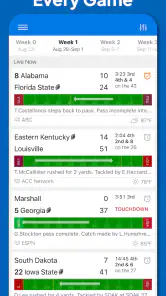
The schedule is more useful than it may appear at first. I use it before kickoff to identify the games that deserve attention, then return to it when I need to understand what is coming later. This prevents a common mistake with live-score apps: opening them only after something important has already happened and then trying to reconstruct the day from scattered notifications or search results.
More From Our News Desk

Clash of Clans Is Won Between the Battles

Android Auto Makes the Case for Quieter Car Software

MobiOffice: Transforming Mobile Productivity with Seamless Integration

EA SPORTS FC™ Mobile Soccer: Redefining Mobile Sports Gaming

How Microsoft OneDrive Became a Mobile Productivity Giant

How Google Translate Breaks Language Barriers Effortlessly
My preferred workflow is to scan the schedule early, choose the games that matter to me, and use the live score view as the day develops. That small change makes the app feel less reactive. Instead of repeatedly searching for a team, I begin with the full college football slate and narrow my attention from there.
The schedule is especially helpful for casual followers who know the teams they care about but do not remember every kickoff time. It also works for a more committed fan planning a viewing day. I can compare simultaneous games, decide which one deserves the television, and keep the others available for quick checks without opening several unrelated services.
Step two: moving from a score to the story of the game
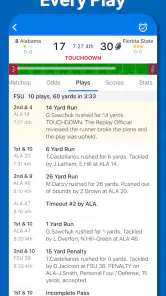
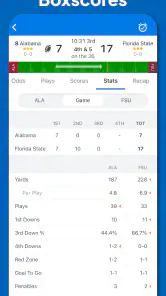
A score alone tells me the current outcome, but not how the game arrived there. The play-by-play view is where the app becomes more valuable during a live contest. When I join late, I can use it to follow the sequence of events instead of guessing whether a lead came from steady drives, a sudden turnover, or a late scoring burst.
This is one of the strongest practical uses for the app. If I am waiting in line, commuting as a passenger, or listening to a game without a screen, the score gives me the headline and the play-by-play gives me context. I do not need a full broadcast to understand why the situation has changed.
I also like using play-by-play as a handoff between people. One person may be watching the game while another is checking the phone. A quick look at recent plays can answer questions such as whether a team is driving, whether a possession has stalled, or whether the score is the result of a single decisive sequence. That makes the app useful in a group without requiring everyone to follow the same screen.
There is a limitation here. Text-based updates are efficient, but they are not a substitute for video, commentary, or the atmosphere of a live broadcast. If I want detailed tactical analysis, replay angles, or a rich visual presentation, I would move to a television or streaming service. Superfan: College Football is better at keeping me informed than entertaining me.
Step three: using statistics without losing the main thread
Statistics are most helpful after I already know the basic score and game situation. I use them to test my first impression. A team may be ahead but struggling to sustain drives; another may be behind while controlling enough of the game to remain dangerous. Looking at the numbers after following the play sequence gives me a more balanced view than reacting to the scoreboard alone.
This creates a useful two-stage habit. First, I check the live situation. Then I use the statistics to understand whether the result reflects the broader performance. That order matters because opening a dense statistical panel too early can make a simple question feel unnecessarily complicated.
The same approach works after the final whistle. Rather than judging a team only by the result, I can review the game as a completed event and connect the outcome with the available statistics. For a fan comparing teams across a weekend, that is more useful than collecting isolated final scores.
I would not describe the statistics as a replacement for specialist analysis, though. Readers who want advanced film breakdowns, recruiting context, or long-form editorial commentary will likely need another source. The app is strongest when I need timely information that supports my own judgment, not when I want someone else to write the entire interpretation for me.
Step four: connecting rankings, schedules, and injuries
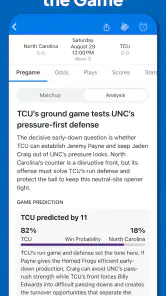
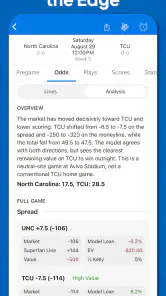
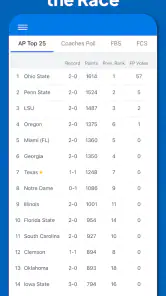
The CFP rankings add a layer that a basic scoreboard does not provide. I can follow a game and then consider what its result may mean in the larger competitive picture. That is particularly useful when several teams are competing for attention and every result feels connected to the postseason conversation.
I find rankings most useful when paired with the schedule rather than viewed alone. A ranking is a snapshot; the schedule shows the path that produced it and the challenges still ahead. Moving between those two areas helps me avoid treating a single position as a complete evaluation of a team.
Injury information serves a different purpose. Before a game, it can affect how I interpret expectations. During the season, it helps explain why a familiar team may look different from one week to the next. I treat that section as context, not as a guarantee of what will happen. An injury note can change the way I watch a matchup, but it cannot predict the final result.
This combination is a concrete advantage over a simple live-score tool. A standalone scoreboard may answer “what is happening now,” while this app also supports the questions “what comes next,” “how does this affect the rankings,” and “what personnel context should I remember?” Those handoffs make it more useful across an entire weekend instead of only during the final minutes of a game.
How I would use it during an ordinary game day
Imagine I have a favorite team playing while two other important games are happening at the same time. Before the afternoon begins, I open the schedule and identify the games I want to track. When the main matchup starts, I keep its score and play-by-play close. During a break, I check another result, then return to the primary game without needing to rebuild the context from memory.
Later, if the favorite wins, I review the statistics and look at the wider ranking picture. If the team loses, the same workflow helps me understand whether the defeat came from a poor overall performance or a narrow turning point. Before the next weekend, I return to the schedule and injury information to see what might shape the next set of games.
The outcome is not just a collection of scores. I finish with a more organized understanding of the day. That is the app’s real strength: it turns fragmented college football information into a repeatable routine.
The handoffs that make the app practical
The most successful handoff is from schedule to live game. The schedule tells me where to begin, while the live view gives me the immediate result. From there, play-by-play supplies the sequence, statistics add depth, and rankings or injuries provide wider context. Each area answers a different question, so the workflow feels logical when I move through it in that order.
Another useful handoff is between the app and other ways of following football. I can watch a broadcast for visual detail, use Superfan for a second game, and return to the app after the broadcast ends to review the result. I can also hear a radio call or follow a conversation with friends while using the app as my factual reference point.
This matters because no single format does everything well. Video is best for emotion and visual explanation. Social feeds are fast but can be noisy. Search engines are flexible but may require several steps. A dedicated college football app sits between those options: more focused than general search, more structured than a social feed, and less immersive than a broadcast.
For a group of friends, the app can also reduce confusion. If someone asks for the current score, the latest sequence, or the next scheduled game, I can check one focused source instead of passing along half-remembered updates. That is a small benefit, but it is exactly the kind of everyday friction a good companion app should remove.
Where the flow breaks
The experience becomes less satisfying when I expect a complete media package. This is not the place I would choose for live video, extended commentary, or a deep editorial explanation of every matchup. Its information-first design is efficient, but it can feel plain if I want a more lively presentation.
It can also be excessive for someone who follows only one team and checks results occasionally. That person may prefer a team-specific source or a general sports app already used for other leagues. The dedicated focus becomes an advantage only when college football is important enough to justify a separate place in the phone.
Another point to consider is the free-plus-purchases model. The app is free to install, but in-app items are listed from $1.99 to $12.99 each. I would therefore review any optional purchase screen carefully and decide whether the extra value fits my habits. A user who only needs scores and occasional context may have no reason to spend money, while a very engaged fan may consider optional additions worthwhile.
The Teen content rating is also worth noting for families. It signals that the app is aimed at a teen audience or older, so I would not treat it as a child-focused sports product. That does not change its usefulness for adult fans, but parents choosing apps for younger children should consider the rating before handing over the phone.
Performance expectations should be realistic as well. Live information is only helpful when I open the app at the right moment and have a usable connection. If I need a guaranteed broadcast or uninterrupted access during travel, I would prepare a separate viewing or listening option rather than relying on this app alone. Its job is to organize football information, not to replace every other game-day service.
Who should install it, and who should pass?
I would recommend Superfan: College Football to fans who regularly follow several college games, want quick access to play-by-play, and care about the relationship between weekly results and CFP rankings. It is particularly suitable for people who split their attention between games or need to keep up while away from the television.
It is also a good choice for a fan who wants more than a final score but less than a full media subscription. The combination of schedules, live events, statistics, rankings, and injuries covers the main information stages of a season without forcing me to search across unrelated sports sections.
I would suggest skipping it if your priority is live streaming, detailed coaching analysis, recruiting coverage, or broad multi-sport entertainment. A general sports platform may be more convenient if college football is only one small part of your interests. Likewise, someone who dislikes checking several information panels may prefer a simpler team alert tool.
Because it is free to start, the decision is relatively easy: install it, follow a full game-day workflow, and see whether the focused layout fits your habits before considering any optional purchase. The important test is not whether it lists many features, but whether it helps you move smoothly from “what games are on?” to “what happened, why did it matter, and what should I watch next?”
My final view after following the complete workflow
Superfan Sports has made a focused college football utility rather than a general-purpose sports entertainment app. I like that its features connect naturally: the schedule starts the day, the score keeps me oriented, play-by-play explains the movement, statistics add evidence, and rankings and injuries put the result into context.
The app does not eliminate every source of friction. It cannot replace a broadcast, and its dedicated purpose will feel unnecessary to people who rarely follow college football. The optional in-app purchases also mean I would pay attention before buying anything beyond the free experience.
For me, the deciding factor is the handoff from one question to the next. I can begin with a crowded slate and finish with a clear understanding of the games that mattered. If college football is a regular part of your week, this is a practical companion worth trying; if you want video or all-sports coverage, choose a broader service instead. Its free entry point, Teen rating, and established presence make it easy to test, while the focused workflow gives it a clear reason to stay on my phone.
Superfan: College Football Frequently Asked Questions
What should I know about the app’s basic details before downloading?
Superfan: College Football is a sports app from Superfan Sports for fans who want college football information on a mobile device. It has a Teen age rating and is available on Android and iOS. Its current version is 13.5.2, and it supports devices running Android 9 or later. These details can help you check whether the app suits your device and expectations.
What information can I follow in Superfan: College Football?
The app brings together college football scores, play-by-play, stats, CFP rankings, schedules, and injury information. That makes it useful for keeping track of games and following key details across the college football season. If you mainly want quick access to football updates and team information rather than a traditional game, its sports-focused tools are the central appeal.
What is Superfan: College Football?
Superfan: College Football is a mobile game focused on the atmosphere and excitement of college football. Rather than simply watching a match, you take part in a fan-centered experience that may include supporting your team, making game-related decisions, and competing through interactive challenges. It is designed for sports fans who enjoy college football culture and want a casual way to stay involved on their Android or iOS device.
Is Superfan: College Football free to download and play?
The app is free to download, with optional in-app purchases priced from $1.99 to $12.99 per item. These purchases can be used for additional content, upgrades, or other convenience features. You can start without an upfront purchase, but consider whether optional spending fits your preferences before downloading, particularly if children will be using the app.
Does Superfan: College Football require an internet connection?
An internet connection is recommended for Superfan: College Football because features such as account synchronization, rankings, live events, updates, and online competitions may depend on access to the game’s servers. Some basic sections might open offline, but functionality can be limited. For the most reliable experience, use a stable Wi-Fi or mobile-data connection and install updates when they become available.
Pros
- Live scores and schedules make it easy to follow games on the go.
- Team-focused content helps fans stay connected to their favorite programs.
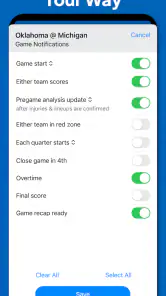
- Push notifications can keep you updated during important matchups.
- A clean interface makes browsing college football news straightforward.
- Useful for tracking multiple teams throughout the season.
Cons
- Some features may depend on reliable internet access.
- Frequent notifications could feel excessive for casual fans.
- Coverage and content quality may vary between teams.
- The app may use extra battery when alerts are enabled.
- Advertising can interrupt browsing in the free experience.
- Category
- Sports
- Version
- 13.5.2





