SubTime - Sub Timer & Rotation
- 97.00
- 4.7
- Installs
- 100.00K
- Price
- Free

Screenshots
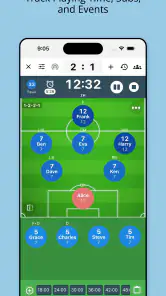
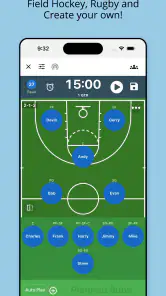
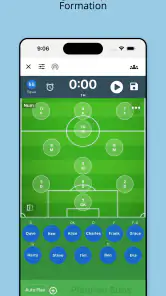
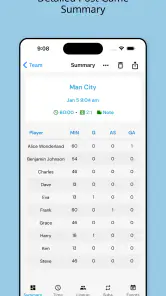
Analysis by Reviewed
Coaching a youth match is difficult enough without trying to remember every substitution, lineup change, and playing-time detail in your head. I found SubTime - Sub Timer & Rotation useful because it focuses on that narrow but important part of sports coaching: keeping a rotation moving while the game is happening. It is a free sports app from OTDSoft Inc., and its simple purpose makes more sense once you are standing beside a field or court with several players waiting for their turn.
The app is designed for coaches who need a practical timer and rotation planner rather than a full club-management platform. I would not describe it as a complete team administration suite. Instead, it is a focused tool for organizing playing time, preparing lineups, and making substitution decisions with less mental clutter. That focus is its main strength, although it also means that people looking for messaging, registration, statistics, or detailed performance analysis will probably need something else alongside it.
How the basic match workflow feels in real use
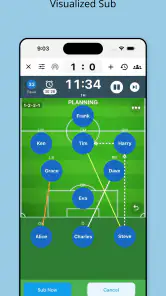
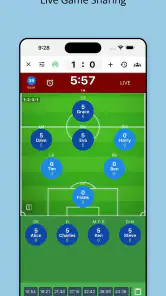
The most useful way to approach SubTime is to prepare before the match rather than treating it as a stopwatch you open at the last second. I would first think through the available players, the intended starting lineup, and the rotation rhythm I want to follow. Once the match begins, the app can act as the visible reference point for when a change is due, while I keep my attention on the action and on the players themselves.
That distinction matters. A timer alone does not make a rotation fair, because a coach still has to account for late arrivals, injuries, fatigue, positions, and the actual flow of play. SubTime helps by giving the rotation a repeatable structure. I found that especially helpful when several players were waiting and I did not want to rely on memory after a tense sequence or a long break in play.
A realistic example would be a youth match where the team arrives with a planned order, but one player needs a little longer to warm up and another is already tiring. I can start with the intended arrangement, watch the game, and adjust the next substitution instead of abandoning the whole plan. The value is not that the app makes the decision for me; it keeps the original plan visible so that changes remain deliberate rather than accidental.
Before using it in a competitive match, I would run through the complete process during a practice. That gives me a chance to learn where the lineup controls and timer actions are located without looking down repeatedly during play. It also reveals whether my planned rotation is realistic for the sport and age group. A rotation that looks tidy on paper may be too frequent to manage comfortably once the game becomes busy.
One habit made a noticeable difference for me: I would set up the player order in the same way every time. Consistency reduces the number of decisions made on the sideline. If the next player is always easy to identify, I can spend more time watching positioning and less time reconstructing who has already played. This is a small workflow improvement, but it is more valuable than constantly changing a complicated plan.
More From Our News Desk

Clash of Clans Is Won Between the Battles

Android Auto Makes the Case for Quieter Car Software

MobiOffice: Transforming Mobile Productivity with Seamless Integration

EA SPORTS FC™ Mobile Soccer: Redefining Mobile Sports Gaming

How Microsoft OneDrive Became a Mobile Productivity Giant

How Google Translate Breaks Language Barriers Effortlessly
What it does well for youth coaches
SubTime fits best when the coach wants a clear rotation aid and does not need a large collection of unrelated tools. The store rating is a 4.7 average from 765 ratings, and the app has passed 100K+ installs, which gives it a reassuring level of adoption for a specialized coaching utility. Those figures do not replace personal testing, but they suggest that the basic problem it addresses is familiar to many coaches.
The Everyone age rating is also appropriate for its role. This is not an entertainment game aimed at children; it is a coaching tool that can be used around a youth team without an adult-oriented presentation. I would still expect the coach to control the device and the decisions, especially with younger players, because the app is an aid for managing participation rather than a substitute for coaching judgment.
Its strongest use case is a team where equal or planned participation matters and the coach wants a visible routine. It can also help when another adult occasionally takes over the sideline. A consistent setup makes the rotation easier to understand than a private mental system that only the regular coach knows.
The first settings I would check
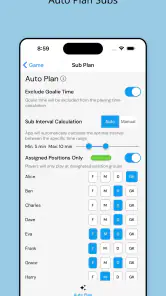
I would not begin by changing everything available. I would first check the timing behavior and make sure it matches the way the sport is actually played. A coach who substitutes at natural stoppages may use the timer as a reminder, while a coach working with fixed periods may treat it as a closer representation of the game structure. The important point is to decide what the alert means before kickoff.
I would also review the lineup before starting the clock. It is easy to assume that a quick entry is enough, but a small setup mistake can affect every later decision. Confirming the player order, identifying the first group, and checking the planned sequence are worthwhile steps. This is one of those apps where careful preparation produces a smoother experience than trying to repair the plan while the match is underway.
Another useful habit is to leave room for exceptions. A rotation plan should be a guide, not a rigid promise that ignores what is happening on the court or field. If a player is uncomfortable, a position needs stabilizing, or the match has an unusual stoppage, I would pause and adapt. The app can preserve the structure, but it cannot know why a substitution should be delayed.
Because the current version is 10.8.11 and the minimum operating-system requirement is Android 7.0, the app is accessible on a broad range of older Android devices. That can be helpful for a team that keeps a dedicated sideline phone rather than using a coach’s newest personal device. I would still test the specific phone before relying on it, particularly if the screen is small or the device is already used for calls, messages, and other match-day tasks.
Settings are most useful when they support a habit
The best configuration is not necessarily the most detailed one. I would choose a timing pattern that I can recognize immediately, then keep it consistent across practices and matches. When the same alert always means “prepare the next change,” the sound or visual cue becomes part of my coaching routine instead of another piece of information to interpret.
I would also avoid building a rotation so intricate that it requires constant editing. A simple sequence with sensible substitutions is easier to maintain than a perfect-looking schedule that falls apart after one unexpected event. This is a trade-off many coaches miss: more planning can create more work if every adjustment forces several other changes.
For a new coach, I would begin with a small test group and a short practice segment. I could observe whether the alerts are noticeable from the sideline, whether I can identify the next player quickly, and whether the device remains usable while wearing gloves or standing in bright outdoor light. These are practical questions that a feature list cannot answer as well as a rehearsal.
Faster patterns for busy match days
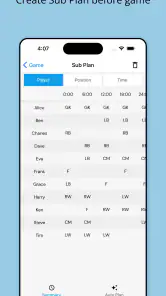
Once the basic workflow feels familiar, the app becomes more effective when paired with repeatable shortcuts. My first shortcut would be preparing the rotation before the team arrives at the venue. Even a rough order is better than starting from an empty screen while players are asking questions and the match is about to begin.
My second shortcut would be using the same substitution language with the team. If players know that the next rotation is being prepared when the timer signals, the transition can happen more calmly. The app does not need to become the center of attention; it should quietly support a routine that the players already understand.
A third pattern is to treat the timer as an early warning rather than an exact command. If I wait until the signal before thinking about the change, I may be late because the game is still active. Preparing a little ahead gives me time to identify the next player, check the situation, and make the change at an appropriate stoppage. This is where the app works best as a coaching assistant rather than an automatic referee.
I would also keep the device positioned where I can glance at it without losing sight of play. That may mean using a stable place on the bench or keeping it with the assistant coach. The exact arrangement depends on the venue, but the principle is the same: the timer should be visible enough to help and unobtrusive enough not to distract.
For teams with several coaches, agreeing on who controls the app is important. Two people changing the plan independently could create confusion even if both are trying to help. One person can manage SubTime while the other watches the players and communicates the next change. That division of responsibility turns a simple app into part of a more reliable sideline system.
Where it beats paper and a generic stopwatch
A paper rotation sheet is cheap and flexible, but it does not remind me when the next decision is approaching. A generic stopwatch can count time, but it leaves the lineup and substitution order in my head or on another piece of paper. SubTime sits between those options by combining the timing task with the rotation context.
That combination is most valuable when the coach is alone. With no assistant to call out the next change, a written plan and a separate timer can become awkward to manage. Keeping the relevant information in one focused tool reduces the number of objects and mental steps involved. It is not a replacement for a full sports-management platform, but it is more purposeful than using a timer that knows nothing about the team.
On the other hand, a paper sheet remains better in some situations. It works without battery concerns, is easy to mark with unusual events, and can be shared instantly with another coach. If the venue is wet, the device is unreliable, or the team’s rotation changes constantly, paper may be the safer backup. I would carry a simple written plan even when using the app, not because SubTime is ineffective, but because match-day tools should have a fallback.
Practical limits experienced users should expect
The app’s focused design is also its boundary. I would not choose it as the main solution for a club that needs player registration, attendance records, team communication, season statistics, or a shared online workspace. Those tasks belong to broader coaching and team-management products. SubTime makes more sense as the specialized rotation layer in a simple coaching setup.
It also cannot remove the judgment involved in fair playing time. A timer can tell me that a planned moment has arrived, but it cannot evaluate whether a player is ready, whether the team is in a safe position to substitute, or whether a particular match situation calls for a different decision. Coaches who want complete automation may find that limitation frustrating, but I see it as an appropriate boundary for a tool used in youth sports.
There is also a learning cost, even though the purpose is straightforward. The app is only helpful if I prepare it correctly and look at it at the right moments. A coach who downloads it immediately before a match may spend more attention navigating than coaching. That is why I recommend a practice run, especially if the team uses a rotation system with many players or frequent changes.
The free price makes trying it easy, but in-app purchases range from $2.49 to $34.99 per item. I would look at the available purchase choices carefully and decide whether the basic workflow already covers my needs before paying for anything. For a coach who only needs occasional timing support, the free experience may be sufficient; for someone managing regular rotations, the value depends on which added capabilities are relevant to that specific routine.
Another trade-off is device dependence. A phone is convenient, but it introduces a battery, visibility, and distraction issue that a laminated rotation card does not. I would start the day with the device charged, silence unrelated notifications, and keep the backup plan nearby. These are not glamorous tips, but they prevent a useful sideline tool from becoming a source of avoidable stress.
Who should use it and who should skip it
I would recommend SubTime to a youth coach who regularly plans substitutions, wants a repeatable playing-time routine, and prefers a focused Android app over a large team-management system. It is particularly suitable for coaches who often work alone and need a reminder without carrying a separate stopwatch and rotation chart.
I would be more cautious if your sport does not fit a timed rotation approach, if substitutions are almost entirely determined by irregular stoppages, or if your main need is statistical analysis. In those cases, a paper plan, a general timer, or a sport-specific management platform may be a better match. The app is not weak because it lacks those functions; it is simply aimed at a narrower coaching problem.
I would also skip making it the only record of a complicated tournament day. When multiple matches, changing squads, and unusual playing-time rules are involved, I prefer a written summary or a broader planning tool alongside it. SubTime can help with the live rhythm, but it is not the place I would expect to find a complete archive of everything that happened.
My verdict after building a repeatable routine
After using it as a focused coaching aid, I see SubTime as a practical solution to a problem that is easy to underestimate. It does not try to coach the match, analyze every player, or replace communication with families and assistants. Instead, it helps me turn a rotation intention into a visible, timed routine.
The best results come from combining three habits: prepare the lineup early, use the timer as an advance reminder, and keep a flexible backup plan for real match situations. That approach avoids the common mistake of expecting the app to make every substitution decision automatically. It also makes the tool faster to use because the important thinking happens before the opening whistle.
For me, the decisive question is whether you repeatedly struggle to remember who should enter next. If the answer is yes, this app offers a focused way to reduce that burden without forcing you into a complicated sports-management system. If your needs extend to communication, statistics, registration, or detailed season records, I would look elsewhere or use SubTime only as a companion.
My final recommendation is simple: use it as a disciplined sideline assistant, not as an all-purpose team platform. Its free entry point, accessible Android support, and clear purpose make it worth testing during practice. With a consistent setup and a paper backup, it can give a youth coach more confidence that playing-time plans are being followed while attention stays where it belongs: on the players and the match.
SubTime - Sub Timer & Rotation Frequently Asked Questions
Who is SubTime - Sub Timer & Rotation designed for?
SubTime is a sports app developed by OTDSoft Inc. for coaches, particularly those working with youth teams. It may also suit players or team organizers who want a simple way to keep track of playing time and plan substitutions and lineups. Its focus is practical match and session management rather than broader team administration.
Is SubTime free to download, and are there in-app purchases?
SubTime is free to download, with in-app purchases offered for users who want them. Those purchases range from $2.49 to $34.99 per item, so it is worth checking the purchase options in the app before confirming anything. The free price makes it easy to try the basic idea of timed substitutions and rotation planning before deciding whether any paid options suit your needs.
What is SubTime - Sub Timer & Rotation used for?
SubTime - Sub Timer & Rotation is designed to help coaches, players, and teams manage substitutions during matches or training sessions. After setting the match duration and rotation preferences, the app provides timed reminders for substitutions. It can be useful for sports such as soccer, basketball, hockey, volleyball, and other activities where players need to rotate regularly and fairly.
How do I set up a match or rotation schedule in SubTime?
The setup process generally involves choosing the total duration of the game or session, defining the substitution interval, and adding the players who will participate. Depending on the selected sport or rotation method, you can organize the lineup and start the timer. It is worth checking every setting before beginning, because an incorrect interval or match length may affect the timing of later substitution alerts.
Does SubTime work without an internet connection?
SubTime - Sub Timer & Rotation is primarily a timer and scheduling tool, so its core functions should be available without a continuous internet connection once the app is installed. This makes it practical for gyms, fields, and sports venues with unreliable mobile data. However, features such as downloading updates, viewing store information, or using external services may still require an internet connection.
Pros
- Quickly creates custom timers for recurring subscriptions.
- Rotation scheduling helps manage alternating services and plans.
- Clean interface makes subscription timing easy to understand.
- Useful reminders can help prevent missed renewals or cancellations.
- Lightweight app focused on one practical task.
Cons
- Requires accurate manual entry for subscription dates and durations.
- May offer limited value if you only manage a few subscriptions.
- Reminder usefulness depends on granting notification permissions.
- No guarantee it can sync billing data from every provider.
- Advanced scheduling features may take time to learn.
- Category
- Sports
- Version
- 10.8.11





