

StudentSquare
- 286.00
- 3.3
- Installs
- 100.00K
- Price
- Free
Screenshots
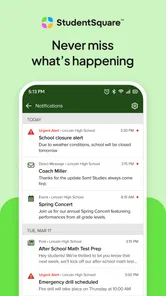

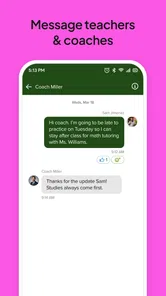

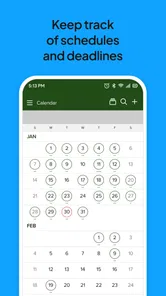





Analysis by Reviewed
School communication is easy to underestimate until a timetable changes, an assignment needs clarification, or a family has to keep track of several messages at once. I found StudentSquare most useful as a focused place for those school conversations rather than as a general-purpose social app. It is an Education app developed by ParentSquare, and its purpose is to give schools and students a private communication channel.
That focus is both its main strength and its first limitation. StudentSquare is not trying to replace a full learning-management system, a document editor, or a group-chat service for every part of daily life. Instead, it works best when a school has adopted it as one of its official communication routes and expects students to check it consistently. If your school does not use the platform actively, there is little reason to install it simply because it exists.
How StudentSquare fits into a normal school day
I focus here on the small habits that make school messages easier to act on, especially when a busy day leaves little time to reread them. A useful check is to separate information you only need to know from instructions that call for a reply or a later reminder. That distinction can make the next section’s setup choices feel less like trial and error.
A practical baseline workflow
My recommended routine is simple: open the app at a predictable time, scan new school messages, deal with anything that requires a response, and then leave the rest for later reference. That habit matters more here than constantly checking the screen. A communication app becomes useful when it reduces uncertainty, not when it creates another stream of interruptions.
For a student, the first pass should focus on messages that affect the next school day. A change in arrangements, a reminder from a teacher, or a request that needs an answer deserves attention before older notices. I would avoid treating every notification as equally urgent. StudentSquare is more manageable when it is used as an organized school inbox instead of an endless chat feed.
A realistic example would be a student who gets home and needs to confirm whether tomorrow’s activity is still taking place. Rather than searching through several unrelated conversations or relying on a message passed along by a classmate, the student can check the school communication channel, read the latest notice, and return to it later if a detail needs confirming. That small change can prevent the familiar problem of acting on an outdated message.
The same workflow helps when a student is absent. Instead of asking several people for the same basic information, the student can review the communication already sent through the school’s chosen platform. I would still treat it as a communication aid, not an automatic substitute for asking a teacher about missed work. The important distinction is between finding an announcement and receiving a complete explanation of what to do next.
More From Our News Desk

 Instagram
Instagram’s Power Comes From Its Place in Your Phone
A close look at how Instagram turns Meta’s reach, recommendation systems and everyday camera habits into durable platform power—and what that costs users.

 Gmail
GmailGmail in a Busy Inbox: Who Benefits Most?
From first account to crowded workday, Gmail earns its place through dependable search and flexible sorting—but its best fit depends on how much inbox maintenance you can tolerate.

 Prime Video
Switching to Prime Video: What Changes in Your Viewing Routine
Prime Video can make a compelling second home for streaming, but switching means learning a different catalog, rental layer, and route from browsing to playback.

 Universal TV Remote Control
Universal TV Remote Control Works Best as a Reliable Backup
A phone remote earns its place through quick setup and reliable habits. Here is how to get more from Universal TV Remote Control—and where its limits show.

 Weather - By Xiaomi
Weather by Xiaomi Review: Clear at a Glance, Less Clear Up Close
Xiaomi’s weather app makes everyday forecasts quick to scan, but its calm surface can leave useful details and recovery paths harder to find than they should be.

 X
XX Under Pressure: Can It Recover When Posting Goes Wrong?
A resilience-focused review of X, examining setup, mistaken posts, interruptions, weak connections, and the gaps that matter when recovery needs to be dependable.
Latest News



Families can also benefit when students and parents are expected to stay aware of the same school information. The private-school communication model is more appropriate for notices and school-related exchanges than for casual social discussion. That boundary is useful: it keeps the purpose clear and makes it easier to decide which messages belong in StudentSquare and which belong elsewhere.
What to check before relying on it
The first question is not whether the interface looks convenient; it is whether your school uses StudentSquare consistently. Communication tools only solve a problem when the organization behind them actually sends important information there. If teachers use one system, administrators use another, and students are expected to monitor several unrelated channels, the app may become one more place to check rather than a central solution.
I would also confirm that the account connected to the app is the one your school expects you to use. A communication platform can appear empty or incomplete when the wrong account, school connection, or student profile is involved. That is not necessarily an app failure, but it is a practical setup issue worth resolving before an important announcement arrives.
Because StudentSquare is designed for private school communication, I would not use it as a replacement for ordinary messaging with friends. That choice keeps school information easier to find and avoids mixing informal conversation with notices that may need to be revisited. It also makes the app more useful for students who already feel overwhelmed by too many notifications.
Settings that deserve an early review
After installation, I would spend a few minutes checking the notification behavior instead of accepting every default without thought. The ideal arrangement depends on how frequently your school communicates. If messages are occasional but important, visible alerts may be worthwhile. If there is a steady stream of reminders, a quieter approach can help you avoid dismissing everything automatically.
The key is to create a habit that you can maintain. Turning off every alert may cause you to miss something that matters, while leaving every alert active can train you to ignore the phone. I prefer a middle ground: keep school communication noticeable, then use a regular manual check to catch anything that did not trigger an alert or that was overlooked during a busy period.
It is also worth checking how the app presents conversations and notices on your particular device. Small display choices can affect whether an important detail is visible at a glance or requires opening a message. When a notice includes several instructions, I recommend reading the whole item once before responding. Fast scanning is useful for routine reminders, but it is risky when a message contains conditions, deadlines, or changes to an earlier plan.
StudentSquare is free, which removes a common barrier for students and families deciding whether to try it. Its content rating is Everyone, so the app is positioned for broad school use rather than a narrowly restricted audience. It was released on October 24, 2018, and the current version is 2.116.0, with Android support starting at version 7.0. Those details make it accessible to many older Android devices, although I would still check that the phone receives the updates and notifications you need.
Faster patterns for repeat users
Experienced use comes from reducing repeated decisions. I would open StudentSquare using the same mental sequence every time: newest communication first, anything requiring action second, and reference material last. This prevents the common mistake of spending several minutes rereading familiar notices while overlooking the one message that actually needs a reply.
Another useful pattern is to read, act, and verify. Read the complete message, perform the requested step, and then confirm that you have not missed a second instruction. This is especially helpful when communication is sent to a whole student group and the wording feels general. A message may be informative for most people but require a specific response from only some students.
I also recommend keeping a separate personal reminder for anything that has a future consequence. StudentSquare can help you find the original school message again, but relying on memory after reading a notice is fragile. If a communication matters next week rather than today, copy the relevant action into the calendar or reminder system you already trust. This is not a criticism of the app; it is a sensible division of labor between communication and planning.
For students who receive many notices, a short daily review is more efficient than opening the app repeatedly without a purpose. During that review, look for changes since the last check and avoid reopening old messages unless you need a detail. This routine makes the app feel less intrusive while preserving its value as a reliable record of school communication.
When a message is unclear, I would refer to the original wording before asking a follow-up question. That often answers small uncertainties and prevents unnecessary back-and-forth. If the wording remains ambiguous, ask the school contact directly and mention the specific part that caused confusion. A focused question is more likely to receive a useful answer than a vague request to explain everything again.
Where it is stronger than ordinary alternatives
Compared with ordinary text messaging, StudentSquare has a clearer school identity. A personal group chat may be quick, but it can contain jokes, side conversations, forwarded claims, and outdated information. A private school platform is better suited to keeping communication connected to the institution that sent it. That distinction matters when accuracy and context are more important than casual speed.
Compared with email, the app can feel more direct for students who rarely check an inbox. Email remains useful for long-form messages, attachments, and formal records, but it is easy for a school notice to disappear among unrelated mail. StudentSquare’s narrower purpose can make school communication easier to notice, provided the school actually uses it as intended.
Compared with a full learning platform, StudentSquare is more focused. A learning-management system may be the better place for course materials, grades, submissions, and detailed academic workflows. I would not expect this app to replace those tools. Its value is in the communication layer: getting information to students in a private school context without forcing every message into a system built primarily for coursework.
That comparison also explains who should skip it. A student looking for study tools, lessons, flashcards, assignment management, or a broad academic dashboard will probably be disappointed. StudentSquare is not a general education toolkit. It is worthwhile when the school’s communication needs are the problem you are trying to solve.
Advanced limits and points of friction
The biggest limitation is dependence on school adoption. Even a well-organized communication app cannot guarantee that every teacher or department will use it in the same way. Students may still need to monitor another official channel for coursework or urgent instructions. I would therefore treat StudentSquare as part of the school’s communication arrangement, not automatically as the only source of truth.
There is also a human limitation: notification fatigue. If every reminder feels urgent, users may begin dismissing alerts without reading them. The solution is not simply to turn notifications on or off. It is to establish a repeatable checking habit and decide which messages require immediate action. That approach takes a little discipline but is more dependable than hoping the phone will make every priority obvious.
Another trade-off is the difference between visibility and privacy. A private school communication platform is more appropriate than a public social network for school-related messages, but users should still be thoughtful about what they send. Keep replies relevant, avoid sharing someone else’s personal details unnecessarily, and remember that school communication is not the same as a private conversation with a close friend.
Older devices may be supported, but support alone does not guarantee a smooth experience. Battery-saving settings, restricted background activity, or aggressive notification controls can interfere with timely alerts on any communication app. If a message seems to arrive late, I would check the phone’s notification and battery settings before assuming the school failed to send it. For important information, opening the app directly remains safer than relying only on a banner.
The rating sits at a 3.3 average from 869 ratings, with 285 written reviews, while the app has passed 100K+ installs. I read those figures as a sign that StudentSquare has a real audience but may not deliver the same experience for everyone. Communication apps are particularly dependent on the school’s setup, message habits, and account configuration, so a student’s practical experience can vary widely even when the app itself is unchanged.
Who will get the most from it
I would recommend StudentSquare to students whose schools actively use ParentSquare’s platform and who need a straightforward way to keep up with official communication. It is also a sensible choice for families who want school notices separated from personal chats. The app is most valuable when it becomes part of a stable routine rather than something opened only after a problem appears.
It is less suitable for someone who wants one app to manage every academic task. If your priority is submitting assignments, reviewing grades, building a study schedule, or collaborating on documents, another education tool will likely be more appropriate. StudentSquare can sit beside those services, but it should not be judged as though it were designed to perform all of their jobs.
I would also hesitate to recommend depending on it alone when your school communicates inconsistently across several platforms. In that situation, the best approach is to identify which channel is official for announcements, which one handles coursework, and which one is used for direct questions. StudentSquare can still be useful, but only as one clearly defined piece of the system.
My verdict after building a routine around it
StudentSquare succeeds when I use it for what it is: a private communication app for school life, not a complete academic environment. Its free access, broad Everyone rating, and support for Android 7.0 make it approachable, while the current 2.116.0 release shows that it remains an actively maintained option for its intended audience. The developer, ParentSquare, has built the experience around communication rather than trying to turn it into a crowded collection of unrelated tools.
The best results come from pairing the app with a repeatable checking habit, sensible notification choices, and a separate calendar for future actions. That combination turns a basic message reader into a dependable part of a student’s routine. It also protects against the app’s main weaknesses: missed alerts, scattered school channels, and the temptation to treat every notice as equally urgent.
My final view is positive but conditional. If your school sends meaningful information through StudentSquare, I would keep it installed and check it deliberately. If you need a learning platform, a study assistant, or a universal messaging replacement, I would choose something else. For the specific job of keeping school communication private, visible, and easier to revisit, it earns a place on the phone—provided the school community uses it consistently.
StudentSquare Frequently Asked Questions
Can I use StudentSquare if my school does not use ParentSquare?
StudentSquare is intended for communication connected to a participating school or district, so access depends on your institution using the platform. Having the app installed does not by itself create a school connection or provide access to school updates. If you are unsure whether your school participates, contact its office or administrator before relying on the app for announcements or messages.
What devices and operating systems can run StudentSquare?
StudentSquare is an education app for mobile devices, and its minimum operating-system requirement is version 7.0. Before downloading, check that your device meets this requirement and has enough available space for the installation. Keeping your operating system and the app updated can also help with compatibility and performance. StudentSquare is free to download, so you can install it without an upfront purchase.
What is StudentSquare, and who is it designed for?
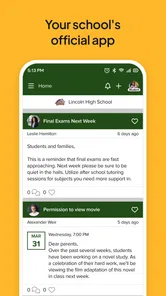
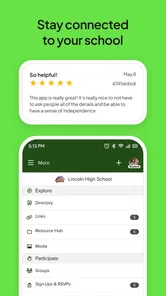
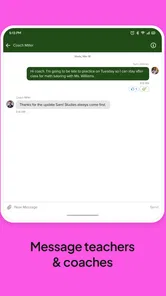
StudentSquare is a school communication app that helps students and families stay connected with teachers, schools, and district staff. It can be used to receive announcements, review messages, check reminders, and follow important school updates from a mobile device. Availability and features may vary depending on whether the student’s school or district uses the platform.
How do I sign in to StudentSquare?
To use StudentSquare, you generally need an account connected to a participating school or district. Sign-in details may be provided by the school, or access may be linked to an existing ParentSquare account or school directory information. If you cannot log in, your school’s office or administrator is usually the best contact because account access depends on the information registered by the institution.
What notifications and messages can I receive in StudentSquare?
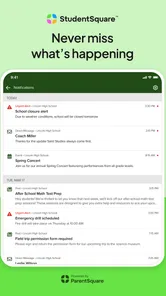
The app may deliver school announcements, classroom or group messages, event reminders, attendance-related notices, emergency communications, and other updates selected by the school. Depending on your role and the school’s configuration, you may also receive direct messages from teachers or administrators. Notification settings can normally be adjusted, but disabling alerts could cause you to miss time-sensitive information.
Pros
- Keeps school announcements and updates organized in one convenient feed.
- Supports direct communication between families and teachers or school staff.
- Push notifications help users notice important messages promptly.
- Useful for sharing reminders
- events
- forms
- and school-related information.
- Available on mobile devices
- making school communication accessible on the go.
Cons
- Requires participation from the school for the app to be genuinely useful.
- Notification volume can become overwhelming during busy school periods.
- Some features may vary depending on the school’s subscription or setup.
- Account access may depend on verified school or district credentials.
- Occasional technical issues can delay messages or affect app usability.












