

ParentSquare
- 12.72K
- 4.3
- Installs
- 1.00M
- Price
- Free

Screenshots








Analysis by Reviewed
I would decide whether to use ParentSquare by starting with one practical question: does your school treat it as a main communication channel, or is it just another place where a few notices occasionally appear? A school-family app is only useful when both sides show up. When teachers and administrators use it consistently, it can make school messages easier to find and act on. When they do not, it risks becoming one more icon to check.
That distinction matters more than a long feature list. Before changing your habits, ask which messages, forms, and event details the school expects families to find in the app, and whether existing channels will continue. I would also check whether the school has connected the right family members and contact details. A smooth start depends on the school’s setup as much as on the app itself.
For families, the key trade-off is convenience versus attention. Moving school communication into one place can reduce inbox clutter, but it does not automatically reduce the number of messages or decisions coming your way. If notifications are poorly tuned, the convenience of a central channel can turn into a steady stream of interruptions. I’d choose settings that make genuinely time-sensitive notices easy to spot while leaving routine information for a planned check-in.
When a school-centered app earns its place
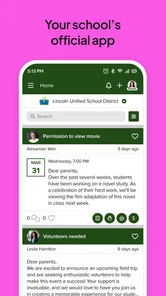
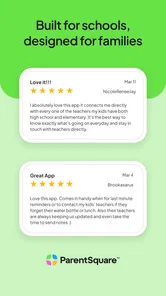
As an education app developed by ParentSquare, this platform is aimed at keeping school communication within a private, school-focused space. It is free, rated for Everyone, and has a 4.4 average from around 42,000 ratings. More than 1 million people have installed it, which suggests it is used by many families, though the deciding factor for any particular household is still whether its own school participates actively.
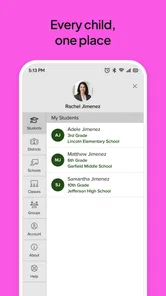
The app makes the most sense for parents and guardians who want a regular place to look for school announcements, reminders, forms, and calendar information. It may also suit a household where more than one caregiver needs to keep up, as long as the school’s account setup accommodates them. If you are already juggling emails, paper slips, and separate school pages, a shared school channel can make it easier to know where to begin.
It is less compelling if your school sends nearly everything through email or maintains a portal that families already check reliably. Installing another communication app will not make those routines disappear by itself. I would avoid treating ParentSquare as the definitive source until the school explains what it uses the platform for and staff actually post there.
Getting Started with Ease
First things first, downloading and setting up the ParentSquare app was a breeze. Available for both Android and iOS, it’s a quick install from the respective app stores. Once you’re in, the app asks for some basic info to connect you with your school. The interface is straightforward, making it super user-friendly, even for those who might not be tech-savvy.
More From Our News Desk

 Instagram
Instagram’s Power Comes From Its Place in Your Phone
A close look at how Instagram turns Meta’s reach, recommendation systems and everyday camera habits into durable platform power—and what that costs users.

 Gmail
GmailGmail in a Busy Inbox: Who Benefits Most?
From first account to crowded workday, Gmail earns its place through dependable search and flexible sorting—but its best fit depends on how much inbox maintenance you can tolerate.

 Prime Video
Switching to Prime Video: What Changes in Your Viewing Routine
Prime Video can make a compelling second home for streaming, but switching means learning a different catalog, rental layer, and route from browsing to playback.

 Universal TV Remote Control
Universal TV Remote Control Works Best as a Reliable Backup
A phone remote earns its place through quick setup and reliable habits. Here is how to get more from Universal TV Remote Control—and where its limits show.

 Weather - By Xiaomi
Weather by Xiaomi Review: Clear at a Glance, Less Clear Up Close
Xiaomi’s weather app makes everyday forecasts quick to scan, but its calm surface can leave useful details and recovery paths harder to find than they should be.

 X
XX Under Pressure: Can It Recover When Posting Goes Wrong?
A resilience-focused review of X, examining setup, mistaken posts, interruptions, weak connections, and the gaps that matter when recovery needs to be dependable.
Latest News



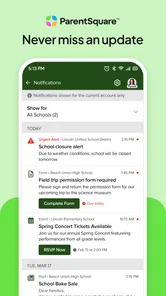
A useful first step is to check that the school connection and contact details are correct, then decide which alerts deserve an immediate interruption and which can wait. If every routine update produces a notification, it becomes easy to tune them all out; if everything is muted, a time-sensitive message can get buried. I’d treat the first few days as a calibration period and adjust notifications around the way your family handles school messages.
I would also establish a simple routine rather than expecting the app to remember every task for me. For example, a parent can check new school messages at a regular point in the day, note any requests that need follow-up, and then return to the app only when a reply or detail is needed. That small habit makes a central channel more useful without turning it into a constant distraction.
Features That Stand Out
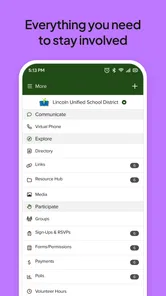
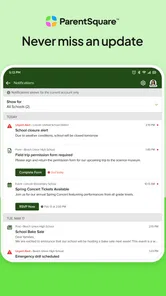
What I really dig about ParentSquare is its array of features designed to keep everyone in the loop. From receiving announcements and reminders to signing forms digitally, it’s like having the school office right in your pocket. The app organizes everything neatly, so you’re not scrambling through emails or paper notes stuffed in your kid’s backpack.
That combination is most useful when a school sends several kinds of information during a busy week. I would use the app as the first place to check for school notices, then keep personal reminders for anything that needs action, such as returning a form or preparing for an event. The important distinction is that receiving a message is not the same as completing its request: a quick daily scan can help prevent a notice from being mistaken for a finished task.
One feature I found particularly useful is the calendar integration. It's a lifesaver for keeping track of school events, holidays, and even parent-teacher meetings. No more excuses for missing out on important dates!
For a realistic example, imagine seeing a meeting notice while commuting or between errands. I’d check the details when I have a moment, then put the time somewhere I routinely review rather than relying on memory. A school calendar is especially helpful for spotting clashes between school commitments, but families with multiple children may still want a personal calendar for activities that sit outside the school’s schedule.
There is a useful distinction between using the calendar as a reference and treating it as a complete family planner. School dates can help you notice a conflict early, but I would still record appointments, transport plans, and extracurricular commitments in the calendar the household already uses. That avoids assuming every person who needs a reminder is following the same school app.
Communication Made Simple
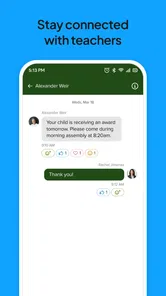
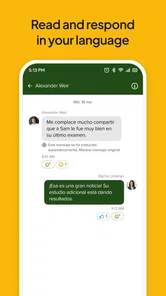
Another strong point of the app is its communication tools. You can send messages to teachers and even other parents, which is a huge plus. It’s like having a digital PTA meeting anytime you need it. Plus, the app supports multiple languages, making it inclusive and broadening its accessibility.
I see the messaging as a more focused alternative to searching through a crowded email inbox, particularly when a question belongs with a specific teacher or school contact. Still, it is not a reason to expect an instant reply; I would use the channel for ordinary school matters and follow the school’s stated process for urgent issues. Group conversations can also become noisy, so a short, clear message with the child’s context is usually more useful than a long thread that mixes several topics.
For a message that needs an answer, I’d put the question near the beginning and include only the context the teacher needs. That makes it easier to respond without an extended exchange. If the subject involves a sensitive family matter, I would consider whether a direct conversation through the school’s preferred process is more appropriate than a group discussion.
Compared with broad family-messaging apps, ParentSquare’s purpose is narrower: it is centered on school-to-family communication. That focus can reduce the effort of finding school announcements among unrelated chats. On the other hand, if your main need is simply coordinating rides or sharing informal updates with a small parent group, a general messaging app may feel more natural. The better choice depends on whether the school is an active participant, not just on which interface you prefer.
It also differs from a school portal in the way I would use it: a portal can be the better destination when a family mainly needs to look up formal records or established school resources, while a communication app is more useful for keeping up with ongoing notices and conversations. These tools can serve different jobs rather than replacing one another. I would follow the school’s guidance on which channel is authoritative for each kind of information.
Security and Privacy
In this digital age, security is a top concern, and ParentSquare doesn’t disappoint. The app ensures that all communications are secure, with strong privacy controls to protect student and family information. This gives peace of mind knowing that your data isn’t floating around in cyberspace.
Because school conversations can involve personal details, I’d still keep messages focused and share only what is needed to resolve the issue. Families should also consider who in the household needs access and how school updates will be handled when a caregiver changes. The app can make communication easier, but good judgement about what to send remains part of using any school platform responsibly.
For a shared-care arrangement, it is worth sorting out access and expectations early. Decide who is responsible for checking routine notices and how the other caregiver will hear about anything that requires a joint decision. This is a household workflow question, not just a settings question: two adults can have access and still miss something if each assumes the other has seen it.
What changes when you switch channels
There is a small switching cost if your school is moving from a mix of email, paper, and other portals: you may need to check more than one place while everyone settles into the same routine. I would not delete old messages or stop checking an existing channel until the school clearly confirms where important updates will appear. ParentSquare runs at version 2.100.0 and requires Android 7.0 or later, a practical point to check if you are installing it on an older device.
The adjustment is not only technical. Families may need to change where they look for a permission request, who is expected to reply, and how they keep track of dates. I’d give the school’s new process time to become clear, but I would not assume a message has moved just because the app is installed. During a transition, a quick check of the school’s usual channel can prevent a missed notice.
The platform is not the right answer for every communication problem. If the main issue is that a school rarely updates its chosen channel, switching apps will not fix that habit. If your household prefers one shared inbox and the school already communicates there consistently, adding a separate app may be unnecessary. In those situations, I would ask the school whether its process is changing before spending time reorganizing family routines.
Overall, ParentSquare is a game-changer for school communication. It’s convenient, comprehensive, and connects the dots seamlessly between schools and families. For anyone looking to streamline their school-related communications, this app is definitely worth checking out. Whether you're a parent, teacher, or school admin, it’s an invaluable tool to keep everything organized and clear.
My recommendation is strongest for families whose school actively uses the app for announcements, messages, forms, and calendar items. If the school’s communication is scattered or staff rarely post there, a familiar email inbox or the school’s existing portal may be more dependable until its habits change. The app itself is free, so the deciding factor is less about cost than whether it becomes the channel your school actually maintains.
So, if you're tired of the old-school communication hassles, give ParentSquare a go and see how it transforms the way you connect with your child's school life.
ParentSquare Frequently Asked Questions
What is ParentSquare’s average rating, and is it widely used?
ParentSquare has an average rating of 4.4 from around 42,000 ratings, with about 12,000 written reviews. It has over 1 million installs, reflecting its use by families and school communities. Ratings and reviews can help you understand other users’ experiences, but whether the app is useful to your family depends mainly on your school’s use of ParentSquare.
What should I check before downloading ParentSquare for my phone?
Check that your device meets the app’s operating-system requirements before installing. ParentSquare requires Android 7.0 or later on Android devices. The app is also available for iOS, and families can access the platform through a web browser. For school-specific communication, confirm that your school or district uses ParentSquare and knows how you should connect your account.
Is ParentSquare free to download and use?
ParentSquare is a free education app for families and school communities. You can download it without paying an upfront purchase price, then use it to stay connected with school communications. Keep in mind that access to the platform is tied to a school or district using ParentSquare, so downloading the app alone may not provide school-specific messages or information.
Who can use ParentSquare, and do I need a school invitation?
ParentSquare is intended to connect schools with parents, students, and staff. To receive communications for a particular school, your family or school community needs to be connected through that organization. If you are unsure how to join, check with your school about its ParentSquare setup and the correct way to access your account before relying on the app for important updates.
What is ParentSquare and how does it work?
ParentSquare is a comprehensive communication platform designed for K-12 schools to engage with parents, students, and staff. It offers features such as messaging, announcements, event scheduling, and forms. Users can access the platform via the web or mobile app, ensuring easy communication and collaboration between schools and families.
Pros
- User-friendly interface enhances communication.
- Real-time updates keep parents informed.
- Integrates well with school systems.
- Offers multilingual support for inclusivity.
- Secure platform protects user data.
Cons
- Limited features in the free version.
- Notification overload can be overwhelming.
- Mobile app can lag occasionally.
- Initial setup can be time-consuming.
- Some features require paid subscription.












