

Stock Scanner - Market Mover
- 43.00
- 3.1
- Installs
- 50.00K
- Price
- Free

Screenshots
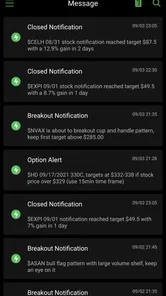
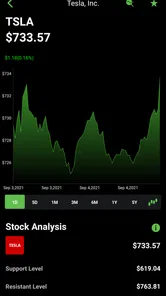
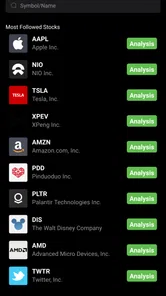
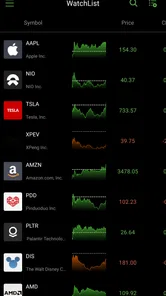
Analysis by Reviewed
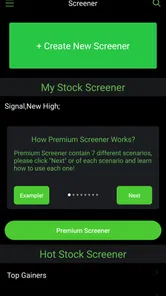
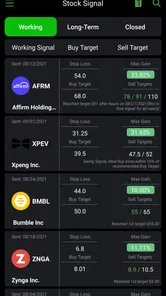
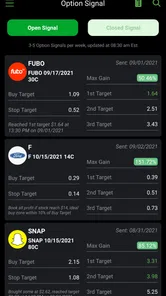
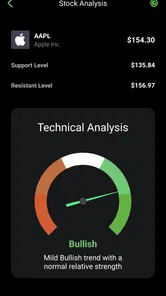
Stock Scanner - Market Mover is the kind of finance app I would open when I want a quick view of what is happening in the stock market rather than a full trading workstation. Its focus is straightforward: follow stocks, notice large-money activity, scan market movements, and keep up with stock news. After spending time with it, my impression is that it can be useful as a lightweight research companion, but it works best when you treat it as a starting point for investigation instead of a complete investing solution.
The app is free to install, with optional in-app purchases ranging from $9.99 to $349.99 per item. That makes the first step easy for curious users, although anyone considering paid tools should look carefully at what is included before committing. It is published by Stock Screener APP, belongs to the Finance category, and is suitable for Everyone. The current version is 8.1 and it runs on Android 8.0 or later, so it remains accessible on many older phones.
Getting past the first points of friction
The most common difficulty with a stock scanner is not necessarily a broken screen. It is knowing what to do with a large amount of market information. A page showing moving stocks, news, and unusual activity can feel useful at first, yet it becomes noisy if I open it without a question in mind. I get better results when I decide whether I am looking for a company to research, checking a holding I already own, or simply trying to understand the day’s market direction.
I also recommend starting with a small watchlist rather than trying to follow everything. A compact list makes changes easier to notice and gives the news section more context. If I add too many unrelated companies, the app becomes a stream of headlines instead of a practical research tool. This is one of the less obvious trade-offs: the scanner can save time, but only after I limit the amount of information competing for my attention.
The store rating is 3.1 from around 200 ratings, which suggests that the experience is mixed rather than universally smooth. I would not read that number as a reason to dismiss the app, but I would take it as a reminder to test the parts I actually need before relying on it. A scanner may be perfectly useful for monitoring ideas while still feeling less polished than a dedicated brokerage or professional market terminal.
On the first launch, I would check that the app is running on a supported Android version and that the phone has a stable connection. Market tools depend heavily on current information, so a blank panel or stale-looking screen should not immediately be interpreted as a problem with a ticker. I would first refresh the view, close and reopen the app, and compare the result with another trusted market source.
Another sensible setup habit is to search for one familiar company before building a larger routine. If that company appears correctly, I can then add a few more symbols and see whether the problem is limited to a particular search or affects the whole app. This simple test avoids wasting time changing settings when the real issue is an unfamiliar ticker format or a company listed on a different exchange.
More From Our News Desk

 Gmail
GmailGmail in a Busy Inbox: Who Benefits Most?
From first account to crowded workday, Gmail earns its place through dependable search and flexible sorting—but its best fit depends on how much inbox maintenance you can tolerate.

 Prime Video
Switching to Prime Video: What Changes in Your Viewing Routine
Prime Video can make a compelling second home for streaming, but switching means learning a different catalog, rental layer, and route from browsing to playback.

 Universal TV Remote Control
Universal TV Remote Control Works Best as a Reliable Backup
A phone remote earns its place through quick setup and reliable habits. Here is how to get more from Universal TV Remote Control—and where its limits show.

 Weather - By Xiaomi
Weather by Xiaomi Review: Clear at a Glance, Less Clear Up Close
Xiaomi’s weather app makes everyday forecasts quick to scan, but its calm surface can leave useful details and recovery paths harder to find than they should be.

 X
XX Under Pressure: Can It Recover When Posting Goes Wrong?
A resilience-focused review of X, examining setup, mistaken posts, interruptions, weak connections, and the gaps that matter when recovery needs to be dependable.

 Clash of Clans
Clash of Clans Is Won Between the Battles
Its raids are quick; its community is a long-term project of coordination, teaching, rivalry, and shared responsibility—with all the friction that entails.
Latest News



What I would check before judging the scanner
I would also review the app’s basic settings and notification choices before using it every day. The right balance depends on how actively I follow markets. Someone checking investments once in the evening may find frequent alerts distracting, while an active watcher may want faster awareness of a major move. I would begin conservatively and increase the amount of information only when it proves useful.
It is worth separating three tasks that are easy to mix together: discovering a stock, researching a stock, and making a trade. Stock Scanner - Market Mover is most naturally suited to the first two. It can help me notice a movement or headline that deserves attention, but that does not automatically make the underlying company attractive. I would still verify financial information, company announcements, and the trading details in a separate, reliable source before placing an order.
That distinction matters particularly when the app highlights big-money activity. Large transactions or unusual market behavior can be interesting clues, but they are not instructions. A large participant may be hedging, reducing risk, or acting for reasons that are invisible to a casual observer. I find the feature more useful as a prompt for questions than as a shortcut to a buy or sell decision.
Recovering a useful workflow when information feels confusing
When a scan produces too many results, I use a three-step routine. First, I note why a stock appeared. Second, I open its related news and look for a plausible event or broader market explanation. Third, I place the symbol on a short watchlist instead of acting immediately. This turns a fast-moving screen into a repeatable research process and reduces the temptation to chase whatever is currently most visible.
A realistic example would be checking the app during a lunch break after noticing that a company I follow has moved sharply. I would look at the market-mover view, read the relevant headlines, and compare the movement with the wider sector. If the entire sector is moving, the cause may be broader than that one company. I would then save the stock for later review rather than making a rushed decision from a single screen.
If news appears outdated or a scanner seems empty, I would first refresh and check the connection. Next, I would try a well-known symbol and inspect whether other market sections load. If only one area fails, reopening the app may be enough. If several sections remain unavailable, I would wait and verify the information elsewhere before assuming that the market itself is quiet.
This recovery approach is more useful than repeatedly tapping the same control. Finance apps can display different information at different times, and a delayed update may be caused by connectivity, market timing, or the source of the information rather than by the phone. I would avoid treating an empty result as proof that there are no meaningful market movements.
For the same reason, I would not use a single alert or headline as a complete explanation. News can lag behind price action, and a price can move before a clear explanation becomes available. The app is valuable for helping me notice that something deserves attention; it is less suitable as the only place where I decide why it happened.
When the app is not really the problem
Some frustrations come from expectations rather than from the application. A user looking for live execution, account management, portfolio tax tools, or advanced chart analysis may feel that a stock scanner is incomplete. That is a category mismatch. A brokerage app is usually the better choice for placing orders and managing holdings, while a more advanced market platform may suit someone who needs in-depth technical studies or professional research tools.
Stock Scanner - Market Mover makes more sense beside those services than in place of them. I can use it to discover a company or monitor a market theme, then move to my brokerage for execution and another research source for deeper verification. This two-app workflow may sound less convenient, but it keeps discovery separate from decisions and reduces the risk of acting on a headline alone.
The app’s free entry point is helpful for testing that workflow. I can see whether its scanning and news approach fits my habits before considering any paid option. Because individual purchases can become expensive, I would be especially careful not to buy simply because a screen feels busy or because I want faster answers. A paid feature is worthwhile only if it solves a specific problem I repeatedly encounter.
There is also a psychological issue that many market tools create: constant checking. A scanner built around movement and news can encourage me to look at short-term changes even when my investment plan is long term. I would set a clear checking schedule and use the app as a research aid, not as a reason to react to every fluctuation. For long-term investors, that discipline may matter more than any individual scanner result.
Privacy and device behavior are practical considerations too, although I would judge them from the app’s own current settings and from how my phone behaves rather than making assumptions. If the app uses more battery or data than expected, I would reduce unnecessary background activity where Android allows it and avoid leaving market screens open continuously. If a problem affects other apps as well, I would troubleshoot the phone or connection instead of blaming this particular scanner.
Who will get the most from it
I think the best audience is a beginner or intermediate investor who wants a focused way to notice market activity and collect ideas for further research. It can also suit someone who already has a brokerage account but wants a separate place to monitor stocks and news without mixing discovery with order placement. The simple premise makes it approachable, provided the user is comfortable verifying important information elsewhere.
It is less suitable for someone who expects a complete professional terminal, guaranteed real-time decision support, or a single app for every part of investing. I would also hesitate to recommend it as the only tool for a person who needs detailed portfolio accounting, sophisticated chart work, or direct trade execution. Those needs call for a different type of finance application.
The app has reached over 50 thousand installs, so it has attracted a meaningful audience without becoming something I would describe as a dominant market standard. That fits my experience of it: useful enough to keep in a research toolkit, but not so comprehensive that I would build my entire investing process around it.
One practical tip is to create a watchlist based on a question rather than on popularity. For example, I might follow several companies in one industry to compare how they respond to the same market event. This gives the news and movement information a framework. Without that framework, the most active stocks can dominate my attention even when they have nothing to do with my goals.
Another useful habit is to record the reason I added a stock. If I cannot explain in one sentence why it belongs on my list, I probably found it impulsively. Later, I can check whether the original reason still holds. This makes the app better for learning and reduces the chance that a temporary market move becomes an accidental investment thesis.
In everyday use, I would open it in the morning to identify areas worth following, return after a major market move to review news, and then close it rather than leaving it running all day. That schedule keeps the scanner in its proper role. It provides prompts and context, while my broader research process supplies the evidence needed for a serious decision.
My practical verdict
After reviewing Stock Scanner - Market Mover as a finance app, I see a useful but limited companion for stock discovery. Its combination of market scanning, news, watchlist-style monitoring, and attention to large-money activity gives casual investors a reason to return. The free starting point and broad Android compatibility also make it easy to try.
My reservation is that the same fast-moving information can become distracting, and the average rating indicates that not every user has found the experience equally satisfying. I would approach the app with realistic expectations, test one familiar stock first, and build a small, purposeful routine before paying for anything. I would also verify important prices, news, and company details through trusted alternatives.
My recommendation is to use it as an alert-and-research layer, not as a replacement for a brokerage or a complete investment platform. If you want a lightweight way to discover market activity and decide what deserves deeper study, it is worth trying. If you need execution, advanced analysis, or detailed portfolio management in the same place, I would choose a more specialized alternative and keep this app only if its scanning workflow genuinely saves me time.
In short, Stock Scanner - Market Mover is most valuable when I remain selective. I use its screens to find questions, its news to gather context, and independent research to reach conclusions. That approach turns a potentially noisy market feed into something practical, while keeping the final investment decision where it belongs: with careful judgment rather than with any single app.
Stock Scanner - Market Mover Frequently Asked Questions
What devices and operating systems can run Stock Scanner - Market Mover?
Stock Scanner - Market Mover is a finance app for mobile devices, with a minimum operating-system requirement of version 8.0. Before downloading, check that your device meets this requirement and has enough available storage for installation. Keeping your operating system updated can also help with compatibility and performance. The app is intended for tracking market activity, so a stable internet connection is useful when checking stock information.
Who develops Stock Scanner - Market Mover, and is it suitable for general audiences?
The app is developed by Stock Screener APP and has an Everyone content rating, making it suitable for a general audience. Its subject is stock-market activity, though, so some screens and terms may be more useful to people who already follow investing. It has an average rating of 3.1 from around 200 ratings, so it is worth considering user feedback alongside your own needs before installing.
What is Stock Scanner - Market Mover used for?
Stock Scanner - Market Mover is designed to help investors monitor stocks that are attracting unusual attention in the market. It can be useful for finding significant price changes, active trading volume, momentum, and other market-moving signals in one place. The app is better suited to research and discovery than to replacing a complete brokerage platform or a carefully planned investment strategy.
Does Stock Scanner - Market Mover provide real-time stock data?
The availability and speed of market information may depend on the selected market, data provider, subscription level, and your internet connection. Some quotes or indicators may be delayed, so users should check the timestamp and any disclosure shown in the app before making a trading decision. Always confirm important prices and company information through an official exchange, broker, or trusted financial source.
Can I buy or sell stocks directly through the app?
Stock Scanner - Market Mover is primarily intended as a market-scanning and monitoring tool rather than a full investment account. Whether trading is available depends on the current version and any supported broker integrations. In most cases, users will need to place orders through their separate brokerage account. The app should therefore be viewed as a research companion, not as a guarantee of execution or investment success.
Pros
- Quickly highlights stocks with unusual price and volume activity.
- Useful filters help narrow results by market movement and trading signals.
- Clean interface makes scanning watchlists straightforward for beginners.
- Can support faster research before making a more detailed investment analysis.
- Market-mover data may reveal opportunities that standard watchlists miss.
Cons
- Scanner results can change rapidly and may become outdated within minutes.
- Some advanced indicators or features may require a paid subscription.
- Signals do not explain the full reasons behind a stock’s movement.
- Limited coverage may vary depending on the exchange or market selected.
- Beginners could mistake short-term momentum for a reliable investment opportunity.













