

Stocks Signals - Stock Tracker
- 82.00
- 3.4
- Installs
- 100.00K
- Price
- Free
Screenshots
Analysis by Reviewed
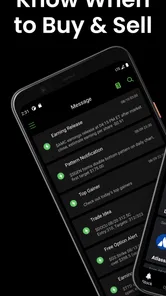
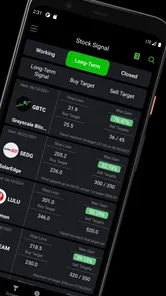
I approached Stocks Signals - Stock Tracker as a practical finance companion rather than a replacement for a broker. Its main appeal is simple: it brings stock screening and AI-powered trading signals into one mobile app, giving me a quicker way to narrow down ideas before doing deeper research elsewhere. That makes it potentially useful when I want a focused starting point instead of opening several market tools at once.
The app is free to install, carries an Everyone age rating, and is developed by Stock Screener APP. It has passed the early stage of its life with more than one hundred thousand installs, although its average score of 3.4 from roughly four hundred ratings suggests that the experience is not equally smooth for everyone. I think that mixed response is important context: the concept is convenient, but the value depends heavily on how carefully you interpret its signals and how well the app fits your research habits.
Getting past the first points of friction
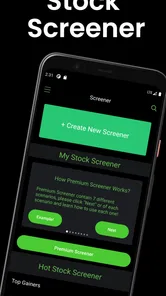
The first useful mindset is to treat the app as a discovery and monitoring tool. A screener can help reduce a large market to a smaller group of stocks, while a signal can draw attention to a possible change in momentum or direction. Neither one removes the need to check the company, the wider market, the news, or your own risk limits. If I opened it expecting a complete investing decision in a few taps, I would probably be disappointed.
Some users may get stuck because they expect the opening screen to behave like a brokerage account. This is not the same as a trading platform where the central task is placing orders. I would use it before opening my broker: first to explore candidates, then to verify the details through a more established research source, and only after that to decide whether an action makes sense.
Another possible source of confusion is the difference between an alert and a recommendation. A signal is best understood as a prompt to investigate. It may help me notice a stock that deserves attention, but it does not know my entry price, portfolio size, time horizon, tax position, or tolerance for loss. I would never turn an alert into an automatic buy decision.
The app’s current version is 4.9 and it requires Android 8.0 or later. Those details matter before troubleshooting anything more complicated. If the application will not install or behaves strangely, I would first check the device’s Android version, available storage, and whether the operating system has pending updates. A compatibility problem can look like an app problem even when the software itself is working as intended.
Small setup checks that save time
I would begin with a stable connection and a fully updated installation. Market information is especially sensitive to interruptions, so an empty screen or delayed result should not immediately be interpreted as a meaningful market condition. I would close and reopen the app, switch between reliable networks if necessary, and give the screen a moment to refresh before changing several settings at once.
More From Our News Desk

 Gmail
GmailGmail in a Busy Inbox: Who Benefits Most?
From first account to crowded workday, Gmail earns its place through dependable search and flexible sorting—but its best fit depends on how much inbox maintenance you can tolerate.

 Prime Video
Switching to Prime Video: What Changes in Your Viewing Routine
Prime Video can make a compelling second home for streaming, but switching means learning a different catalog, rental layer, and route from browsing to playback.

 Universal TV Remote Control
Universal TV Remote Control Works Best as a Reliable Backup
A phone remote earns its place through quick setup and reliable habits. Here is how to get more from Universal TV Remote Control—and where its limits show.

 Weather - By Xiaomi
Weather by Xiaomi Review: Clear at a Glance, Less Clear Up Close
Xiaomi’s weather app makes everyday forecasts quick to scan, but its calm surface can leave useful details and recovery paths harder to find than they should be.

 X
XX Under Pressure: Can It Recover When Posting Goes Wrong?
A resilience-focused review of X, examining setup, mistaken posts, interruptions, weak connections, and the gaps that matter when recovery needs to be dependable.

 Clash of Clans
Clash of Clans Is Won Between the Battles
Its raids are quick; its community is a long-term project of coordination, teaching, rivalry, and shared responsibility—with all the friction that entails.
Latest News



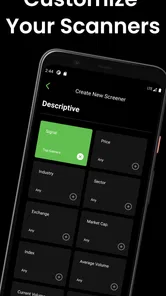
It is also worth starting with a narrow question. Instead of trying to screen the entire market with every available condition, I would choose one clear objective, such as finding companies with a particular price behavior or reviewing stocks that have triggered a signal. This makes it easier to tell whether the result is useful and easier to identify which filter caused an unexpected outcome.
If a search returns little or nothing, I would loosen one condition at a time rather than removing everything. A very restrictive combination can produce an apparently broken result when the real issue is simply that few stocks match it. This is one of the most practical habits for any screener, but it is especially helpful on a phone, where compact controls can make several active conditions easy to overlook.
I would also keep notes outside the app about the logic behind a shortlist. For example, I might record why a stock appeared, what signal caught my attention, and what information still needs checking. That prevents the common mistake of returning later and remembering only the exciting part of the alert. The app can help me find an idea; my notes help me judge whether the idea still deserves attention.
A safer way to read signals
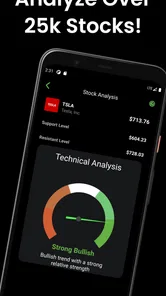
The phrase AI-powered trading signals sounds powerful, but I would keep my expectations grounded. A signal is useful when it organizes attention, not when it pretends to predict the future with certainty. I would compare it with the stock’s recent behavior, look for relevant company or sector news, and check whether the broader market is moving in the same direction.
One useful workflow is to separate discovery from confirmation. On the first pass, I might use the screener to build a short list. On the second pass, I would examine each candidate independently and remove anything that conflicts with my financial plan. This two-stage approach reduces the temptation to act simply because an item appeared near the top of a results screen.
There is a trade-off here. The app can make market exploration faster, but speed can also encourage shallow decisions. If I only have a few minutes, I would use it to create a watchlist for later rather than place a rushed trade. That is a better fit for the app’s strengths and avoids treating a mobile signal as a complete investment thesis.
Recovering when a workflow goes wrong
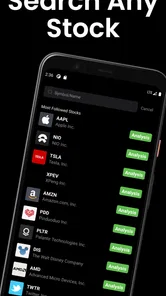
When a screen does not behave as expected, I would retrace the last action instead of assuming the whole service is unavailable. Did I change a filter, search for a symbol in a different format, or move from a screener result into a signal view? Repeating the process with a simpler search can reveal whether the issue is tied to one query or affects the wider app.
If a result seems stale, I would avoid making a decision from it until it refreshes or can be checked elsewhere. A delayed quote, an interrupted connection, or a temporary service issue can make an old signal look current. The safest recovery is to confirm the relevant market information independently before acting.
When a shortlist suddenly becomes too broad, I would not assume that the app has lost my preferences. I would inspect the active conditions and rebuild the screen in a controlled order. Start with the most important filter, review the result, then add the next one. This takes longer than tapping several options at once, but it makes the final list much easier to understand.
If the app closes or becomes unresponsive, the ordinary steps are sensible: reopen it, restart the device if needed, and check for an available app or system update. I would avoid repeatedly tapping controls while the screen is loading, because that can make it harder to tell whether the problem is a delayed response or an actual failure. If the same behavior continues, I would record the exact screen and action involved before seeking support.
Paid access deserves a careful look as well. The app is free, but in-app purchases range from $9.99 to $349.99 per item. I would not buy anything simply to solve a temporary loading problem or because a signal feels urgent. Before spending, I would identify which part of my workflow is currently limited and whether the added access would genuinely improve my research. A free version may be enough for occasional screening, while a frequent user may consider an upgrade only after testing the basic experience.
When the app is not the real cause
Finance apps are often blamed for results that are actually caused by the market itself. A stock can move sharply after news, a sector can reverse without warning, and a technically positive signal can be followed by a loss. That does not automatically mean the screen failed. It may mean the signal was only one piece of evidence and was never designed to account for every event affecting a company.
My own rule would be to check the time context. A signal that looked interesting earlier may no longer fit the current price or market mood. I would also ask whether I am looking at a liquid, familiar company or a thinly followed stock where small trades can create dramatic movements. The app can surface candidates, but it cannot replace judgment about how much confidence a particular result deserves.
There is a similar issue with expectations around accuracy. A middling overall rating does not tell me exactly which feature caused dissatisfaction, but it does encourage a realistic trial rather than blind dependence. I would use the app with modest expectations, test it against my existing research process, and keep independent records of decisions instead of assuming every alert will be useful.
For someone who already uses a full-featured broker, this app may feel like an extra layer rather than a complete solution. A broker usually remains the better place for account management and order execution. A dedicated research website may be better for detailed company analysis, financial statements, and long-form market context. Stocks Signals - Stock Tracker makes more sense when I want a mobile-first way to scan possibilities and organize the next research step.
A realistic everyday scenario
Imagine I have a short lunch break and want to review the market without making an immediate trade. I could open the app, run a focused screen, and note a few names that match the conditions I care about. I would then use the signal view as a prompt, not a verdict, and write down what needs confirmation. Later, I could compare those names with company news and my broker’s information before deciding whether any belongs on a watchlist.
This scenario shows where the app is strongest: reducing the time needed to begin research. It also shows its boundary. The actual decision still happens outside the signal itself. If I had only enough time to glance at an alert and buy immediately, I would skip the trade rather than let convenience determine the outcome.
Another useful case is learning how different screening ideas affect the market universe. A new investor can experiment with one condition, observe the type of companies it surfaces, and then compare that result with another approach. The important lesson is not just which stocks appear, but how changing the rules changes the shortlist. That makes the app more educational when used deliberately.
Who should use it, and who should pass
I would recommend trying it if you want a compact stock screener, enjoy building your own shortlist, and understand that signals are starting points. It can suit a casual investor who wants a quicker daily scan, or a more active researcher who needs another way to discover candidates before doing detailed checks elsewhere.
I would be more cautious if you are completely new to investing and are likely to read an alert as a guaranteed call. In that case, a learning-focused resource or a platform with clearer educational explanations may be a better first step. I would also skip this app if your main requirement is direct order execution, portfolio accounting, or comprehensive fundamental research in one place.
Privacy, permissions, and purchase choices are worth reviewing in the normal way before regular use, particularly because the app offers optional items at a wide range of prices. I would keep any purchase decision separate from the excitement of a market move. The free starting point makes testing easier, so I would use that opportunity to decide whether the workflow genuinely saves me time.
My practical verdict
After looking at the app as a working tool rather than a promise of effortless profits, I see a useful but limited role for it. The combination of screening and AI-assisted signals can make the first stage of stock research more convenient. Its best contribution is helping me decide where to look next, especially when I have a specific question and want a fast mobile shortlist.
The friction comes from the same place as the appeal: condensed information can feel more decisive than it really is. Filters need to be checked carefully, delayed information should be verified, and signals need context. The app is also not a substitute for a broker or a complete research service, and the optional purchase range means I would test the free experience before considering any paid item.
My recommendation is to use it as a screening assistant with a written confirmation process. Start narrowly, change one condition at a time, verify anything important outside the app, and never let an alert override a personal risk limit. Used that way, Stocks Signals - Stock Tracker can earn a place in a broader investing routine. Used as an automatic decision-maker, it is the wrong tool for the job.
Stocks Signals - Stock Tracker Frequently Asked Questions
Is Stocks Signals - Stock Tracker free to download?
Stocks Signals - Stock Tracker is free to download, but some features may involve in-app purchases. Those purchases range from $9.99 to $349.99 per item, so it is worth checking the purchase details before subscribing or unlocking anything. You can start with the free app and decide whether its available tools meet your needs before spending money.
Which devices can run Stocks Signals - Stock Tracker?
Stocks Signals - Stock Tracker is available for Android devices running Android 8.0 or later. Before downloading, check your device’s operating system version and make sure you have enough available storage for the installation. The app is in the Finance category, and its content rating is Everyone, making it suitable for a broad audience interested in tracking stocks.
What is Stocks Signals - Stock Tracker used for?
Stocks Signals - Stock Tracker is designed to help users follow market prices, review stock information, and monitor potential trading opportunities from a mobile device. It can be useful for beginners who want a simple overview as well as more experienced investors who need quick access to watchlists, price movements, charts, and signal-style insights while away from a desktop platform.
Are the signals in Stocks Signals - Stock Tracker guaranteed to be accurate?
No. Any signals, indicators, forecasts, or recommendations shown in Stocks Signals - Stock Tracker should be treated as informational tools rather than guaranteed predictions. Stock prices can change rapidly because of news, earnings, economic events, and market sentiment. Before buying or selling, users should research the company, consider their own risk tolerance, and avoid relying on a single signal or automated suggestion.
Can I buy and sell stocks directly through the app?
Stocks Signals - Stock Tracker is primarily intended for tracking market data and reviewing stock-related information. Whether it supports direct trading depends on the app’s current integrations, region, and available broker connections. In many cases, users must place orders through a separate brokerage account. Check the app description and permissions carefully before assuming that monitoring prices and executing trades are available in the same place.
Pros
- Clear buy
- sell
- and hold signals help simplify market research.
- Real-time price tracking keeps important stock movements easy to monitor.
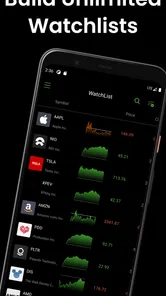
- Watchlists let you follow selected companies without checking every market.
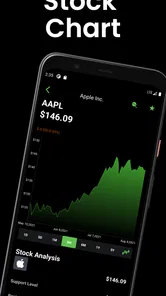
- Useful charts make it easier to review price trends and past performance.
- Push alerts can notify you about notable changes and potential opportunities.
Cons
- Signal accuracy can vary and should not replace independent investment research.
- Some advanced indicators or features may require a paid subscription.
- Market data may be delayed depending on the selected exchange or plan.
- The interface can feel crowded when monitoring many stocks at once.
- Frequent alerts may become distracting during volatile trading sessions.













