

Stock Screener - Stock Screens
- 52.00
- 4.3
- Installs
- 10.00K
- Price
- Free

Screenshots
Analysis by Reviewed
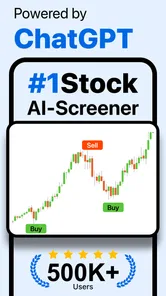
If you are new to stock research, Stock Screener - Stock Screens is the kind of finance app that tries to make the first step less intimidating. Instead of opening a long list of companies and wondering where to begin, I can use a stock screener to narrow the market around conditions that matter to me. The app also presents trading signals and an AI-powered approach, so its main appeal is helping me turn a vague idea such as “I want to find interesting stocks” into a more focused research routine.
I would not treat it as an automatic investing machine, though. In my experience, a screener is most useful when it helps me create a shortlist and ask better questions. It is much less useful when I expect a signal to replace reading, comparison, or risk control. That distinction is important for a first-time user: the app can organize the search, but the final decision still needs judgment.
Getting from installation to a useful shortlist
I’d use this section to make the first screening session feel purposeful rather than turning it into a tour of every option. Starting with one plain-language question, then changing only one condition at a time, makes it easier to see why a shortlist changes—and helps me avoid mistaking a tiny set of matches for a confident investment answer.
What to expect when opening it
Stock Screener - Stock Screens is a free finance app from Stock Screener APP, with a general Everyone content rating. It runs on Android versions from 8.0 onward, which makes it accessible to many older devices as well as newer phones. The current release is version 2.4, and the app has passed the early discovery stage with over ten thousand installs. Its average rating is 4.3 from nearly two hundred ratings, a reasonable sign that many users find the basic idea worthwhile, while still leaving enough room for individual experiences to differ.
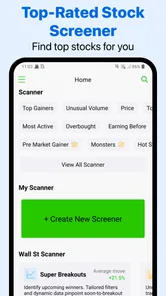
The central experience is not a brokerage account or a portfolio replacement. I see it more as a research workspace. I start with a filter or screening idea, inspect the companies that appear, and then decide whether a result deserves more attention elsewhere. That makes the app suitable for someone who wants a quicker way to scan possibilities, but not ideal for someone looking for a complete investing dashboard with every account, order, and holding in one place.
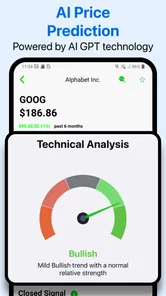
The wording around AI-powered signals may sound more decisive than it really is. I read those signals as prompts for investigation rather than instructions. A signal can help me notice a stock I might otherwise miss, but it does not automatically explain the company’s business quality, debt, valuation, competitive position, or suitability for my personal finances. The most reliable use is shortlist first, verify second, decide last.
Making the first setup less confusing
On the first launch, I would begin with one simple goal instead of trying to understand every available option at once. For example, I might want to find companies showing a particular combination of market behavior and financial characteristics. Starting with a single question gives the results a purpose. Without that question, it is easy to tap through filters simply because they look interesting and then end up with a list that cannot be compared meaningfully.
More From Our News Desk

 Gmail
GmailGmail in a Busy Inbox: Who Benefits Most?
From first account to crowded workday, Gmail earns its place through dependable search and flexible sorting—but its best fit depends on how much inbox maintenance you can tolerate.

 Prime Video
Switching to Prime Video: What Changes in Your Viewing Routine
Prime Video can make a compelling second home for streaming, but switching means learning a different catalog, rental layer, and route from browsing to playback.

 Universal TV Remote Control
Universal TV Remote Control Works Best as a Reliable Backup
A phone remote earns its place through quick setup and reliable habits. Here is how to get more from Universal TV Remote Control—and where its limits show.

 Weather - By Xiaomi
Weather by Xiaomi Review: Clear at a Glance, Less Clear Up Close
Xiaomi’s weather app makes everyday forecasts quick to scan, but its calm surface can leave useful details and recovery paths harder to find than they should be.

 X
XX Under Pressure: Can It Recover When Posting Goes Wrong?
A resilience-focused review of X, examining setup, mistaken posts, interruptions, weak connections, and the gaps that matter when recovery needs to be dependable.

 Clash of Clans
Clash of Clans Is Won Between the Battles
Its raids are quick; its community is a long-term project of coordination, teaching, rivalry, and shared responsibility—with all the friction that entails.
Latest News



I would also keep my first screening broad enough to produce a manageable group rather than chasing an extremely narrow result. A filter that is too strict can create a false sense of certainty: seeing only a few matches may feel like discovering the “best” stocks, when it may simply mean the conditions were unusually restrictive. A broader first pass gives me room to learn how the app responds and which criteria actually change the list.
For a beginner, the best setup is a repeatable one. I would write down the reason for the screen in plain language, then apply only the conditions connected to that reason. If I am exploring growth companies, I should not mix in unrelated preferences just to make the list look sophisticated. If I am looking for possible trading opportunities, I should remember that a short-term signal and a long-term investment thesis are different jobs.
The app is free to install, but it includes in-app purchases ranging from $29.99 to $299.99 per item. That is a meaningful consideration before I build my routine around features that may require payment. I would first test the free experience and decide whether the screening workflow genuinely saves me time. A paid upgrade can make sense for a serious user who gets regular value from the app, but the price range makes it unsuitable as an impulse purchase for casual curiosity.
Finding the first meaningful result
My recommended first session would be short and deliberate. I would choose one market idea, run the screen, and inspect several results instead of immediately focusing on the first company shown. The aim is not to make a trade during the first few minutes. The aim is to learn whether the results match the kind of companies I intended to find.
When a result catches my attention, I would ask three practical questions. Why did this stock appear? Which condition made it relevant? What information do I still need before considering it seriously? Those questions turn the screener into a learning tool. They also protect me from confusing visibility with quality. A company can match a filter and still be a poor fit for my time horizon or risk tolerance.
A realistic everyday use case would be checking the app during a lunch break after reading that a particular industry is becoming interesting. Instead of searching random company names, I could screen that idea into a smaller watchlist, review the signals, and save the names for deeper research later. The success of that session is not placing an order; it is ending with a clear list and a reason for each name on it.
Another useful workflow is to compare a screen with my existing assumptions. Suppose I already follow several companies. I can see whether they appear under the conditions I claim to care about. If none of them do, that may reveal that my stated strategy and actual holdings are not aligned. This is one of the less obvious benefits of a screener: it can expose inconsistency in my process, not just discover new stocks.
How to read signals without overtrusting them
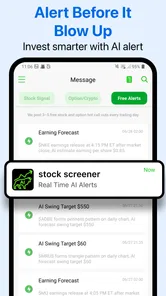
The trading-signal side of the app is likely to attract users who want a quick answer about market direction. I understand that appeal, especially when markets move quickly. Still, I would avoid treating a signal as a promise. Signals are snapshots or interpretations, while an investment decision often depends on information that changes more slowly, such as earnings quality, management decisions, industry pressure, and valuation.
I would use a signal as a trigger for a second check. If it suggests that a stock deserves attention, I would look at the company’s recent developments, compare it with similar businesses, and consider whether the reason for the signal fits my intended holding period. A signal that is useful for a short-term trader may be irrelevant to someone building a long-term portfolio. The app can help identify the starting point, but I still need to match the result to my own plan.
The AI-powered positioning also deserves a practical boundary. AI can make patterns easier to surface, but it does not know my income, emergency savings, tax situation, or emotional reaction to a falling share price. I would never use the app as a substitute for personal financial advice. For a new investor, that may sound obvious, yet the speed and confidence of automated suggestions can make weak conclusions feel stronger than they are.
Common points of confusion
The first confusion is likely to be the difference between screening and investing. Finding a stock is not the same as evaluating it, and evaluating it is not the same as buying it. Stock Screener - Stock Screens belongs mainly to the first part of that chain. I would still need another place for execution if I wanted to trade, and I would need a broader process for tracking actual holdings and performance.
The second confusion is the meaning of a match. A stock that satisfies several filters has met a search condition; it has not received a guarantee of future performance. I would be especially careful when a screen produces a very small list. Narrow results can be useful for focus, but they can also encourage me to believe that the app has found an objectively superior choice.
A third issue is the difference between a watchlist and a decision. I would keep promising results in a research list, then revisit them after checking the underlying company. This small pause is valuable because it separates the excitement of discovery from the discipline of selection. It also lets me notice whether a result remains interesting or only looked attractive at the moment I first saw it.
There is also a practical learning curve around filters. More conditions do not automatically create a better screen. If I cannot explain what each selected condition is doing, I would remove it and rebuild the search gradually. That approach makes the result easier to trust because I can tell which change caused the list to expand or shrink. It is a better habit than copying a complicated combination without understanding it.
Where this app fits beside familiar alternatives
Compared with manually searching stock names through a general finance app, this screener should be more useful when I begin with characteristics rather than a company name. Manual browsing works well when I already know what I want to research. A screener is stronger when the problem is discovery: I have an idea, but I do not yet know which companies fit it.
Compared with a full brokerage application, the emphasis here is different. A broker is built around accounts, orders, balances, and holdings, while this app is centered on finding and reviewing candidates. I would prefer the broker for execution and account management, but I would prefer a dedicated screener when I want to scan possibilities without being distracted by my current portfolio or the pressure to trade immediately.
Compared with a spreadsheet, the app is more convenient for quick exploration because I do not have to construct every filter manually. A spreadsheet can be better for users who want complete control, custom calculations, and a personal record of why they made each decision. The trade-off is convenience versus ownership of the method. Stock Screener - Stock Screens saves setup time, while a spreadsheet can make the research process more transparent and customizable.
Compared with professional market-analysis platforms, this app is easier to approach for a beginner, but I would not expect the same depth or breadth of research tools. That is not necessarily a flaw. A simpler interface can help a new user complete a first screen instead of getting lost in advanced dashboards. The right choice depends on whether I need a clear starting point or a comprehensive workstation.
Who will benefit most from it
I think the app is a good match for a beginner who wants a structured way to explore stocks, a casual investor who needs help narrowing a large market, or a more experienced user who wants a quick secondary screen before doing deeper research. It can also suit someone who prefers mobile research and wants to turn spare moments into a consistent review habit.
It is less suitable for someone who wants guaranteed recommendations, hands-off portfolio management, or a complete replacement for a brokerage account. I would also hesitate to recommend it to a user who is uncomfortable interpreting financial information or who tends to trade impulsively after seeing a strong-looking signal. In that situation, a slower educational resource or advice from a qualified professional may be more appropriate.
The cost structure matters for different users in different ways. A curious beginner may find the free starting point enough to decide whether the workflow is useful, while a frequent researcher may consider one of the in-app purchases if the extra value is clear. Because individual items can reach $299.99, I would compare the purchase against how often I actually screen stocks and whether the app replaces a tool I already use. Paying for more signals is not automatically worthwhile if I do not have time to validate them.
A practical routine for continued use
After the first successful screen, I would avoid opening the app only when I feel like making a trade. A better routine is to use it at a fixed point in my research process: define a theme, run a screen, record the reason for each candidate, and then review the list with independent information. This reduces the chance that the latest market movement will dictate my entire approach.
I would also separate discovery screens from monitoring screens. A discovery screen can be broad and exploratory, while a monitoring screen should answer a narrower question about companies I already understand. Mixing both purposes can make the results difficult to interpret. The first tells me what might deserve attention; the second helps me notice when a previously interesting idea has changed.
One advanced but simple habit is to keep a note about rejected results. If I remove a company, I would record whether the problem was valuation, business quality, volatility, or simply a mismatch with my time horizon. This prevents me from repeatedly rediscovering the same stock without learning why I passed on it. The app supplies the shortlist, but my notes supply the memory and accountability.
I would also resist changing filters every time the market moves. If I constantly adjust the rules to produce attractive results, I can accidentally design a screen around yesterday’s winners. Keeping the original purpose visible makes it easier to distinguish a genuine change in strategy from a temporary reaction. That discipline is especially important when using AI-assisted signals, because a polished result can still encourage short-term thinking.
My final take for a first-time user
Stock Screener - Stock Screens makes the most sense as a focused discovery tool. I like the way its screening concept can give a beginner a concrete first action: choose a question, narrow the market, inspect the matches, and move to deeper research. The trading signals and AI-powered angle add speed, but I would use them as research prompts rather than final answers.
Its free entry point and Everyone rating make it approachable, and the Android compatibility from version 8.0 onward helps it fit a wide range of phones. At the same time, the in-app purchase range means I would not rush into paying. I would first prove that the app improves my own process, especially if I already have a broker, spreadsheet, or another research service.
My recommendation is straightforward: install it if you want help discovering stocks and are willing to verify what you find. Start with one simple screen, inspect several results, and write down why each candidate matters before you consider any action. If you want a complete investing platform or an effortless answer about what to buy, this is not the right expectation. If you want a mobile companion that turns an unfocused search into a more organized shortlist, Stock Screener - Stock Screens is worth trying, provided you keep the final decision firmly in your own hands.
Stock Screener - Stock Screens Frequently Asked Questions
Is Stock Screener - Stock Screens free to download, and are there in-app purchases?
Stock Screener - Stock Screens is free to download, so you can try its stock research tools without an upfront purchase. The app also offers in-app purchases, with items ranging from $29.99 to $299.99 each. Check the purchase details shown on your device before subscribing or buying, and consider whether any paid options fit the way you plan to use the app.
What devices and age groups is the app intended for?
The app is rated for Everyone and is intended for devices running Android 8.0 or later. It is a finance app, so its screening tools may be useful to people learning about stocks as well as more experienced investors, though the information itself can take time to interpret. Before installing, check that your device meets the operating-system requirement and that you are comfortable using financial research tools.
What is Stock Screener - Stock Screens used for?
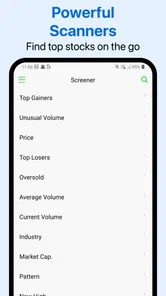
Stock Screener - Stock Screens is designed to help investors filter and research publicly traded companies using customizable criteria. Instead of browsing through long lists of stocks manually, you can narrow results by factors such as price, market capitalization, valuation ratios, growth, profitability, dividends, volume, and technical indicators. It is mainly a research and discovery tool, not a replacement for professional financial advice or a complete trading platform.
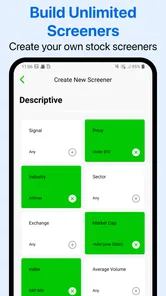
Can I create custom stock screens and save my favorite filters?
The app is most useful when you adjust the screening conditions to match your own strategy, whether you focus on dividend stocks, value opportunities, growth companies, momentum, or smaller businesses. Depending on the version and available features on your device, you may also be able to save screens, monitor selected companies, or return to previously used filters. It is worth checking the app’s current feature list before downloading, as tools can vary between releases.
Does Stock Screener - Stock Screens provide real-time stock prices?
You should not automatically assume that every quote or market statistic is delivered in real time. Some stock-screening apps use delayed market data, while others provide real-time information only for selected exchanges or through a premium subscription. Prices, volume, financial statements, and technical indicators can also update at different intervals. Always verify the data timestamp and confirm important figures with your broker or an official exchange source before making a trade.
Pros
- Quickly filters stocks using customizable screening criteria.
- Supports multiple markets and exchanges for broader research.
- Clear price
- volume
- and valuation data at a glance.
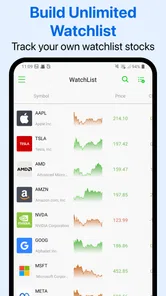
- Useful watchlists help track selected stocks in one place.
- Saves time compared with manually checking individual stocks.
Cons
- Some advanced filters may require a paid subscription.
- Market data can be delayed depending on the exchange or plan.
- The large number of criteria may overwhelm beginners.
- Limited analysis tools compared with full trading platforms.
- Investment decisions still require independent research and risk assessment.













