

Stanford Health Care MyHealth
- 1.16K
- 4.4
- Installs
- 100.00K
- Price
- Free

Screenshots
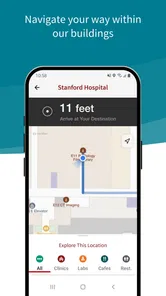
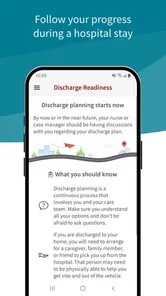
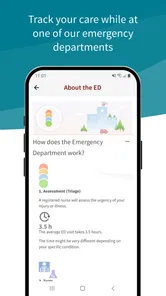
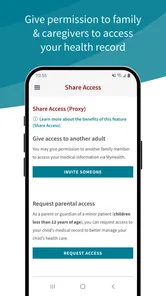
Analysis by Reviewed
Stanford Health Care MyHealth is the kind of medical app I appreciate most when I stop treating it like an app and start treating it like a practical doorway into my care. It is free, made by Stanford Health Care, and designed to help patients manage health care from an Android phone. My first impression was not that it was exciting; it was that it could reduce the small bits of friction that make appointments, records, and follow-up tasks harder than they need to be.
That distinction matters. A health app does not need to entertain me or keep me checking it every hour. It needs to be dependable when I need a result, a message, an appointment detail, or a clearer view of what has happened in my care. In my experience, MyHealth is most valuable in those short, purposeful visits. Its lasting appeal depends less on novelty and more on whether it becomes a quiet part of a patient’s routine.
The app sits in the medical category and carries a 4.4 average from around 2.8 thousand ratings, with more than 100 thousand installs. It is rated for Everyone, although the health information accessed through it is obviously personal and should be treated carefully. The current version is 12.3.1, and it requires Android 10 or later. Those details make it worth checking your phone before you plan to rely on it, particularly if you use an older device.
What the first week feels like
During the first week, I would approach MyHealth with one simple goal: make sure it is useful before I begin depending on it. That means installing it, signing in through the available patient process, and checking whether the parts of my care I actually use are easy to reach. I would not judge it by how often I open it. I would judge it by how quickly I can find the information that brought me there.
The strongest first-week benefit of a health portal is consolidation. Instead of searching through email, paper documents, phone notes, and separate reminders, I can use one patient-focused place as a starting point. That does not eliminate every other channel, but it can make the overall process less scattered. For someone who has several appointments or is helping coordinate care for a family member, that central role can be more important than a polished visual design.
A realistic example is a week in which I have an appointment coming up, need to review information from an earlier visit, and want to send a question without waiting on hold. I can open the app with a specific task in mind rather than trying to remember which office handled which detail. If the relevant information is already available in the account, that saves time and reduces the chance of relying on an outdated note in my phone.
My advice is to use the first session as a setup check rather than a tour. Look for the areas you expect to revisit: appointments, health records, communication, and any care-management tools presented for your account. Then close the app and return later to see whether you can still find them without thinking too hard. A medical app earns trust through repeatability. If the route to an important item feels obvious on the second visit, that is a better sign than a flashy first impression.
More From Our News Desk

 Instagram
Instagram’s Power Comes From Its Place in Your Phone
A close look at how Instagram turns Meta’s reach, recommendation systems and everyday camera habits into durable platform power—and what that costs users.

 Gmail
GmailGmail in a Busy Inbox: Who Benefits Most?
From first account to crowded workday, Gmail earns its place through dependable search and flexible sorting—but its best fit depends on how much inbox maintenance you can tolerate.

 Prime Video
Switching to Prime Video: What Changes in Your Viewing Routine
Prime Video can make a compelling second home for streaming, but switching means learning a different catalog, rental layer, and route from browsing to playback.

 Universal TV Remote Control
Universal TV Remote Control Works Best as a Reliable Backup
A phone remote earns its place through quick setup and reliable habits. Here is how to get more from Universal TV Remote Control—and where its limits show.

 Weather - By Xiaomi
Weather by Xiaomi Review: Clear at a Glance, Less Clear Up Close
Xiaomi’s weather app makes everyday forecasts quick to scan, but its calm surface can leave useful details and recovery paths harder to find than they should be.

 X
XX Under Pressure: Can It Recover When Posting Goes Wrong?
A resilience-focused review of X, examining setup, mistaken posts, interruptions, weak connections, and the gaps that matter when recovery needs to be dependable.
Latest News



There is also a useful psychological advantage to doing this early. When a health issue becomes stressful, I do not want to learn the structure of a portal at the same time I am trying to understand a medical instruction. Spending a few minutes exploring the app while everything is calm can make later use more deliberate. I can also decide which information I want to review before an appointment and which questions belong in a message to the care team.
Where the early convenience can end
MyHealth should not be confused with an emergency service or a replacement for direct medical advice. A patient portal is suited to managing an existing relationship with a health provider, not to diagnosing a sudden problem. If I were facing a serious or urgent symptom, I would use the appropriate emergency or clinical channel instead of waiting for an app response.
That limitation is not a flaw unique to this product, but it changes how I evaluate it. The app is useful when the task is administrative, informational, or connected to ongoing care. It is not the right tool when I need immediate attention, a second opinion from an unrelated provider, or broad medical education without a Stanford Health Care connection.
Another early question is whether it can replace every health-related tool I already use. Usually, I would not expect that. A patient portal is different from a general medication reminder, a fitness tracker, a symptom journal, or a personal archive of records from multiple health systems. MyHealth can be the most relevant place for Stanford Health Care interactions while still leaving room for other tools.
Why it can remain useful month after month
The month-to-month value comes from recurring moments rather than constant engagement. Appointments change, questions arise, records accumulate, and follow-up instructions can become difficult to remember. A portal is worthwhile when it gives me a reliable place to return to instead of making every interaction feel like a fresh administrative project.
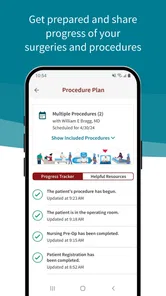
I find this especially useful before an appointment. Rather than arriving with a vague feeling that I have forgotten something, I can review recent information available in the account and prepare a short list of questions. That preparation can improve the conversation without turning the app into a substitute for the clinician. The best workflow is simple: review what is already there, write down what is unclear, and use the visit itself for interpretation and decisions.
After an appointment, the value changes. I may need to revisit instructions, check what was documented, or keep track of the next step. This is where a portal can outperform loose paper notes, because the information is connected to the care relationship rather than stored in a drawer. I still prefer to make my own brief notes for important instructions, but having the official patient record as a reference gives those notes a more dependable anchor.
For ongoing care, I would build a small monthly habit instead of opening the app randomly. A quick check before scheduled visits is enough for many people. If I have a condition requiring more frequent communication, I would check whenever I know a result, message, or appointment update may be relevant. The goal is not to create another notification ritual; it is to make the app available at the moments when it can prevent confusion.
A less obvious benefit is preparation for conversations with other people involved in my care. If I need to explain the timing of a visit or clarify what I am waiting for, having the relevant account information nearby can make that conversation more precise. This is particularly helpful when a family member is assisting with transportation, scheduling, or remembering questions. I would still be careful about privacy and would not casually leave the phone open where someone else can read personal health information.
MyHealth also makes more sense as a continuity tool than as a one-time download. Someone who uses Stanford Health Care only once may not feel a dramatic difference after the novelty fades. Someone with repeated appointments or follow-up needs is more likely to notice the cumulative benefit. Each individual visit may save only a little effort, but avoiding repeated searches and calls can make the overall experience calmer.
How it compares with ordinary alternatives
The usual alternative is a mixture of phone calls, printed paperwork, email, calendar entries, and memory. That mixture can work, but it spreads responsibility across too many places. A calendar may tell me when an appointment is scheduled, yet not provide the surrounding clinical context. A paper document may contain useful details, yet be unavailable when I am away from home. Calling the office can be appropriate, but it may take more time for a question that could be handled through a patient portal.
Compared with a general health organizer, MyHealth has a narrower but more meaningful role. A general organizer may be better for combining information from several unrelated providers or tracking personal habits. MyHealth is the better choice when the task is specifically connected to Stanford Health Care and the patient account behind it. I would not choose one as a complete replacement for the other unless my health care is unusually simple.
That trade-off is important for people who move between health systems. If I regularly see providers in different networks, I would keep a broader personal record system as well. The Stanford app can remain useful for its own care relationship, but it should not become my only archive simply because it is convenient.
The maintenance burden is small, but not zero
MyHealth does not demand the kind of daily maintenance associated with fitness or habit apps. That is a strength. I do not need to feed it constant data just to keep it useful. Its maintenance is mostly practical: keep the app updated, protect access to the phone and account, and remember to check it when a care event makes that worthwhile.
The Android requirement matters here. Since the app needs Android 10 or later, anyone using an older phone should confirm compatibility before making it part of an important care routine. If the device is supported, keeping the operating system and app current is sensible, especially for a medical application. I would not wait until the morning of an appointment to discover that the phone needs an update or that I have forgotten how to sign in.
Account access is another part of maintenance that is easy to underestimate. I recommend confirming recovery details while I am calm and not in a waiting room. I also avoid storing sensitive information in casual notes or screenshots unless there is a clear reason. A patient portal is convenient precisely because it brings personal information together, so the convenience should be matched with ordinary phone security habits.
Notifications can either support the routine or create fatigue. I would keep alerts that help me notice a meaningful care update, but I would review the settings if the app begins encouraging unnecessary checking. Health information deserves attention, not constant interruption. A useful rule is to ask whether an alert changes what I need to do. If it does not, it may not deserve a prominent place in my day.
One practical tip is to open the app before a planned call or appointment and identify the exact question I want answered. This prevents aimless browsing and makes it easier to notice whether the information is current and relevant. Another is to use the app as a preparation tool, not only as a storage cabinet: review the account, write down uncertainties separately, and take those uncertainties to the appropriate professional.
What may cause fatigue over time
The biggest source of fatigue is that health care itself is fragmented. Even a well-designed patient portal cannot make every provider, record, instruction, and insurance task appear in one place. If I expect MyHealth to solve all of those problems, I will probably become disappointed. Its value is strongest within the Stanford Health Care relationship, and weaker when I ask it to organize everything outside that boundary.
There is also a natural emotional burden to medical apps. Opening a portal can remind me of appointments, test results, or unresolved questions that I would rather postpone. That is not something an interface can completely fix. I find the experience easier when I give each visit a narrow purpose and avoid repeatedly refreshing the app out of worry.
Another possible friction point is the difference between access and understanding. Seeing information in a patient account does not always explain what it means. Medical wording can be precise but unfamiliar, and an app cannot replace a conversation about how a result fits my situation. I would use MyHealth to prepare questions and review the documented information, not to draw conclusions beyond what a clinician has explained.
People who want a single dashboard for nutrition, exercise, sleep, medication reminders, and records from every provider may also find the app too focused. That is not necessarily a weakness for its intended purpose, but it is a reason to skip it as a primary health-management platform if my needs are broader. A general wellness app may be more motivating for daily habits, while MyHealth is more relevant to formal care administration and patient communication.
Finally, a free app can still have a cost in attention. I need to remember which tasks belong in the portal, which require a phone call, and which require urgent care. If the app becomes another place where I check the same information without acting, it has stopped helping. The best long-term use is selective and intentional.
My long-term verdict
After the first-week novelty fades, Stanford Health Care MyHealth earns its place when I have an ongoing connection with Stanford Health Care and want a more organized way to manage that relationship. Its strongest quality is not entertainment or breadth. It is the possibility of making recurring health-care tasks less scattered and easier to revisit.
I would recommend it to Stanford Health Care patients who prefer handling routine information on a phone, want to prepare better for appointments, or regularly need to return to their care history and follow-up details. It is also a sensible companion for someone helping coordinate care, provided privacy and account access are handled thoughtfully.
I would skip it as my main health app if I do not receive care through Stanford Health Care, if I need emergency support, or if my priority is tracking lifestyle habits across many services. In those situations, a different tool or direct clinical channel is a better fit. I would also avoid relying on it alone when my records are spread across several health systems.
The app has been available since December 17, 2015, and its continued usefulness comes from the same basic promise that makes patient portals worthwhile: return access to your own care information when you need it. With a current version of 12.3.1, a free price, and an Everyone age rating, it is easy to try for eligible patients. My final view is straightforward: this is a maintenance app, not a novelty app. If it reduces one unnecessary call, helps me ask a better question, or keeps an important follow-up from getting lost, it has done its job.
That is why I would keep it installed, but I would not force myself to use it every day. I would make it part of appointment preparation, follow-up, and occasional record review. Used that way, Stanford Health Care MyHealth has a realistic chance of becoming a quiet, lasting part of managing care rather than another app that feels useful only during its first week.
Stanford Health Care MyHealth Frequently Asked Questions
Is Stanford Health Care MyHealth free to download, and what devices can run it?
Stanford Health Care MyHealth is a free medical app developed by Stanford Health Care. It is intended for Android devices running Android 10 or later, so check your device’s operating system before downloading. The app is rated for Everyone. Its mobile format is designed to make it convenient to manage health care from a compatible phone or tablet.
Who is eligible to use Stanford Health Care MyHealth?
MyHealth is intended for patients who are eligible to use Stanford Health Care’s patient portal. Access to the app’s features depends on your relationship with Stanford Health Care and the services connected to your account. Before downloading, consider whether you already receive care through Stanford Health Care or can complete its registration process; having the app installed alone does not provide access to a patient account.
What is Stanford Health Care MyHealth?
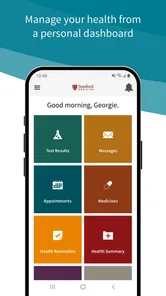
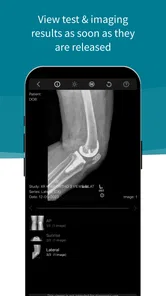
Stanford Health Care MyHealth is the official patient portal app for eligible Stanford Health Care users. After signing in, patients can review portions of their medical record, see test results, manage appointments, communicate with care teams, request prescription renewals, and access health information. Available features may depend on your relationship with Stanford Health Care and the services connected to your account.
How do I sign in or create a Stanford Health Care MyHealth account?
You generally sign in with an existing MyHealth username and password, while new users must complete Stanford Health Care’s registration process. Enrollment may require personal information, an activation code, or identity verification. If you cannot remember your credentials, use the recovery options in the app or contact Stanford Health Care support. Do not create an account using someone else’s information.
Can I use the app to schedule appointments and contact my doctor?
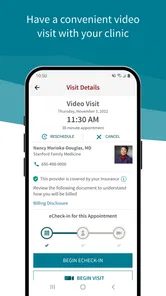
For many participating departments, MyHealth lets you request or manage appointments, review upcoming visits, and send secure messages to members of your care team. The exact options can vary by provider, specialty, appointment type, and patient status. Secure messaging is not intended for emergencies, and response times may differ, so urgent symptoms should be handled through appropriate emergency or immediate-care services.
Pros
- Secure access to appointments
- test results
- and health records in one place.
- Easy messaging with care teams without needing to call the clinic.
- Prescription refill requests can save time for ongoing medications.
- Supports health tracking and helps users review their medical information.
- Useful appointment reminders can help reduce missed visits.
Cons
- Some features may depend on your clinic using Stanford Health Care systems.
- Medical results can be difficult to understand without professional guidance.
- Notifications may require careful setup to avoid missing important updates.
- Account recovery or identity verification can be inconvenient for some users.
- Performance and availability may vary with internet connection or app updates.











