St. Luke's
- 627.00
- 4.3
- Installs
- 100.00K
- Price
- Free

Screenshots
Analysis by Reviewed
Managing health care is rarely difficult because of one dramatic task. It is usually the small jobs that create friction: finding the right place to start, checking a message, remembering an appointment, or deciding whether a question belongs with a clinic, a pharmacy, or an urgent service. St. Luke’s is designed to bring those routine interactions into one mobile starting point. I reviewed it as a medical app from St. Luke's University Health Network, and my overall impression is that it makes the most sense for people who already use that network and want a simpler way to stay connected to their care.
The app is free and rated for Everyone, which makes it approachable for a household with different levels of technical confidence. It has been available since late summer 2017 and has grown into a familiar choice, with over a hundred thousand installs and an average rating of 4.3 from around one and a half thousand ratings. Those figures do not make it automatically right for everyone, but they do suggest that it has found a practical role beyond being a digital brochure.
How I Would Decide Whether St. Luke’s Fits
My first decision criterion would be whether St. Luke's University Health Network is already part of your health-care routine. This is not a general wellness tracker that becomes equally useful no matter which clinic you visit. Its value comes from the relationship between the app and the network behind it. If your appointments, questions, and care records are connected to St. Luke’s, the app has a clear reason to live on your phone. If your providers are spread across unrelated organizations, a broader health-management option may feel more central.
The second criterion is the kind of access you want. Some people mainly need a place to organize information. Others want a direct route into their health network when a question comes up. I would choose this app for the second group, particularly someone who dislikes calling a clinic for every ordinary administrative matter. The advantage is not that a phone replaces a clinician. The advantage is that the first step can be less awkward and less dependent on office hours.
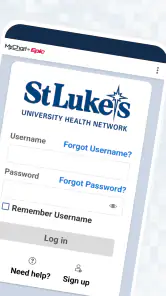
I would also think about how you handle sensitive information on a phone. A medical app can be convenient, but convenience works best when you are comfortable using a passcode, keeping your device updated, and checking that you are signed into the correct account. I would not install it casually on a shared device without considering who else can open that device. That is not a criticism unique to St. Luke’s; it is a basic trade-off whenever personal health information moves from a folder or phone call to a mobile screen.
Finally, I would separate convenience from urgency. The app may help you begin a routine health-care task, but I would never treat a medical app as a substitute for emergency help or immediate clinical judgment. When symptoms are serious or time matters, the right decision is to use the appropriate urgent channel rather than waiting for a mobile workflow to respond.
The everyday situation where it earns its place
Imagine that I have an appointment coming up, realize I need to check a detail, and do not want to search through old messages or wait on hold. An app connected to my health network gives me a more natural place to begin. I can open it before leaving home, review the information available to me, and deal with the question while it is still fresh. That small change matters because health-care tasks often get postponed when they require several separate calls.
A second realistic case is a family member helping an older relative. The helper may not need to manage every part of care, but may need a clearer way to keep track of routine interactions. St. Luke’s can be useful as a shared point of reference when the patient and helper agree on how the phone and account should be used. I would still keep the patient involved rather than turning the app into an invisible substitute for communication.
There is also a useful preparation habit here: open the app before you need it. Sign-in problems, forgotten credentials, or an unfamiliar screen are much less stressful on an ordinary afternoon than immediately before an appointment. I would spend a few minutes learning where the main care-management tools are, then close the app and return later. That simple test reveals whether the experience suits you without forcing a rushed decision.
Where St. Luke’s Is Strongest
The strongest part of the experience is its focus. St. Luke’s does not need to convince me that a broad collection of lifestyle tools belongs in the same place. Its purpose is narrower and more useful: helping patients interact with one health network. That focus can reduce the mental load of deciding which website, number, or paper should handle a routine question.
I also like the idea of having a network-specific tool rather than relying entirely on a generic health app. A general app may be excellent for counting steps, recording symptoms, or storing information from different sources, but those functions do not necessarily create a direct connection with the organization providing care. St. Luke’s is better judged as a patient-access companion than as a complete personal health dashboard.
For someone who has several ordinary tasks connected to the same network, the benefit can build over time. The first use may feel merely convenient. After that, the real strength is familiarity: the app becomes the place I check first instead of reconstructing the process from memory. This is one of the less obvious reasons to prefer a provider-specific app. It may not be the most feature-packed option in the medical category, but it can be the most relevant one for an established patient.
The app’s age is another interesting point. It was released in 2017, while the current version is 11.7.2. I would read that history in two ways. On the positive side, it indicates an ongoing product rather than a brand-new experiment. On the cautious side, a long-running app can accumulate screens and processes that feel designed around an organization’s internal structure instead of a patient’s ideal workflow. I would judge it by how quickly I can complete my own common tasks, not simply by how modern the interface looks.
Small habits that make the experience better
My first practical tip is to use the app as a starting point, not as a place to endlessly browse. Before opening it, decide what you are trying to accomplish: prepare for a visit, locate a care-related detail, or begin a conversation. That keeps the session focused and makes it easier to notice whether the app is actually saving time.
My second tip is to check details early when another person is involved. If I am helping a parent or partner, I would confirm whose account is open before reviewing anything. A quick identity check prevents the kind of confusion that can happen when several people use one phone. I would also avoid leaving the app open while handing the device to someone else.
My third tip is to keep a backup habit for important appointments and instructions. Even when an app is working well, I would still note a crucial date or instruction in a place I can access when offline. This is not because St. Luke’s is unreliable; it is because phones lose signal, batteries run down, and health decisions should not depend on one screen being available at the exact moment I need it.
These habits reveal a broader trade-off. The app can reduce friction around routine care, but it does not remove the need for personal organization. It works best when I use it alongside sensible reminders and direct communication, rather than expecting it to remember every detail of my health life for me.
When Another Category May Be Better
St. Luke’s is not the right choice if I want one neutral place to combine records from many unrelated providers. A provider-specific app naturally favors the network it represents. If I see specialists in different systems, use multiple hospitals, or want a broad overview of information from several sources, I may prefer a general health organizer or the separate patient apps offered by those organizations. The trade-off is that a broader tool may organize more sources while offering less direct connection to any one care team.
It is also not my first choice for fitness, nutrition, medication experimentation, or long-term lifestyle coaching. Those needs belong to different app categories. A fitness tracker is usually built around activity and trends; a medication reminder is built around schedules; a symptom journal is built around repeated personal observations. St. Luke’s should not be judged harshly for not replacing all of them. Its job is closer to helping me navigate care through a particular health network.
Someone who rarely uses a smartphone may find a phone call or in-person conversation more comfortable. The app can shorten a process only after the user is willing to learn it. If every visit involves a family member completing the digital steps, the supposed convenience may simply move the work from a receptionist to that helper. In that situation, I would choose the method that the patient can use confidently, even if it is less fashionable.
There is another important exception: people who need immediate answers to serious symptoms should not make an app their main plan. A mobile health tool can support ordinary care coordination, but it should not delay urgent action. For non-urgent questions, it may be a useful first stop; for emergencies, I would use emergency services or the clinical route appropriate to the situation.
The switching cost is lower than it first appears
Trying St. Luke’s is relatively easy because it is free. That removes the financial risk of testing whether it fits my routine. The real cost is time: installing it, signing in, learning the layout, and deciding whether it is genuinely faster than my current method. I would give it a fair trial across more than one ordinary task rather than judging it after a single opening screen.
Switching away can be just as simple in practical terms, but I would not abandon an established workflow without checking what I still need from it. If I have become accustomed to using the app for network-related tasks, moving back to calls or a browser may mean more waiting or more searching. On the other hand, if I only use a general health app and have no meaningful connection to St. Luke’s, adding another medical app may create clutter rather than convenience.
My preferred approach would be gradual. I would keep my existing reminders and contact methods, try St. Luke’s for a routine task, and compare the number of steps and the confidence I feel afterward. If it makes the next interaction clearer, I would keep it. If it sends me back to the same phone calls without adding useful context, I would not force it into my routine simply because it is free.
Device compatibility also belongs in that decision. The listed minimum operating-system requirement is version 11, so I would check the software version on an older phone before planning around the app. For people using a current device, that may not matter at all. For someone keeping an older phone specifically for health tasks, it is a practical detail worth checking before installation.
My Recommendation for Different Patients
I recommend St. Luke’s to patients who receive care through St. Luke's University Health Network and want a mobile way to begin everyday health-care tasks. It is especially appealing if calling is inconvenient, if you regularly prepare for appointments, or if you help a family member coordinate routine care. The free price and Everyone rating make experimentation straightforward, while the established release history suggests that the app is intended to remain part of the network’s digital patient experience.
I would recommend it less strongly to people whose care is spread across several unrelated organizations. They may get more value from a broader tool, even if that tool is less closely tied to one provider. I would also skip it if my only goal were exercise tracking, diet planning, or medication alarms. Those are different problems, and a focused app from another category may serve them better.
My final judgment is practical rather than enthusiastic for its own sake: St. Luke’s is worth installing when your relationship with St. Luke’s is the reason you need a medical app. It can make routine care feel more manageable, but its usefulness depends on that connection. I would start with one low-pressure task, protect access to the account, keep a backup for important information, and then decide whether it genuinely reduces effort. Used that way, St. Luke’s is a sensible companion for network patients, not a replacement for clinicians, emergency care, or every other health tool on a phone.
Pros
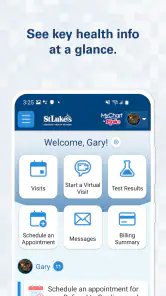
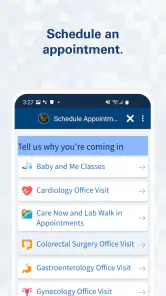
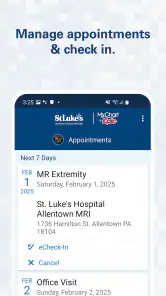
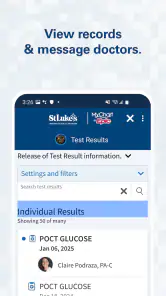
- Quick access to appointments
- test results
- and medical records
- Secure messaging makes contacting care teams more convenient
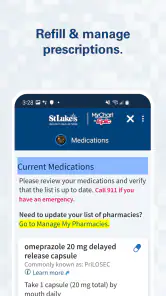
- Medication details and health information are easy to review
- Useful tools help patients manage ongoing care in one place
- Clean interface is generally straightforward for regular users
Cons
- Some features may depend on your St. Luke’s location or care provider
- Account setup can require identity verification and extra personal details
- Notifications may become excessive if multiple services are enabled
- Certain records or results may appear later than expected
- The app is less useful for people outside the St. Luke’s care network

- Category
- Medical
- Version
- 11.7.2