

SpyX: Monitoring App
- 147.00
- 4.8
- Installs
- 50.00K
- Price
- Free

Screenshots

Analysis by Reviewed
In the first few days with a child’s new phone, it is easy to see the appeal of having location checks, alerts and blocking tools close at hand. The harder question is whether those controls remain useful after the novelty fades and family routines settle. SpyX: Monitoring App brings several kinds of oversight together, but its lasting value depends less on the number of controls than on whether parents can use them calmly and consistently.
Before switching anything on
I would begin by asking what problem needs solving this week. Is a child taking a new route alone, struggling to put a phone away during homework, or encountering online material that worries the family? Those are different concerns, and the answer affects which control is worth considering. Starting with a specific need makes it easier to judge whether the app is helping rather than simply adding another thing to check.
It is also worth agreeing on how the child can raise a concern about the rules. A restriction that makes sense on a school night may not work during a holiday or a changed schedule. Giving the child a straightforward way to ask for a review does not weaken a boundary; it makes the boundary easier to explain and maintain. For families that value predictable rules, that conversation is part of setup, not an optional extra.
What feels useful in the first week
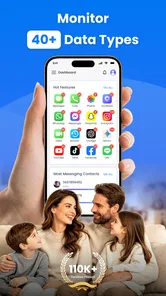
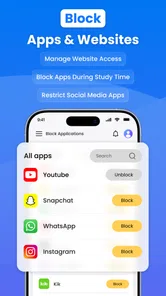
SpyX is a free parenting app from SPYX.COM for families who want to keep an eye on a child’s phone activity as well as their whereabouts. Its main tools address three different concerns: GPS tracking, keyword alerts and the ability to block apps or websites. That combination can make the first setup feel purposeful: parents can consider safety outside the home, online exposure and distractions in one place instead of treating each as a separate problem.
In the first week, I would resist turning every control on at once. A better start is to agree with the child on one or two clear goals, such as knowing they reached an agreed destination or limiting a distracting site during homework. Then use the relevant control and see whether it solves the actual problem. This makes it easier to tell the difference between a helpful safeguard and a setting that creates friction without improving anyone’s day.
The location feature is easiest to justify when it answers a practical question, not when it becomes a constant check-in habit. For example, if a child takes a familiar route home after school, a parent might use location information to confirm they have arrived when plans change. That is more respectful and less tiring than repeatedly opening a map just because the option is there. The app’s value comes from supporting an agreed routine, not replacing ordinary communication.
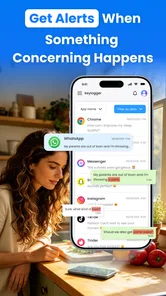
Keyword alerts need a similarly thoughtful purpose. They may help a parent notice terms that signal a possible concern, but an alert is a prompt to have a conversation, not proof that something is wrong. Context matters: a word can appear in a joke, a school assignment or a discussion that has nothing to do with risk. I would treat any alert as a reason to ask an open question rather than jump to punishment or an accusation.
More From Our News Desk

 Gmail
GmailGmail in a Busy Inbox: Who Benefits Most?
From first account to crowded workday, Gmail earns its place through dependable search and flexible sorting—but its best fit depends on how much inbox maintenance you can tolerate.

 Prime Video
Switching to Prime Video: What Changes in Your Viewing Routine
Prime Video can make a compelling second home for streaming, but switching means learning a different catalog, rental layer, and route from browsing to playback.

 Universal TV Remote Control
Universal TV Remote Control Works Best as a Reliable Backup
A phone remote earns its place through quick setup and reliable habits. Here is how to get more from Universal TV Remote Control—and where its limits show.

 Weather - By Xiaomi
Weather by Xiaomi Review: Clear at a Glance, Less Clear Up Close
Xiaomi’s weather app makes everyday forecasts quick to scan, but its calm surface can leave useful details and recovery paths harder to find than they should be.

 X
XX Under Pressure: Can It Recover When Posting Goes Wrong?
A resilience-focused review of X, examining setup, mistaken posts, interruptions, weak connections, and the gaps that matter when recovery needs to be dependable.

 Clash of Clans
Clash of Clans Is Won Between the Battles
Its raids are quick; its community is a long-term project of coordination, teaching, rivalry, and shared responsibility—with all the friction that entails.
Latest News



Blocking has a different role. It can be useful when a particular app or website repeatedly interrupts sleep, homework or family time. But a block works best when the child knows what is restricted and why. If the rule is unclear, the tool may turn a routine boundary into a daily argument. My practical recommendation is to explain the restriction before applying it and to revisit it when the underlying schedule changes.
Make the controls serve a family agreement
One non-obvious advantage of having location, alerts and blocking in the same parental-control setup is that it encourages parents to separate types of concern. A location check is about safety and logistics; a website block is about access or distraction; an alert is a possible conversation starter. Treating these as interchangeable forms of surveillance is a mistake. Each should have its own reason, a clear expectation and a point at which the family reviews whether it is still needed.
That distinction also helps avoid overreacting. If a child is late, location information may be more immediately useful than a keyword alert. If a particular site is disrupting study time, blocking may address the issue more directly than checking where the child is. Choosing the narrowest tool for the problem keeps monitoring from expanding simply because the app makes more controls available.
Whether it earns a place month to month
After the first few weeks, the question is not whether the features are interesting but whether they reduce uncertainty without adding more work. SpyX’s strongest case is for parents who have specific, recurring needs across more than one area: they want a location check for agreed journeys, a way to respond to online concerns and a means of limiting particular distractions. For those families, the combination may remain useful because it supports several routines rather than a one-off experiment.
Its wider reception suggests that many users find the app appealing: it has a 4.8 average from 419 ratings, and it has passed 50,000 installs. Those figures are a signal of interest, not a guarantee that the app will fit a particular household. Parental-control tools are especially personal: a setup that feels reassuring to one family may feel intrusive or unnecessarily complicated to another.
For month-to-month value, I would set a recurring family check-in rather than leave every rule in place indefinitely. Ask whether the location checks are still needed, whether a block is addressing a real distraction and whether alerts have led to useful conversations. If a control has produced no meaningful benefit, remove or narrow it. A tool that adapts as a child gains independence is more likely to stay useful than one that quietly becomes permanent.
A realistic example is a child who starts travelling independently to an after-school activity. A parent could use location checks during the initial adjustment, while agreeing that the child will message if plans change. Once the route and routine feel familiar, the family can decide whether frequent checking still adds anything. Meanwhile, a website restriction might remain relevant only during a homework period. The two controls need not have the same lifespan.
Compared with relying only on a phone’s built-in family settings, SpyX’s appeal is its focus on combining location, keyword alerts and app or website blocking in a single parenting-oriented product. Built-in tools may be a better fit for families who want simpler controls and fewer monitoring dimensions. A dedicated app like this is more compelling when the family genuinely wants those distinct functions together and is prepared to manage them deliberately.
The upkeep that can be easy to overlook
Monitoring is not a set-and-forget task. Parents need to keep expectations clear, check whether controls still match the child’s routine and respond sensibly when an alert or location detail raises a question. The app can provide information or restrictions, but it cannot decide whether a child is safe, explain an unusual message or settle a disagreement about screen time. Those responsibilities remain with the family.
I would also build a small amount of maintenance into the routine: review the active restrictions when school schedules change, and revisit location expectations if the child’s travel pattern changes. This is a practical habit, not an assumption about any particular settings screen. It helps prevent old rules from creating unexpected blocks or making parents rely on checks that no longer fit the situation.
One useful maintenance habit is to keep the reason for each active control simple enough to explain in a sentence. “We check this route while you learn it” is easier to review than an open-ended rule to monitor a child’s movements. The same test applies to a block: if nobody can say what problem it is solving now, it may be time to change it. This keeps the tool connected to family needs rather than turning its controls into permanent defaults.
There is a privacy conversation to maintain, too. Children are more likely to understand monitoring when parents explain what is being checked and for what reason. That does not mean every boundary must be negotiated away; it means the purpose should be understandable. For younger children, the explanation can be simple. As a child becomes more independent, the family may need to reconsider how much oversight is appropriate.
SpyX is rated for Everyone, and its current version is 2.1.2, with a minimum operating-system requirement of 7.0. Those details make it easier to judge basic suitability, but technical compatibility alone does not make a monitoring arrangement a good fit. Parents should think about the child’s age, maturity and needs before deciding which controls to use and how openly to discuss them.
Where monitoring can become tiring
The main risk is not simply that an app has multiple controls; it is that parents may feel compelled to use all of them. Frequent map checks can turn reassurance into a habit of constant supervision. Alerts can create anxiety when they lack context. Blocks can become a source of conflict if a child is not told what prompted them. These are not reasons to reject parental controls outright, but they are reasons to use the narrowest intervention that addresses the concern.
Another source of fatigue is false confidence. A location view cannot substitute for a direct check-in when plans are unclear, and an alert cannot tell a parent what a conversation means. Likewise, blocking an app or site does not teach a child how to manage time or make safer choices. SpyX is best understood as a support for parenting decisions, not as a replacement for them.
There can also be a mismatch between what a parent hopes an alert will do and what an alert can actually contribute. It may bring a potentially relevant word to attention, but a parent still has to decide whether the surrounding situation calls for action. If every notice becomes a reason to investigate, the monitoring itself can consume attention and strain trust. I would choose this kind of tool only if I could treat signals as leads for measured conversation, not as verdicts.
Families who mainly want a basic screen-time routine may prefer a simpler built-in option. Those who rely on trust and conversation, and have no specific need for location checks or keyword alerts, may find a monitoring-focused app more intrusive than useful. It is also a poor match for anyone hoping that installation alone will resolve disagreements about phone use. The app can help enforce a boundary, but the family still has to decide what that boundary should be.
SPYX.COM’s product has a focused purpose, and the mix of monitoring and blocking tools gives parents more than a single kind of intervention. I would recommend SpyX: Monitoring App to a family with a clear reason to use those tools and a willingness to review them as circumstances change. I would not recommend keeping every form of oversight active simply because it is available.
A lasting fit depends on restraint
For me, SpyX earns lasting space only when it supports a small number of agreed routines and makes them easier to manage. Its free price removes a purchase decision, while the 4.8 average gives prospective users a useful sign of how it has been received; neither should decide the matter on its own. What matters is whether the app helps your family handle a real concern without creating more checking, suspicion or conflict than the concern warrants.
Start with one need, explain the rule, and review the result after the routine has had time to settle. If location tracking, keyword alerts or blocking continues to solve a practical problem, keep the relevant control. If it mainly fuels worry or arguments, scale it back. That measured approach is the best way to turn SpyX from a first-week experiment into a tool with genuine month-to-month value—or to recognize that a simpler alternative is the better choice.
SpyX: Monitoring App Frequently Asked Questions
What is SpyX: Monitoring App, and what can it do?
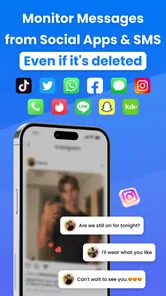
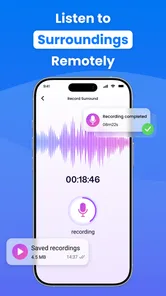
SpyX is marketed as a phone-monitoring service that may provide access to activity such as call records, messages, location, and app usage, depending on the device, operating system, subscription, and features available at the time. Its capabilities should not be assumed to work on every phone. Review the current product details and app-store listing carefully, and use monitoring tools only with the device owner’s informed consent and in accordance with local law.
Is SpyX compatible with Android and iPhone?
Compatibility can differ substantially between Android and iOS, and between individual device versions. Some functions may require setup on the target phone, particular system permissions, or an account configuration, while other functions may be unavailable or limited by Apple or Google restrictions. Before paying or installing anything, check SpyX’s current compatibility information for the exact device model and operating-system version, and confirm whether the advertised features apply to that setup.
Does using SpyX require installing an app on the phone being monitored?
Setup requirements depend on the device and the features you intend to use. A service may require an app, account access, configuration, or permissions on the phone, and instructions can change as operating systems update. Avoid services or setup guides that ask you to bypass security protections, obtain someone’s credentials deceptively, or install software without their knowledge. Check official documentation and make sure the device owner has clearly agreed before proceeding.
Is SpyX legal and safe to use?
Legality depends on where you live, who owns the device, the person’s age, and whether everyone being monitored has given the consent required by law. Secretly tracking another adult or accessing private communications can violate privacy laws and may expose you to serious consequences. Also assess the service’s privacy policy, data handling, account security, and cancellation terms before sharing sensitive information. For child safety or workplace use, follow applicable laws and disclose monitoring appropriately.
Is SpyX free, and how can I cancel a subscription?
Do not assume SpyX is free simply because you can visit its website or begin setup; monitoring services commonly place features behind a paid plan, and pricing, trial offers, and renewal conditions may change. Read the checkout screen and subscription terms carefully before entering payment details. If you subscribe, note where billing is managed—such as an app store or the provider’s account portal—and follow that channel’s cancellation instructions to avoid future charges.
Pros
- Offers a clear dashboard for reviewing activity in one place.
- Can help parents spot changes in a child's digital habits.
- Activity summaries may make routine check-ins quicker.
- Remote access can be useful when a device is not nearby.
- May support more informed conversations about online safety.
Cons
- Monitoring someone without their informed consent raises serious privacy concerns.
- Some features may require extensive permissions on the monitored device.
- Compatibility and available features can vary by device and operating system.
- Background monitoring may affect battery life or device performance.
- Use may be restricted by local laws and platform policies.











