SportsEngine – Team Management
- 2.78K
- 4.5
- Installs
- 1.00M
- Price
- Free

Screenshots

Analysis by Reviewed
When a family shares the work of getting a player to practices and games, the schedule can end up scattered across texts, inboxes, and someone’s paper calendar. I like the idea of bringing team logistics into one place, but the benefit depends on who actually checks it and how the household divides responsibilities. SportsEngine – Team Management is a sports app from NBC Sports NEXT, and its focus is practical: helping a team keep track of people, plans, and messages rather than trying to replace every family calendar or conversation.
One team, several people helping out
A useful household setup might have a coach sharing the schedule, a parent checking when and where the next game is, and a player following team messages. That can reduce the familiar scramble of forwarding updates to everyone who needs them. It works best when the team agrees that SportsEngine is the place to check for team details; if half the group still relies only on a separate chat, information can split again.
I would treat it as a shared team workspace, not a substitute for deciding who is responsible for each task. For example, a parent can check a game time while another handles the ride, but the app cannot resolve an unclear handoff by itself. A small household habit—checking the team schedule together at the start of the week—makes the shared information more useful than simply installing the app on several phones.
Accounts and expectations matter
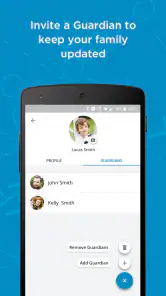
Before inviting family members into a team’s routine, it is worth agreeing on who will manage updates and which person should receive team communication. A coach may be the source of schedule changes, while a parent or player may only need to keep up with them. Keeping those roles clear helps avoid duplicate messages and prevents one person from assuming another has seen an important change.
SportsEngine is free, and its Everyone age rating makes it broadly suitable to consider in a household. That does not mean every child should manage team communication independently: I would follow the team’s own expectations and have an adult help younger players understand where official updates appear. I also would not assume that a shared phone means everyone should use the same account; each household should follow the app’s available account setup and the team’s guidance.
Getting Started with SportsEngine
First things first, downloading SportsEngine is a breeze. Available on both Android and iOS, this app is designed to cater to all your team management needs. Once you’ve got it on your phone, setting up your team is as easy as pie. No more wrestling with complicated spreadsheets or endless email chains. The user interface is pretty intuitive, so even if you’re not tech-savvy, you’ll find your way around without breaking a sweat.
Features that Make a Difference
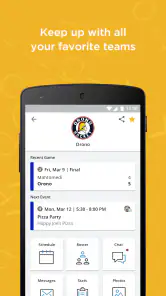
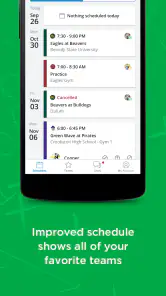
This app is packed with features that make it stand out in the crowded app market. One of my favorites is the scheduling tool. You can easily create, edit, and share your team’s schedule, ensuring everyone is on the same page. No more last-minute “Where’s the game?” texts from your players.
More From Our News Desk

Clash of Clans Is Won Between the Battles

Android Auto Makes the Case for Quieter Car Software

MobiOffice: Transforming Mobile Productivity with Seamless Integration

EA SPORTS FC™ Mobile Soccer: Redefining Mobile Sports Gaming

How Microsoft OneDrive Became a Mobile Productivity Giant

How Google Translate Breaks Language Barriers Effortlessly
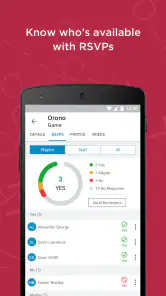
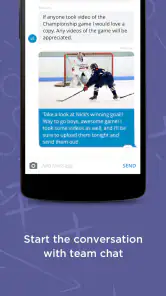
Another standout feature is the communication tool. It allows you to send messages to the entire team or individual members, keeping everyone in the loop about important updates. Plus, you can track player attendance and availability, which is a game-changer for planning practices and matches.
Why You’ll Love It
What really sets SportsEngine apart is its focus on community and engagement. The app isn’t just about managing logistics; it’s about bringing your team closer together. There’s something incredibly satisfying about having everything you need in one place, accessible with just a few taps on your screen. Efficiency and team spirit go hand in hand here.
For a coach, a less obvious payoff is having attendance and availability alongside the schedule. Before choosing a practice plan, I’d check responses first, then use a team message to clarify who can attend; that avoids treating an old roster as a reliable headcount. For a parent, the same information can help with ride planning, but it is still wise to confirm unusual changes directly with the coach rather than relying on an old notification or a family member’s memory.
When a simpler option is enough
Compared with a basic group chat, SportsEngine is more structured: schedules and roster details have a clearer home, while chat messages can quickly disappear beneath unrelated conversation. Compared with a shared calendar, it keeps team communication closer to the event, but a household calendar may still be better for combining sports with work shifts, school appointments, and other activities. I would use both only if someone is willing to maintain them; duplicating every change creates its own confusion.
This is most useful for coaches, team organizers, and families coordinating recurring practices or games. If you only need to tell a few friends about an occasional pickup match, a straightforward message thread is probably easier. The same goes for a household that already has a dependable system and does not want another place to check. The app’s value comes from the team adopting it together, not from its presence on one person’s phone.
A practical weekly routine
Imagine a game time changes during a busy school week. I would check the team schedule, read the related message, and then tell the other adult handling transport; if the player’s availability has changed, I would make sure the team’s attendance information reflects that too. That sequence puts the event, communication, and planning decision in context. It is a modest workflow, but it can prevent a stale calendar entry from becoming the household’s assumed plan.
One trade-off is that a team app only stays dependable when people keep its information current. Before relying on it for a tight pickup or a last-minute change, I would make a habit of checking for the latest team message rather than assuming a saved schedule can never change. The same goes for roster and availability details: treat them as coordination tools, not a replacement for direct confirmation when a decision affects a player’s attendance.
What to expect from the app
The app has a 4.5 average from around fourteen thousand ratings, and more than a million installs. It first appeared in 2013, and version 7.4.1 is the current release. Those figures suggest an established product, but they do not guarantee that every team uses it consistently or that every family will prefer its routine. I’d judge it by whether the coach and other households actually post the information you need.
There is no need to turn a shared-device situation into a complicated system: agree on who checks messages, who updates availability, and who relays a change to the person handling transport. If several people use the same phone, make sure everyone knows whose account is active before sending or changing anything. That is a practical boundary, not a special family feature, and it helps keep team communication intentional.
Oh, and did I mention the app is free? Yup, you heard that right. While there are optional in-app purchases, the core functionality comes at no cost, making it accessible to teams of all sizes and budgets.
A Few Parting Words
If you’re involved in sports in any capacity, whether as a coach, player, or parent, SportsEngine – Team Management is worth checking out. It’s like having a personal assistant dedicated to your team, minus the hefty salary. So, why not give it a shot? You might just find that it’s the missing piece in your team management puzzle.
In a nutshell, this app is not just about managing a team; it’s about enhancing the overall experience of being part of one. SportsEngine makes team management not just efficient but enjoyable, and that’s a win in my book.
Making the handoff work on a busy day
The best household workflow I can see is deliberately small. One person checks the team’s current plan, another confirms transport, and the player knows which messages are meant for them. For example, if a parent is at work when a practice detail changes, the person who sees the update can pass along the key point directly rather than forwarding a string of unrelated chat messages. That keeps the app as the team’s reference point while leaving family decisions in the family’s hands.
I would also separate “I saw the update” from “I can act on it.” A player’s availability response can help the coach plan, but it does not automatically arrange a ride or tell a caregiver that pickup plans have changed. That distinction matters in homes where several adults share duties: use the team tools to establish the sports plan, then confirm the practical handoff with the person responsible.
Roster information is useful only when maintained
A roster is more than a convenient list when a team is trying to communicate with the right people. Before a season gets busy, I’d encourage the organizer to check that the people who need team information are represented correctly and to make a routine of reviewing changes as players join or leave. This is not glamorous administration, but it helps prevent messages and attendance expectations from being based on an outdated group.
There is a trade-off here: putting team details in a shared workspace makes them easier to find, but it also makes accuracy a shared responsibility. Parents should not assume that a roster entry is proof that every relevant adult has seen an update, and coaches should avoid treating a missing response as a definite absence without checking. The app can organize the information; people still need to interpret it sensibly.
Choosing the right tool for the team
If the coach already runs the team through a different system, I would not introduce SportsEngine on the side just because its layout sounds appealing. Two official channels are worse than one imperfect but consistently used channel. Ask which app the team expects members to check, and use that as the primary source for schedules and messages. If no team-wide tool exists, this one is worth considering when the group needs a shared roster and recurring coordination rather than an informal chat alone.
For a very small group arranging one event, a text thread is quicker and needs little explanation. For a family trying to see sports alongside appointments and work, a general calendar offers a broader household view. SportsEngine’s stronger case is the middle ground: an organized place for team-specific plans, communication, and player availability. I would choose it for repeated team activity, not as a universal organizer for everything happening at home.
How I would introduce it to younger players
The Everyone rating is a useful indication that the app is broadly suitable for general audiences, but age suitability and family readiness are not the same question. I’d show a younger player where the team’s schedule and messages are, explain which updates require an adult’s attention, and agree that changes affecting transport or attendance should be confirmed with a caregiver. That gives the player a way to follow team life without putting the whole coordination burden on them.
In a household with a shared device, I would be especially careful before making changes or sending a message: first check which account is active, then make sure the action is intended for the team. This is simple account hygiene, not a claim about built-in family controls. If the household needs formal restrictions or separate managed access, it should choose tools and settings specifically designed for that need rather than relying on a team-management app to provide them.
Who will get the most from it
I’d recommend trying it when a team has regular events, a coach willing to keep details current, and several people who need the same schedule or updates. The combination of messages, player availability, and roster organization can save time when a parent is coordinating transport or a coach needs a clearer picture before practice. Its audience is not limited to coaches: a player who checks team communications and a caregiver who manages logistics can both find a practical role.
I’d skip it when the team is inactive, the group rarely needs more than a quick message, or nobody is prepared to keep the shared information updated. It may also be the wrong fit for a family that wants one calendar to cover school, appointments, work, and sports all together. In those cases, the familiar chat or household calendar is simpler, and the extra routine of checking a separate team app may not repay the effort.
My household verdict
With a 4.5 average and around fourteen thousand ratings, SportsEngine has a sizable audience, but the deciding factor for me is still local: will this particular coach and team use it consistently? NBC Sports NEXT has built a sports-focused coordination app, not a replacement for clear communication between adults. I would start by agreeing on one source for team updates, choosing who checks it, and deciding how changes reach the person handling the next ride.
As a free sports app with an Everyone age rating, it is easy to consider for a household that wants team details in a more orderly place. Its value is strongest when the team—not just one family—uses the schedule, messages, and roster as part of its regular routine. For that situation, I’d give it a try. If the group will not adopt it, or if your main need is a complete household calendar or formal child-account controls, I’d choose a tool built around that need instead.
SportsEngine – Team Management Frequently Asked Questions
Is SportsEngine suitable for a first-time team manager?
SportsEngine is built around practical team-management tasks, including team chat, game schedules, and player rosters. That makes it a useful option for someone who is coordinating a team and wants those details gathered in one place. If you are new to managing a team, you can start by exploring the roster and schedule tools, then use the communication features to keep participants informed.
Can families and players stay informed through the app?
SportsEngine is designed to help a team share information and coordinate activities, so it can be useful to families and players as well as coaches and organizers. Team communication and schedule details can help everyone follow updates about team activities. The app is rated for Everyone, making it suitable for a broad audience, though each team will decide how it wants members and families to use it.
Can I use SportsEngine to manage a roster as well as schedules?
Yes. SportsEngine is a mobile team manager for building a player roster and organizing team games, alongside its communication and coordination tools. That combination can help coaches and team organizers keep essential team details together rather than juggling separate ways to track players and activities. It is designed for sports teams, including youth and amateur groups.
Is SportsEngine free to download?
SportsEngine is free to download, so you can try its team-management features without paying for the app itself. The app is developed by NBC Sports NEXT and is rated for Everyone. If you are considering it for a team, it is still sensible to check the app store details and any relevant team arrangements before getting started, especially when more than one family or team member will use it.
What is SportsEngine and who is it for?
SportsEngine is a comprehensive team management app designed for coaches, parents, and athletes involved in youth and amateur sports. It helps streamline communication, scheduling, and team coordination. Whether you're managing a soccer team or organizing a community basketball league, SportsEngine offers a variety of tools to simplify the management process and enhance team collaboration.
Pros
- User-friendly interface for easy navigation
- Comprehensive team scheduling tools
- Instant communication with team members
- Real-time game updates and scores
- Streamlined payment tracking and management
Cons
- Limited customization options for teams
- Occasional syncing issues with calendars
- Ads can be intrusive at times
- Requires constant internet connection
- Some features hidden behind paywall
- Category
- Sports
- Version
- 7.4.1





