Spark Mail: AI Email, Calendar
- 3.48K
- 4.1
- Installs
- 1.00M
- Price
- Free

Screenshots

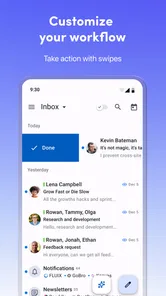

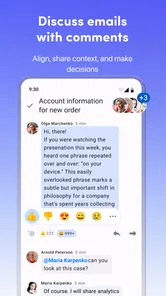
Analysis by Reviewed
I spent time with Spark Mail: AI Email, Calendar as a daily productivity app rather than treating it as just another inbox replacement. My first impression was that it is designed for people who receive mail from several services and want one calmer place to work. The appeal is easy to understand: Gmail, AOL, Yahoo, and Hotmail accounts can be brought together, while calendar work sits beside email instead of being handled in a completely separate routine.
That convenience also creates the main question I had while using it: how much control do I want to hand to one app that sits between me and several important accounts? Spark Mail App, the developer, presents the product as an AI-powered mail and calendar tool, but the useful test is less about the label and more about the choices visible during everyday use. Can I tell which account I am working in? Can I avoid sending from the wrong address? Can I decide what deserves attention instead of letting an assistant shape the whole workflow?
My answer is cautiously positive. This is a free productivity app for everyone, and its broad compatibility makes it practical for mixed personal and work inboxes. However, I would not recommend connecting every account immediately without first checking the account prompts, notification choices, and sending identity. The app is most convincing when it reduces routine switching while leaving the final decisions with me.
How Spark Mail earns trust in a crowded inbox market
When I judge Spark Mail’s place in a crowded inbox market, I look beyond the appeal of bringing several accounts together and ask whether that setup feels manageable over time. Its 4.1 average rating across around 89 thousand ratings suggests broad interest, but the better test is how carefully I can keep account identities and daily habits in view. That question leads naturally to the practical issue of speed: what should I expect when I open it to get through a busy inbox?
One workspace, but not one kind of email
The usual alternative is to keep using each provider’s own application. That approach is familiar and can feel safer because Gmail stays in Gmail, Yahoo stays in Yahoo, and so on. The downside is obvious when several addresses matter: I have to remember which app contains a message, repeat notification settings, and switch contexts whenever a conversation moves between accounts.
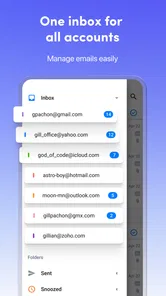
Spark Mail takes the opposite approach. Its central value is consolidation. I can look at several supported mailboxes from one interface, which is especially useful for someone who has a personal Gmail address, an older Hotmail account, and a separate address used for subscriptions or freelance work. The gain is not merely fewer icons on the home screen. It is a single place to review what needs action and what can wait.
That model is helpful, but it changes the risk of a mistake. In a provider-specific app, the account identity is often obvious because the entire application belongs to one service. In a unified inbox, I need to pay closer attention before replying, forwarding, or creating a calendar item. I found that the best habit is to pause at the compose screen and verify the sender account, particularly when a personal and professional address are both connected.
More From Our News Desk

Weather by Xiaomi Review: Clear at a Glance, Less Clear Up Close

X Under Pressure: Can It Recover When Posting Goes Wrong?

Clash of Clans Is Won Between the Battles

Android Auto Makes the Case for Quieter Car Software

MobiOffice: Transforming Mobile Productivity with Seamless Integration

EA SPORTS FC™ Mobile Soccer: Redefining Mobile Sports Gaming
The AI promise needs a practical interpretation
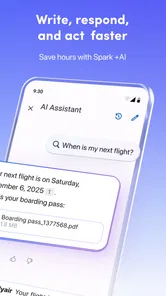
The AI wording may sound like a reason to expect the app to manage email automatically. I would interpret it more modestly. AI can be useful for reducing the effort involved in reading, organizing, or drafting, but it should not replace my review of sensitive messages. A short suggested response may save time, yet a message involving money, employment, health, travel documents, or a legal commitment still deserves my own wording and a careful check of recipients.
This is where trust becomes a user-interface issue rather than a slogan. I want visible choices before anything is sent, shared, or acted on. I also want the ability to ignore an automated suggestion without feeling pushed toward it. Spark Mail works best for me when its intelligent assistance is treated as a starting point, not as an authority.
What the adoption numbers tell me, and what they do not
The app has passed 1 million installs, with an average rating of 4.1 from around 89 thousand ratings and about 3.5 thousand written reviews. Those figures suggest that Spark Mail has attracted a substantial audience and that many people find the overall concept useful. They do not remove the need to test it against my own account setup, because a person with two ordinary inboxes has a different experience from someone managing many work identities.
I also noticed that the current version is 3.18.6, while the app requires Android 10 or later. That matters if I am installing it on an older phone or maintaining a device that no longer receives regular operating-system updates. Compatibility is not the same as suitability: even when installation is possible, I would still keep the operating system and the app updated before connecting important accounts.
Account controls deserve attention before convenience
When an app combines mail and calendar, the first setup should be treated as a review of access rather than a race to reach the inbox. I would connect one account first, observe how the account name appears in the interface, and check the notification behavior before adding another. This simple sequence makes it easier to identify whether an unexpected alert or calendar entry belongs to the new connection or to an earlier one.
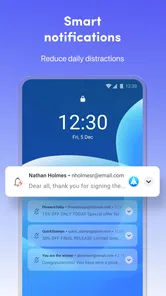
I would also avoid granting access casually on a shared or borrowed device. A unified inbox can expose more than a single provider app because it brings multiple conversations into one view. A lock screen notification that seems harmless for one account can reveal a great deal when it comes from several accounts. Reducing message previews and reviewing device-level notification settings is therefore one of my first steps.
Where the free model fits
Spark Mail is free to install and use, with in-app purchases ranging from $4.99 to $199.99 per item. That range tells me to inspect any upgrade screen carefully rather than assuming every useful capability belongs to the free experience. I prefer to understand what I can do without paying before building a workflow around the app.
This is not a criticism of optional purchases by itself. Development, synchronization, and advanced productivity tools can involve real costs. My concern is practical: if I use the app for several accounts and become dependent on a particular workflow, a later change in access could be disruptive. I would test the free experience with a noncritical account first and decide whether the paid path offers enough value for my actual routine.
Everyday scenario: separating urgent work from personal noise
Imagine a weekday morning with a work address, a personal Gmail inbox, and an older Yahoo account used for shopping. In separate apps, I might check all three in an arbitrary order and lose time opening messages that do not need a response. In Spark Mail, the unified view gives me a chance to scan the whole situation before deciding what deserves a reply, a calendar action, or no action at all.
My preferred routine would be to review the combined inbox, identify messages that require a decision, and then open the relevant account context before replying. A meeting request should be checked against the correct calendar, while a personal appointment should not accidentally become a work event. The advantage is a shorter path from message to action; the trade-off is that I must remain deliberate about which identity and calendar I am using.
Useful workflows that are easy to overlook
One non-obvious strength of a combined mail-and-calendar tool is that it can change how I process messages. Instead of treating the inbox as a permanent to-do list, I can use it as a triage point: read, decide, and move the next step to the appropriate place. For example, a message about an appointment should lead me to verify the details and then check the calendar, not remain unread as a reminder.
A second useful habit is to keep account roles clear. I would reserve one address for external work, another for personal communication, and avoid relying on memory alone when composing. The more accounts I connect, the more valuable this discipline becomes. A unified interface saves switching time, but it does not remove the consequences of sending from the wrong address.
A third trade-off concerns notifications. The most convenient setup is not always the most private one. If every account produces immediate alerts, the unified inbox can recreate the same distraction it was meant to solve. I would start with notifications for the account that truly needs rapid responses, then add others only if the delay has a real cost. This gives the app a chance to reduce noise instead of becoming another source of it.
Calendar convenience can create a new checking habit
Putting calendar work near email is sensible because many events begin as messages. Still, I would not assume that an email’s wording is enough to create a correct event. Dates, time zones, locations, and recurring details can be ambiguous, especially when a conversation changes plans. I would check each important detail before saving anything and confirm which calendar receives it.
This is another area where user agency matters. An assistant can help me notice that a message may involve scheduling, but I want the final event to remain my decision. For low-stakes reminders, quick handling is convenient. For interviews, flights, medical visits, or client meetings, I would manually verify the details and calendar identity every time.
Handling sensitive messages with restraint
Email is often more sensitive than the app category suggests. In one inbox I may have receipts, private conversations, account recovery messages, work documents, and personal plans. Bringing those streams together improves visibility, but it also means that a single search, notification, or open screen can reveal information from multiple parts of my life.
My cautious approach is to connect only the accounts I genuinely need in the same workflow. I would not add an account simply because it is supported. I would also take extra care with automated drafting around confidential material. A suggested response can be convenient, but I would read it as carefully as I would read a message written by someone else, checking names, commitments, tone, and attachments before sending.
Account recovery deserves similar attention. If the app becomes the place where I see messages from several services, losing access to the phone or account connection could be inconvenient. I would keep the original provider apps or browser access available until I am confident that Spark Mail fits my routine. That backup is especially sensible during the first few days, when I am still learning where each control lives.
Who will appreciate Spark Mail most?
I think this app suits people who actively manage multiple supported mail accounts and dislike jumping between provider applications. It is also a good match for someone who wants email and calendar tasks close together, provided that person is willing to verify account identity before taking action. Freelancers, families with several addresses, and users who maintain an older mailbox alongside a newer one may find the single workspace particularly useful.
The app is less compelling for someone who uses only one provider and is already happy with that provider’s mail and calendar tools. In that case, adding a separate layer may introduce more setup and more decisions without solving a real problem. It is also not my first choice for a person who wants a completely manual email experience with no interest in AI-assisted workflows.
Users with strict organizational requirements should evaluate it carefully in their own environment. A personal productivity app may be convenient, but a workplace can have rules about which services may access business mail or calendars. I would follow those rules before connecting a company account, regardless of how attractive the unified inbox appears.
How it compares with familiar alternatives
Compared with Gmail’s own app, Spark Mail is more appealing when my accounts extend beyond Google. Gmail remains the simpler choice if nearly everything I do already lives in Google and I prefer the provider’s native account controls. Spark Mail becomes more interesting when I want Gmail, AOL, Yahoo, and Hotmail accounts viewed together rather than maintained as separate destinations.
Compared with Outlook, the decision depends on where my work already lives. Outlook is a natural fit for people centered on Microsoft mail and calendar services, while Spark Mail’s value is its mixed-provider approach. I would choose the app that matches my account ecosystem instead of assuming that a larger feature list automatically means a better daily experience.
Compared with separate provider apps, Spark Mail reduces switching and can make cross-account triage faster. The price of that convenience is a larger concentration of information and a greater need for careful sending and notification habits. For me, that is a fair trade when I have several active accounts, but not when I only need a straightforward single-inbox solution.
Small frictions that affect long-term use
The biggest friction is cognitive rather than technical: one screen can contain too many identities. I have to remember which account owns a conversation, which calendar should receive an event, and whether a notification deserves immediate attention. The app can bring those tasks together, but I still need a personal system for labels, priorities, and review times.
There is also a risk of overtrusting convenience. A unified inbox feels efficient because it hides the boundaries between services. Those boundaries still matter for security, recovery, retention, and organizational policy. I would treat Spark Mail as a working interface, not as proof that all accounts have become one account.
Finally, the purchase range means I would not make a long-term decision based only on the free download. I would first establish whether the app is reliable for my actual mix of accounts and whether the controls feel understandable. Paying makes sense only after the workflow has earned a place in my routine.
My cautious verdict after using it
Spark Mail is strongest when it gives me one clear place to review several accounts without taking the final decision away from me. Its combination of mixed-provider email, calendar access, and AI-oriented assistance makes sense for people who are tired of scattered inboxes. The free entry point also makes it reasonable to try with one low-risk account before committing more deeply.
I would recommend it to a friend who regularly switches between Gmail, AOL, Yahoo, or Hotmail and wants a more unified way to handle messages and scheduling. I would tell that friend to verify the sending account, limit noisy notifications, review calendar details manually, and read every automated suggestion before using it. Those habits are not optional extras; they are what make the convenience manageable.
I would skip it if one provider’s existing app already handles everything well, or if my workplace does not allow third-party access to business accounts. I would also avoid connecting every mailbox on the first day. Start small, inspect the visible account choices, and keep an alternative access route until the workflow feels dependable.
With an average rating of 4.1 and more than 1 million installs, Spark Mail has clearly found an audience, but my recommendation rests more on its fit than on popularity. For a multi-account user who values a single workspace and is comfortable staying attentive at sensitive moments, it is a useful productivity app. For everyone else, the familiar provider app may remain the simpler and more controlled choice.
Spark Mail: AI Email, Calendar Frequently Asked Questions
Can I manage several inboxes without switching between separate email apps?
Yes. Spark Mail is designed to bring supported email accounts together in one interface, so you can handle more than one inbox without opening a separate app for each provider. Its store summary specifically highlights Gmail, AOL, Yahoo, and Hotmail. This can be useful for keeping personal and work messages in one place, while still organizing how you use each account.
Does Spark Mail include a calendar as well as email?
Yes. Spark Mail combines email and calendar features in one app, which can be convenient if you want to manage messages and calendar tasks from a single place. The app is presented as an AI-powered mail and calendar tool, so it brings those productivity functions together rather than focusing on email alone. The particular calendar options available may depend on the app version and your setup.
Can I use Spark Mail on my device?
Spark Mail is a productivity app for Android and iOS, with a minimum operating-system requirement of version 10. Before downloading, check that your device meets this requirement and that the app is available for your device through its app store. The app is free to download, and its content rating is Everyone, making it suitable for a general audience.
What does Spark Mail bring together in its inbox and calendar?
Spark Mail combines email and calendar features in one app, with an AI-powered approach to managing messages. Its store description highlights syncing Gmail, AOL, Yahoo, and Hotmail in one inbox. That can make it a convenient option if you want to handle supported email accounts alongside calendar tasks without relying on a separate email app for each provider.
What is Spark Mail: AI Email, Calendar, and who is it designed for?
Spark Mail is an email and calendar application designed to help users manage multiple accounts in one place. It supports common providers such as Gmail, Outlook, iCloud, Yahoo, and other IMAP services. The app is aimed at people who want a cleaner inbox, better organization, shared email tools, scheduling features, and AI-assisted help when writing or handling messages.
Pros
- Smart AI tools help draft
- summarize
- and improve emails quickly.
- Unified inbox supports multiple email providers in one place.
- Email scheduling and snoozing make it easier to manage follow-ups.
- Collaborative features support shared drafts and team email workflows.
- Calendar integration helps coordinate meetings without leaving the app.
Cons
- Some advanced features require a paid subscription.
- AI features may need review to avoid inaccurate or unsuitable wording.
- The interface can feel busy when many accounts and tools are enabled.
- Large inboxes may take time to sync and organize initially.
- Some users may prefer a simpler app with fewer productivity features.











