

Southwest Airlines: Travel App
- 59.42K
- 4.4
- Installs
- 10.00M
- Price
- Free

Screenshots





Analysis by Reviewed
I think the Southwest Airlines app works best when you already know you want to fly with Southwest: it brings booking and trip management into one place, rather than trying to replace every travel tool you use. That focus is useful, but it also sets a limit. If you are comparing several airlines or building a trip around multiple providers, you will still want other apps or websites beside it.
As a free travel app from Southwest Airlines, it has a clear role for people who book with the carrier regularly and want the airline’s own tools close at hand. Its 4.5 average from around 166,000 ratings suggests many travelers find it useful, while its Everyone age rating makes it suitable for a broad audience. I would treat it as a practical companion to a Southwest itinerary, not a universal travel planner.
Where an airline app beats a general travel app
Travel search apps are handy when I am undecided about the airline, dates, or destination. They can help me compare options across providers, but once I have chosen Southwest, its own app is the more direct place to handle that airline’s booking and trip details. I do not have to translate a third-party itinerary into the carrier’s own tools before managing the flight.
That distinction matters on travel day. A realistic use case is a traveler checking a flight status at home, saving the boarding pass in the app, and then checking the itinerary again while heading to the airport. Keeping those tasks together can reduce the small bits of email searching and app switching that tend to create stress when time is tight. I would still keep an independent map or broader travel planner for the rest of the trip; the airline app is most useful for the airline part.
Small planning choices that make a difference
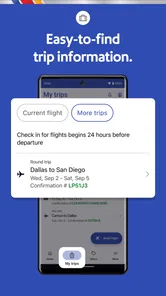
The check-in window is worth treating as a reminder rather than something to leave until the last minute: the app lets you check in up to 24 hours ahead, so planning around that point can help you avoid forgetting. If boarding position matters to you, make a note of the opening time and check in when the window becomes available. It is a useful habit, though it is not a promise of a particular position.
I also see value in using the app to review a booking before plans become urgent. If a schedule changes, the ability to change or cancel through the app may be more convenient than finding the relevant email and starting from there. Before confirming any change, I would read the options and consequences shown on screen carefully; a quick workflow is helpful, but it is still your trip and your decision.
Who should keep it—and who may not need it
This is a strong fit for Southwest passengers who want flight booking, status checks, boarding passes, and Rapid Rewards in the same place. It is especially handy if you fly the airline often enough to care about tracking points or using them toward a booking. The app has over 10 million installs, and its long presence in the travel category reflects how established it is as a dedicated airline companion.
More From Our News Desk

 Prime Video
Switching to Prime Video: What Changes in Your Viewing Routine
Prime Video can make a compelling second home for streaming, but switching means learning a different catalog, rental layer, and route from browsing to playback.

 Universal TV Remote Control
Universal TV Remote Control Works Best as a Reliable Backup
A phone remote earns its place through quick setup and reliable habits. Here is how to get more from Universal TV Remote Control—and where its limits show.

 Weather - By Xiaomi
Weather by Xiaomi Review: Clear at a Glance, Less Clear Up Close
Xiaomi’s weather app makes everyday forecasts quick to scan, but its calm surface can leave useful details and recovery paths harder to find than they should be.

 X
XX Under Pressure: Can It Recover When Posting Goes Wrong?
A resilience-focused review of X, examining setup, mistaken posts, interruptions, weak connections, and the gaps that matter when recovery needs to be dependable.

 Clash of Clans
Clash of Clans Is Won Between the Battles
Its raids are quick; its community is a long-term project of coordination, teaching, rivalry, and shared responsibility—with all the friction that entails.

 Android Auto
Android Auto Makes the Case for Quieter Car Software
The car interface is no longer judged by how much it can do, but by how quietly it helps. Android Auto shows what drivers now expect—and what still gets in the way.
Latest News



On the other hand, if you fly many different airlines, prefer to compare all carriers before booking, or need one itinerary to coordinate several companies, a general travel app may be a better starting point. You can still use this app for a Southwest flight, but it will not replace the broader comparison and planning role those services play. The same applies if you rarely use Southwest: installing an airline-specific app may not be worthwhile for a one-off search.
A focused tool, with a few practical trade-offs
The main trade-off is that convenience depends on keeping your Southwest travel inside Southwest’s own ecosystem. That is helpful for flight-specific tasks, but less so when your plans include other airlines, lodging providers, or local transport. The app’s summary mentions hotel booking as part of its wider travel offering, but I would still compare lodging choices separately if price, location, or room details are central to the decision.
Another sensible habit is to keep a backup route to essential trip information. The app can make a boarding pass easy to retrieve, but a traveler should not assume one screen is the only way to access an important detail. I like the app for reducing routine friction; I would not make it my sole source for every element of a complicated itinerary.
For a traveler deciding whether to install it, the practical question is simple: do you book Southwest often enough to want its booking and trip tools in your pocket? If yes, the convenience is easy to justify. If you mainly need broad airline comparisons or a single dashboard for a multi-provider holiday, start with a general travel service and add this one when a Southwest booking makes it useful.
The app first appeared on November 29, 2010, and version 12.11.4 requires iOS 8.0 or later. That history gives it the feel of a long-running airline tool rather than a new travel experiment, though I would still keep it updated so the version on my device stays current. Overall, I recommend it to Southwest flyers who value quick access to their own flight details; for everyone else, its usefulness depends on how much of their travel actually involves this airline.
How I would fit it into a real trip
For a work trip booked well in advance, I would use the app as the airline-specific layer rather than the place where every decision begins. I might compare routes elsewhere first, then open Southwest’s app once I have settled on a flight, so the reservation and day-of-travel details are easy to find together. That split avoids asking one tool to do two different jobs: discover the best overall itinerary and manage a particular airline booking.
On the day itself, a useful routine is to check the itinerary before leaving home, check in when the window opens, and revisit the flight information before setting off for the airport. The practical benefit is not that an app removes every travel uncertainty; it is that it gives me a familiar place to look when I need the details tied to my Southwest flight. I would still check airport directions and ground transport separately, especially when timing matters.
Questions worth considering before relying on it
If you are wondering whether you need an account to make the app worthwhile, the answer depends on what you want to do. A traveler who only needs to look up general options may not get much from keeping an airline app installed. Someone managing a booked trip, checking in, or using Rapid Rewards has a clearer reason to keep it close. I would decide based on whether I expect to manage a Southwest reservation, not simply because I am planning a holiday.
Another common concern is whether it can handle a trip that includes more than one provider. It can be useful for the Southwest portion, but I would not expect it to become the master itinerary for flights on other airlines, lodging, and local transport. I would keep a separate itinerary or planner for those pieces and use the airline app for the information that belongs to the Southwest booking. That division is less elegant than one universal dashboard, but it is more realistic.
When plans change, using the app can make the first step more convenient, but I would not tap through a rebooking decision while distracted or in a hurry. I would compare the offered choices with the rest of my schedule and check what the displayed terms mean before confirming. A mobile workflow is helpful for handling a change from the couch or airport, yet convenience should not replace a careful look at how the revised flight affects connections, hotel plans, or appointments.
Where the convenience has limits
There is also a difference between having key flight details in one place and having every travel need solved. A Southwest-focused booking tool is naturally more useful when the trip is centered on that airline; it is less compelling when the flight is only one small part of a complex itinerary. For a traveler who wants to compare multiple carriers right up to checkout, a general search service remains the better first stop, even if the Southwest app becomes useful after a decision is made.
I would be cautious about treating any airline app as the only way to access essential information. Phones can run low on battery, a traveler can lose connectivity, and an airport is not the best place to discover that a detail is harder to retrieve than expected. Keeping the booking confirmation available through another route is a simple backup habit. It is not a criticism unique to Southwest; it is sensible preparation whenever a phone screen becomes part of the travel routine.
For a first-time Southwest passenger, the app can still be worthwhile if there is an actual booking to manage. The learning curve is less important than knowing which tool answers which question: use the airline app for the reservation and flight-day tasks, and use broader services for comparing unrelated airlines or organizing activities at the destination. That distinction helps prevent disappointment from expecting a dedicated carrier app to work like a full-service trip organizer.
A quick look at its place in the travel category
Among travel tools, I see this as a companion rather than a replacement. A general booking platform is usually stronger when flexibility across airlines and providers is the priority; Southwest’s own app is the more focused choice once the airline is part of the plan. That makes the two approaches complementary. I would search broadly when I am undecided, then move to the airline’s app when I want direct access to the trip I have chosen.
The difference matters most for frequent flyers. If Southwest is a regular choice, keeping its app installed can make repeat tasks feel more straightforward, especially when checking a reservation or looking at rewards. If you only take an occasional Southwest flight, the benefit is more situational: install it when you have a trip to manage, and do not expect it to earn a permanent place on your phone if the rest of your travel happens elsewhere.
So, let's chat about the Southwest Airlines app. If you're anything like me, juggling travel plans can sometimes feel like trying to solve a Rubik's Cube blindfolded. But with this app, things feel a little less chaotic and a bit more like a breeze. Let me walk you through why this app is a must-have for any traveler.
Booking Flights Made Simple
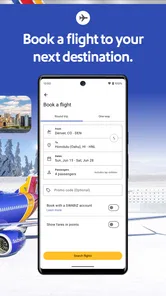
First off, the booking process on the Southwest Airlines app is as smooth as a perfectly executed takeoff. You just pop in your travel dates, pick your destination, and voila, you’re on your way to booking a flight. The app provides a straightforward interface, making it easy even for those who might not be the most tech-savvy. And the best part? No hidden fees creeping up on you at checkout. What you see is what you get.
Your Travel Companion
Once you're all booked, the app continues to shine. It acts like your little pocket travel buddy. Need to check your flight status? It’s right there. Want to view your boarding pass without fumbling through emails? Easy peasy, it’s stored in the app. I can’t emphasize enough how much I love having everything in one spot. It’s like having a personal assistant who’s always on top of things.
Another feature I appreciate is the ability to change or cancel flights directly from the app. Plans change, and it’s nice to know you can handle it without stress. Just a few taps, and you’re all set. Plus, the app sends timely notifications, so you’re always in the loop about your travel itinerary.
Extra Perks and Rewards
Let’s not forget about the rewards! If you’re a frequent flyer, you’ll love how the app integrates with your Rapid Rewards account. You can track points, view your status, and even use your points to book flights. The app makes it all super accessible, so you’re never left wondering how many more flights until your next free trip.
And for those who like to plan ahead, the app offers a feature to check in up to 24 hours in advance. Trust me, a little planning goes a long way, especially if you want to snag those prime boarding positions.
The User Experience
In terms of user experience, the app is pretty intuitive. The design is clean and minimalistic, which I find refreshing. Navigation is a breeze, and the app rarely lags or crashes. It’s reliable, which is exactly what you want when you’re managing travel plans. The developers seem to have put a lot of thought into making the app user-friendly, and it shows.
In conclusion, if you’re traveling with Southwest, downloading their app is a no-brainer. It simplifies the whole travel process, from booking to boarding. Plus, with all the extra perks and a user-friendly interface, it’s like having a travel buddy in your pocket. So next time you’re planning a trip, give it a go. You might just find it makes your travel experience a whole lot easier.
Southwest Airlines: Travel App Frequently Asked Questions
What is the Southwest Airlines app, and who develops it?
Southwest Airlines: Travel App is a travel app developed by Southwest Airlines. It brings flight booking, hotel booking, and other travel planning tools together in one place. If you are considering installing it, its focus is on handling travel tasks from a mobile device, rather than serving as a general-purpose travel guide.
Is the Southwest Airlines app available for both Android and iPhone?
Yes. The Southwest Airlines app is available for Android and iOS, so you can use it on a compatible Android phone or an iPhone. The app is free to download, and its travel features include booking and managing flights, checking flight status, and accessing a boarding pass. Before installing, check that your device meets the operating system requirement for your platform.
What age group is the Southwest Airlines app suitable for?
The app has an Everyone content rating, making it suitable for a broad audience. Its travel tools are intended for people arranging or managing trips, including booking flights and hotels and checking flight information. As with any travel app, the person using it should be able to manage the relevant travel arrangements and any purchases made through the app.
Can I book a hotel through the Southwest Airlines app?
Yes. The app brings travel planning together in one place, with hotel booking alongside flight booking. This can be useful when you want to arrange more than one part of a trip from your phone. You can also use the app to manage flights and access travel tools such as flight status and your boarding pass.
Is the Southwest Airlines app suitable for travelers who do not have a Rapid Rewards account?
You can use the app for travel tasks such as booking and managing flights, checking flight status, and accessing a boarding pass. It also includes access to a Rapid Rewards account for members. The app’s main travel features make it useful for organizing a journey, while account-related tools are available when you want to view your rewards information.
Pros
- User-friendly interface simplifies booking
- Real-time flight status updates
- Easy mobile check-in feature
- Rapid Rewards program enhances loyalty
- In-app customer support chat
Cons
- Limited international destinations
- Occasional app crashes
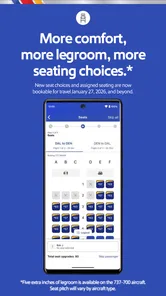
- No seat selection during booking
- Baggage policies not clearly detailed
- Requires stable internet connection











