

Sound Profile (Volume control)
- 2.27K
- 3.7
- Installs
- 1.00M
- Price
- Free

Screenshots



Analysis by Reviewed
I find volume control surprisingly easy to underestimate. Most phones let you change sound levels, but they do not always make the difference between a ringtone and a notification obvious. That is the small problem Sound Profile, a free personalization app from Corcanoe, tries to solve. Its purpose is direct: give me separate control over call volume and notification volume instead of treating every alert as one block.
After using it, my impression is that this is a focused utility rather than a complete sound-management suite. It does not try to redesign the whole phone or bury a simple adjustment under visual effects. The appeal is practical: when I want calls to remain audible but notifications to stay quiet, I can manage those levels independently. That makes it especially relevant for people who receive many messages during work, study, travel, or sleep hours.
The best reason to try it is control without complication. The important question, however, is not only whether the app changes volume. It is whether that extra control fits your phone, your habits, and your comfort with granting a personalization tool access to sound settings. I will focus on those everyday decisions rather than treating a short feature description as the whole experience.
How Sound Profile fits into everyday phone use
When I think about fitting Sound Profile into a routine, I start with the moments when a phone’s competing sounds become a nuisance: focusing at work, winding down at night, or staying reachable without hearing every alert at full volume. I’ll look at how a simple baseline can make those moments easier to manage, and why testing it in ordinary situations matters more than changing several settings at once.
A narrow problem solved in a useful way
The usual Android volume panel is convenient when I need a quick adjustment, but it can be frustrating when I want different behavior from different types of sound. A loud ringtone may be useful when I am waiting for an important call, while a stream of message alerts can become distracting. Conversely, reducing everything can make me miss a call. Sound Profile is built around that distinction.
In a realistic workday scenario, I might keep call volume high enough to hear from another room and lower notification volume so incoming messages do not interrupt a meeting or concentration session. At home, I can reverse that preference or reduce both levels before going to bed. The value is not dramatic; it is the removal of a repeated little annoyance.
I also see a benefit for people who share spaces with others. A phone that rings clearly does not need to announce every application update at the same intensity. Parents, students, shift workers, and anyone who keeps a device nearby overnight may appreciate the ability to make those sounds less intrusive without silencing calls altogether.
More From Our News Desk

 Instagram
Instagram’s Power Comes From Its Place in Your Phone
A close look at how Instagram turns Meta’s reach, recommendation systems and everyday camera habits into durable platform power—and what that costs users.

 Gmail
GmailGmail in a Busy Inbox: Who Benefits Most?
From first account to crowded workday, Gmail earns its place through dependable search and flexible sorting—but its best fit depends on how much inbox maintenance you can tolerate.

 Prime Video
Switching to Prime Video: What Changes in Your Viewing Routine
Prime Video can make a compelling second home for streaming, but switching means learning a different catalog, rental layer, and route from browsing to playback.

 Universal TV Remote Control
Universal TV Remote Control Works Best as a Reliable Backup
A phone remote earns its place through quick setup and reliable habits. Here is how to get more from Universal TV Remote Control—and where its limits show.

 Weather - By Xiaomi
Weather by Xiaomi Review: Clear at a Glance, Less Clear Up Close
Xiaomi’s weather app makes everyday forecasts quick to scan, but its calm surface can leave useful details and recovery paths harder to find than they should be.

 X
XX Under Pressure: Can It Recover When Posting Goes Wrong?
A resilience-focused review of X, examining setup, mistaken posts, interruptions, weak connections, and the gaps that matter when recovery needs to be dependable.
Latest News



Who will notice the difference most
This app suits users who regularly adjust sound and dislike the all-or-nothing behavior of standard controls. It is also a reasonable choice for someone who wants a small personalization tool rather than a large automation platform. The free download lowers the barrier to testing it, while optional in-app purchases range from $0.99 to $6.49 per item if the available paid options appeal to you.
I would be more cautious if your phone already exposes separate, reliable sliders and you rarely touch them. In that situation, adding another control layer may not improve anything. I would also skip it if you expect a modern, highly automated profile system with elaborate schedules, location rules, or a large collection of sound themes. The central idea here is volume separation, not an all-purpose replacement for every sound setting.
The app is marked for Everyone, which makes its intended audience broad. It has been available since May 18, 2012, and the current version is 13.03. That long presence can make a simple utility feel familiar, but it also means I would judge it by how well it behaves on my particular phone rather than assuming an older, established app will match every recent Android interface.
What the public response suggests
Sound Profile has passed one million installs, with an average rating of 3.7 from roughly sixteen thousand ratings and about 2.3 thousand written reviews. I read those figures as a sign of useful but uneven appeal. Enough people find the concept worthwhile to keep using it, yet the rating is not so high that I would recommend installing it without checking how it interacts with your device.
That middle-ground reputation matches the nature of the app. Volume behavior can differ between phone manufacturers, Android versions, notification systems, and modes such as silent or vibrate. A utility can be perfectly sensible in design and still feel inconsistent when the operating system changes what an app is allowed to control. I would therefore test the core action immediately after installation instead of configuring every preference first.
Starting with a small, safe test
My preferred setup is simple. I first choose a modest difference between call and notification volume, then make a test call and trigger a notification. This confirms whether the two channels behave as expected on my device. I would not begin by lowering notifications to zero or raising calls to maximum, because a small change makes it easier to identify whether the app is working without creating an unpleasant surprise.
Once the basic distinction is clear, I would use the app during an ordinary day rather than judging it from a single tap. A notification from a messaging service, a calendar reminder, and an incoming call may not behave identically. Testing across those situations reveals more than looking at sliders alone, especially if the phone applies its own sound mode or manufacturer-specific rules.
Controls, trust, and the choices that matter
I also pay attention to the choices that sit behind a volume adjustment: which sound I want to hear, how much interruption I can accept, and whether an app’s controls behave as expected on my phone. In this section, I’ll weigh the convenience of separate levels against the times Android’s own tools are more precise, so the next part can focus on using those controls deliberately.
Separate controls are useful, but not magic
The central control is easy to understand: calls and notifications can be treated separately. That sounds obvious, but it changes how I think about a phone’s sound. Instead of asking, “How loud should the phone be?”, I can ask two more useful questions: “How easy should it be to hear a call?” and “How much interruption can I tolerate from notifications?”
That distinction is especially helpful when I use a phone for both urgent communication and noisy application activity. A delivery call, family call, or work call may deserve priority, while social updates and promotional alerts do not. Sound Profile gives me a way to express that preference through volume rather than muting every source.
There is an important trade-off, though. Separate volume is not the same as selective notification management. If one particular application is constantly noisy, lowering the shared notification level affects all notifications, not only that application. In that case, Android’s per-app notification settings may be the better tool. I would use Sound Profile for broad sound balance and the system settings for fine-grained notification decisions.
Where the normal alternatives may be better
The first alternative is the phone’s own volume panel. It is already installed, familiar, and usually the safest place to make a quick adjustment. If your device offers independent call and notification sliders, the built-in controls may be enough. There is no reason to add a separate app merely because the app exists.
The second alternative is Android’s notification settings. These are preferable when I want to block a category, silence a specific application, or decide whether an alert should appear visually as well as audibly. Sound Profile is more convenient when the goal is a broad volume relationship, but system settings are more precise for notification policy.
A third alternative is a full automation or profile app. Such tools can be better for people who want sound changes based on time, location, calendar events, or connected devices. They can also be more demanding to configure and may present more permissions or background behavior to evaluate. I would choose Sound Profile when I want a focused adjustment, not a complicated routine builder.
Permission awareness should be part of the setup
Because this app changes phone sound behavior, I would inspect the permissions screen and the visible controls before deciding how far to use it. The important trust question is practical: what access does the app request, why is each access needed for the control I want, and can I decline anything unrelated? I would not assume that a personalization label automatically answers those questions.
I also prefer to keep the app’s role narrow. If the interface offers optional settings, I would enable only the ones I understand and leave unnecessary choices off. I would review Android’s app permissions page after installation and again after a major update. That is not a criticism unique to Sound Profile; it is a sensible habit for any utility that changes device behavior.
Account control matters too. I would be wary of any unexpected request to create an account for a task as small as adjusting volume. If the app presents a sign-in or backup choice, I would consider whether that function is genuinely useful to me before providing details. For a local sound preference, my preference is to use the app with the smallest amount of personal involvement possible.
Handling sensitive moments without losing control
Sound settings become most important when the phone is not in my hand. Before a meeting, I would test the call level and reduce notification volume rather than relying on memory. Before sleep, I would confirm whether the phone’s current mode changes the result. Before travel, I would check the setting after connecting headphones or another audio device, since different output paths can make a familiar volume number feel different.
I would also avoid assuming that lowering notification volume makes every interruption disappear. Some alerts may use separate channels, vibration, visual banners, or priority behavior. If I need genuine quiet, I would combine the app with Android’s Do Not Disturb controls and check which contacts or applications are allowed through. Sound Profile can help shape loudness, but it should not be treated as a complete emergency or sleep-management system.
Another useful habit is to keep a known baseline. I might choose a moderate call level and a clearly lower notification level, then return to that arrangement after experimenting. Without a baseline, repeated adjustments can become confusing, especially when the phone is already in silent or vibrate mode. The app is most useful when it reduces decisions rather than creating another set of mysterious ones.
What I would watch for after installation
I would check three things during the first day. First, do the separate values remain after restarting the phone? Second, do they behave consistently when switching between normal, vibrate, and silent modes? Third, does the app’s control match what I hear from calls and notifications rather than merely showing a changed number?
If one of those checks fails, I would not keep adjusting random settings in the hope of fixing it. I would compare the result with the phone’s native controls, inspect battery or background restrictions, and see whether the operating system is overriding the app. If the built-in panel already produces the result I need, I would remove the extra layer. A volume utility should make the phone clearer, not turn sound troubleshooting into a hobby.
Value over time
Since the app is free to install, the main cost is attention rather than money. That makes a short trial worthwhile for users who genuinely need separate levels. The optional purchases deserve a deliberate approach: I would first confirm that the basic workflow solves my problem, then decide whether any paid item adds enough convenience to justify it.
I would not pay simply because the app has been around for a long time or because it has a large install base. Its value depends on a very specific improvement in my daily routine. If I stop reaching for the app after a week because the system controls are just as convenient, that is useful information. If I repeatedly use it before meetings, bedtime, and busy notification periods, the small focused tool has earned its place.
My cautious verdict
I recommend Sound Profile to Android users who want a straightforward way to keep calls audible while making notifications less intrusive. The concept is clear, the free entry point makes experimentation easy, and the app belongs naturally in the personalization category. For me, its strongest quality is not a long feature list but the way it separates two sounds that are often lumped together.
My recommendation comes with a condition: test it against your phone’s native controls and review its requested access before settling into regular use. The average rating of 3.7 shows that it is not a universal success, and device-specific behavior matters here more than the simplicity of the description. A user with excellent built-in sliders may gain little, while someone constantly balancing calls against message noise may notice the benefit immediately.
I would choose another solution when I need per-application notification rules, scheduled sound profiles, location-based automation, or a complete Do Not Disturb workflow. I would also avoid making it the sole tool for critical alert management. But if the exact frustration is that changing one volume level changes too much, this app addresses that frustration directly.
Overall, I see Sound Profile as a modest, practical utility rather than an essential installation for every phone. It earns a place on my device only when its separate call and notification controls behave reliably and reduce a real daily annoyance. For the right user, that focused improvement is enough; for everyone else, the standard Android controls may remain the cleaner and more trustworthy choice.
Sound Profile (Volume control) Frequently Asked Questions
Can Sound Profile (Volume control) automatically change my sound settings at different times or in different situations?
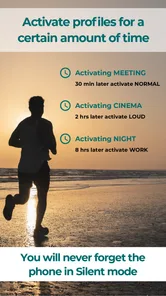
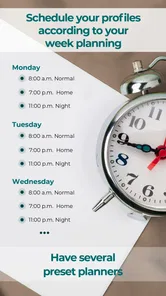
Sound Profile is intended to make it easier to switch between saved sound configurations as your routine changes. You can use different profiles for situations such as work, sleep, or being outdoors, then select the one that suits you. Automatic actions can depend on the features you enable and how your particular Android device handles background activity and system settings.
Is Sound Profile (Volume control) available for iPhone, or is it an Android app?
Sound Profile (Volume control) is an Android app for managing phone audio settings. It is designed to work with Android’s sound controls, so it is intended for Android phones rather than iPhones. Before downloading, check that your Android device meets the app’s system requirement and consider that manufacturers can handle volume and sound options differently.
Can Sound Profile (Volume control) help me keep calls and notifications at different volume levels?
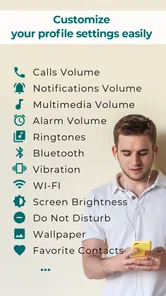
Yes. Sound Profile is designed to control phone volume for calls and notifications separately, which is useful if you want to hear incoming calls clearly without making every alert equally loud. You can also use its profile-based approach to keep preferred sound settings together and switch between them as your routine changes.
What is Sound Profile (Volume control), and what does it do?
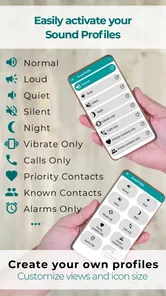
Sound Profile (Volume control) is an Android utility designed to manage your phone’s audio settings more conveniently. It can help you adjust volume levels for ringtones, notifications, media, alarms, and calls, depending on your device and Android version. The app is especially useful when you frequently switch between loud, silent, and customized sound configurations.
Can I create custom sound profiles with this app?
Yes, the main purpose of Sound Profile (Volume control) is to let you organize preferred audio settings into separate profiles. For example, you may create profiles for work, home, meetings, sleep, or outdoor use. Each profile can contain different volume levels and, on supported devices, options related to vibration, ringtone behavior, and notification sounds.
Pros
- Quickly switch between custom sound profiles.
- Separate volume levels for calls
- media
- alarms
- and notifications.
- Useful scheduling options for automatic profile changes.
- Simple interface with clearly labeled volume controls.
- Can help reduce interruptions during meetings or at night.
Cons
- Some advanced features may require accessibility or system permissions.
- Automatic profile switching can be unreliable on certain devices.
- Limited customization compared with full automation apps.
- Background operation may affect battery life on older phones.
- Some settings may behave differently across Android versions.











