

Soccer Ronaldo wallpapers CR7
- 492.00
- 4.8
- Installs
- 10.00M
- Price
- Free

Screenshots
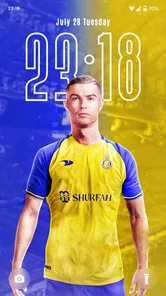
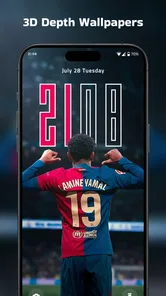
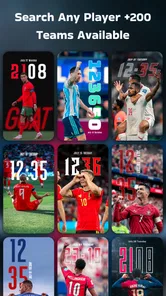
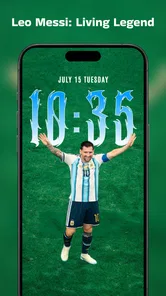
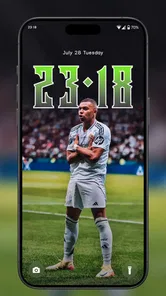
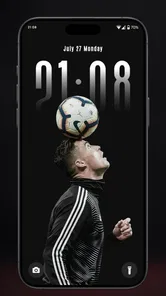
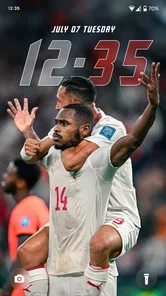
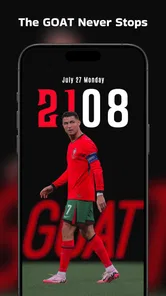
Analysis by Reviewed
If you want Cristiano Ronaldo to be part of your phone’s look, Soccer Ronaldo wallpapers CR7 is built around that simple idea. I’d treat it as a fan-focused personalization app rather than a general wallpaper library: its appeal depends on wanting Ronaldo imagery specifically, not browsing every kind of background. That clear focus makes it easy to understand, though it also means the app is less useful if your tastes change often or you prefer understated designs.
A practical way to make it part of your routine
My simplest approach would be to choose one image for the lock screen and another for the home screen, then leave them in place long enough to see whether icons and text remain easy to read. A dramatic action shot can look great full-screen but feel busy behind app labels. For a daily-use phone, I’d favor a composition with open space where the clock and icons sit; save a close-up or celebration image for the lock screen, where it gets more room to stand out.
That small bit of planning is more useful than changing the background every time I open the app. If you like variety, a repeatable habit—browse when you have a moment, choose a few favorites, and rotate manually when one feels stale—keeps the phone personal without making customization another daily task. I’d also preview a choice on the actual screen before settling on it, since the crop that works on one device may cut off the part of the image you care about on another.
Who will enjoy it, and who may want another option
The app makes the most sense for a Ronaldo supporter who wants a recognizable football theme and is happy to keep that subject on their screen. It is free, rated for Everyone, and developed by WallForApps. Its 4.8 average from around 66,000 ratings and more than 10 million installs suggest that many people have tried it, though popularity alone cannot tell you whether the image style will suit your taste.
If you want landscapes, abstract art, or a changing mix of subjects, a broad wallpaper app is probably a better fit. Those alternatives make discovery across styles easier; this one keeps the focus narrow. I’d also skip it if you want a comprehensive football news source or a tool for editing your own photos. A Ronaldo-themed background is the central reason to use it, so it is best approached with that expectation rather than as an all-purpose customization suite.
Choosing a look that works beyond the preview
A useful way to judge a wallpaper is to check how it behaves in the places you actually use your phone, rather than deciding from a thumbnail alone. I’d look at the clock, notification text, and the first row of app icons after applying an image. If Ronaldo’s face or a key detail lands under those elements, the image may still be worth keeping on the lock screen, but it could be distracting as a home-screen background.
There is also a small but important trade-off between a strong football image and a calm everyday layout. A celebration shot can bring energy to the screen, while a simpler portrait may make the phone easier to scan when I’m in a hurry. I would save a couple of options for different moods instead of trying to make one wallpaper do everything. That makes the app more useful even if I prefer not to change my setup often.
More From Our News Desk

 Gmail
GmailGmail in a Busy Inbox: Who Benefits Most?
From first account to crowded workday, Gmail earns its place through dependable search and flexible sorting—but its best fit depends on how much inbox maintenance you can tolerate.

 Prime Video
Switching to Prime Video: What Changes in Your Viewing Routine
Prime Video can make a compelling second home for streaming, but switching means learning a different catalog, rental layer, and route from browsing to playback.

 Universal TV Remote Control
Universal TV Remote Control Works Best as a Reliable Backup
A phone remote earns its place through quick setup and reliable habits. Here is how to get more from Universal TV Remote Control—and where its limits show.

 Weather - By Xiaomi
Weather by Xiaomi Review: Clear at a Glance, Less Clear Up Close
Xiaomi’s weather app makes everyday forecasts quick to scan, but its calm surface can leave useful details and recovery paths harder to find than they should be.

 X
XX Under Pressure: Can It Recover When Posting Goes Wrong?
A resilience-focused review of X, examining setup, mistaken posts, interruptions, weak connections, and the gaps that matter when recovery needs to be dependable.

 Clash of Clans
Clash of Clans Is Won Between the Battles
Its raids are quick; its community is a long-term project of coordination, teaching, rivalry, and shared responsibility—with all the friction that entails.
Latest News



When a focused collection beats a general wallpaper app
Compared with a broad wallpaper library, this app has a narrower job: helping a Ronaldo fan keep one subject at the center of the phone’s appearance. That focus is a benefit when I already know what I want, because I don’t need to sift through unrelated categories. It is a limitation when I’m in the mood to refresh my screen with nature, illustrations, or abstract patterns; then a general personalization app gives me more room to explore.
I’d also separate wallpaper discovery from image-making. If the goal is simply to choose a football-themed background, a focused collection is the more direct route. If I want to combine my own photos, add precise typography, or create a layout from scratch, a dedicated editor is the more sensible tool. The right choice depends on whether I’m selecting an existing look or building a new one.
A World of CR7 Awaits
Upon launching the app, you're instantly greeted by a sleek interface that screams Ronaldo’s charisma. The app is flooded with high-quality images that celebrate every aspect of CR7’s illustrious career. Whether you’re a fan of his early days at Sporting CP or his current exploits in the Saudi Pro League, there’s something for everyone.
What struck me the most is the variety. We're not just talking about static wallpapers here. The app offers dynamic wallpapers that bring your screen to life. Imagine Cristiano’s iconic celebration popping up on your lock screen every time you check your phone—it’s pure magic!
Easy Navigation and Customization
One of the things I absolutely loved about the app is how user-friendly it is. Navigating through different categories is a breeze, and each wallpaper is just a tap away from being set as your background. The app doesn't just stop at wallpapers—it lets you customize them. You can adjust the brightness, add filters, or even combine multiple images to create a collage of your favorite Ronaldo moments.
For those who love to keep their phone fresh, the app also includes a feature to automatically change your wallpaper every day. So, every morning, you wake up to a new CR7 masterpiece. How cool is that?
Stay Updated with the Latest
Another feature that deserves a shoutout is the news section. It keeps you up-to-date with the latest happenings in Ronaldo's world. From transfer rumors to match highlights, you’ll never miss out on anything. Plus, you can even set alerts for breaking news about CR7. It’s like having a personal Ronaldo news channel right in your pocket.
The developers have done a fantastic job at ensuring the app runs smoothly. I didn’t experience any lags or crashes, which is a huge plus in my book. And yes, it’s light on your phone’s memory too!
Final Thoughts
All in all, the Soccer Ronaldo wallpapers CR7 app is a must-have for any Ronaldo aficionado. It’s not just an app; it’s a tribute to one of the greatest footballers of all time. From stunning wallpapers to the latest news, it keeps the CR7 spirit alive in the most vibrant way possible. So, if you haven’t already, go ahead and give it a try. Your phone deserves a touch of Ronaldo magic!
Settings and small choices that matter
When I’m setting up a wallpaper app, I check the result on both the lock and home screens rather than assuming one crop will suit both. If a chosen image feels too crowded, I’d try a different framing or a less busy moment instead of adding more effects. Brightness and filters can help an image sit comfortably under icons, but restraint usually makes a better everyday screen than stacking edits just because they are available.
Automatic changes are appealing if you enjoy seeing a different image, but they trade a familiar look for variety. I’d use that option only if I’m comfortable with the phone changing its appearance without a deliberate choice each morning. If consistency matters more—especially when a particular image helps me identify my home screen at a glance—manual selection is the safer pattern. The app is currently version 3.1.0 and supports Android 7.0 or later.
Limits, alternatives, and a sensible verdict
One useful distinction is between a wallpaper app and a reliable source for football updates. The published article describes news and alerts, but I would still rely on a dedicated sports news service when accuracy, context, or match coverage matters. Likewise, a wallpaper collection is not a substitute for a full photo editor: if you want precise control over layers, text, or original artwork, a dedicated editing app gives you a more suitable workflow.
For an everyday scenario, imagine checking your phone before heading out and seeing a Ronaldo image that makes you smile without obscuring the clock or app names. That is where this app’s focused theme can work well. If you are choosing it, browse for a composition that fits your screen, preview the crop, and decide whether you prefer a steady background or frequent changes. Those checks answer the practical question of whether it will feel enjoyable after the novelty wears off.
A repeatable setup for busy days
For me, a good routine is to make the first choice when I have time, then leave the phone alone during the workday. I’d try a clean image on the home screen and reserve a more expressive one for the lock screen, where I see it briefly rather than constantly. That setup keeps the theme visible without making the icons harder to find. It is also easy to reverse if I discover that the crop or contrast is inconvenient.
If I do want a refresh, I’d pick a moment when I can check the result properly—perhaps while charging the phone at home—rather than changing it in a hurry. I’d keep the previous choice in mind, so I can return to a familiar look if the new one feels too busy. This is a simple habit, but it makes personalization feel deliberate instead of turning every idle minute into another round of browsing.
What to check before relying on automatic changes
Automatic wallpaper changes suit people who enjoy surprise, but they are not automatically the best choice for a phone used for quick, repeated tasks. A new image can alter contrast and make familiar icons feel less legible, so I’d test the feature before relying on it as a set-and-forget routine. If I use the phone for quick checks throughout the day, a stable background may be more comfortable than a fresh visual every morning.
Likewise, editing options are best treated as small adjustments rather than a promise of full design control. Brightness or a filter may help a chosen image fit the screen, but a complex collage can compete with the interface. I’d start with the original image, make one change at a time, and stop once the result is readable. That way, the subject remains the point instead of getting lost under effects.
Who should keep looking
This is a straightforward choice for someone who wants Ronaldo to be a regular part of their phone’s identity. It is less convincing for a user who wants a large library of unrelated art, detailed control over every visual element, or a dependable way to follow football developments. Those needs call for different tools, and choosing them separately is often less frustrating than expecting one focused wallpaper app to cover every task.
My verdict is that the app’s value comes from a clear preference, not from being a universal customization solution. If the subject already appeals to you, the focused approach can make choosing a background pleasantly simple. If you are unsure about keeping a football theme on your phone, try one image and live with it for a while before building a whole setup around it. The best result is the one that still looks good when you are checking the time, replying to a message, or opening an app in a hurry.
Soccer Ronaldo wallpapers CR7 Frequently Asked Questions
How much storage space should I set aside for Soccer Ronaldo Wallpapers CR7?
If you are considering Soccer Ronaldo Wallpapers CR7, make sure your phone has enough free space for the app and any images you choose to save. Wallpaper files can use additional storage once downloaded, so keeping some room available helps avoid interruptions when personalizing your device. You can check your available storage in your phone’s settings before installing or saving images.
Can I use the wallpapers on my lock screen as well as my home screen?
The app is intended to help users personalize a phone with Ronaldo-themed backgrounds. Whether a selected image can be set on the home screen, lock screen, or both depends on the options offered by your device when applying a wallpaper. After choosing an image, check the system’s wallpaper settings to select the screen where you want it to appear.
Do I need an internet connection to browse or save wallpapers?
An internet connection may be useful when opening the app and browsing its wallpaper collection, particularly when images need to load. Once an image has been saved to your device, you can generally manage it through your phone’s gallery or wallpaper settings without returning to the app. For the smoothest first use, connect to a reliable network before exploring and downloading images.
Can I share a Ronaldo wallpaper with friends?
If you find an image you like, your phone may offer sharing options for saved images through its usual apps and tools. The available choices depend on the device and the sharing services you use. You can also save an image first and then share it from your gallery. This makes it convenient to show fellow football fans a favorite Ronaldo-themed background.
Does Soccer Ronaldo Wallpapers CR7 work on my phone’s operating system?
Soccer Ronaldo Wallpapers CR7 is a personalization app for Android, with version 3.1.0 requiring Android 7.0 or later. Before downloading, check your device’s Android version in its settings to make sure it meets that requirement. If it does, you can use the app to browse Ronaldo-themed images and customize your phone’s background.
Pros
- High-quality images of Ronaldo.
- Regularly updated with new wallpapers.
- Easy to set as background.
- Lightweight app with fast performance.
- User-friendly interface.
Cons
- Limited to Ronaldo fans.
- No customization options.
- Contains ads.
- Requires internet for updates.
- No option for offline download.












