Smile Generation MyChart
- 231.00
- 4.2
- Installs
- 100.00K
- Price
- Free

Screenshots

Analysis by Reviewed
I came away from Smile Generation MyChart with a fairly clear impression: it is most useful when I treat it as a practical doorway into my healthcare information rather than as a complete replacement for every conversation with a dental or medical office. That distinction matters. The app is built around managing health information, and its value appears in the small moments when I need to check something, prepare for an appointment, or keep track of information without making another phone call.
As a free medical app from PDS Health Technologies, it is aimed at people who want a more direct way to interact with their health records. The app is available for Everyone, and its presence on Android devices with a minimum operating system of Android 9 makes it accessible to a broad group of users. I also found its focused purpose easier to understand than the many general health apps that try to combine records, exercise, medication reminders, wellness content, and messaging in one crowded package.
My overall view is positive, but not uncritical. Smile Generation MyChart is strongest as a convenience tool for existing patients, especially those who prefer checking information digitally. It is less compelling for someone looking for diagnosis, urgent medical guidance, or a universal record system that automatically gathers information from every provider.
What the app does well in everyday healthcare management
The most useful quality is its focus. Rather than presenting itself as a broad lifestyle platform, Smile Generation MyChart centers the experience on health information. That makes the app easier to evaluate: if I already use the associated healthcare services and want a digital point of access, it has a clear reason to be installed. If I do not have a connection to that care environment, the app’s usefulness is naturally much narrower.
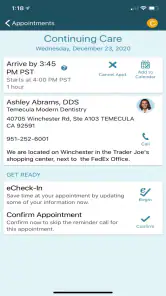
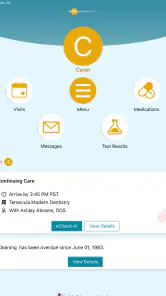
In ordinary use, a patient portal can save time in ways that are easy to underestimate. I might want to review information before an appointment, check what was recorded after a visit, or look back at details when speaking with another member of my care team. Having that information available in an app can be more convenient than searching through paper documents, old emails, or a phone’s notes application. It also gives me a better chance of arriving prepared instead of trying to remember everything at the last minute.
A realistic example is a follow-up visit that was scheduled several weeks earlier. The night before, I can open the app and review the information connected with my care, then make a short list of questions while the details are still fresh. That workflow is more useful than simply opening an app out of habit. It turns the portal into a preparation tool: I use it before the appointment, during the period when I am organizing my concerns, and afterward when I need to recall what was discussed.
Another strength is the separation between health information and informal memory. I do not have to rely entirely on what I think happened at a previous visit. For people managing several appointments or trying to coordinate care for a family member, that distinction can be meaningful. A digital record is not a substitute for understanding one’s care, but it can provide a more stable reference point than scattered personal notes.
The app’s rating gives it a reasonable public reputation, with a 4.2 average from around 500 ratings. That is not proof that every patient will have a smooth experience, but it suggests that many users find the basic purpose worthwhile. Its reach is also substantial, with over 100 thousand installs, so this is not an obscure experiment that only a handful of people have tried.
A better workflow than relying on phone calls alone
For me, the biggest practical advantage of a patient portal is not that it eliminates contact with staff. It is that it can reduce unnecessary contact. A phone call is still the better route when I need clarification, when something feels urgent, or when a situation is too complicated to explain through a digital interface. But for routine information management, opening an app is often less disruptive than waiting for office hours or repeating details to a receptionist.
This is where Smile Generation MyChart compares well with the usual alternative: doing everything through calls, printed paperwork, and personal reminders. A phone conversation can be reassuring, but it is not always convenient to repeat. Paper can be useful, but it is easy to misplace. Personal notes help me remember what I was told, but they do not necessarily preserve the formal information connected with my care. A patient portal sits between those options, offering a digital reference without requiring me to build my own filing system.
There is also a psychological benefit to having a single place to start. When I am unsure whether I need to contact the office, I can first check the app for the information already available to me. That does not resolve every question, but it can prevent unnecessary back-and-forth. The key is to use it as a first check, not as an authority for every health decision.
One tip I would give new users is to open the app before they actually need it. A portal is much less helpful if the first login happens while I am sitting in a waiting room, feeling rushed, or trying to answer a question immediately. Setting it up in a calm moment lets me learn where information is presented and whether I can access what I expect. That small preparation step makes the app feel more useful later.
Why the focused design can be a strength
Many health applications compete for attention with reminders, educational articles, wellness dashboards, and promotional material. Smile Generation MyChart has a more specific job. I appreciate that focus because health information is already mentally demanding. A portal does not need to entertain me; it needs to help me find the information connected to my care without making the process feel like another social or fitness platform.
The developer, PDS Health Technologies, has positioned the app in the medical category rather than treating it as a general productivity utility. That is an important difference in how I judge it. I do not expect it to track every aspect of my lifestyle or replace a dedicated medication, fitness, or symptom journal. I judge it by whether it helps me manage the patient side of healthcare in a direct way.
Its current version, 11.5.2, also indicates that the app has continued through multiple revisions rather than remaining frozen at its original release. It first appeared on March 24, 2020, and the current version suggests an ongoing product rather than a one-time digital brochure. Still, an updated version alone does not guarantee that every screen will feel perfect, so I would keep expectations realistic.
Where the experience can create friction
The largest limitation is tied to the app’s purpose: it is most valuable when I am already part of the relevant care network. A general health-record aggregator may be a better fit for someone who sees several unrelated providers and wants one broad overview. A direct phone call may also be better when the issue is urgent, emotionally sensitive, or difficult to describe with short written messages.
This is not an app I would use to diagnose symptoms. A portal can help me manage information, but it cannot replace professional judgment. If I have a sudden or serious concern, waiting for an app workflow would be the wrong choice. The right response would be to contact an appropriate healthcare professional or emergency service depending on the situation. That boundary is important because the convenience of digital access can sometimes make people expect more than a patient-information tool is designed to provide.
There is also a difference between seeing information and understanding it. Medical language can be precise but unfamiliar, and a record may make sense to a clinician while leaving a patient with new questions. I would not interpret a brief entry, result, or note on my own if the meaning could affect a decision about care. The app can help me identify what I want to ask; it should not encourage me to become my own interpreter of complex medical information.
Another possible source of frustration is that digital convenience depends on the information being current and presented in a way that is easy to follow. If I am looking for something specific and cannot immediately tell where it belongs, the experience can feel less efficient than expected. This is a common trade-off with portals: they offer access, but access is only useful when the patient knows what to look for and when the care team’s information is available in the expected place.
For that reason, I would keep a simple personal note with appointment dates, questions, and any instructions that I personally need to remember. I would not use the note as a replacement for the app. Instead, I would use it as a companion: the note captures my own priorities, while the portal gives me a place to review the health information connected with my care. This two-part workflow is more reliable than expecting one app to organize every detail of a medical experience.
Who should install it, and who should look elsewhere
I would recommend Smile Generation MyChart first to patients who already receive care through the services connected with it and want a convenient digital way to manage their information. It is particularly suitable for people who dislike making routine phone calls, prefer checking details on a phone, or want to prepare more carefully before appointments. It can also suit users who are comfortable with patient portals and understand that digital access complements, rather than replaces, direct care.
It may be a good choice for someone who often forgets what was discussed during a visit. Reviewing information afterward can help turn a rushed appointment into something easier to process. I also see value for people who like to prepare questions in advance. Instead of walking into an appointment with a vague feeling that something was missed, I can review what I already know and identify the exact point that needs clarification.
I would be more cautious about recommending it to someone who expects one app to combine records from every healthcare provider. If a person regularly moves between unrelated systems, a broader record-management solution may offer a more complete overview. Likewise, users who rarely use smartphones or who find account-based healthcare tools stressful may prefer speaking with staff and keeping a carefully organized paper file.
Families should also think about whose information they are managing and how clearly responsibilities are separated. I would avoid casually mixing one person’s health details with another person’s notes. A patient portal works best when I take a moment to confirm that I am viewing the correct information before making plans or discussing it with someone else. That is a simple habit, but it matters more in healthcare than it does in an ordinary shopping or calendar app.
Value, accessibility, and the decision to keep it installed
The app is free, which removes one obvious barrier to trying it. That does not mean every user will find it equally valuable, because the real benefit depends on having relevant care information available through the service. Still, a free patient portal is easy to justify for an existing patient: I can install it, explore the available workflow, and decide whether it saves me time without committing to another subscription.
The Everyone age rating also fits the app’s practical role. It is not presented as entertainment or as a specialist tool reserved for professionals. Even so, an age rating should not be confused with medical simplicity. Health information can be sensitive and complicated regardless of the user’s age, so I would encourage families to discuss what information is being viewed and how it should be handled.
On an Android device running version 9 or newer, the technical entry point is reasonably broad. That is helpful for people who do not replace their phone frequently. I would still keep the operating system updated where possible, especially when using any application connected with personal health information. In my experience, basic device maintenance is part of using a medical app responsibly, even though it is easy to overlook.
One less obvious trade-off is that convenience can make me less proactive if I use the app passively. Opening a portal only when I am worried is not the best use of it. I get more value when I use it deliberately: before a visit to prepare, after a visit to review, and between visits to organize questions. That habit turns the app from a place I occasionally check into a small part of my personal healthcare routine.
My final view after weighing the trade-offs
Smile Generation MyChart succeeds because it understands a simple need: patients often want easier access to information connected with their care. Its strongest case is not flashy technology, but reduced friction. When it works as intended for the right patient, it can make preparation, follow-up, and routine information checking less dependent on phone calls and memory.
Its limitations are equally clear. It is not a diagnostic service, not an emergency channel, and not necessarily the best single record solution for someone using many unrelated healthcare systems. The app’s usefulness is closely tied to the patient relationship behind it. That makes the choice straightforward: existing patients who want a digital portal should give it a try, while people seeking a universal health-management platform should compare it with broader alternatives.
After considering its role, cost, accessibility, and practical workflow, I would keep it installed if my care is connected to the service it supports. I would use it as a reference and preparation tool, while continuing to contact professionals whenever a question needs explanation or a situation needs urgent attention. My recommendation is positive for the right audience: use it to stay organized, not to replace care.
That is the most honest way I can describe Smile Generation MyChart. It is a focused medical app with a useful everyday purpose, a free entry point, and enough reach to show that many patients find value in this kind of access. It will not solve every healthcare-management problem, but for the person who wants their information closer at hand and is willing to use the portal thoughtfully, it can become a practical part of staying informed.
Pros
- Secure access to appointments
- test results
- medications
- and health records.
- Lets you message participating providers without calling the office.
- Supports proxy access for managing eligible family members’ care.
- Appointment reminders and health updates help keep care organized.
- Some bills can be reviewed and paid directly through the app.
Cons
- Features depend on whether your healthcare provider uses the MyChart system.
- Some results may be delayed while clinicians review or release them.
- Proxy access requires setup and may be limited by age or provider rules.
- The app may request sensitive permissions and handles highly private data.
- Older devices or unstable connections can make the interface feel sluggish.

- Category
- Medical
- Version
- 11.5.2