Smart Sleep Coach by Pampers™
- 135.00
- 4.2
- Installs
- 100.00K
- Price
- Free

Screenshots


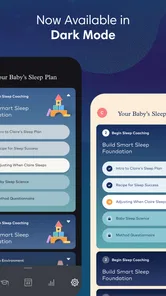
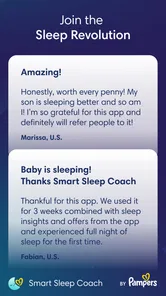
Analysis by Reviewed
When nights are broken into short stretches, it can be hard to tell whether a change in routine is helping or whether baby sleep is simply shifting on its own. I find Smart Sleep Coach by Pampers™ most useful as a place to organize observations and get guidance, rather than as a promise of instant results. It is a free parenting app from Charlie Banana (USA) LLC, with optional in-app purchases, and it is designed around personalized sleep coaching and tracking. Parents who prefer a clear plan may appreciate that focus; those who want only a basic timer may find a simpler tracker easier.
What a useful first week looks like
I would begin with one practical goal, such as understanding how naps relate to bedtime, rather than trying to overhaul every part of sleep at once. During the first few days, enter the information the app asks for as consistently as you can and use the guidance as something to consider, not a strict timetable. That gives you a more useful baseline than changing several things at once and then trying to work out which change mattered.
It also helps to decide in advance what you want to learn. If evenings are difficult, note how the day unfolded and whether the bedtime routine stayed similar. If naps are the concern, focus on their timing and duration as you observe them. Keeping the question narrow makes the coaching easier to apply and prevents the tracker from becoming a stream of numbers with no clear purpose.
When household routines do not match the plan
Personalized guidance can be helpful without being a perfect fit for every family. A caregiver returning to work, a parent managing several children, or a household with changing shifts may not be able to follow a suggested rhythm precisely. In that situation, I would use the plan to identify a direction and then fit it around the routines the family can actually maintain. A realistic routine that survives a busy week is more useful than an ideal one that creates extra stress.
For example, if one caregiver handles mornings and another takes bedtime, agree on a simple way to describe sleep periods before comparing notes. You do not need to turn the day into a detailed report; the point is to make the observations understandable to the next person. If the app’s guidance seems to clash with feeding needs, childcare arrangements, or what a clinician has advised, those real-world priorities come first.
Choosing between coaching and a lighter tool
Parents often choose between a paper diary, a shared notes app, a basic sleep timer, and a coaching-focused product. A diary is flexible and does not ask you to follow a particular approach, but it leaves the interpretation to you. A timer can make logging quick, though it may offer little help in deciding what a pattern means. This app’s stronger case is the pairing of records with sleep education and tailored guidance, which suits someone who wants help making sense of observations.
That combination is not automatically better. If you already know what you want to track and only need a timestamp, a simpler option may take less effort. If you need individualized medical guidance, a clinician is the better person to consult. I see the app as sitting between those choices: more instructive than a blank notebook, but not a substitute for professional care or a guarantee that a particular schedule will work.
More From Our News Desk

 Gmail
Gmail in a Busy Inbox: Who Benefits Most?
From first account to crowded workday, Gmail earns its place through dependable search and flexible sorting—but its best fit depends on how much inbox maintenance you can tolerate.

 Prime Video
Switching to Prime Video: What Changes in Your Viewing Routine
Prime Video can make a compelling second home for streaming, but switching means learning a different catalog, rental layer, and route from browsing to playback.

 Universal TV Remote Control
 Works Best as a Reliable Backup
A phone remote earns its place through quick setup and reliable habits. Here is how to get more from Universal TV Remote Control—and where its limits show.

 Weather - By Xiaomi
Weather by Xiaomi Review: Clear at a Glance, Less Clear Up Close
Xiaomi’s weather app makes everyday forecasts quick to scan, but its calm surface can leave useful details and recovery paths harder to find than they should be.

 X
X Under Pressure: Can It Recover When Posting Goes Wrong?
A resilience-focused review of X, examining setup, mistaken posts, interruptions, weak connections, and the gaps that matter when recovery needs to be dependable.

 Clash of Clans
 Is Won Between the Battles
Its raids are quick; its community is a long-term project of coordination, teaching, rivalry, and shared responsibility—with all the friction that entails.
Latest News



The Magic Behind Smart Sleep Coach
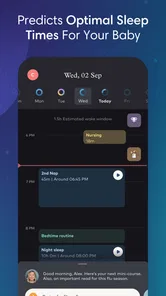
First things first, the setup. The app guides you through a personalized sleep plan for your little one. It's like having a sleep consultant in your pocket, which is pretty cool, right? You start by inputting your baby's age, sleep patterns, and any specific goals you have in mind. The app then crafts a tailored plan to help your baby snooze better. I found the interface super intuitive, even in my sleep-deprived state!
Features That Stand Out
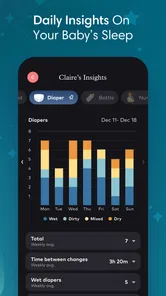
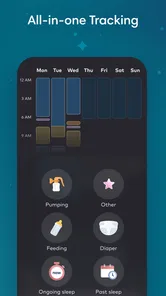
One feature I absolutely love is the sleep tracking. With just a few taps, you can log naps, nighttime sleep, and even those middle-of-the-night wake-ups. The app then analyzes the data and provides insights into your baby's sleep patterns. It's like having a crystal ball for sleep!
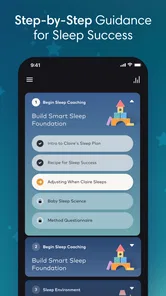
But wait, there's more! The Smart Sleep Coach by Pampers™ also offers expert tips and advice. These nuggets of wisdom pop up just when you need them, like when you're at your wit's end trying to soothe a fussy baby. Plus, the app is packed with educational content to help you understand the science of sleep, which, let's be honest, is a game-changer for rookie parents.
Making the tracking useful in real life
The most helpful way to use a tracker like this is to record events close to when they happen, rather than reconstructing a whole day from memory at bedtime. If you and another caregiver share the routine, agree on what counts as a nap starting or ending; consistent notes are more useful than perfectly precise ones. I’d also look for patterns across several days before changing the schedule, since one unusual night can make a normal rhythm look worse than it is.
A realistic example: after a short nap and a restless evening, a parent can log the timings, follow the plan’s guidance, then compare the next few days instead of guessing whether bedtime should move earlier. That makes the app a practical conversation aid between caregivers, too. It can help you explain what you have observed, but it should not replace a pediatrician’s advice when a sleep concern is persistent or worrying.
Who benefits, and where it may frustrate
I’d recommend trying it if you want more structure than a notebook provides and are willing to enter sleep details regularly. New parents who are still learning their baby’s rhythms may find the combination of tracking and educational material especially reassuring. By contrast, experienced caregivers who already have a stable routine, or parents who dislike logging every sleep period, may get more value from a lightweight timer or a shared notes app.
That trade-off is worth keeping in mind: tracking only helps when it is sustainable. On a hectic day, logging can feel like another task, and an app’s suggested plan may not fit every household’s work hours, feeding pattern, or changing circumstances. I would treat recommendations as a starting point, adapt them to the child and family, and avoid turning every wake-up into a scorecard.
One ordinary day with the app
Imagine a morning that starts earlier than expected, followed by a nap that ends sooner than usual and an unsettled stretch before bed. Rather than making a sweeping change that evening, I would record what happened, check the app’s guidance, and keep the rest of the routine familiar. The next day, I would add the new observations and look for a repeated pattern before deciding whether to adjust anything. This is where a tracker can help: it gives tired caregivers a shared reference point when memory is unreliable.
The useful insight is not that every logged event produces an answer. It is that a few consistent entries may reveal whether a difficult evening followed a short nap, a changed routine, or no obvious pattern at all. If the notes remain inconclusive, that is still a reason not to force a conclusion. I would rather keep the routine steady and ask for appropriate advice than treat a single suggestion as proof of what a baby needs.
My Personal Experience
Now, let me tell you about my personal experience. After a week of using the app, I noticed a significant improvement in my baby’s sleep schedule. The bedtime routine feature was a lifesaver. It helped me create a consistent routine that my little one actually started looking forward to. Who knew bedtime could be less of a struggle?
Another thing I appreciated was the positive reinforcement. The app celebrates little wins with you, and honestly, that encouragement can make a world of difference on tough days. Plus, the user-friendly design made it easy to navigate, even during those late-night sessions.
Keeping expectations grounded
It is tempting to judge a sleep tool by whether it produces a quick change, but baby sleep is not a problem an app can solve on command. I would judge this one by whether it helps me notice routines, understand the guidance, and make decisions with less guesswork. Some families may see progress; others may mainly gain a clearer record of what is happening. Either outcome can be useful, provided the process does not add pressure.
I would also avoid treating an apparent improvement as proof that one particular recommendation caused it. Sleep changes for many reasons, and ordinary variation can be easy to mistake for a trend when everyone is tired. Keep notes long enough to compare several days, change one practical thing at a time where possible, and ask a healthcare professional about concerns that go beyond routine coaching.
Its place among sleep tools
Compared with a plain sleep diary, the appeal here is the tailored coaching alongside the record of naps and wake-ups; compared with personal advice from a clinician, it is a convenient everyday guide, not an individual medical assessment. That distinction matters. I’d use the app to notice routines and prepare better questions, not to diagnose a problem or assume its plan is right for every baby.
The app is rated for everyone, and its current version is 1.6.4. It first appeared on January 10, 2024, and has reached over 100,000 installs, with an average rating of 4.4 from around 1,300 ratings and 123 written reviews. It is free to download, while in-app purchases range from $29.99 to $119.99 per item, so I’d check what a paid option includes before committing. The minimum operating system is Android 9.
What to check before spending
The basic app is free, but optional purchases make it sensible to understand what you are paying for before choosing anything. I would first try the tracking and guidance available to me, then decide whether an extra purchase addresses a specific need rather than buying because a difficult night makes an immediate solution feel appealing. The listed purchase range is substantial enough that checking the in-app description and terms before confirming is a practical step.
For device compatibility, the stated minimum is Android 9, so Android users should check that their device meets it before planning to rely on the tracker. The age rating is Everyone, but that rating does not make sleep guidance a replacement for age-appropriate care or a clinician’s recommendations. For parents sharing responsibility, it is also worth considering whether everyone involved is willing to keep entries consistent; the usefulness of the record depends on that habit.
What to keep in mind as it evolves
The release date and current version establish where the product stands, but they do not by themselves show which features changed or how those changes affect an existing plan. If you already use it, I’d keep your routine notes consistent and check the app’s own update details before relying on a change to coaching or tracking. For someone deciding whether to start, the more important test is whether its approach fits your household and whether you are comfortable entering sleep information regularly.
For existing users, I would be cautious about comparing a new version’s experience with old notes as though the app’s advice must have stayed identical. Keep the observations that matter to your family, and pay attention to any explanation the app gives when its tools or recommendations change. For a prospective user, the version number is a useful snapshot of the current release, not evidence on its own of a particular improvement. I would look for clear, relevant update notes rather than assume that a newer release means a different sleep method.
Who should choose another approach
This app is not the right fit for every parent. If logging feels like one more demand during an already difficult period, a short handwritten note or a shared calendar may be easier to sustain. If your baby’s sleep is already working well for your household, adding a coaching plan may solve a problem you do not have. And if you are looking for a diagnosis or help with a persistent health concern, a sleep tracker is the wrong tool for that job.
On the other hand, parents who want a structured starting point and are curious about how daily sleep events connect may find the combination more useful than a bare timer. I would try it with a modest goal and give myself permission to stop if the recording becomes stressful or the guidance does not fit. The best option is the one that supports the family’s routine without making sleep feel like a test.
In conclusion, if you're a parent on the brink of sleep-deprivation madness, give Smart Sleep Coach by Pampers™ a go. It's like having a sleep guru at your fingertips, offering guidance and support every step of the way. While it may not make your baby sleep through the night instantly, it certainly provides the tools to get there. Sweet dreams, fellow parents!
Smart Sleep Coach by Pampers™ Frequently Asked Questions
Is Smart Sleep Coach by Pampers™ free to download, and what may cost extra?
Smart Sleep Coach by Pampers™ is free to download, so parents can try the app without paying upfront. Optional in-app purchases are available, with prices ranging from $29.99 to $119.99 per item. Consider what features you want before making a purchase, and check the options shown in the app so you can decide whether any paid extras suit your family.
Who develops Smart Sleep Coach by Pampers™, and is it available on older phones?
Smart Sleep Coach by Pampers™ is developed by Charlie Banana (USA) LLC and is a parenting app focused on baby sleep. It runs on devices using Android 9 or later. Before downloading, check your phone’s operating system version to make sure it meets that requirement. The app is rated for Everyone, making its store age classification suitable for a general audience.
What is Smart Sleep Coach by Pampers™ and how does it work?
Smart Sleep Coach by Pampers™ is a mobile application designed to help parents improve their babies' sleep patterns. The app provides personalized sleep plans, expert advice, and tracking tools to monitor progress. By analyzing your baby's sleep habits, it suggests customized strategies and routines that aim to create a consistent sleep schedule, making it easier to get your baby to sleep through the night.
Is Smart Sleep Coach by Pampers™ suitable for all ages of babies?
Yes, Smart Sleep Coach by Pampers™ is suitable for infants and toddlers. The app is designed to cater to various stages of a child's development, offering tailored advice and routines that evolve as your baby grows. It addresses different sleep challenges faced at each age and adjusts its recommendations accordingly, providing support from newborns to toddlers.
What features does Smart Sleep Coach by Pampers™ offer to help improve baby sleep?
The app offers a variety of features to assist parents, including personalized sleep coaching plans, sleep tracking, expert tips, and insights on baby sleep patterns. It also provides a daily sleep log, bedtime routines, and age-specific advice. The interactive charts and progress tracking help parents understand their baby's sleep trends and make informed decisions to enhance sleep quality.
Pros
- User-friendly interface
- Customizable sleep schedules
- Comprehensive sleep tracking
- Expert sleep tips and advice
- Seamless integration with devices
Cons
- Limited free features
- Requires internet connection
- Occasional syncing issues
- Subscription can be pricey
- Not suitable for older children