Smart Print - Air Printer App
- 2.22K
- 4.5
- Installs
- 1.00M
- Price
- Free

Screenshots
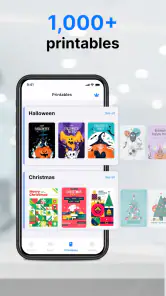
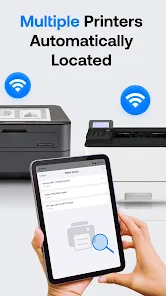
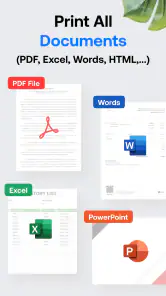
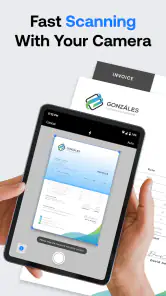
Analysis by Reviewed
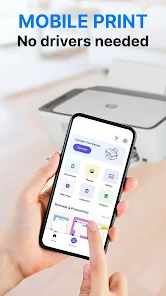
I judge a phone-printing app by what happens when I’m in a hurry, not by how many settings it can display. Smart Print - Air Printer App is aimed at a familiar snag: a document is ready on an Android phone, but the printer is across the room and a computer is nowhere nearby. As a productivity app from MAPLE LABS CO., LTD, it offers a direct route from mobile files to paper. That simple purpose can be useful, though the experience still depends on the printer, the file, and how comfortably you can navigate the steps.
Reading a job before sending it
The app’s clean, straightforward interface is a practical starting point for people who find crowded menus tiring. In my experience, keeping the task focused on choosing something to print and checking the result is more helpful than being presented with a long list of technical controls. The preview is especially valuable: I’d use it to catch a sideways page, an unexpectedly blank sheet, or a document that looks different on a phone than it does on paper. A quick visual check can save both frustration and supplies.
It is worth slowing down when a file contains small text, tables, or information close to the page edge. A phone preview is not a substitute for reading a full-size proof, but it can help me notice obvious layout problems before printing. If a document is important, I would first check the page size and orientation rather than assume the printer will choose correctly.
How the printing experience fits different needs
Smart Print has an average rating of 4.5 from around 66,000 ratings, and it has been installed over a million times. It is free to install, rated for Everyone, and its current version is 3.3.1; optional in-app purchases range from $0.99 to $99.99 per item. Those details make it approachable to try, but I’d still look at any purchase prompt carefully and decide whether the functions I need justify it.
Motor, sensory, and practical considerations
Printing involves more than tapping a button: choosing a file, positioning a phone, reading settings, and collecting pages can all matter. The app’s uncomplicated presentation may reduce the effort of finding a basic print action, while the preview gives an extra chance to verify a job without relying only on sound or a printer’s status lights. I would not assume that this replaces a person’s preferred accessibility tools, though. If small controls, screen glare, or sustained touch interaction are difficult for you, test the flow with a low-stakes page first and use your device’s usual display or input settings where helpful.
For someone with limited hand movement, the most useful workflow may be to prepare the file before opening the app: give it a clear name, save it somewhere easy to locate, and avoid making last-minute edits on a cramped screen. That reduces the number of precise taps needed. If another person is helping, agreeing on the document and page settings before printing can prevent repeated handling of the phone.
When mobile printing earns its place
A realistic use is arriving home with a form in an email and needing a paper copy before leaving again. Instead of moving it to a laptop, I can try to open it on the phone, inspect the preview, choose the page orientation, and send it to a nearby printer. Cloud access can also help when a file is already stored online, although a stable connection and access to the right account may be part of that workflow. For sensitive paperwork, I’d check that the selected file and printer are correct before confirming, especially in a shared home or office.
More From Our News Desk

Clash of Clans Is Won Between the Battles

Android Auto Makes the Case for Quieter Car Software

MobiOffice: Transforming Mobile Productivity with Seamless Integration

EA SPORTS FC™ Mobile Soccer: Redefining Mobile Sports Gaming

How Microsoft OneDrive Became a Mobile Productivity Giant

How Google Translate Breaks Language Barriers Effortlessly
That convenience is most compelling for occasional jobs and for people who already keep documents on their phones. It is less persuasive if you print large batches, need to make detailed edits, or want precise control over a complicated layout. In those cases, a computer’s larger screen or a printer maker’s own utility may be a better fit. The phone route saves a transfer step; it does not make every document easier to review or manage.
Where it sits beside other options
Compared with Android’s built-in print route, a separate app can be appealing when I want a more guided place to select and preview files. The built-in option may be enough for someone who only prints from a supported app and prefers not to add another tool. A printer manufacturer’s app can be a stronger choice when a particular model’s own controls or troubleshooting matter more than a general workflow. Smart Print is most useful as a bridge for everyday documents and photos, rather than as a replacement for a full desktop publishing or scanning setup.
Compatibility claims should not be treated as a guarantee for every printer and network combination. Before relying on it for a deadline, I’d test a single page while both devices are available and confirm that the printer appears and handles the file as expected. If it does not, checking the printer’s connection and trying the manufacturer’s software is a sensible next step rather than repeatedly sending the same job.
Easy Setup and User-Friendly Interface
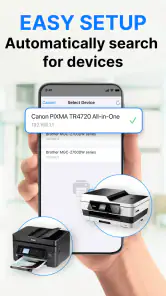
When I first downloaded the Smart Print - Air Printer App, I was a bit skeptical about how easy it would be to set up. But, let me tell you, it was smooth sailing right from the start. The app guides you through every step, making it super easy to connect your phone to your printer, whether it’s a wireless connection or via USB. The interface is clean, intuitive, and doesn’t throw a ton of confusing options at you. You know how some apps make you feel like you need a degree in rocket science to figure them out? Not this one!
Compatibility and Performance
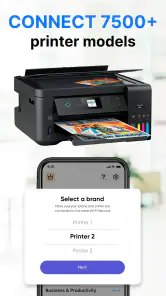
One of the standout features of this app is its wide compatibility. It works with almost all printer models, which is a huge relief if you’ve got an older printer model that doesn’t usually play nice with modern tech. During my trial, I was impressed with how quickly documents were sent to the printer. Even large files were processed without a hitch, making it a reliable ally for anyone with printing needs. Plus, you can print directly from various formats like PDF, Word, Excel, and even photos.
For a clearer result, I’d check a multi-page document before printing the entire file, particularly if it mixes portrait pages with wide tables or includes photos. A small test job is a useful way to catch an issue without wasting paper. This also helps answer a common practical question: does a printer work well with this phone and file? The answer is best established with that quick trial, before a deadline or a larger batch.
Extra Features Worth Checking Out
Beyond the basic printing capabilities, the app also offers some nifty extras. For instance, you can adjust printing settings like page size, orientation, and even choose between color or black and white prints. The preview feature is a lifesaver, allowing you to see exactly what’s going to come out of your printer before you hit the print button. It’s these little touches that make the Smart Print - Air Printer App stand out from the crowd.
For an everyday photo, I’d decide between color and black-and-white before sending the job, then look at the preview for cropping or orientation surprises. For forms and schoolwork, I’d prioritize legibility and page layout over saving a few taps. These small choices make the app more useful without turning printing into a long setup exercise.
Another handy feature is the ability to print from the cloud. Whether your documents are stored in Google Drive, Dropbox, or iCloud, you can access and print them directly from the app. This is particularly useful if you’re someone who’s always on the go and needs to print documents without having to transfer files between devices.
Cloud printing is convenient when the file is already organized online, but it can add extra steps if the account needs attention or the connection is unreliable. I’d keep an offline copy of anything time-sensitive and confirm I’ve selected the latest version before printing. That simple habit helps avoid carrying away an outdated form or reprinting because the wrong document was chosen.
Situations where I would choose another route
The app is a better match for someone who needs to print a document or photo now and then than for a household that routinely produces thick packets. A long batch raises the cost of a mistake, and inspecting every page on a phone can become tedious. For that kind of work, I’d prepare the file on a computer, where the larger display makes it easier to compare page breaks and catch layout shifts. Smart Print is handy when convenience matters more than extensive control; it is not a substitute for a careful desktop proofing process.
I’d also think about the setting before starting. In a workplace or shared home, a phone may contain several similar versions of a form, and the printer may be visible to other people. A useful habit is to rename the final file clearly and check the printer destination immediately before sending. That is a small organizational step, but it reduces the chance of printing the wrong draft or leaving sensitive pages unattended.
Making the workflow easier to repeat
If I were using the app for recurring paperwork, I’d settle on a simple routine: keep the final file in a known location, check the preview, confirm the orientation, then print one page when the document is unfamiliar. Once that combination of phone, file, and printer has behaved as expected, later jobs are less of a guessing game. The trade-off is that a first-time setup still deserves patience; a quick test is more useful than assuming every printer will appear automatically.
For someone who finds visual scanning tiring, I’d make the file itself easier to identify before opening it, rather than relying on tiny thumbnail differences. Clear filenames can also help a family member or colleague assist without needing to inspect several documents. This is not a special accessibility feature, but it is a practical way to reduce searching and repeated screen interaction.
Final Thoughts
In conclusion, if you’re looking for a hassle-free way to print from your smartphone, Smart Print - Air Printer App is definitely worth checking out. It’s reliable, user-friendly, and packed with features that cater to both basic and advanced printing needs. Whether you’re printing homework for your kids or important work documents, this app has got you covered. Give it a try, and you might just find it’s the printing solution you didn’t know you needed.
My inclusive verdict is that this is a sensible option for people who want a guided mobile route to occasional printing, especially when moving files to a computer would be an unnecessary detour. The free entry point makes it easy to try, while the optional purchases are worth considering only after you know what you need. If screen interaction is tiring, the printer is shared, or the job is complex, build in time for a test page or choose a workflow with more comfortable controls. For straightforward document and photo jobs, I’d keep it as a practical tool rather than expect it to solve every printing problem.
Smart Print - Air Printer App Frequently Asked Questions
Can I print from Smart Print - Air Printer App without transferring files to a computer?
Yes. Smart Print - Air Printer App is designed to send documents and photos directly from an Android device to a printer, so you can handle simple print tasks without first moving files to a computer. It is a practical option when the material you want to print is already on your phone, though the printer still needs to be available for the print job.
Is Smart Print - Air Printer App free to download?
Smart Print - Air Printer App is free to install, so you can download it without an upfront purchase. It also includes in-app purchases, ranging from $0.99 to $99.99 per item. Those purchases may affect the cost of using particular options, so check the purchase details shown in the app before paying for anything.
Can I use Smart Print - Air Printer App on my Android phone?
Smart Print - Air Printer App is an Android productivity app for printing documents and photos directly from a mobile device. It requires Android 8.0 or later, so checking your phone’s software version before downloading is a sensible first step. The app is free to install, with in-app purchases available.
Who makes Smart Print - Air Printer App, and is it intended for general users?
Smart Print - Air Printer App is developed by MAPLE LABS CO., LTD and is rated for Everyone. Its purpose is straightforward: helping users send documents and photos from an Android device to a printer. That makes it relevant for everyday printing needs, whether you want to print a photo or a file without first moving it to a computer.
What is Smart Print - Air Printer App and how does it work?
Smart Print - Air Printer App is a mobile application designed to facilitate wireless printing from your Android or iOS devices. The app connects with compatible printers over a Wi-Fi network, allowing users to print documents, photos, emails, and more directly from their smartphones or tablets. It supports a wide range of file formats and offers convenient features for managing print jobs.
Pros
- Easy wireless printing setup
- Supports multiple file formats
- High-quality print output
- User-friendly interface
- Compatible with most printers
Cons
- Occasional connectivity issues
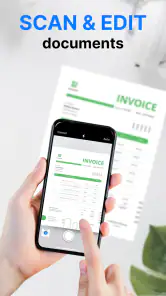
- Limited editing features
- Requires subscription for full access
- Not compatible with all printer models
- Can consume a lot of mobile data
- Category
- Productivity
- Version
- 3.3.1











