Sleeper Fantasy Sports
- 7.61K
- 4.4
- Installs
- 1.00M
- Price
- Free

Screenshots





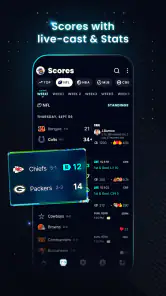


Analysis by Reviewed
I first look at Sleeper Fantasy Sports as a place to manage the social and practical sides of following a fantasy league, rather than just a scoreboard. It is a free sports app from Blitz Studios, Inc., aimed at adults aged 18 and over. Its 4.4 average across around 57,000 ratings suggests it has found a substantial audience, though popularity alone does not tell you whether its league style will suit you.
Where the experience can feel confusing
The app brings league activity, conversation, and team decisions together, which is convenient once you know where to look. At first, though, a newcomer may be unsure whether to start by joining an existing league, creating one, or browsing the fantasy and daily fantasy options. I would decide what kind of play I actually want before tapping around; otherwise, it is easy to spend time exploring without getting to the main thing you came for.
That choice matters because fantasy football is a continuing commitment: you need to keep up with your roster and league through the season. Daily fantasy has a different rhythm, while other sports fans may be looking for a particular competition or format. The app’s broad scope is useful, but it can make the first visit feel less focused than a single-purpose fantasy tool.
Setup checks that save time
Before inviting friends, agree on the league basics together: the format, scoring preferences, and how active everyone expects to be. Customization can make a league feel personal, but it also creates room for mismatched expectations. I would settle those details in conversation first, then have the organizer enter them carefully. That small step helps prevent a lively group chat from turning into a debate about rules after the season is underway.
If you are joining rather than organizing, check that you have the correct league invitation and that you are signed into the account you intend to use. If something appears missing, I would first revisit the invitation and the league selection rather than assuming the app has lost your team. On a phone, also make sure you are running a version compatible with your operating system; the current release is version 124.0, with support starting at iOS 7.1.
Recovering a routine when plans change
Fantasy schedules are easy to neglect when work, school, or family plans get busy. I find it helps to make one short check-in part of an existing habit, such as reviewing the team while planning the weekend. Use that moment to look over your roster and league conversation, then make any decisions you have time for. This is more dependable than relying on a stream of alerts to tell you what deserves attention.
Notifications are helpful when tuned to your interests, but they can also become noise if every league update interrupts your day. I would start with only the alerts I genuinely need and adjust them after seeing how active my league is. If a message or update seems delayed, refreshing your view, checking the selected league, and reopening the app are sensible first steps before making the same change twice.
More From Our News Desk

Clash of Clans Is Won Between the Battles

Android Auto Makes the Case for Quieter Car Software

MobiOffice: Transforming Mobile Productivity with Seamless Integration

EA SPORTS FC™ Mobile Soccer: Redefining Mobile Sports Gaming

How Microsoft OneDrive Became a Mobile Productivity Giant

How Google Translate Breaks Language Barriers Effortlessly
What Makes Sleeper Stand Out?
First off, let’s talk about the user interface. The app is incredibly intuitive and user-friendly. From the moment you open it up, everything is laid out in a way that just makes sense. You won’t find yourself getting lost in a maze of menus and submenus. Instead, you’ll be setting up your fantasy league in no time.
One of the standout features of Sleeper is its real-time chat. This isn’t just any chat—this is an integrated, smooth, and almost addictive way to keep in touch with your league members. Trash talk, strategize, or just keep up with the latest scores; it’s all possible without leaving the app. This feature really sets Sleeper apart because it turns fantasy sports into a social experience, not just a game.
When the app may not be the cause
Not every frustration is an app problem. A quiet league, an unanswered trade proposal, or a disagreement about rules often comes down to the group’s habits and expectations. I would ask league members to agree on response times and decision-making before assuming a tool can fix the issue. Sleeper can keep the conversation close to the team activity, but it cannot make everyone participate.
Likewise, a fantasy decision is still a judgment call. Player information and league activity can help you think through a choice, but I would not treat any suggestion as a guarantee. If your main goal is simply to follow live sports news, a dedicated scores or news app may be a better fit; Sleeper is most worthwhile when you have a league to manage or a fantasy format you genuinely want to play.
Customization and Flexibility
The level of customization available in Sleeper is another huge plus. You can tweak nearly every aspect of your league to suit your preferences. Want to try out a new scoring system? No problem. Interested in a dynasty league? Sleeper has you covered. This flexibility means that no matter how niche your fantasy sports cravings might be, you can probably satisfy them here.
I also love the notifications system. Instead of bombarding you with alerts that you don’t care about, Sleeper tailors notifications to what’s important to you. Injuries, trades, and scores come through as needed, so you never miss a beat. It’s like having a personal assistant for your fantasy team!
Putting it to work on an ordinary day
For example, imagine checking your team during a lunch break before a busy evening. I would scan the roster, catch up on the league chat, and make only the decisions that need attention now. If a friend raises a trade, I can discuss it in the same place as the league activity instead of hunting through a separate group conversation. That compact routine is a practical strength, especially for a group that enjoys talking through the season.
Compared with a basic fantasy app centered mainly on lineup management, Sleeper’s social layer and customization can make the league feel more involved. The trade-off is that a feature-rich league space may be more than a casual player wants. If you prefer a simple, quiet way to check a team occasionally, a lighter alternative may be easier to live with; if your friends are active and enjoy league banter, the integrated conversation is a stronger reason to choose Sleeper.
Drafting Experience
Let’s not forget about the drafting experience. Sleeper offers a slick draft board that’s both visually appealing and functional. Whether you’re doing a live draft with your friends or an automated one, the process is smooth and engaging. Plus, the app provides insights and suggestions to help guide your picks if you’re ever feeling stuck.
And hey, if you’re a bit of a stats nerd like me, you’ll appreciate the detailed player profiles and analytics that Sleeper provides. It’s a treasure trove of information that can give you the upper hand in your league.
Who is likely to enjoy it?
I would recommend it to people who already have friends ready to play, commissioners who want room to shape league rules, and fans who like pairing roster decisions with conversation. The app has more than a million installs, but that does not remove the need for a committed group: the experience depends heavily on whether your league shows up and communicates. Newcomers can still learn as they go, but agreeing on a simple format before starting can make that first season less intimidating.
It is less suited to someone who wants sports coverage without fantasy management, dislikes frequent league chatter, or does not want to keep checking in over time. The adults-only age rating is also worth noting for households choosing apps for younger sports fans. Sleeper is free to download, which makes trying it straightforward, but I would choose it for the kind of league experience it offers, not simply because it costs nothing.
Choosing a league style before you commit
A useful way to decide whether the app fits is to start with your group’s appetite for involvement, not with the longest list of settings. If everyone wants an active season and is happy to discuss decisions, customization can help the league match your shared preferences. If most people only want an occasional check-in, keep the setup simple and agree that nobody needs to respond instantly. A complicated format cannot compensate for a group that has little time to play.
That distinction also helps with the choice between season-long fantasy and daily fantasy. They ask for different patterns of attention, so I would not treat them as interchangeable ways to pass a few minutes. Think about whether you want an ongoing team to manage with friends or a more self-contained fantasy activity. If you are unsure, take time to understand the format before making commitments or building a routine around it.
Making league communication useful
Keeping chat beside league activity is convenient, but it works best when the conversation has a purpose. I would use it for questions about a lineup, a trade discussion, or a quick note about league plans, while keeping rules decisions clear enough that members can find and understand them later. When a topic affects everyone, a short, explicit message is more useful than assuming the group has followed a long run of banter.
There is a social trade-off here: keeping discussion in one place can make the league feel lively, but it can also put more chatter in the same space where you are checking your team. If that becomes distracting, decide which conversations genuinely need your attention and adjust your notification habits. You do not need to treat every message as a prompt to open the app or make a fantasy decision immediately.
Practical checks before troubleshooting
If a league or update seems wrong, I would pause before repeating an action. Confirm that you are viewing the intended league, check whether the invitation or account is the one you meant to use, and reopen the app if the screen appears stale. For a setting that affects the whole group, ask the organizer to confirm what was chosen. These checks are simple, but they help separate a navigation mistake or misunderstanding from a genuine technical issue.
It is also worth considering timing and context. A fantasy discussion may not receive an immediate reply, and a roster decision should not be repeated just because a conversation has gone quiet. I prefer to verify the current screen and ask a league member before trying to recreate something that might already be in place. That cautious approach reduces confusion, especially when several people are coordinating a league from their phones.
Final Thoughts
All in all, Sleeper Fantasy Sports is a must-try for anyone interested in fantasy sports. Its combination of user-friendly design, social interaction, and deep customization options make it a standout choice in the fantasy sports app world. So, if you want to elevate your fantasy sports game to the next level, give Sleeper a shot. Trust me, your fantasy league will thank you!
My recommendation is strongest for a group that wants its fantasy league to be both a game and a shared conversation. Before settling in, check that your device meets the minimum operating-system requirement and remember that the experience is intended for adults. The app has been around since its release on April 28, 2015, and its current version is 124.0; what matters day to day, though, is whether its mix of league management and social activity suits how you and your friends like to follow sports.
For someone who wants only scores, news, or an occasional glance at a team, I would choose a more focused alternative. For a league that enjoys discussing choices and shaping its own rules, Sleeper offers a more communal way to stay involved. Its average rating of 4.4, supported by around 7,600 written reviews, gives a useful sense of its reach, but my practical advice is simpler: agree on the format, keep the first routine manageable, and choose it only if the group is ready to participate.
Sleeper Fantasy Sports Frequently Asked Questions
Does Sleeper Fantasy Sports require an account, and what can I do after joining?
Sleeper Fantasy Sports is built around fantasy sports and league participation, so an account is the practical starting point for setting up or joining a league and following your teams. Once you are in, the app brings together fantasy competition, sports updates, and league activity. If you mainly want a passive way to read sports news, its league-focused approach may feel different from a standard news app.
Which devices can run Sleeper Fantasy Sports?
Sleeper Fantasy Sports is available for mobile devices, and the iOS version requires iOS 7.1 or later. Before downloading, check the operating system on the device you plan to use and make sure it meets that requirement. The app is designed for following fantasy sports and league activity on the go, so choosing a compatible phone or tablet will help you access those features comfortably.
Is Sleeper Fantasy Sports suitable for every age group?
Sleeper Fantasy Sports is intended for adults aged 18 and older, so it is not designed for younger users. It focuses on fantasy sports and related competition, which may involve formats and discussions best suited to adults. If you are downloading it for someone else, check that the age requirement is appropriate before setting up an account or joining a league.
What should I know about Sleeper Fantasy Sports before installing it?
Sleeper Fantasy Sports is a free sports app from Blitz Studios, Inc., centered on fantasy football, daily fantasy sports, and more. Its app version is 124.0, and it requires iOS 7.1 or later. The app has an average rating of 4.4 from around 57,000 ratings, with over one million installs, giving new users a sense of its established audience.
What is Sleeper Fantasy Sports and how does it work?
Sleeper Fantasy Sports is a comprehensive app for fans of fantasy sports. It offers a platform where users can create or join leagues, draft teams, and compete with friends or other players globally. The app supports various sports including football, basketball, and esports, providing real-time updates, statistics, and a user-friendly interface to track team performance and league standings.
Pros
- User-friendly interface.
- Customizable league settings.
- In-depth player stats.
- Real-time updates.
- Engaging community features.
Cons
- Occasional app crashes.
- Limited customer support.
- In-app ads can be intrusive.
- Some features behind paywall.
- Initial setup can be confusing.
- Category
- Sports
- Version
- 124.0





