Slack
- 7.27K
- 4.7
- Installs
- 10.00M
- Price
- Free

Screenshots




Analysis by Reviewed
I find Slack works best when a team agrees on how it wants to communicate before everyone starts posting. Without a little structure, a busy workspace can become another stream of interruptions rather than a calmer alternative to email. Used with clear channels and sensible notification choices, though, it can make it easier to follow decisions and find the right conversation later.
Start with the team’s real workflow
Before creating channels, I’d list the conversations your team already has: ongoing work, short-lived projects, and questions that keep landing in people’s inboxes. Then make channels reflect those needs rather than creating one for every possible topic. A small, understandable setup is easier to maintain, especially for a team that is new to Slack.
That distinction matters because a channel is useful only when people know where to post. If a project has a dedicated space, keep its updates and decisions there instead of scattering them across direct messages. For sensitive or one-to-one matters, a private conversation may be more appropriate; for information the group will need later, a shared channel is usually easier to revisit.
Capture conversations so they stay useful
Channels help with organization, but the practical benefit comes from making messages searchable. I try to include a project name or a specific detail in a message when it will help someone find it later. When an old decision comes up again, search can be faster than asking the whole team to reconstruct the conversation from memory.
A useful habit is to treat a channel as a running record, not just a place to chat. When a decision is buried in a long exchange, post a brief follow-up that states what was agreed and what happens next. This takes a moment, but it gives colleagues who were away a clearer point to catch up from. File sharing can also keep a relevant document near the discussion, although a conversation is not a substitute for a carefully maintained source of truth when a document needs formal version control.
Build a routine instead of checking constantly
Notifications are where a well-organized workspace can either help or frustrate me. I’d start by deciding which channels need immediate attention and which can wait until a planned check-in. That makes it easier to use Slack as part of a workday rather than letting every new message interrupt concentration. If a team expects instant replies everywhere, changing notification settings alone will not fix the underlying expectation.
For example, a colleague beginning the day can scan the channels tied to current projects, respond to questions that are blocking work, and leave less urgent reading for a quieter moment. Before signing off, they can post a concise status or next step in the relevant project space. That creates a useful trail without turning every update into a meeting or a long email chain.
More From Our News Desk

Weather by Xiaomi Review: Clear at a Glance, Less Clear Up Close

X Under Pressure: Can It Recover When Posting Goes Wrong?

Clash of Clans Is Won Between the Battles

Android Auto Makes the Case for Quieter Car Software

MobiOffice: Transforming Mobile Productivity with Seamless Integration

EA SPORTS FC™ Mobile Soccer: Redefining Mobile Sports Gaming
Where the workflow can break down
The main trade-off is that more conversation can mean more noise. Too many channels with overlapping purposes make it unclear where an update belongs, and direct messages can hide information other teammates need. I would periodically review whether a channel still has a distinct purpose and whether a recurring discussion could be kept in one shared place instead.
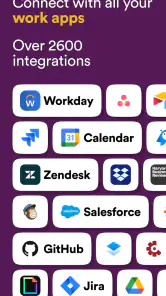
Slack is also not automatically a replacement for every work tool. Its integrations can bring connected services into a team’s routine, but adding connections is only helpful when they reduce context switching rather than create another source of alerts. For detailed project planning, a dedicated task manager may be a better home for owners, deadlines, and progress; for formal announcements or external correspondence, email may still be the more suitable choice.
Who will get the most from it
I’d recommend Slack to teams that collaborate throughout the day, need conversations grouped by project, and want a searchable record of everyday decisions. It can be particularly handy for people working across several projects, since channels make it easier to move between topics without mixing every update into one inbox. Smaller groups can benefit too, provided they keep the setup simple.
It is less compelling for someone who mostly works alone, has few team discussions, or prefers to keep work communication in occasional email exchanges. A team that has not agreed on response times or channel etiquette may find the extra stream distracting. In those cases, a simpler email routine or a focused task tool could be easier to manage.
Slack is a free business app from SLACK TECHNOLOGIES L.L.C., and its 4.7 average from around 162,000 ratings suggests that many people find it useful. It has more than 10 million installs, is rated for everyone, and its current version is 25.11.30.0 for devices running Android 10 or later. It first appeared on July 22, 2013, and I see its strongest value not in replacing every tool, but in giving a team’s ongoing conversations a more deliberate home.
Getting Started with Slack
First things first, setting up Slack is a breeze. Whether you're using it on your Android or iOS device, the installation process is quick and seamless. Once you’ve got it installed, creating a workspace is as easy as pie. You’ll need to enter a bit of information about your team, and voila, you’re ready to start slacking!
Features that Make Slack Stand Out
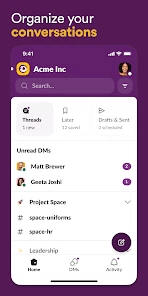
Slack offers a plethora of features that make team communication a whole lot easier. Channels are a standout feature, allowing you to create separate spaces for different teams or projects. This means you can keep conversations organized and focused, without mixing up topics. And the search functionality? It’s an absolute lifesaver when you need to dig up that one message from weeks ago.
Integrations are another area where Slack shines. From Google Drive to Trello, you can connect a multitude of apps to streamline your workflow. It’s like having all your tools in one place, making work feel less like work.
Why I Love Using Slack
One of the things I love about Slack is its ability to bring personality into professional communication. You can react to messages with emojis, which adds a fun element to otherwise mundane conversations. Plus, the ability to share files and make voice or video calls without leaving the app is incredibly convenient.
The notification system is also worth mentioning. You can customize notifications so you’re not bombarded with updates but still stay in the loop with important discussions. It's like having a personal assistant filtering out the noise for you!
My Take on Slack for Team Communication
After using Slack for a while, I can confidently say it’s a must-have app for any team looking to enhance their communication. It’s intuitive, feature-rich, and genuinely makes work collaboration smoother and more enjoyable. If you're tired of juggling between emails and different platforms, give Slack a try. Trust me, you’ll wonder how you ever managed without it.
So, what are you waiting for? Dive into the world of Slack and see your team's productivity soar to new heights!
Slack Frequently Asked Questions
Is Slack suitable for someone who has never used a team communication app?
Slack is designed to bring team communication into one place, with channels for topic-based discussions and direct messages for one-to-one conversations. Its structure may feel different from a basic texting app at first, especially when a team uses several channels. Once you know which channels matter to you, it can make ongoing project discussions easier to follow.
Can Slack notifications be useful without becoming distracting?
Slack notifications can help you keep up with messages and activity in the conversations that matter to you. How busy they feel depends on how many channels and conversations your team uses and how you manage your notification preferences. Before downloading, consider whether you are comfortable checking a dedicated communication app and adjusting alerts to suit your work or group.
Does Slack work for personal use, or is it mainly for workplace teams?
Slack is built primarily for team and business communication, but its channels and direct messages can also suit groups coordinating around shared projects or interests. Conversations can be organized by topic, while file sharing and integrations help keep related work together. It is most useful when the people you communicate with are also using Slack.
Can I use Slack on my phone as well as on a computer?
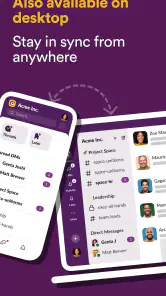
Yes. Slack supports Android and iOS mobile devices, along with Windows, macOS, and Linux computers. That lets you follow team conversations from a phone when away from your desk and continue using the service on a computer later. Its channel-based layout helps keep discussions organized across devices, rather than separating communication into unrelated conversations.
What is Slack and how does it work?
Slack is a communication platform designed for teams and businesses to collaborate effectively. It offers features like channels for different topics, direct messaging, file sharing, and integrations with other tools. Users can join channels related to specific projects or interests, making it easy to organize conversations and keep track of important information.
Pros
- User-friendly interface for quick adaptation.
- Seamless integration with numerous apps.
- Real-time messaging boosts team productivity.
- Customizable notifications enhance focus.
- Strong security features ensure data privacy.
Cons
- Limited free plan features restrict usability.
- Mobile app can be slow at times.
- Search function could be more intuitive.
- Notification overload can be distracting.
- Pricey for small businesses or startups.
- Category
- Business
- Version
- 25.11.30.0











