

SkyportHome
- 625.00
- 4.6
- Installs
- 100.00K
- Price
- Free

Screenshots
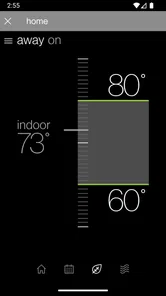
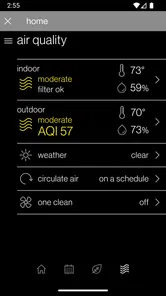
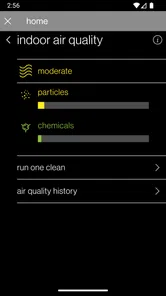
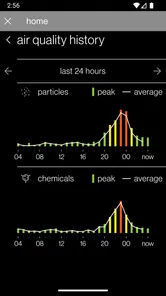
Analysis by Reviewed
Managing heating and cooling from a phone sounds simple until the first connection does not behave as expected. In my experience with SkyportHome, the app is most useful when you treat it as a remote control connected to an existing compatible system, not as a replacement for the equipment, thermostat, or home network. That distinction explains many of the frustrations people run into during setup.
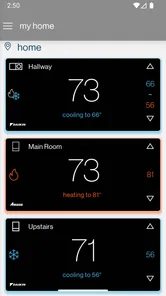
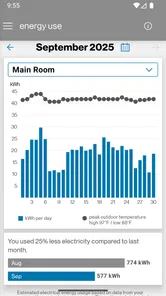
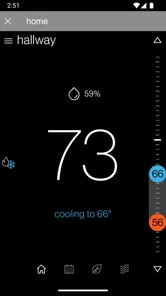
This free House & Home app comes from Daikin Comfort Technologies North America, Inc. It is designed for owners of Daikin, Amana, and Goodman heating and cooling systems who want to check or adjust their home climate while away. The idea is practical: instead of walking to the thermostat every time, I can use my phone as the point of access. The real value depends heavily on the equipment already installed and on whether the initial connection is completed cleanly.
The app has built a solid audience, with an average rating of 4.6 from around 5.9 thousand ratings and more than 100 thousand installs. Those figures suggest that the basic concept works well for many households, but they should not be read as a promise that every installation will be equally smooth. Connected-home products are unusually sensitive to equipment compatibility, account details, network changes, and the condition of the control hardware.
Where SkyportHome Usually Feels Difficult
I’ll begin with the places where the experience tends to become confusing: the handoff among the phone, home network, and installed control. Keeping those separate makes it easier to spot whether the trouble is with remote access or with the heating and cooling system itself. Once that distinction is clear, a few setup checks can prevent avoidable frustration.
The phone app is only one part of the system
The first point I would make to a new user is that SkyportHome cannot solve a problem caused by a disconnected thermostat, an unavailable indoor unit, or an unreliable home network. When the app does not show the expected system, it is tempting to keep tapping refresh or reinstalling it. That may help with a temporary app issue, but it will not correct a problem farther down the chain.
I find it helpful to think of the setup as three connected pieces: the heating and cooling equipment, the home control device, and the phone application. If any one of those pieces is offline or incorrectly associated with the account, remote control becomes unreliable. This is especially important for people moving into a home where the system was already installed. The equipment may be perfectly functional while the digital access still needs to be established for the new occupant.
That is also why the app is a better fit for someone who knows which Daikin, Amana, or Goodman system they have, or who can get that information from an installer or property manager. If you are looking for a universal controller that works with any thermostat or air conditioner, this is not the right category of product. Its usefulness begins with supported equipment rather than with the phone alone.
More From Our News Desk

 Instagram
Instagram’s Power Comes From Its Place in Your Phone
A close look at how Instagram turns Meta’s reach, recommendation systems and everyday camera habits into durable platform power—and what that costs users.

 Gmail
GmailGmail in a Busy Inbox: Who Benefits Most?
From first account to crowded workday, Gmail earns its place through dependable search and flexible sorting—but its best fit depends on how much inbox maintenance you can tolerate.

 Prime Video
Switching to Prime Video: What Changes in Your Viewing Routine
Prime Video can make a compelling second home for streaming, but switching means learning a different catalog, rental layer, and route from browsing to playback.

 Universal TV Remote Control
Universal TV Remote Control Works Best as a Reliable Backup
A phone remote earns its place through quick setup and reliable habits. Here is how to get more from Universal TV Remote Control—and where its limits show.

 Weather - By Xiaomi
Weather by Xiaomi Review: Clear at a Glance, Less Clear Up Close
Xiaomi’s weather app makes everyday forecasts quick to scan, but its calm surface can leave useful details and recovery paths harder to find than they should be.

 X
XX Under Pressure: Can It Recover When Posting Goes Wrong?
A resilience-focused review of X, examining setup, mistaken posts, interruptions, weak connections, and the gaps that matter when recovery needs to be dependable.
Latest News



Remote control is not the same as remote diagnosis
Another common misunderstanding is expecting the application to explain every heating or cooling fault. A phone interface can make a setting easier to reach, but it does not turn the app into a service technician. If the home is not warming or cooling properly, changing a setting remotely may not address the underlying cause.
I would use the app to check whether the system appears reachable and whether the selected operating setting is what I intended. I would not rely on it to determine why a unit is making an unusual noise, why airflow has weakened, or why the indoor temperature is not changing as expected. Those situations can involve the equipment, power, filters, sensors, ductwork, or installation, none of which should be diagnosed casually through a control app.
Why an apparently simple action can feel slow
Cloud-connected controls can introduce a pause between pressing a command and seeing the result. A request may travel from the phone through the internet and home network before reaching the equipment. If I am standing beside the thermostat, that delay can feel unnecessary, because a physical control often gives immediate local feedback.
For that reason, I prefer SkyportHome for convenience rather than for urgent operation. It makes sense when I am leaving the house, returning from a trip, or checking the system from another location. If I need an immediate response while standing in the same room, the local thermostat remains the more dependable choice.
Setup Checks That Prevent Most Friction
A little preparation can make the first connection much less stressful, especially when someone else previously managed the system or the home network has changed. I focus on confirming access and testing ordinary operation before relying on remote control. The next section looks at how to do that without making setup more complicated than it needs to be.
Start with the equipment, not the download screen
Before spending time inside the app, I would identify the actual heating and cooling system and confirm that its control arrangement is intended for this service. The names Daikin, Amana, and Goodman cover a broad range of equipment, but brand recognition alone is not enough to guarantee that every installation follows the same connection process.
If you are renting, buying a recently occupied home, or taking over a system from another family member, ask who previously managed the connected control. Ownership and access can be separate issues. A system may already be attached to another account, or the installer may have left instructions that are more useful than guessing through the app. Sorting that out early is usually easier than repeatedly creating new accounts or attempting random resets.
I also recommend having the phone close to the control device during the first setup. Even when the final purpose is remote access, the initial pairing or registration may require attention at the equipment itself. Keeping the thermostat, equipment labels, and phone together reduces the chance of entering details for the wrong system.
Use a calm, repeatable connection process
My preferred approach is to complete setup when the home network is stable and nobody urgently needs heating or cooling. Avoid testing for the first time just before leaving for work or during an uncomfortable evening. A quiet setup gives you time to read each screen, verify the selected home or system, and notice whether the app is actually completing a step rather than merely appearing to progress.
It is worth checking the phone’s internet connection before blaming the app. A weak mobile signal, a temporary Wi-Fi problem, or a network that recently changed its credentials can make a correctly configured system appear unavailable. If the home router has been replaced, the equipment may need attention even though other household devices are working normally.
One useful habit is to test the system locally before testing it remotely. If the physical control cannot operate the heating or cooling equipment, an app-based command is unlikely to help. If local operation works but the phone cannot connect, the investigation can stay focused on account, network, or application access instead of the mechanical system.
Give account details the same care as equipment details
Connected-home setup often fails because the user is signed into a different account than expected, uses an old email address, or assumes that reinstalling the app will erase the system relationship. I would first confirm the account identity and carefully distinguish between a login problem and a device connection problem.
Reinstalling can be a reasonable last resort for a corrupted local session, but it should not be the first response to every error. It may remove locally stored state without fixing the underlying registration. Before taking that step, note the information you used during setup and make sure you can sign back into the intended account.
Test more than one ordinary action
A successful sign-in is not the same as a successful installation. After the system appears, I would check a normal, non-urgent control action and then allow enough time for the equipment to respond. I would also close and reopen the app later to see whether the system remains associated with the account.
This matters because a setup that works only during the initial session is not yet useful for travel or daily routines. The goal is not simply to make the equipment appear once; it is to establish a repeatable path between the phone and the home system.
Recovering a Workflow When Something Goes Wrong
When a command appears not to work, my first instinct is to slow down rather than repeat it. Checking what still works locally helps narrow the problem and avoids changing settings blindly. The following section lays out a measured recovery approach, including when a simple restart is sensible and when it is better to leave equipment settings alone.
Separate a display problem from a control problem
When the system status looks stale, I avoid issuing the same command again and again. First I check whether the phone itself has a working connection. Then I reopen the application and compare what it shows with the local control. If the local control responds normally while the app remains outdated, the issue is more likely in communication or session state than in the heating or cooling equipment.
This distinction prevents an easy mistake: changing a setting multiple times because the screen has not caught up. Repeated commands can make it harder to tell which instruction the system received. A patient check is safer and more informative than rapid tapping.
Use local control as the recovery anchor
If remote access stops working, I return to the physical control first. This gives me a reliable way to keep the home comfortable while I investigate the phone connection. I check whether the equipment is powered, whether local commands are accepted, and whether the displayed operating state makes sense.
Once local operation is confirmed, I work outward: phone connection, account session, application state, and home network. This order is useful because it avoids treating every remote-access failure as a mechanical failure. It also means the household is not left waiting for an app issue to resolve before basic climate control is restored.
When restarting helps and when it does not
Closing and reopening the app can clear a temporary session problem. Reconnecting the phone to the network can also help if the original connection was interrupted. These are sensible, low-risk first steps. I would not jump immediately to aggressive resets of the equipment, especially if the system is operating locally and there is no clear reason to disturb its configuration.
A full reset can create more work by removing an existing association or requiring setup information that is not immediately available. If the system belongs to a landlord, a shared household, or a managed property, I would ask the responsible person before changing the equipment’s connected settings. The safest recovery is usually the smallest one that restores the specific failed link.
A practical travel routine
One of the better use cases is preparing the home before returning from a trip. I would not wait until the airport or a distant location to discover that remote control is unavailable. Before leaving, I would confirm that the app can reach the system from the normal home network and then perform a simple check using the phone away from the thermostat.
That test reveals a subtle but important trade-off: an app can appear perfect when the phone and equipment are on the same local network yet behave differently when accessed through a mobile connection. Testing both situations gives a more realistic picture of whether the remote workflow is ready for travel.
When the App Is Not the Cause
Remote access can fail even while the heating and cooling system is working normally, so I find it useful to look beyond the phone before treating an outage as an app defect. Network changes, equipment behavior, and household coordination can all affect the experience in different ways. The final section helps distinguish those situations and points toward the appropriate next step.
Equipment behavior needs equipment-level attention
If the system is reachable but the home remains uncomfortable, I would not assume that the application caused the problem. A command can be delivered correctly while the equipment still cannot produce the expected result. Airflow, power, filters, sensors, outdoor conditions, and maintenance all sit outside the phone interface.
For basic safety, I would avoid opening equipment panels or attempting electrical repairs based on what the app displays. If there is a burning smell, unusual electrical behavior, water where it should not be, or a repeated failure to operate, the appropriate response is to stop experimenting with remote commands and contact a qualified professional or the responsible property manager.
Network changes can look like app failures
Households frequently change routers, internet providers, Wi-Fi names, or passwords. Other devices may reconnect automatically while the climate-control equipment remains disconnected. In that situation, SkyportHome may be functioning normally; it simply cannot reach the system through the path it used before.
The same principle applies to temporary internet outages. A local thermostat can continue controlling the home even when remote access is unavailable. That is why I consider the app an added convenience layer, not the sole method of operating the heating and cooling system.
Shared homes need a clear access plan
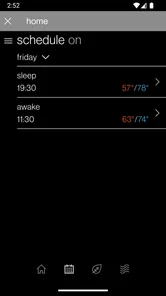
In a family home, several people may expect to control the same system. Confusion can arise when one person changes a setting remotely while another is adjusting the local control. Before relying on the app, I would agree on who manages schedules or temperature changes and how the household handles conflicting preferences.
This is less a technical flaw than a practical limitation of connected controls. The app can make access easier, but easier access also means more opportunities for simultaneous changes. A simple household agreement prevents many “the system changed by itself” misunderstandings.
Who Will Benefit Most From SkyportHome?
I think this app is most appealing to owners of compatible Daikin, Amana, or Goodman systems who regularly leave home for long periods, manage a second residence, or want to check the climate before arriving. It is also useful for people who dislike walking to the thermostat repeatedly, provided their system and network are already dependable.
The free price makes it easy to try without adding a subscription decision to the setup. Its Everyone content rating also makes it suitable for a broad household audience. The current version is 3.6.9, and the app supports operating systems from version 9 onward, so users should still check that their phone meets that requirement before planning around it.
I would be more cautious about recommending it to someone with an unsupported or uncertain system, a frequently changing home network, or a strong preference for immediate physical controls. It is also not the best answer for a person seeking a universal smart-home hub that combines unrelated appliances from many manufacturers. SkyportHome is focused, and that focus is both its strength and its boundary.
How It Compares With Ordinary Alternatives
The most obvious alternative is the thermostat or equipment control already installed in the home. Local control wins for immediate response, independence from internet access, and clarity when troubleshooting. SkyportHome wins when distance matters. If I am away, the wall-mounted control cannot tell me whether the system is reachable, while the phone may provide that convenience.
A general smart-home platform may be more attractive to someone who wants lighting, locks, cameras, and climate control in one place. However, a manufacturer-focused app can be easier to reason about because it is tied directly to the supported heating and cooling ecosystem. The trade-off is that users who want broad automation may find the focused approach less flexible than a larger platform.
There is also a difference between convenience and resilience. A physical control remains important because it can continue to operate the home when the phone, account, or internet connection is unavailable. I would use SkyportHome to extend access, not to eliminate the local control from my routine.
My Practical Verdict
SkyportHome is a worthwhile free companion for people who already use a compatible Daikin, Amana, or Goodman heating and cooling system and genuinely need access away from the thermostat. In my view, its strongest quality is convenience: it turns a home climate check into something I can do from the phone instead of requiring me to be physically present.
The setup deserves patience. Confirm the equipment relationship, use a stable connection, test local operation first, and verify remote access before depending on it during travel. When something fails, work from the system outward rather than assuming the app is responsible. That approach saves time and avoids unnecessary resets.
The app is not a universal controller, a repair tool, or a substitute for the installed thermostat. People who understand those limits are the ones most likely to enjoy it. For them, the combination of free access, broad household suitability, and support for the three named equipment brands makes it a sensible addition to a connected home. For everyone else, the ordinary local control may remain the simpler and more dependable choice.
My final recommendation is straightforward: try it if your equipment is compatible and remote climate control would solve a real daily problem. Set it up before you need it, test it from outside the home network, and keep the local control as your fallback. Used that way, SkyportHome is a useful convenience layer rather than a source of unnecessary complexity.
SkyportHome Frequently Asked Questions
Can SkyportHome control my heating and cooling system remotely?
SkyportHome is designed to let you control compatible Daikin, Amana, and Goodman heating and cooling systems from anywhere. It can be useful when you want to manage your home’s climate while away, as well as when you are at home. The system needs to be compatible with the app, and you will need to set up access for your equipment before using its controls.
Which heating and cooling brands work with SkyportHome?
SkyportHome is intended for Daikin, Amana, and Goodman heating and cooling systems. If you own equipment from one of these brands, check that your particular system is supported before downloading, since compatibility can depend on the equipment and its setup. The app is focused on managing connected heating and cooling systems rather than serving as a general home-control tool.
What is SkyportHome and what can I use it for?
SkyportHome is a home-focused application designed to help users access and manage services, information, or features connected with their Skyport experience. Depending on the available configuration, it may provide a central place for account details, updates, requests, reservations, communications, or property-related tools. The exact functions can vary by provider, location, and user permissions, so it is worth checking the app description and supported services before downloading.
Is SkyportHome free to download and use?
SkyportHome is free to download. However, some features or services could depend on your Skyport account, property, subscription, or organization. Downloading the app does not necessarily mean every function is free. Before using paid services, review any displayed prices, terms, or billing information carefully. Availability can also differ between Android and iOS, as well as between regions and participating properties.
Do I need an account or invitation to use SkyportHome?
In many cases, an account, registration, or invitation from a participating property or service provider may be required to access the main features of SkyportHome. Some information might be visible without signing in, but personalized tools generally depend on verified user details. If you cannot register independently, look for an activation email, access code, or instructions from your building, host, employer, or Skyport representative.
Pros
- Simple interface makes home controls easy to find.
- Supports remote access when you are away from home.
- Useful automation options can reduce repetitive tasks.
- Centralized control helps manage compatible devices efficiently.
- Notifications can keep you informed about important home events.
Cons
- Requires compatible hardware to provide its full functionality.
- Some features may depend on your internet connection.
- Initial setup can take time for multiple devices.
- Compatibility may vary between Android and iOS devices.
- Advanced automations may feel confusing for first-time users.







