SkyHalo Weather for Wear OS
- 36.00
- 4.6
- Installs
- 1.00K
- Price
- $2.99
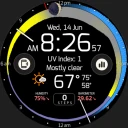
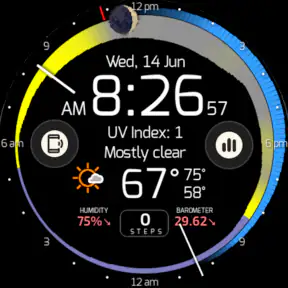
Screenshots
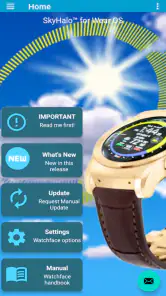
Analysis by Reviewed
I find the strongest reason to consider SkyHalo Weather is its focus on Wear OS rather than trying to be another all-purpose phone forecast. If I’m already wearing a Pixel, Galaxy, Fossil, or another compatible watch, checking conditions without pulling out my phone can be genuinely useful. It also includes moon-phase information, a nice extra for anyone who likes to plan evening walks, camping trips, or simply keep an eye on the lunar cycle. That combination gives the app a clearer purpose than a generic weather shortcut.
Who gets the most from a wrist forecast
This makes the most sense for people who check the weather in short bursts throughout the day: commuters, dog walkers, cyclists, and anyone whose plans depend on whether rain is approaching. On a busy morning, I can see the appeal of checking the watch before deciding whether to take a jacket, then looking at the phone only if I need a fuller picture. It is less compelling if you rarely use your smartwatch or prefer to study radar maps and detailed weather charts on a large screen. In that case, a phone-first weather service may be a better fit.
A practical habit is to treat the watch view as a quick decision aid, not a substitute for every kind of forecast. Before a short walk, a glance can help answer “Do I need an extra layer?” For a long drive, hike, or outdoor event, I’d still check a phone forecast before leaving and again if conditions look unsettled. Small watch displays are convenient, but they are not the best place to compare several hours of changing conditions or make a high-stakes safety call.
Where it fits among weather apps
Compared with the usual phone weather apps, the key difference is where the information is meant to be used. A phone app can give you more room to read and explore; a Wear OS app is valuable when speed and convenience matter more than a deep forecast session. The moon phase adds a distinct point of interest, but it won’t replace a specialist astronomy tool if you need detailed observing guidance. I’d choose this for quick watch access and keep a more expansive weather app available for planning around complex or severe conditions.
There is also a trade-off in buying into a watch-specific experience: its usefulness depends on whether the watch is part of your everyday routine. If you leave it charging or mainly use it for notifications, a separate paid weather app may not earn its place. Videotropic’s app costs $2.99, so I’d decide based on how often I actually check weather from my wrist rather than the novelty of having another watch app. Its Everyone age rating makes it suitable for a broad audience, but the practical question is still whether its format matches your habits.
For example, imagine leaving work on a day when the sky looks clear but rain is possible later. A quick check on the watch can prompt me to bring a light layer or change a walking route, while a phone check can help me decide whether the forecast is uncertain enough to alter evening plans. That division of labor is useful: the watch handles quick checks, and the phone handles decisions that need more context. I would not rely on a glance alone when the weather could affect safety or a long trip.
Questions worth considering before installing
One reasonable question is whether it works beyond a particular watch brand. It is presented as a Wear OS app for devices such as Pixel, Galaxy, and Fossil watches, so it is aimed at that ecosystem rather than Apple Watch users. Another is whether the $2.99 purchase is worthwhile: for someone who checks forecasts from a watch every day, paying for a focused wrist experience may feel fair; for occasional use, a free phone app may be enough. The app is rated 4.6 on average from around 127 ratings, with 36 written reviews and over 1,000 installs, which suggests a modest but positive reception rather than broad adoption.
More From Our News Desk

Weather by Xiaomi Review: Clear at a Glance, Less Clear Up Close

X Under Pressure: Can It Recover When Posting Goes Wrong?

Clash of Clans Is Won Between the Battles

Android Auto Makes the Case for Quieter Car Software

MobiOffice: Transforming Mobile Productivity with Seamless Integration

EA SPORTS FC™ Mobile Soccer: Redefining Mobile Sports Gaming
I’d also think about what I expect from “weather on the wrist.” A glanceable forecast is best for routine choices, while exact local conditions can vary and forecasts are not guarantees. Before depending on any watch display for a time-sensitive plan, I’d check the details on a larger screen. That is not a flaw unique to this app; it is a sensible limit of compact wearable displays and weather predictions generally.
A small-screen workflow that earns its place
The most useful way I can picture using it is as a series of brief checks attached to decisions I already make. Before leaving home, I’d glance at the watch and decide whether to carry a layer. At lunch, I might check again before walking to a nearby errand. If either glance raises a question, I’d move to the phone rather than trying to squeeze a full planning session into the watch interface. This keeps the wearable useful without asking it to do a phone’s job.
That distinction also helps answer whether a dedicated watch weather app is redundant. If your preferred watch face already gives you the conditions you need, the extra app may not change much. If you find yourself reaching for your phone just to check the forecast, a dedicated wrist option has a clearer purpose. I’d compare the information you already see at a glance with what you want to know, then decide whether the moon phase and separate weather access add enough value to justify another purchase.
When it comes to checking the weather, most people rely on their smartphones or a quick glance out the window. But what if you could have all that essential weather information right there on your wrist? Enter the SkyHalo Weather app for Wear OS. It's a neat little package that promises to keep you up-to-date with the latest weather reports, all while you're on the go. But does it really deliver on its promises? Let's dive into it.
First Impressions
The first thing you'll notice when you install the SkyHalo Weather app is its clean, intuitive interface. Setting it up is a breeze, and once it's up and running, you're greeted with a user-friendly display that shows current weather conditions, forecasts, and more. It’s like having a mini meteorologist right on your wrist. The app integrates smoothly with Wear OS, so it feels like a natural extension of your smartwatch rather than a clunky add-on.
Features That Stand Out
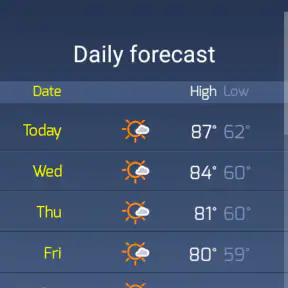
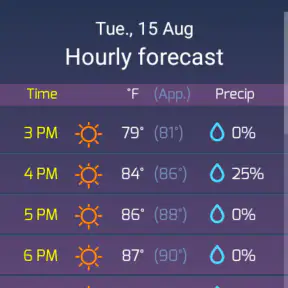
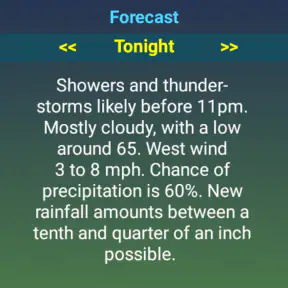
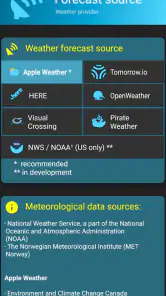
What really sets SkyHalo Weather apart are its features. You get real-time weather updates that are hyper-localized, meaning you can get the weather of not just your city, but your specific neighborhood. This is pretty handy if you're planning a local outing or just want to know if you'll need an umbrella for your walk to the coffee shop. Additionally, the app provides detailed forecasts, including hourly updates, which is perfect for those who like to plan their day down to the last detail.
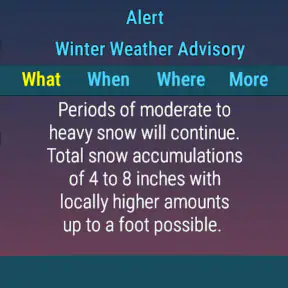
A feature I particularly enjoyed was the weather alerts. The app can notify you of severe weather conditions, ensuring you're never caught off guard by sudden changes in the weather. Whether it's a thunderstorm or an unexpected cold front, SkyHalo Weather has got your back.
Performance and Usability
In terms of performance, the app is quite robust. It updates quickly and doesn't lag, which is crucial for something as dynamic as a weather app. The battery consumption is also surprisingly low, so you won't have to worry about your smartwatch dying on you halfway through the day. As for usability, the app is straightforward enough for anyone to use. Whether you're a tech-savvy millennial or someone who's just getting into the world of smart gadgets, you'll find it easy to navigate.
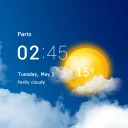
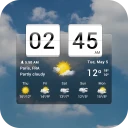
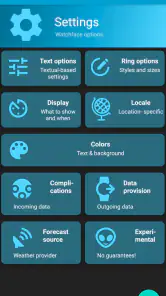
One nifty little feature is the customizable watch faces. You can choose from a variety of designs that suit your style, all while displaying the weather information you care about most. It’s both functional and stylish, making your smartwatch a more integral part of your daily routine.
Final Thoughts
All in all, SkyHalo Weather for Wear OS is a solid choice for anyone looking to have quick access to weather information. It’s reliable, easy to use, and packed with features that make it stand out in the crowded world of weather apps. Whether you're a professional who needs to keep an eye on the weather for work or someone who just likes to stay informed, this app is worth checking out.
If you're on the fence about downloading yet another app, give SkyHalo Weather a shot. It might just become your go-to weather companion. After all, having the weather at a glance right on your wrist is pretty darn convenient!
Its place in a changing Wear OS lineup
SkyHalo Weather was released on February 21, 2020, and the useful way to judge that history is not to assume that age automatically means either neglect or maturity. The date tells me when the app first appeared, but it does not by itself establish what has changed since then. The version you install is the practical evidence to check: read its current notes and confirm that it supports your particular watch before making a purchase. I would treat any future improvements as possibilities, not promises.
For someone who already uses a compatible watch, the release history matters most when considering fit and continuity. If the app’s current presentation works well on your device, its established place in the Wear OS ecosystem may be enough; if you need a feature introduced only in a recent update, verify that it is present before building a routine around it. Either way, the essentials here are the wrist-based forecast and moon phase, not an assumed stream of new capabilities.
Small habits that make the watch view more useful
I’d use the watch face as a prompt to check conditions at the moments when a decision is still easy to change: before walking out, before a lunch break outdoors, or before heading home. That is more useful than repeatedly checking without a plan. If the displayed outlook gives me pause, I can open a phone weather app for the broader view rather than trying to interpret a complicated situation on a small screen. This workflow keeps the convenience while avoiding overconfidence in a brief glance.
There is a related trade-off for people who already have weather information on their watch. If your current watch face or preferred app covers the forecast you need, adding SkyHalo may duplicate that glance rather than improve it. Its appeal rises if you want a dedicated weather experience that also includes the moon phase; it falls if you want one app to serve as a full planning dashboard. That distinction is worth settling before paying, especially if your phone already handles detailed forecast checks well.
What I would check as a new user
Before relying on it for a routine, I would confirm that the watch is running Wear OS and that the app behaves as expected on that specific device. I’d then spend a few ordinary days checking the same forecast on the watch and phone, not to demand identical presentation, but to learn how quickly I can read the information and when I need the larger screen. This simple trial helps answer the most personal question: does a wrist forecast actually change how conveniently I plan my day?
For severe weather, travel, or outdoor work, I would keep a more detailed source within reach and follow relevant local guidance. A compact watch display is best for awareness and quick choices, not as the sole basis for a safety decision. That limit does not cancel the app’s convenience; it sets a sensible boundary around what a wearable forecast can do.
What I’d watch for over time
After trying it in ordinary routines, I’d judge the app less by how impressive the first glance feels and more by whether I still reach for it after the novelty fades. Does the wrist check save a step on a rushed morning? Does the moon information suit a habit you genuinely have, such as choosing an evening for a walk under a brighter sky? Those personal tests are more useful than expecting a watch app to transform how you plan.
I would also pay attention to whether the forecast remains legible and useful on your particular watch, especially if you prefer to read information quickly while moving. Wearables vary in size and shape, and a layout that feels comfortable on one device may not be equally convenient on another. That is why checking compatibility and trying a few everyday scenarios before depending on it is a sensible approach.
My recommendation
SkyHalo Weather is easiest to recommend to Wear OS owners who want weather close at hand and will use that access often enough to justify a paid app. The moon-phase information gives it a small but memorable extra, while its watch-first approach is the main reason to choose it over a phone-only alternative. I would skip it if I rarely wear my smartwatch, need extensive map-based analysis, or already have a watch setup that answers the same questions. For everyone else, it is a focused option whose value comes down to a straightforward test: whether checking the forecast from your wrist makes everyday decisions easier.
SkyHalo Weather for Wear OS Frequently Asked Questions
What does SkyHalo Weather do on a Wear OS watch?
SkyHalo Weather is a weather app for Wear OS, with a focus on forecasts and moon phases. It is intended to bring weather information to compatible watches, including devices such as Pixel, Galaxy, and Fossil models. The experience is designed around checking weather from your wrist, rather than relying only on a phone.
Who develops SkyHalo Weather, and what is its age rating?
SkyHalo Weather is developed by Videotropic and is rated Everyone, so its content is intended for a broad audience. It is a weather app rather than a game or social platform. If you are choosing apps for a family member, the age rating offers a quick indication of the content category, while the app’s weather-focused purpose helps set expectations.
What features does SkyHalo Weather offer for Wear OS?
SkyHalo Weather provides real-time weather updates directly on your Wear OS device. It features customizable watch faces that display weather conditions, forecasts, and alerts. Additionally, it offers radar maps, severe weather notifications, and integration with your calendar to provide weather insights for your scheduled events.
Is SkyHalo Weather compatible with all Wear OS devices?
SkyHalo Weather is designed to be compatible with most Wear OS devices. However, it's always a good idea to check the app's listing on the Google Play Store for specific compatibility details, as some older models may not support all features. Ensure your device is updated to the latest Wear OS version for optimal performance.
Does SkyHalo Weather consume a lot of battery on Wear OS?
SkyHalo Weather is optimized to provide accurate weather updates without significantly draining your Wear OS device's battery. It uses efficient data fetching techniques and allows users to customize update intervals. For best results, users can adjust settings based on their preferences and battery-saving needs.
Pros
- Accurate weather forecasts
- Wear OS optimized interface
- Customizable watch faces
- Real-time weather alerts
- Low battery consumption
Cons
- Limited free features
- Occasional sync issues
- Ads in free version
- Requires Wear OS 2.0+
- No offline mode
- Category
- Weather
- Version
- Varies with device