

Six Flags
- 6.46K
- 3.4
- Installs
- 5.00M
- Price
- Free

Screenshots





Analysis by Reviewed
Before I head to a Six Flags park, I like to have one practical question answered: can my phone help me turn a loose plan into a smoother day? The Six Flags app is a travel and local companion from Six Flags Entertainment Corp., aimed at people visiting its parks rather than at theme-park fans looking for a general directory. It is free, rated for Everyone, and has a 4.3 average from around 36,000 ratings; more than a million installs suggest it is a familiar tool for many visitors. I’d treat it as a useful starting point, not a promise that every detail will be effortless.
A Virtual Roller Coaster in Your Pocket
Have you ever found yourself yearning for a thrilling adventure but just couldn't find the time or the means to make it to an amusement park? Well, the Six Flags app is here to bridge that gap and bring the excitement of a theme park right to your fingertips.
For a first-time user, the best approach is to install it before leaving home and explore the park information at a relaxed pace. The current version is 5.0.1, and the app has been around since May 27, 2015, but what matters more on the day is whether you can quickly find the information you need. I’d start by checking that I have the right park selected, then look over the map and decide on one or two priorities. That simple preparation makes the app feel less like another thing to manage once the crowds arrive.
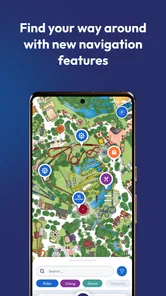
A useful first success is finding a destination on the map and using it to orient your route. Rather than trying to plan every minute, I’d pick a ride or area everyone in the group wants to visit, then use the map to understand what is nearby. This is especially helpful when plans change: a snack stop, a slower walking pace, or a group splitting up can make a rigid itinerary frustrating. The app is most valuable when it supports flexible decisions instead of trying to run the whole day for you.
Features Galore
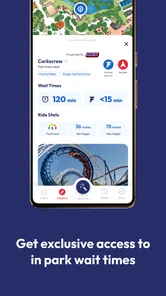
One of the standout features of this app is its interactive maps. Gone are the days of fumbling with paper maps while trying to navigate through the park. The app offers a detailed and interactive map that not only shows you where everything is but also gives you real-time updates on ride wait times. So, you can maximize your fun and minimize your wait.
Wait-time information can help with a practical trade-off: a ride that looks appealing may not be the best next choice if the displayed wait makes a nearby alternative more sensible. I’d check the map again after each major stop rather than build the entire day around one glance, since a busy park visit is naturally subject to change. And if you are visiting with children or friends who prefer different rides, agree on a meeting point before anyone wanders off. A map is useful for finding places, but a shared plan is what prevents “where are you?” messages from taking over the day.
Another feature that deserves a shoutout is the mobile food ordering. You know that dreadful feeling when you're starving, but the line for food seems endless? With this app, you can order your food straight from your phone. It's like having a personal assistant who's solely focused on satisfying your cravings.
More From Our News Desk

 Prime Video
Switching to Prime Video: What Changes in Your Viewing Routine
Prime Video can make a compelling second home for streaming, but switching means learning a different catalog, rental layer, and route from browsing to playback.

 Universal TV Remote Control
 Works Best as a Reliable Backup
A phone remote earns its place through quick setup and reliable habits. Here is how to get more from Universal TV Remote Control—and where its limits show.

 Weather - By Xiaomi
Weather by Xiaomi Review: Clear at a Glance, Less Clear Up Close
Xiaomi’s weather app makes everyday forecasts quick to scan, but its calm surface can leave useful details and recovery paths harder to find than they should be.

 X
X Under Pressure: Can It Recover When Posting Goes Wrong?
A resilience-focused review of X, examining setup, mistaken posts, interruptions, weak connections, and the gaps that matter when recovery needs to be dependable.

 Clash of Clans
 Is Won Between the Battles
Its raids are quick; its community is a long-term project of coordination, teaching, rivalry, and shared responsibility—with all the friction that entails.

 Android Auto
 Makes the Case for Quieter Car Software
The car interface is no longer judged by how much it can do, but by how quietly it helps. Android Auto shows what drivers now expect—and what still gets in the way.
Latest News



For a realistic visit, I’d use mobile ordering as a way to make a meal break easier to coordinate, not as a reason to assume food will be ready the instant I want it. Check the available choices and ordering details in the app before the group gets hungry, then decide together where to pause. That small bit of timing can matter when one person wants to keep moving and another needs a proper break. If you prefer choosing food only after seeing the options in person, the app can still help with navigation even if you don’t use ordering.
Perks for the Fans
For those who are regular visitors, the app offers a ton of perks. From exclusive discounts to early access to new rides, it's like being part of an exclusive club. Plus, it's incredibly user-friendly, so even if you're not tech-savvy, navigating through the app feels like a breeze.
That makes it more attractive to repeat visitors, who have a reason to check for park-specific offers and updates before each trip. I would still read the terms shown for any perk rather than assume it applies to every visit or every guest. A first-time visitor may get more immediate value from the map and planning tools, while someone who goes regularly has more reason to make the app part of their pre-visit routine. It is a focused choice: unlike a general maps app, it is built around the park experience, but it is not a replacement for broader travel planning to get to the park.
And let's not forget about the notifications. The app keeps you in the loop about all the exciting events happening in the park. Whether it's a new ride opening or a special event, you'll be the first to know. It's like having an insider's scoop on all things Six Flags.
One point of confusion for newcomers is expecting every feature to work the same way at every park or to answer every question about a visit. I’d use the app for park-focused information, then keep ordinary travel needs—such as getting to the destination or coordinating transport—within the tools I already trust for those tasks. Notifications can be helpful if you want timely park news, but they are optional; if you dislike alerts, you can still open the app when you need it. The version works on operating systems from 7.1 onward, which is useful to check before relying on it with an older device.
My Personal Take
Personally, I found the app to be incredibly useful. It really enhances the park experience by making everything so much more accessible. It’s like having a mini Six Flags concierge right in your pocket. And while nothing beats the real thing, having this app is the next best thing for any thrill-seeker out there.
I’d recommend it most to someone who already knows they are visiting a Six Flags park and wants the park’s own map, updates, and ordering tools in one place. It is less compelling if you are only comparing destinations, planning a trip around several attractions, or do not expect to visit a Six Flags park; a general travel app will be more useful for those jobs. The main trade-off is focus: that park-specific approach is convenient on site, but it does not replace a broader travel toolkit. I’d also keep a flexible backup plan for the day rather than treating app information as an unchanging schedule.
In conclusion, if you're planning a trip to Six Flags or simply want to stay updated on all the latest happenings, the Six Flags app is a no-brainer. It's packed with features that not only make your visit smoother but also add a layer of excitement to the whole experience. So go ahead, download it, and let the adventures begin!
My more measured advice is to download it before your visit, choose the park you need, and try one simple task—finding a place on the map—before you are in a hurry. Then decide whether ordering food or receiving updates fits how your group likes to spend a day. That gives you a clear first win without requiring you to depend on every tool. For a planned park visit, it can be a handy companion; for everything beyond the park gates, I’d pair it with the travel tools you already use.
A calmer way to handle a busy park day
One situation where I would keep the app open is the moment a group’s original plan stops matching reality. Imagine arriving with a short list of rides, then discovering that someone needs a slower pace or the group wants to eat earlier than expected. I’d use the map to find a nearby alternative and let the day bend around the people with me. That is a better use of a park app than repeatedly checking it to see whether every minute is going according to plan.
For families, I’d agree on a simple regrouping routine before separating: choose a recognizable place on the map, make sure everyone can identify it, and decide when to check back in. The app can help with orientation, but it cannot replace clear communication or make a split group automatically coordinated. For friends who want different rides, this small bit of planning is more useful than trying to keep everyone on one route all day.
What I would check before relying on it
A common practical question is whether the app is worth installing if I only want to check one detail. If that detail is park navigation, ride waits, food ordering, or park updates, having the official app ready can save some back-and-forth during a visit. If I only need directions to the park or broader trip planning, I’d use a general navigation or travel app instead. Those tools are designed for the journey as a whole, while this one is centered on the experience inside a Six Flags park.
I’d also treat the map and wait information as aids to a decision, not guarantees about how the next hour will unfold. Conditions can change while you walk, and the most convenient choice may depend on the group’s energy, appetite, and interests as much as on a displayed wait. Checking again at natural pauses—after a ride or before choosing lunch—keeps the app useful without turning the visit into a constant screen-checking exercise.
Another sensible first-time question is whether I need to use every tool for the app to be worthwhile. I don’t think so. A visitor who only uses the map still has a clear reason to keep it; a repeat guest may care more about offers or updates, while someone who dislikes phone-based ordering can simply make food plans in person. I’d start with the one task most likely to remove a real annoyance, then leave the rest alone unless it becomes useful.
Who will get the most from it
The strongest fit is someone with a confirmed park visit who wants practical, location-specific help without relying entirely on paper signage or a general map. It also suits repeat visitors who want to check the park’s own information and look for relevant perks before arriving. For a first visit, I’d use it to become familiar with the layout and choose a couple of priorities, not to design a strict schedule from opening to closing.
By contrast, I would skip it if I had no likely visit planned or wanted one app to manage a whole vacation across multiple destinations. It is also not the right answer for every question that comes up on site: a map can orient you, but a direct conversation with park staff may be more appropriate when you need help with a specific situation. Keeping that distinction in mind avoids expecting a phone tool to solve things it was not meant to handle.
Compared with a paper map, the app is more convenient for checking digital updates and changing direction without carrying a folded guide. Compared with a general maps app, its advantage is its Six Flags focus; the general alternative remains better for routes outside the park and wider travel planning. I see them as complements rather than rivals. I’d use the park app for the visit itself and keep my usual navigation tool for getting there and heading home.
My final recommendation
For a first visit, I’d install it ahead of time, select the park, and test the map before the day becomes busy. Once there, I’d use it at a few decision points: choosing where to go next, coordinating a meal, or checking for an update that matters to my plans. That workflow offers the practical benefits without asking the phone to become the focus of the outing.
The Six Flags app is a focused companion rather than a complete travel planner, and that is both its best quality and its main limitation. When I’m heading to one of its parks, I’d rather have a purpose-built map and park information close at hand than try to make a general-purpose tool cover every on-site need. I’d recommend it to visitors who value that convenience, while encouraging everyone to keep plans flexible and use other tools for the rest of the trip.
Six Flags Frequently Asked Questions
What should I know about the Six Flags app before installing it?
Six Flags is a free Travel & Local app from Six Flags Entertainment Corp., designed to help visitors explore the parks. It has a 4.3 average from around 36,000 ratings and more than 1 million installs. The app is rated Everyone, so its content is suitable for a broad audience. Check that your device meets the operating-system requirement before downloading.
What operating-system version does the Six Flags app require?
The Six Flags app supports Android and iOS devices. Android users should have Android 7.1 or later to meet the listed minimum requirement. The app’s current version is 5.0.1, and keeping your device’s operating system up to date can help with compatibility. If you are using an iPhone or iPad, check the app’s compatibility information in the relevant app store before installing.
Is the Six Flags app available for my phone?
The Six Flags app is available for Android and iOS, so visitors can check their device’s compatibility before downloading. It is a Travel & Local app developed by Six Flags Entertainment Corp. The listed minimum operating-system requirement is Android 7.1, so Android users should check that their phone meets it. The app is free to download.
What is the Six Flags app and what features does it offer?
The Six Flags app is a mobile application designed to enhance your experience at any Six Flags amusement park. It offers features such as interactive maps, real-time ride wait times, show schedules, and exclusive discounts. Additionally, the app allows you to purchase tickets, manage memberships, and view dining options, making it a must-have for visitors.
How can I benefit from the Six Flags app during my visit?
By using the Six Flags app during your visit, you can significantly enhance your park experience. The app provides real-time updates on ride wait times and show schedules, allowing you to plan your day efficiently. You can also use it to locate amenities and dining options, receive special offers, and purchase tickets or memberships directly from your phone.
Pros
- Wide variety of thrilling rides.
- Family-friendly attractions.
- Seasonal events and festivals.
- Convenient mobile app for park navigation.
- Numerous dining options available.
Cons
- Long wait times for popular rides.
- High ticket prices.
- Limited shade in hot weather.
- Parking fees can add up.
- Some attractions may be closed.











