Site Audit Pro
- 90.00
- 4.1
- Installs
- 100.00K
- Price
- $12.90

Screenshots
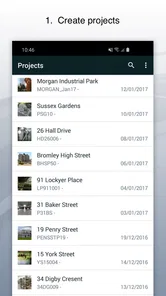
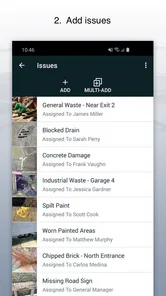
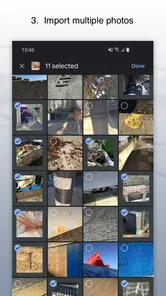
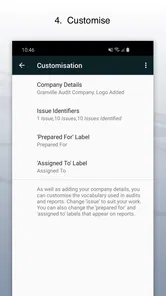
Analysis by Reviewed
I find Site Audit Pro most useful when an inspection needs to become a clear record rather than a collection of notes that are hard to act on later. It is a productivity app from Veam Studios Ltd, built around capturing site issues, adding photos, and sharing reports. Its focus is refreshingly practical: instead of trying to be an all-purpose project manager, it puts the inspection itself at the center of the workflow.
Where it fits in a working day
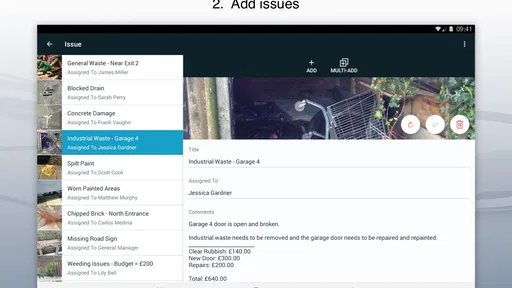
Imagine walking a site with a supervisor and spotting a damaged surface that needs follow-up. You can record the issue while you are beside it, take a photo for context, and later share the report with the person responsible. That sequence can prevent the familiar end-of-day scramble of matching handwritten notes to pictures in a camera roll. I would use the same approach for maintenance walk-throughs, property checks, or recurring quality reviews where a consistent written record matters.
The useful habit is to record observations in a way someone else can act on: describe the location clearly, explain what needs attention, and take a photo that shows both the issue and enough surrounding context to identify it. A close-up alone may prove a defect exists but leave a colleague unsure where to find it. This small bit of discipline matters more than taking lots of pictures, and it makes the resulting report easier to review.
Who will get the most from it
I can see it suiting inspectors, construction managers, and small teams who need to document findings in the field without building a complicated system first. It is also a sensible option for someone replacing paper forms who wants observations and images gathered in one inspection workflow. At an average rating of 3.9 from 729 ratings, it has a mixed enough reception that I would try a representative inspection before making it central to a large organization’s process.
It is less compelling if your main need is task assignment, scheduling, or managing a project from start to finish. A dedicated project-management tool may be a better fit for those jobs, while a camera and notes app can be enough for occasional, informal checks. The distinction is important: an inspection report can communicate what was found, but a team may still need a separate process to assign work, track deadlines, and confirm completion.
A practical trial before switching
Before replacing a familiar paper form or general-purpose notes app, I would test Site Audit Pro on one ordinary inspection rather than designing an idealized process in advance. Pick a walk-through with a few different kinds of findings, record them as they arise, and see whether the resulting report makes sense to someone who was not there. That quick test answers a more useful question than whether the interface looks simple: can another person understand what needs attention without calling you for missing details?
I would also keep the first trial deliberately small. Choose a handful of fields your team actually uses, agree on how locations should be written, and avoid turning every observation into a long form. If people are carrying equipment or moving through a busy site, a workflow that asks for too much detail at the moment of capture is likely to be abandoned or completed from memory later. A short, consistent record is often more dependable than an ambitious template nobody wants to fill in.
More From Our News Desk

Weather by Xiaomi Review: Clear at a Glance, Less Clear Up Close

X Under Pressure: Can It Recover When Posting Goes Wrong?

Clash of Clans Is Won Between the Battles

Android Auto Makes the Case for Quieter Car Software

MobiOffice: Transforming Mobile Productivity with Seamless Integration

EA SPORTS FC™ Mobile Soccer: Redefining Mobile Sports Gaming
Streamlined Inspections, Happy Users
One of the first things you'll notice about Site Audit Pro is how it simplifies the inspection process. The app is designed to make your life easier, whether you’re a construction manager or a site inspector. No more lugging around heavy folders or deciphering your own messy handwriting. You just whip out your phone or tablet, and boom, you're ready to go. It’s like magic, but better because it’s real.
Easy Setup and User-Friendly Interface
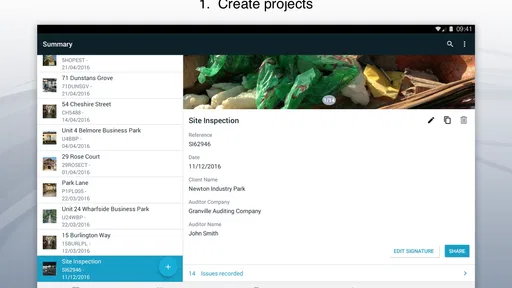
Getting started with the app is a breeze. The interface is intuitive, which means you don’t have to be a tech wizard to figure things out. Everything is laid out in a way that just makes sense. You can create new projects, add observations, and even snap photos with just a few taps. It’s as if the app is holding your hand through the entire process, gently nudging you in the right direction.
Customizable Reports on the Go
Now, let's talk about one of my favorite features: customizable reports. With Site Audit Pro, you can tailor the reports to suit your needs. Want to highlight certain observations or add specific notes? No problem! The app lets you tweak the templates so that your reports reflect exactly what you want. And the best part? You can generate these reports on the fly, right from your device. It’s like having a mini office in your pocket.
Making reports useful after the walk-through
Templates are most helpful when they match the way your team already reads findings. Before a busy inspection, I would settle on a small set of headings and wording conventions, then keep them consistent across reports. For example, distinguish an immediate concern from a note for later review, and make location descriptions predictable. That makes comparisons between visits easier for people receiving the reports, even if they never use the app themselves.
There is a trade-off to customization: too many fields can slow down capture and encourage people to skip details when they are in a hurry. I would start with only the information needed to identify, understand, and follow up on an issue, then adjust the template after a few real inspections. The aim is not to create the longest report; it is to make the report useful without turning every observation into paperwork.
Using photos as evidence, not decoration
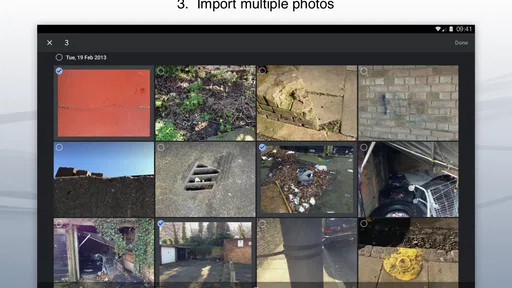
Photos are most valuable when they help someone locate and interpret a finding, not simply when they make a report look fuller. I would take one image that establishes the wider setting and, when needed, another that shows the detail. In a property check, for instance, a close view of a stain may show its shape, while a wider shot can indicate which room or surface needs attention. This two-scale habit can save a follow-up visit caused by an otherwise ambiguous picture.
There is a small but important trade-off: more images can make a report harder to scan, especially when several similar issues occur in one area. I would keep each photo tied to a clearly worded observation and review the sequence before sharing. If the image does not add location or condition information, it may be better left out. That makes the report quicker to read and helps the person receiving it focus on decisions rather than sorting through a camera roll.
Perfect for Team Collaboration
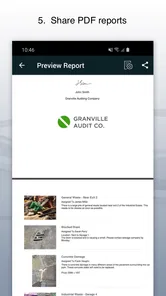
If you’re working with a team, this app is a game-changer. You can easily share your reports with colleagues or clients, ensuring everyone is on the same page. The collaboration feature is seamless and keeps everyone in the loop without the hassle of endless email threads. It’s teamwork made easy, folks!
Sharing with the right expectations
Sharing is valuable when the report is the handoff: a colleague can see what was observed and use the photos and notes to decide what happens next. I would still agree within the team who reviews incoming reports and who owns follow-up, since sending a document is not the same as tracking a repair through to completion. For a small operation, that simple division may be enough; a larger team with formal approvals may need a separate system around the inspection record.
A realistic routine might be a facilities worker making a morning round, documenting a loose fitting and a damaged panel, then sending the report to a supervisor before the next job begins. The supervisor can use the written locations and images to decide which issue needs immediate attention and which can be scheduled. The app can help preserve the observations and communicate them, but the team still needs to decide who acts, when they act, and how completion is recorded.
This is where it differs from the usual alternatives. A paper checklist is dependable and familiar, but photos and notes may end up separated, and someone has to assemble them later. A basic camera-and-notes workflow is flexible for occasional checks, yet it can become messy when findings need consistent headings or a presentable report. A full project-management or compliance platform is more appropriate when assignment, approvals, and long-term tracking are the main job. I see Site Audit Pro occupying the middle ground: a focused inspection record rather than a complete operational system.
The app costs $13.99, so I would weigh that against how often inspections happen and how much time is lost assembling notes and images by hand. It is rated for Everyone, and the current version is 3.2.28. The app first appeared on Oct 14, 2014, and its continued version history gives existing users a concrete point of reference; it does not, by itself, tell me what changed between releases. I would check that the current workflow suits the devices and reporting habits of the people who will use it before rolling it out widely.
What version history can and cannot tell you
For someone already using the app, the current version is a practical checkpoint: it helps identify which build is in use when comparing a workflow across devices or troubleshooting a change. The release date also shows that this is an established product rather than a brand-new inspection concept. Those facts are useful context, but they are not a substitute for testing the specific steps your team depends on. I would avoid assuming that an older start date means every requested workflow has been added or that a newer version has changed a particular feature.
What I would watch is whether the report process continues to fit the way inspections are carried out: can people capture findings consistently, can recipients read the result without extra explanation, and does the handoff still work as the team changes? If your existing template or record-keeping rules are strict, test a real report against them before relying on the app as the only record. Expectations about future changes should stay separate from what the current version demonstrably does for your team today.
What to check before relying on it
If you are moving from paper, test a complete inspection rather than stopping after creating a project: capture several kinds of observations, take photos in the way your team expects, produce a report, and share it with someone who was not on the walk-through. That trial reveals whether the report is readable and whether your chosen template captures enough context. It also gives you a chance to see how the app fits your actual handoff, not just the person entering the findings.
For a long site visit, I would also decide in advance how to handle interruptions: finish one observation before starting another, and review the report before sharing so that a photo or note has not been attached to the wrong finding. This is a practical safeguard in any mobile inspection workflow, especially when several issues look alike. If your work depends on formal record retention or a particular approval chain, confirm that the app’s reporting process meets those needs before treating it as the sole record.
Limits that matter in larger workflows
The main limitation I would plan around is scope. Recording an issue and sharing a report can make the inspection handoff clearer, but it does not automatically answer who is responsible for a fix or whether the fix has been completed. A small team can handle that with a simple agreed routine, such as reviewing reports at a regular check-in. A larger organization may find that a dedicated work-order or compliance system is a better home for accountability, with inspection findings passed into that process.
I would also be cautious about treating a generated report as proof that every internal requirement has been met. Teams with formal sign-off, prescribed retention practices, or a required audit trail should compare their needs with the actual report they can produce before changing their record process. That is not a reason to dismiss the app; it is a reminder to separate convenient documentation from the broader controls some workplaces require.
Final Thoughts
In conclusion, Site Audit Pro is a must-have tool for anyone involved in site inspections. It’s efficient, user-friendly, and packed with features that make your job easier. Whether you’re looking to streamline your workflow or enhance team collaboration, this app has got you covered. So, if you’re tired of the old pen-and-paper routine, give this app a whirl. Trust me, you won’t look back!
My recommendation is a little more measured: I would choose it when the core problem is recording site observations, attaching visual context, and turning those findings into something shareable. I would skip it if the real need is broader work management or a tightly controlled compliance process that depends on capabilities I have not established here. With over 100,000 installs and a practical inspection focus, it is worth considering, but a short trial using your own report format is the best way to decide whether it belongs in your routine.
Site Audit Pro Frequently Asked Questions
Is Site Audit Pro suitable for people who are not construction professionals?
Site Audit Pro is described as a project management tool for construction professionals, but its central workflow—recording issues, taking photos, and sharing reports—may also suit others who need to document site observations. Consider whether that audit-focused approach matches your work before downloading. The app is listed in the Productivity category and has an Everyone content rating.
What is Site Audit Pro and how does it work?
Site Audit Pro is a project management tool designed for construction professionals. It allows users to create and manage site audits efficiently by compiling photos, notes, and annotations into comprehensive reports. Users can easily capture issues on-site, add details, and instantly generate professional PDF reports to share with their teams or clients, streamlining the communication process on construction projects.
Is Site Audit Pro available on both Android and iOS platforms?
Yes, Site Audit Pro is available for download on both Android and iOS devices. Users can find the app in the Google Play Store for Android devices and the Apple App Store for iOS devices. This cross-platform availability ensures that users can access and use the app irrespective of their device preference, providing flexibility and convenience for construction professionals.
Can I use Site Audit Pro offline?
Yes, Site Audit Pro offers offline functionality, making it extremely useful on construction sites with limited or no internet connectivity. Users can perform audits, take photos, and make notes offline, and the data will automatically sync to the cloud once the device reconnects to the internet. This feature ensures continuous productivity without any disruption.
Does Site Audit Pro support custom templates for reports?
Site Audit Pro allows users to create and customize their own report templates to suit specific project needs. This feature enhances the flexibility of report generation, enabling users to tailor reports with personalized branding, layouts, and content requirements. Custom templates help ensure that reports meet professional standards and specific client or project expectations.
Pros
- User-friendly interface.
- Comprehensive audit reports.
- Customizable templates.
- Offline functionality.
- Export reports easily.
Cons
- Limited free version.
- Occasional syncing issues.
- No real-time collaboration.
- Steep learning curve initially.
- Lacks advanced features.











