SimplyWise Cost Estimator
- 1.35K
- 4.7
- Installs
- 500.00K
- Price
- Free

Screenshots


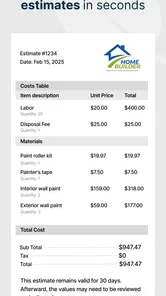

Analysis by Reviewed
Estimating a construction job often becomes difficult before the work even starts. Material prices, labor, waste, travel, and unexpected details all compete for attention, while a customer is usually waiting for a clear quote. I tested SimplyWise Cost Estimator as a business app from SimplyWise to see whether it can become a useful part of that routine rather than just an interesting tool used once and forgotten.
My first impression was practical rather than flashy. The app is built around turning a construction idea into an estimate that is easier to discuss with a customer. Its purpose is straightforward: help combine labor and material costs, then prepare a quote without reaching for a spreadsheet every time. That focus gives it a clear place in a contractor’s workflow, especially when speed matters during a site visit or an early customer conversation.
It is free to install and is rated for Everyone, which makes it approachable for small operators, independent tradespeople, and people who occasionally price renovation work. The app has reached over 500 thousand installs and holds a 4.7 average from around 15 thousand ratings, so it has clearly attracted more than a small group of curious users. I would still treat those figures as a sign of broad appeal, not proof that every estimating situation will fit it perfectly.
What the first week feels like
During the first week, the strongest benefit is the reduction in setup friction. A conventional spreadsheet can be flexible, but it also asks you to create columns, remember formulas, and decide how to organize labor separately from materials. A dedicated estimator starts with the question that matters most: what will this job cost, and what should I quote?
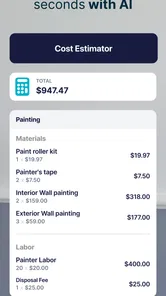
That makes the app useful when an estimate needs to be prepared quickly. Imagine a small painting contractor visiting a customer who wants several rooms refreshed. Instead of writing a rough total in a notebook and promising to calculate the details later, the contractor can work through the material and labor portions while the scope is still fresh. The resulting quote is likely to be easier to review because the total has a visible connection to the work involved.
The real advantage is not simply typing numbers into a phone. It is the habit of separating costs before they blur together. I found that this encourages better questions: how much of the job is time, how much is supplies, and where is the margin being protected? Even if the final number is adjusted later, that first structured pass is more useful than relying on memory.
For someone who normally uses a calculator and handwritten notes, the change can feel immediate. For someone already using a carefully designed spreadsheet, the first-week appeal is more conditional. The app needs to save enough time to justify changing an established process. If your spreadsheet already contains reusable templates, tax handling, overhead rules, and customer records, a simple estimator may feel like an extra stop rather than an improvement.
More From Our News Desk

Weather by Xiaomi Review: Clear at a Glance, Less Clear Up Close

X Under Pressure: Can It Recover When Posting Goes Wrong?

Clash of Clans Is Won Between the Battles

Android Auto Makes the Case for Quieter Car Software

MobiOffice: Transforming Mobile Productivity with Seamless Integration

EA SPORTS FC™ Mobile Soccer: Redefining Mobile Sports Gaming
I also like the fact that the app is positioned as a business tool rather than a general calculator. That distinction matters because construction estimates are not just arithmetic. They are communication documents in miniature. A quote has to help the person preparing it remember what was included and help the customer understand why the amount is reasonable.
One useful early workflow is to create an estimate before discussing a firm price, then use it as a checklist during the conversation. If the customer changes the flooring, adds a wall, or removes a section of work, the estimate can be reconsidered instead of the contractor improvising from the original total. This is a small discipline, but it prevents casual changes from quietly consuming the margin.
Who benefits most from the quick workflow
SimplyWise Cost Estimator is most appealing to independent contractors, small construction teams, handymen, remodelers, and tradespeople who need a repeatable way to think through job pricing. It can also help a newer business owner learn to distinguish direct costs from the price presented to a customer.
It is less convincing for a large company that needs a connected estimating, scheduling, inventory, accounting, and customer-management system. In that setting, the usual alternative is a broader construction platform with shared records and permission controls. A focused estimator may still help with a quick field calculation, but it is unlikely to replace the central business system.
The same caution applies to highly specialized work. A simple project can often be described through labor and materials, but unusual engineering, complex subcontractor arrangements, or heavily regulated work may require a more detailed estimating process. I would use this app as a practical starting point, not as a substitute for professional review when the cost of an omission is high.
How it compares with familiar alternatives
The closest alternatives are a phone calculator, a notes app, a spreadsheet, or a full estimating package. A calculator is fastest for a single total but gives little structure. Notes are flexible but make it easy to lose the connection between quantities, labor, and the final quote. A spreadsheet offers more control, particularly when a business has developed its own pricing model, but it demands more maintenance.
The app sits between those options. It is more purposeful than a calculator and less demanding than building a spreadsheet from scratch. That middle position is its strongest argument. It should not be judged by whether it replaces every business tool; it should be judged by whether it makes everyday quoting more consistent without creating another complicated system to manage.
There is also a useful trade-off in choosing a focused app. Less complexity can mean faster entry, but it can also mean fewer ways to customize the process. If your estimates depend on elaborate formulas or a large catalog of service-specific rules, a spreadsheet may remain the better option. If your main problem is getting a clear first estimate prepared while you are busy, the focused approach makes more sense.
Whether it still earns space after the novelty
The first month is where the app has to prove more than convenience. A new estimator is easy to praise after a few successful quotes, but lasting value comes from repetition. I would keep it on my phone if it became the place I begin every small estimate, not merely an app I open when I remember it exists.
That recurring value depends on a simple routine. Before starting a quote, I would gather the job scope, list the material categories, estimate labor realistically, and review the total before showing it to anyone. After the customer changes the scope, I would revise the estimate rather than editing the final price mentally. The app is most helpful when it supports this behavior consistently.
A second month-to-month benefit is comparison. Even without turning the app into a complete accounting system, repeated estimates can teach a business owner where initial assumptions are weak. If a type of job regularly takes longer than expected, the labor figure deserves scrutiny. If materials repeatedly exceed the first estimate, waste or purchasing habits may need attention. The tool becomes more valuable when each quote is treated as feedback for the next one.
This is one of the less obvious reasons to use a dedicated estimator: it can expose underpricing that feels normal because it has happened gradually. A contractor may remember the final amount but forget which part of the calculation caused the problem. Separating labor and materials makes those mistakes easier to notice while the job is still being planned.
Another useful habit is preparing two versions of the thinking, even if only one quote is sent. The first can represent the expected scope, while the review afterward can ask what would happen if the customer requests an addition or if a material choice changes. This does not make the estimate certain, but it makes the contractor less vulnerable to treating an early guess as a permanent promise.
For recurring small jobs, the app can also reduce the mental load of starting from zero. A contractor who prices similar work often knows the general shape of the job but still needs to account for differences in size, access, preparation, and finish quality. A structured estimate encourages those differences to be considered instead of relying on a familiar headline number.
What maintenance the app demands
The maintenance burden is not only about updating the app. It is also about maintaining the pricing habits around it. Construction costs change, labor assumptions drift, and a quote that was reasonable for one customer may be poor for another. No estimator can protect a business from outdated inputs if the person using it stops reviewing them.
That means I would schedule a short pricing check regularly, especially for materials that make up a large share of a job. I would also review whether the labor estimate reflects the complete task, including preparation, cleanup, travel, and time spent communicating with the customer. These details are easy to omit because they do not always appear as a physical item on the job.
The app’s current version is 0.12.3, which suggests a product still developing rather than a long-established, fully mature business suite. That is not automatically negative. An evolving app can improve quickly, but I would be more deliberate about keeping a separate record of important quotes until I am confident the workflow fits my business. For a small job, that may be simple. For a major contract, I would not rely on one mobile tool as the only place where the estimate exists.
There is also a financial point to consider. Although the app is free, in-app purchases range from $4.99 to $299.99 per item. That wide range means I would inspect the available purchase choices carefully before building my entire process around features that may require payment. A free starting point is helpful, but the long-term cost should be judged against the time saved and the importance of the work being priced.
This is where the app may be a better fit for a contractor who quotes often than for someone who estimates one occasional home project. Frequent use gives the workflow a chance to repay its learning curve and any paid upgrade. Occasional users may find that a spreadsheet or a basic calculator remains sufficient, particularly when they already know how to organize the numbers.
Where fatigue can appear
The main source of fatigue is repetition without enough flexibility. Entering similar job details can become tedious if the work changes slightly each time. A dedicated estimator is valuable when it removes decisions, but frustrating when it forces the user to repeat information that a more connected system would remember.
There is also the fatigue of false precision. A quote can look organized and still be wrong if the scope is vague. I would never let a neat total replace a site inspection, a conversation about finishes, or a check of difficult access. The app can make the calculation cleaner; it cannot see hidden damage, unreliable measurements, or a customer’s changing expectations.
Another possible weakness is the gap between estimating and managing the job afterward. The app’s purpose is centered on construction cost estimation and quoting. A business may still need separate tools for invoices, scheduling, customer history, purchasing, and profit tracking. That separation is manageable for a solo operator, but it can become tiring as the number of jobs grows.
Users should also decide where the app fits in their customer communication. A quick estimate is useful during an initial conversation, but a serious agreement may need clearer terms, exclusions, payment conditions, and a record of revisions. I would use the estimate as the financial core of the discussion, then make sure the customer receives whatever additional documentation the job requires.
The app is not the right choice for someone looking for a complete business operating system. It is also not ideal for a user who dislikes checking assumptions or who expects software to know the correct price automatically. Construction pricing remains a judgment task. SimplyWise Cost Estimator can organize that judgment, but it cannot replace it.
Practical ways to get more from it
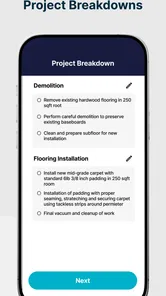
My first tip is to estimate the work in stages instead of entering one large total. Separate preparation, primary labor, materials, and finishing tasks whenever the job allows. This makes a customer change easier to absorb and helps reveal which part of the project is driving the price.
My second tip is to review the estimate once as the contractor and once as the customer. The first review asks whether the costs are realistic. The second asks whether the quote would make sense to a person who did not watch the job being measured. If an item is easy to misunderstand, clarify it before the quote becomes a dispute.
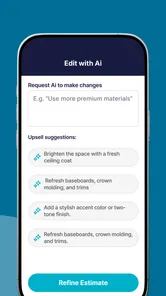
My third tip is to use changes as learning material. When an estimate is adjusted, note mentally whether the change came from a customer request, an overlooked task, or an inaccurate assumption. Over time, this turns the app from a place where numbers are entered into a prompt for improving how jobs are planned.
Finally, I would avoid treating the first total as sacred. A quick estimate is valuable because it starts the conversation, not because it guarantees the outcome. The best use of the app is to make revisions visible and deliberate, especially when the scope moves during a customer discussion.
My long-term verdict
After the initial appeal fades, SimplyWise Cost Estimator earns its place most convincingly as a lightweight quoting companion. It is not a complete replacement for spreadsheets, accounting software, or a full construction-management platform, and expecting it to be one would lead to disappointment. Its strength is narrower and more useful: it gives small operators a focused way to think through labor, materials, and a customer-facing price.
I would recommend it to someone who currently estimates from memory, scattered notes, or a basic calculator and wants more structure without immediately adopting a large business system. I would also recommend trying it to a contractor who often prepares quick quotes away from a desk. The free entry point makes experimentation easy, while the Everyone rating keeps it accessible to a broad audience.
I would be more cautious for established teams with complex pricing rules, extensive customer records, or a requirement that every estimate connect directly to other business processes. Those users may be better served by a spreadsheet they control or a specialized construction platform, even if that option takes longer to configure.
Overall, my opinion is positive but measured. The app’s lasting value comes from the habit it encourages: break a job into understandable costs, review the assumptions, and revise the quote when the scope changes. If I followed that routine regularly, the tool would remain useful after the novelty disappeared. The real payoff is not a faster number; it is a more disciplined quoting process.
SimplyWise Cost Estimator is a free business app from SimplyWise, released on September 17, 2024, and it requires Android 7.1 or later. With its current version at 0.12.3, I see it as a practical product for small-scale estimating that should be used thoughtfully and backed up for important work. It will not solve every construction-business problem, but for the right user, it can turn an informal estimate into a repeatable part of the working day.
SimplyWise Cost Estimator Frequently Asked Questions
What kind of construction costs can SimplyWise Cost Estimator help me estimate?
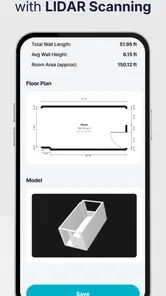
SimplyWise Cost Estimator focuses on construction labor and material costs, helping users put together an estimate for a job. It may be useful when planning work or preparing a quote, but the quality of the result depends on the quantities and prices entered. Consider checking the figures against current local costs before using an estimate to make a purchasing or business decision.
Can SimplyWise Cost Estimator help me prepare a quote quickly?
The app is intended to help users quote jobs in minutes by estimating construction costs for labor and materials. That can make it a practical starting point when you need to organize a project’s expected costs. Before sharing a quote, review the inputs and final calculation carefully, since a quick estimate still needs to reflect the scope of the work and the prices relevant to your job.
Who develops SimplyWise Cost Estimator, and who might find it useful?
SimplyWise Cost Estimator is a business app from SimplyWise, built around estimating construction costs for labor and materials. Contractors and other people planning or quoting construction work may find that focus relevant. Its purpose is to help turn project details into a cost estimate, while the usefulness of the result depends on entering suitable quantities and prices for the work being planned.
What devices and operating systems can run SimplyWise Cost Estimator?
SimplyWise Cost Estimator is listed for devices running Android 7.1 or later. Before downloading, check your device’s operating system version and make sure it meets that requirement. The app is also available in the iOS app marketplace, where compatibility depends on the requirements shown for your particular device. Checking the relevant store page first can help avoid installing an app your phone or tablet cannot run.
What is SimplyWise Cost Estimator used for?
SimplyWise Cost Estimator is designed to help users estimate the cost of services or projects by organizing quantities, prices, and related expenses in one place. It can be useful for contractors, small businesses, freelancers, and individuals who need a quick calculation before preparing a quote or making a purchase. The result should be treated as an estimate rather than a guaranteed final price.
Pros
- Quickly estimates costs for common home improvement projects.
- Simple interface makes it easy for beginners to use.
- Useful for creating an initial project budget.
- Helps compare potential expenses before contacting contractors.
- Convenient reference tool for planning projects on the go.
Cons
- Estimates may vary significantly by location and local labor rates.
- Material prices may not reflect current market changes.
- Limited value for highly customized or unusual projects.
- Does not replace a detailed quote from a licensed professional.
- Some features or estimates may require an internet connection.












