SimplyWise: Receipts, Expenses
- 1.07K
- 4.7
- Installs
- 100.00K
- Price
- Free

Screenshots





Analysis by Reviewed
When I tested SimplyWise for day-to-day money tracking, I approached it as someone who wants less paperwork rather than a full accounting suite. The app, made by SimplyWise, sits in the finance category and focuses on turning receipts and business spending into a more organized record. That makes it especially interesting for freelancers, contractors, and people who handle their own small-business expenses.
My starting point was a familiar one: a handful of paper receipts, digital purchase confirmations, and the vague worry that an important expense would be forgotten before tax time. SimplyWise is free to install and is rated for Everyone, so it feels approachable even if you are not comfortable with bookkeeping software. Its current version is 0.83.0, and it supports Android 7.1 or later.
The app has built a strong public reputation, with a 4.7 average from around 11 thousand ratings and more than 100 thousand installs. Those figures do not replace personal testing, but they do suggest that the basic receipt-and-expense workflow is useful to a substantial number of people. My own impression is that its value depends less on advanced accounting and more on whether you consistently capture information at the moment you spend.
From a loose receipt pile to a usable record
I start this section with the moment a receipt becomes useful: right after a purchase, while I still remember what it was for. I’ll look at how a quick capture can reduce later guesswork, and why checking the scan matters as much as saving it. From there, the next section considers what happens when several expenses arrive during a busy workday.
The best starting point is the moment you pay
The most sensible way to use SimplyWise is not to wait until the end of the week. I would open it immediately after buying supplies, paying for travel connected to work, or receiving a paper receipt from a client-related purchase. That habit matters because the app is designed around the receipt as the starting point, not around reconstructing a month of spending from memory.
A receipt scanner is helpful here because it gives you a practical handoff from physical paper to a digital expense record. Instead of placing a receipt in a drawer and hoping it survives until tax preparation, you can capture it while the details are still obvious. This is particularly useful for small purchases that are easy to overlook, such as parking, office materials, or a meal connected to work.
I found this approach more realistic than trying to maintain a detailed spreadsheet after every purchase. A spreadsheet can be more flexible, but it also depends on manually typing every field and deciding where each expense belongs. SimplyWise narrows the task: capture the document, review what was recognized, and keep the record connected to the spending event.
More From Our News Desk

Weather by Xiaomi Review: Clear at a Glance, Less Clear Up Close

X Under Pressure: Can It Recover When Posting Goes Wrong?

Clash of Clans Is Won Between the Battles

Android Auto Makes the Case for Quieter Car Software

MobiOffice: Transforming Mobile Productivity with Seamless Integration

EA SPORTS FC™ Mobile Soccer: Redefining Mobile Sports Gaming
Review the scan instead of trusting it blindly
Receipt scanning saves time, but it should not be treated as automatic bookkeeping. A blurry receipt, an unusual layout, or a faded total can lead to information that needs checking. My practical advice is to spend a few seconds reviewing the merchant, date, total, and expense category before moving on.
That small review is one of the most important parts of the workflow. A scanned receipt that contains an incorrect total is worse than an obviously unfinished note because it can look complete later. I would also keep the original paper until I am comfortable that the digital copy is readable, especially for a larger purchase or anything I may need to explain.
The useful habit is capture first, verify second, categorize third. Trying to do all three in a hurry creates more friction than the app is meant to remove. SimplyWise works best when it becomes a short routine attached to the purchase itself.
Turn individual receipts into an expense trail
Once a receipt is captured, the next question is not merely whether it exists, but whether it will make sense later. A business expense tracker is valuable when it helps you understand why a payment was made and how it fits into your records. I would add context whenever the receipt alone is ambiguous, such as noting that a hardware-store purchase was for a specific client project or that a transport charge was for a work appointment.
This is one of the less obvious trade-offs. The app can reduce repetitive entry, but it cannot decide every accounting judgment for you. A receipt may show what you bought without explaining whether the whole amount is business-related, partly personal, or subject to a special tax treatment. That decision still belongs to you, or to an accountant who understands your situation.
For a self-employed person, the strongest workflow is therefore selective rather than careless: scan every potentially relevant receipt, then add enough explanation to make the record understandable months later. That is more reliable than assuming the image itself will answer every question.
A realistic working-day example
Imagine I am working away from home and buy printer supplies in the morning, pay for parking near a client meeting, and pick up a replacement cable in the afternoon. Without a system, those three receipts can end up in different pockets, and the parking slip may fade before I remember it. With SimplyWise, I can capture each one close to the purchase, check the extracted details, and keep the expenses together as part of the same working period.
The benefit is not dramatic after one receipt. It becomes clear when the month has been busy. Instead of asking myself where the money went, I have a trail of documents to review. That makes a later bookkeeping session more about checking and organizing than trying to remember events.
I would still separate personal and business spending as much as possible. Mixing them makes any expense app harder to use, because the problem is no longer receipt storage; it is deciding what belongs in the business record. SimplyWise can help preserve evidence, but it does not remove the need for sensible financial boundaries.
Where the handoff to bookkeeping becomes useful
The app’s role is clearest before formal bookkeeping or tax preparation. It can act as a collection point for receipts and expense details, giving you a more orderly source to work from. That is different from replacing every function of dedicated accounting software. If you need payroll, inventory, bank reconciliation, invoicing, or complex reporting, a specialized accounting platform may still be the better destination.
This handoff is important for anyone who works with an accountant. A clean set of receipt records is easier to review than a box of paper and a collection of unexplained card transactions. Before sending anything onward, I would inspect duplicate captures, correct categories, and flag expenses that need clarification. The app is most useful when it improves the quality of that handoff rather than pretending the handoff is unnecessary.
For a very small operation, this may be enough structure to make tax preparation less stressful. For a growing operation, it is more likely to be one layer in a larger process. That is not a weakness by itself; it is a matter of choosing the right boundary for the tool.
How it compares with the usual alternatives
The simplest alternative is a camera app plus a folder. That costs nothing extra and may be sufficient if you only need visual copies. The difference is that SimplyWise is built around expenses and bookkeeping rather than general photography. A folder can hold images, but it does not naturally encourage you to think about the receipt as part of an expense record.
A spreadsheet offers more control over columns, formulas, and custom categories. I would choose one when I need unusual calculations or a highly tailored reporting structure. However, spreadsheets require discipline and manual entry, and they do not make the initial act of preserving a receipt feel as direct.
Full accounting software is stronger when the business has several moving parts. It may provide a broader financial picture, while SimplyWise is more focused on the evidence behind spending. For a freelancer who mainly needs to collect receipts and keep business expenses from disappearing, the lighter workflow can be easier to maintain. For a company with multiple users or complicated accounts, the lighter approach may become too limited.
There is also a practical cost question. SimplyWise is free to use at the basic entry point, while in-app purchases range from under a dollar to several hundred dollars per item. I would check the purchase screen carefully before committing to anything beyond the free experience, especially if I only need occasional receipt capture. The presence of optional purchases means the app should not be evaluated as though every capability necessarily comes without cost.
Small workflow choices that make a big difference
First, I would create a fixed weekly review rather than waiting for tax season. During that review, I would look for unreadable receipts, duplicate entries, and expenses whose categories no longer make sense. This turns SimplyWise into a continuing record instead of an emergency archive.
Second, I would photograph receipts on a flat surface with good light and keep the whole document inside the frame. That sounds basic, but scan quality affects how much correction is needed later. A careful capture is faster than repeatedly trying to interpret a cropped or shadowed receipt.
Third, I would add notes to expenses that could look personal when viewed later. A generic restaurant receipt, fuel purchase, or electronics bill may be perfectly legitimate, but the image alone may not explain the business reason. A short note can make the later handoff much clearer.
Fourth, I would avoid using the app as a substitute for checking bank or card statements. A receipt proves that a purchase document exists; a financial statement confirms that the payment actually cleared. Comparing the two periodically can reveal missing receipts, duplicate uploads, or purchases that were captured but later refunded.
What the result feels like after regular use
After a consistent routine, the main result is reduced uncertainty. I am less likely to wonder whether I lost a receipt, and I can approach expense review with actual documents instead of vague recollections. That is a modest outcome, but for self-employed work it can save time and prevent small expenses from being forgotten.
The app also changes the timing of bookkeeping. Rather than doing all the work in one large session, I can distribute small actions across the week and reserve a shorter period for checking. This is where the receipt scanner has its strongest practical advantage: it moves the effort closer to the event, when the context is still fresh.
It does not make financial administration disappear. I still need to decide which expenses are allowable, keep an eye on personal use, and understand the rules that apply to my work. SimplyWise is a record-keeping aid, not personal tax advice. Used with that expectation, it can make the administrative side of independent work feel more manageable.
Where the workflow breaks down
The first breaking point is poor input. If I scan receipts casually and never review them, the app cannot compensate for missing context or unreadable details. The second is inconsistent use. Capturing only large purchases while ignoring small ones creates an incomplete picture, even if the saved receipts look tidy.
The third is complexity. Someone who needs detailed accounting reports, multiple business entities, formal collaboration, or extensive automation may outgrow this style of tool. In that situation, dedicated accounting software is likely a better primary system, with SimplyWise serving only if its receipt capture fits alongside it.
The fourth is expectation. If I want the app to decide how every expense should be treated for tax purposes, I am asking it to do a job that requires personal judgment and sometimes professional advice. Its strength is organizing evidence, not making every financial decision.
There can also be friction around optional purchases. Since individual in-app items can range from $0.99 to $449.99, I would read the terms of any upgrade or paid feature before confirming it. A casual user who only wants a place to store a few receipts should be especially careful not to assume that every advanced need is covered by the free starting point.
Who should use it, and who should skip it
I would recommend SimplyWise to a freelancer, contractor, or sole proprietor who regularly handles receipts and wants a more deliberate expense trail without beginning with a large accounting system. It is also a sensible fit for someone whose biggest problem is losing paper receipts rather than producing complex financial reports.
I would be more cautious if your business already has a mature bookkeeping process. In that case, adding another place to capture expenses may create duplicate work unless you have a clear handoff. I would also skip it as a primary solution if you need full accounting management rather than receipt and expense organization.
For occasional personal budgeting, it may be more structure than necessary. A basic notes system or bank app could be quicker if you only want to remember a purchase. Its real value appears when receipts have future importance and need to remain connected to work-related spending.
My final take after following the full flow
SimplyWise is most convincing when I use it as a bridge: a receipt enters through the scanner, becomes a checked expense record, and later supports a bookkeeping or tax review. That complete flow is more useful than the scanning feature considered on its own. It gives self-employed users a practical way to preserve details while the purchase is still fresh.
I like its focused purpose and the fact that it does not require me to begin with a complicated accounting setup. The free starting price lowers the barrier, the Everyone rating makes it broadly approachable, and the app’s established 4.7 average from around 11 thousand ratings gives it reassuring user momentum. Still, I would keep expectations realistic: it cannot replace financial judgment, careful review, or a full accounting platform when the business becomes complicated.
My recommendation is straightforward. If your current system is a messy receipt pile, start by scanning consistently and reviewing every capture. If your current system already handles accounting, first decide exactly where this app would fit and how records would be handed off. Used within those limits, SimplyWise can turn an easily neglected chore into a repeatable routine, which is exactly the kind of improvement many self-employed people need.
SimplyWise: Receipts, Expenses Frequently Asked Questions
Who is SimplyWise: Receipts, Expenses best suited for?
SimplyWise: Receipts, Expenses is a finance app from SimplyWise aimed at people who want a more organized way to manage purchase records. It may be especially useful for self-employed users, as well as anyone tracking household spending, work purchases, or receipts for later reference. Its receipt-scanning and expense-tracking focus makes it worth considering if you want to reduce paper clutter and keep records together.
What is SimplyWise: Receipts, Expenses used for?
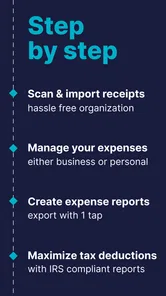
SimplyWise: Receipts, Expenses is designed to help you organize receipts, track expenses, and keep important purchase records in one place. After scanning or uploading a receipt, the app can help capture useful details such as the merchant, date, and total amount. It is particularly helpful for budgeting, reimbursements, tax preparation, warranty records, and anyone who wants to reduce paper clutter.
How do I add receipts and expenses in SimplyWise?
You can generally add a receipt by taking a photo with your phone’s camera or importing an existing image from your device. The app then processes the document and attempts to identify key information automatically, which can save time compared with entering every detail manually. You should still review the extracted data, especially totals, dates, tax amounts, and merchant names, before relying on it for financial records.
Is SimplyWise: Receipts, Expenses free to download and use?
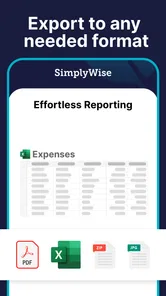
SimplyWise can be downloaded without an upfront charge, but available features may depend on the current subscription structure, account type, or usage limits. Some tools, such as advanced receipt storage, automatic organization, exporting, or additional financial features, may require payment. Before subscribing, check the pricing information shown in the app store and review whether the plan renews automatically.
What devices and software versions support SimplyWise?
SimplyWise is available for Android, and the minimum supported operating system is Android 7.1. Before downloading, check your device’s software version and make sure it meets that requirement. Keeping your phone’s operating system updated can also help with general app compatibility and security. If you use a different platform, confirm availability in its app store before planning to keep your receipt records there.
Pros
- Scans receipts quickly and extracts key details automatically.
- Keeps digital copies organized for easier access later.
- Useful expense tracking for personal budgeting and reimbursements.
- Supports receipt searches without sorting through paper documents.
- Helps reduce clutter by replacing many physical receipts.
Cons
- Some advanced features may require a paid subscription.
- OCR accuracy can vary with blurry
- faded
- or unusual receipts.
- Manual corrections may be needed for incorrectly read totals.
- Privacy-conscious users may hesitate to upload financial documents.
- Limited value if you rarely save receipts or track expenses.












