Simple Alarm Clock
- 10.53K
- 4.5
- Installs
- 10.00M
- Price
- Free
Screenshots
Analysis by Reviewed
When I choose a wake-up app, I care less about having a clever morning routine built around it and more about setting the right alarm without a lot of screen work. Simple Alarm Clock is aimed at that kind of use: a focused tool for people who want to set a time, choose when it repeats, and get on with the evening. Its straightforward approach is appealing, though it also means the app is not a replacement for every kind of reminder or wake-up support.
Who benefits most from a straightforward alarm?
I’d point this app toward anyone who wants a dedicated wake-up tool without turning the clock into a whole productivity system. If your routine is mostly “set a time, choose the days, and get up,” the simple approach is a strength. Moula Software has kept the focus on alarms rather than adding planning features that can make a basic morning task feel like another project.
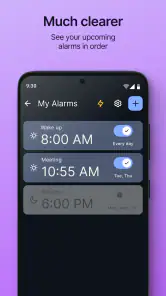
A realistic example: I might set a weekday alarm labeled “Early shift,” then add a separate one for a weekend commitment. The labels make it easier to check the list at night and confirm that tomorrow’s alarm matches the plan. That small check is more useful than it sounds when you have several alarms and are setting them while tired.
Getting Started with Simple Alarm Clock
Setting up the Simple Alarm Clock was, well, simple. Right off the bat, the app greeted me with a clean and intuitive interface. There’s nothing overwhelming about it, which is great because who wants to navigate a complex app when they’re half asleep, right? The design is minimalistic, focusing on functionality rather than flashy graphics. It’s like the app respects your sleepy state and aims to make your morning routine as smooth as possible.
Readability and navigation
The uncluttered layout is helpful when I need to make a quick change before bed. Rather than hunting through a busy dashboard, I can focus on the alarm task in front of me. For people who find crowded screens tiring or distracting, that restraint can make the routine easier to follow. I would still check the time and selected days carefully before saving: a calm interface reduces visual noise, but it cannot prevent a wrong setting if I tap too quickly.
The app is free to install, rated for Everyone, and has a 4.5 average from around 489,000 ratings. Its long presence, dating back to its 2011 release, and more than 10 million installs suggest that this uncomplicated approach has found a broad audience. I see those figures as context, not proof that it will suit every routine; the important question is whether its basic controls match the way you plan your mornings.
Setting the Alarm
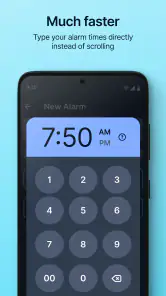
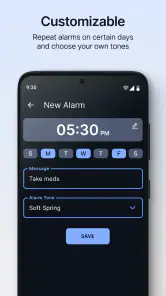
Setting an alarm is a breeze. You just tap on the big ‘+’ sign and voilà, you’re prompted to set the time, recurrence, and label. The app offers a variety of recurrence options, so whether you need an alarm for weekdays, weekends, or specific days, it’s got you covered. Plus, I love that you can label your alarms. It’s a small feature, but adding a little note like “Gym” or “Meeting” helps me remember why I set the alarm in the first place.
More From Our News Desk

Clash of Clans Is Won Between the Battles

Android Auto Makes the Case for Quieter Car Software

MobiOffice: Transforming Mobile Productivity with Seamless Integration

EA SPORTS FC™ Mobile Soccer: Redefining Mobile Sports Gaming

How Microsoft OneDrive Became a Mobile Productivity Giant

How Google Translate Breaks Language Barriers Effortlessly
One practical habit I recommend is using labels to distinguish alarms by purpose, not just by time. “Leave for train” communicates more than “6:30,” especially if you keep several alarms for different days. Recurrence also deserves a final glance after editing: a one-off appointment and a repeating weekday wake-up are easy to confuse when you are moving fast. This kind of brief review is a useful safeguard for anyone relying on a phone alarm for work or travel.
Motor and sensory considerations
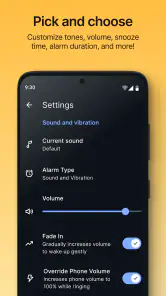
The large add control and limited visual clutter may be easier to approach than a dense clock app with many menus. The gradual volume increase can also be a more comfortable option for someone who dislikes an abrupt sound, while choosing a familiar tone may make the wake-up feel less startling. These are practical comforts, not a substitute for a dedicated accessibility tool or a second wake-up method when waking on time is critical.
There are trade-offs. A sound-based alarm may not suit someone who cannot reliably hear it, and a gradual rise in volume may be too gentle for a deep sleeper or a noisy home. If you share a room, the alarm can also disturb someone else. I’d test the chosen tone and volume while awake before depending on it, rather than discovering in the morning that it is too quiet, unpleasant, or disruptive.
Alarm Features
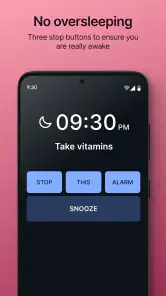
One feature that stood out to me is the gradual volume increase. I find it a lot less jarring to wake up to a gradually increasing sound rather than a blaring alarm. It feels more like a gentle nudge rather than a rude awakening. The app also allows you to customize the alarm tone from your music library, which is a nice touch for those of us who want to wake up to something more personalized. And if you’re the kind who loves snoozing, rest assured, there’s a snooze option too. Although, fair warning, it’s a slippery slope!
Personalization has a useful boundary: a favorite song can feel welcoming, but a track you already associate with relaxing may not create much urgency. I’d pick something I recognize clearly and still respond to, then test it at the intended listening level. The snooze control is convenient if I need a few extra minutes, but I would avoid building a routine around repeated snoozes; placing a second alarm at a meaningful time can be a clearer reminder than tapping snooze without thinking.
Situational access and alternatives
For everyday home use, this is a sensible choice if you want recurring alarms and labels without the learning curve of a feature-heavy clock. Compared with a phone’s built-in clock, its appeal is the focused setup and the options described here; if your built-in clock already handles your needs, switching may not add much. Compared with a smart speaker, it stays tied to the phone rather than offering a separate device across the room. That can be convenient for travel, but it also means you should think about where the phone will be at bedtime.
For an early departure, I’d set the alarm, confirm the repeat days, and leave the phone somewhere I can hear it without making it hard to reach in an emergency. If the phone is charging away from the bed, checking the alarm before sleep matters even more. People who need strong vibration, visual alerts, elaborate wake-up challenges, or multiple backup safeguards may be better served by a different alarm solution designed around those needs.
Choosing it for a real routine
The app makes most sense when the alarm itself is the task, not the first step in a broader sleep or planning system. For example, if I have an early appointment after several ordinary workdays, I can keep a weekday alarm and add a separately labeled one for the unusual morning. Before bed, I can check the list rather than trying to remember which time applies. This is a modest workflow, but it reduces the chance of treating a special departure like an ordinary day.
If your schedule changes often, I’d treat the alarm list as something to maintain rather than set and forget. After a temporary early start, review whether the recurring alarm still belongs on the next morning. Labels can make that review quicker, but they do not automatically resolve a changing schedule. Someone with rotating shifts may prefer a calendar-linked system or a more capable planner that keeps appointments and alarms together, even if it takes more effort to configure.
What to check before relying on it
A common question is whether it can serve as a dependable alarm for an important morning. I would first make a test alarm for a time when I am awake, then confirm that the selected tone is audible in the room where I sleep. I would also verify the recurrence and label after editing. Those checks are especially worthwhile before travel or a work shift, when a mistaken repeat setting is more consequential than a slightly inconvenient alarm.
Another practical question is whether it is a good fit for a shared bedroom. That depends on the sound and the people in the room: gradual volume may feel less abrupt to the person waking, but it does not make a sound alarm private. I would test it with the other person’s routine in mind. If one person needs to wake without disturbing another, a vibration-based wearable or a visual alert may be a better match than relying on a phone’s sound.
It is also worth thinking about how the phone is used overnight. If it is kept nearby and the alarm tone is audible, this setup can be convenient at home or away. If the phone is routinely silenced, placed far from the bed, or used in a noisy environment, I would not assume a simple alarm will overcome those conditions. The useful question is not just whether an alarm is set, but whether the chosen device and sound will reach you in the place you expect to wake.
Usability and Performance
In terms of performance, the app runs smoothly without any glitches. It’s lightweight, meaning it doesn’t eat up much storage or battery life, which is a major plus. I’ve had my fair share of bulky apps that slow down my phone, but this isn’t one of them. The Simple Alarm Clock is designed to do one thing well: wake you up. And it does just that without any unnecessary bells and whistles.
The current version is 8.6.9 and it supports Android 6.0 and up, which makes it an option for people using older Android phones that still meet that requirement. There are in-app purchases priced from $0.99 to $2.99 per item, so I would check the purchase screen before choosing any extras. The basic alarm use is free, and I wouldn’t pay for an add-on unless it solves a specific need rather than simply adding another choice to manage.
One sensible test is to set a near-term alarm while you are awake, then confirm that the sound and recurrence behave as expected on your own phone. That gives you a chance to adjust your tone and volume before relying on it for a shift, a flight, or an appointment. It’s a small step, but it is more dependable than assuming every phone’s sound settings and sleeping environment will be identical.
I also appreciate the lack of ads. In a world where most free apps bombard you with ads, it’s refreshing to use something that doesn’t. It’s just you and your alarm, no distractions or interruptions. This makes the whole experience feel cleaner and more focused.
Remaining barriers and final thoughts
The app’s strength is also its limit: it is built around a conventional sound alarm and straightforward controls. If you want a sleep diary, smart-home routines, wake-up tasks, or extensive accessibility adjustments, you may prefer a broader clock or sleep app. I also wouldn’t rely on any single phone alarm for a high-stakes wake-up without considering a backup, such as another alarm source or help from someone at home.
For readers who are deciding between this and a more elaborate alarm app, I’d ask whether the extra features solve a problem they actually have. A wake-up challenge can help someone who routinely dismisses alarms without getting up, while sleep tracking may suit someone trying to understand a longer-term pattern. Those tools bring their own setup and attention demands. If your main frustration is simply finding and checking a clear alarm, this app’s restrained approach is likely more useful than adding features you will not use.
Overall, if you’re in the market for a no-nonsense alarm clock app that just works, the Simple Alarm Clock is worth considering. Its user-friendly interface, efficient functionality, and thoughtful features make it a reliable choice. I’ve found it to be a great companion for my mornings, and it just might be yours too. So, if you’re tired of fiddling with complex alarm apps and want something straightforward, give this one a try. You might just find it’s exactly what you need to start your day right.
Simple Alarm Clock Frequently Asked Questions
Is Simple Alarm Clock suitable for someone who wants a basic, easy-to-use alarm?
Simple Alarm Clock is built around a straightforward alarm-focused experience, and its short description sums it up as “Simple Alarm.” The app’s emphasis on being simple, loud, fast, and easy makes it a natural option if you want to set alarms without turning to a broader planning tool. It is a productivity app developed by Moula Software.
Can I set separate alarms for different days or routines?
The app supports recurring alarms, which can help when you need an alarm to repeat as part of a regular routine. It also lets you set multiple alarms, so you can keep different wake-up times or reminders separate instead of having to change a single alarm each time. The interface is designed to make setting alarms quick and uncomplicated.
Who develops Simple Alarm Clock, and what kind of app is it?
Simple Alarm Clock is a productivity app developed by Moula Software. Its focus is keeping alarm setup straightforward, with the store summary describing it as “Simple, Loud, Fast and Easy!” It is suitable for users looking for a dedicated alarm app rather than a complicated planning tool. The app is rated for Everyone, so its content rating is appropriate for a broad audience.
What operating system version do I need to install Simple Alarm Clock?
Simple Alarm Clock requires Android 6.0 or later. Before downloading, check your phone’s Android version in its system settings to make sure it meets that requirement. If your device is running a compatible version, you can consider the app alongside its straightforward alarm-focused approach. The current version is 8.6.9, so it is useful to check that your device can access the version offered through its app store.
What features does Simple Alarm Clock offer?
Simple Alarm Clock provides a straightforward, user-friendly interface for setting multiple alarms with ease. It includes features such as customizable alarm tones, snooze options, and vibration settings. The app is designed for simplicity, allowing users to set alarms quickly without unnecessary complexity. It also supports recurring alarms and has a built-in timer feature.
Pros
- Intuitive user interface for easy setup.
- Customizable alarm tones and volume.
- Snooze function with adjustable intervals.
- Vibration option for silent alarms.
- No ads for uninterrupted experience.
Cons
- Limited advanced features for power users.
- No integration with smart home devices.
- Basic design lacks visual appeal.
- No support for multiple alarm settings.
- Requires manual updates for new features.
- Category
- Productivity
- Version
- 8.6.9











