signNow: Sign & Fill PDF Docs
- 1.91K
- 3.8
- Installs
- 5.00M
- Price
- Free
Screenshots
Analysis by Reviewed
When I need to return a signed PDF without hunting for a printer, I want a tool that gets me from document to finished file with as little fuss as possible. signNow is built for that kind of paperwork: I can work with a document on my phone, add a signature or fill in fields, and send it along. It is a productivity app from SignNow, and I see its strongest case in occasional, practical document work rather than replacing every desktop PDF tool.
What the free option means in practice
The app is free to install, which makes it easy to try before deciding whether it suits your routine. There are in-app purchases listed from $19.99 to $359.99 per item, so I would separate “free to get started” from “every workflow is free.” If you only need to sign or complete a document now and then, begin with the available free access and check what the app asks you to pay for before building a regular process around it. The purchase range is broad, so I would not assume that the least expensive option covers every need.
Where it saves real effort
The practical value is less about the novelty of drawing a signature and more about avoiding the print, pen, scan, and re-send loop. For a one-off permission form or a document that arrives while I am away from my desk, working on the phone can turn several chores into one focused task. I would still open the finished file and check names, dates, and filled fields before sending it: mobile editing is convenient, but a quick review is worthwhile when a small typo could delay the paperwork.
A useful habit is to get the document organized before starting. Make sure you have the right version, identify which fields need attention, and decide whether the recipient expects a completed file or a signature alone. That bit of preparation matters because signing the wrong draft is more frustrating than the few seconds saved by skipping a check. For repeat work, keeping a consistent naming habit also makes it easier to find the returned copy later.
Why signNow Stands Out
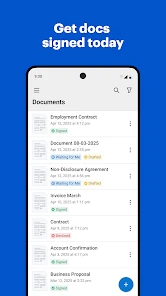
First off, let's talk about its user-friendly interface. From the moment you launch the app, you're greeted with a clean and intuitive layout. It's almost as if the app reads your mind, guiding you seamlessly from one step to the next. No more fumbling around trying to figure out how to get your signature onto that important PDF!
Features That Make Your Life Easier
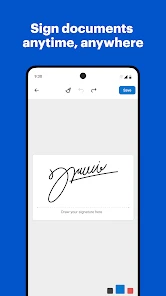
One of the standout features of signNow is its ability to handle multiple document formats. Whether it's a PDF, Word document, or even a JPEG, this app has got you covered. Plus, the signature process is incredibly straightforward. You can either draw your signature using your finger or stylus or upload a pre-saved signature image. The choice is yours!
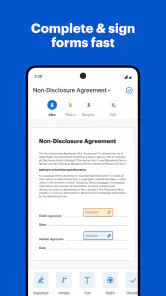
Another fantastic feature is the app's ability to fill out forms. Ever received a form that you needed to print, fill in, scan, and send back? With signNow, those days are over. You can easily fill in forms directly within the app, saving you time and hassle.
You May Like

Clash of Clans Is Won Between the Battles

Android Auto Makes the Case for Quieter Car Software

MobiOffice: Transforming Mobile Productivity with Seamless Integration

EA SPORTS FC™ Mobile Soccer: Redefining Mobile Sports Gaming

How Microsoft OneDrive Became a Mobile Productivity Giant

How Google Translate Breaks Language Barriers Effortlessly
Security You Can Trust
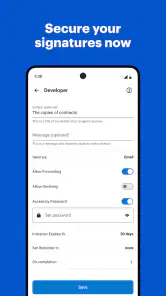
In today’s digital age, security is a top concern, and signNow takes it seriously. The app uses robust encryption methods to ensure that your documents are safe and secure. Plus, with options for password protection and secure cloud storage, you can rest easy knowing that your sensitive information is protected.
Integration and Accessibility
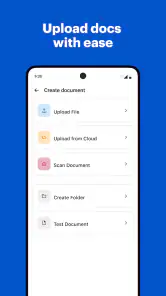
One of the things I love most about signNow is its integration capabilities. It works seamlessly with other apps and services, such as Google Drive, Dropbox, and OneDrive. This means you can easily import documents from your favorite cloud storage service, sign them in signNow, and then send them off, all without ever leaving the app.
Moreover, the app is available on both Android and iOS, ensuring that no matter what device you use, signNow is there for you. It’s perfect for people like me who switch between devices and need a consistent experience across platforms.
Picking the right tool for your paperwork
For occasional signatures, signNow is easier to justify than installing a heavyweight desktop editor: I can handle the document where it arrives and avoid a separate scan. Compared with a basic PDF viewer, it is more focused on completing and returning paperwork. But if I need careful page layout changes, extensive redlining, or a broad set of document-management controls, I would reach for a full PDF editor or work on a computer instead. Those tools are usually better for precise, complex edits; signNow’s appeal is the shorter path through routine signing and form filling.
It also helps to think about who needs to act next. Before I send anything, I check that the signature and entered details are visible in the saved document, then use a clear file name so the recipient can tell what it is. If someone else must review or countersign, I make sure the handoff instructions are explicit rather than assuming a signed file alone explains what to do. That small step reduces avoidable back-and-forth.
Who will get the most from it
I would recommend trying it if you are a freelancer, student, renter, or small-team worker who receives forms and agreements but does not want a printer to be part of every transaction. A realistic example: a student gets a placement form by email while commuting, opens it on a phone, completes the relevant fields, signs, then checks the saved copy before replying. The convenience is meaningful because the task is occasional and self-contained, not because a phone is the ideal place to manage every document.
On the other hand, people who rarely handle PDFs may not gain much from keeping another app on their device; a built-in viewer or an occasional desktop workflow could be enough. I would also be cautious about treating a phone as the right place for documents that need detailed legal review. Signing and filling are not substitutes for understanding the terms, and a larger screen makes dense clauses easier to inspect.
Everyday workflow and tradeoffs
When a form contains repeated information, I would prepare the details first and work through the fields in order instead of jumping around. This makes it easier to spot omissions and reduces the chance of putting a date or contact detail in the wrong place. If the document is a scan or image rather than a clean form, I would inspect the result closely: placing text by hand can take more care than completing clearly marked fields. That is a practical trade-off of doing paperwork on a small screen.
Another question I would ask before relying on the app for frequent work is whether the paid option matches the way I actually use it. The listed purchase prices span a substantial range, so I would check the in-app terms at the point of purchase and compare them with the volume and features I need. I would not pay simply because I expect a signature app to be free forever, nor assume a higher-priced option is worthwhile without a clear recurring use for it.
Compatibility and confidence before sending
The app is rated for Everyone, and its current version is 9.13.0; it requires Android 8.1 or later. It has been available since June 11, 2012, and its Android listing shows more than five million installs, with an average rating of 3.8 from around ten thousand ratings and about 1,900 written reviews. Those figures suggest a well-established tool with a mixed range of user experiences, not a guarantee that every task will feel effortless. I would check that my device meets the minimum requirement before downloading, then test the exact document workflow I expect to use.
For sensitive paperwork, I would also pause before importing a file from a shared account or sending it to the wrong recipient. A secure-sounding tool cannot replace careful handling: confirm the destination, review the completed copy, and avoid treating a quick mobile signature as a reason to skip reading. That is especially important when a form includes personal or financial details.
What to check before making it part of a routine
If you are wondering whether you can complete a whole document on a phone, I would say yes for straightforward forms, but I would not treat every PDF as equally easy. Clear, fillable fields are the simplest case. A scanned page, a cramped signature box, or a form with several similar-looking blanks calls for slower work and a careful final pass. If anything is hard to read at phone size, use a larger screen rather than guessing where information belongs.
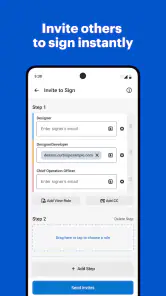
I would also decide in advance how the finished file should reach the other person. A signed copy attached to a reply may be enough for a simple exchange, while a multi-person process needs clearer instructions about who acts next. The app can help with document preparation, but it does not remove the need to confirm that the recipient received the right version or understands what remains to be done. That distinction is useful if you are choosing between a signing app and a dedicated workflow for a team.
Small habits that prevent document rework
For recurring paperwork, I find it useful to keep an untouched original and work from a copy. That makes it easier to restart if I discover that I have the wrong draft or have placed text in the wrong spot. I would also check whether the final saved document opens as expected before deleting or moving the source file. These are modest precautions, but they are more valuable than trying to rush through a form on a small screen.
Before sending a completed document, I would review it from the recipient’s point of view: are all required fields legible, is the signature where expected, and is the file name understandable without extra explanation? This catches practical problems that a quick glance at the editing screen can miss. If the recipient needs a particular format or process, I would follow those instructions instead of assuming that any signed copy will do.
Final Thoughts
In conclusion, signNow is a must-have app for anyone who deals with digital documents. Its ease of use, robust features, and top-notch security make it stand out in a crowded market. Whether you're signing contracts, filling out forms, or just need a reliable PDF editor, signNow has got your back. So why not give it a try? You might just wonder how you ever managed without it!
My verdict is more measured: I would try it when signing and filling forms on mobile are recurring annoyances, but I would not call it essential for everyone or a replacement for a full PDF editor. The free starting point lowers the barrier to testing it; the in-app purchase range means regular users should weigh actual needs before paying. If your paperwork is occasional, simple, and time-sensitive, it can be a handy shortcut. If accuracy depends on close reading or complex edits, use a larger screen and a tool designed for that job.
signNow: Sign & Fill PDF Docs Frequently Asked Questions
Is signNow easy to get started with if I mainly need to sign a PDF?
Yes. signNow is designed to make common PDF tasks straightforward: you can open a document, fill in fields, add a signature, and prepare it for sending. It is a productivity app for signing and filling forms, so it can suit someone who only needs occasional document handling as well as people managing documents more regularly.
What is signNow and what features does it offer?
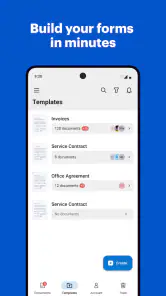
signNow is a mobile application designed to facilitate the signing and filling of PDF documents. It offers features like creating and managing document workflows, sharing documents with others for collaboration, and integrating with popular cloud storage services. Users can easily add signatures, text, and checkboxes to documents, making it a versatile tool for personal and professional use.
Is signNow secure for handling sensitive documents?
Yes, signNow provides a secure environment for handling sensitive documents. It uses industry-standard encryption to protect your data and offers features such as two-factor authentication and audit trails to ensure that your documents are accessed and modified only by authorized personnel. This makes it a reliable choice for users who need to manage confidential documents.
Can I use signNow offline?
Yes, signNow offers offline capabilities. Users can download documents to their device and fill them out without an internet connection. Once the device is back online, the app will automatically sync the changes made offline. This feature is particularly useful for users who need to work on documents while traveling or in areas with unstable internet connectivity.
Does signNow integrate with other applications?
signNow integrates seamlessly with a variety of popular applications and services, including Google Drive, Dropbox, and Salesforce. This integration allows users to easily import and export documents to and from signNow, streamlining the workflow and enhancing productivity. Users can also automate processes by connecting signNow with other apps through platforms like Zapier.
Pros
- Easy to navigate interface.
- Supports multiple file formats.
- Allows in-app document editing.
- Secure and legally binding signatures.
- Integrates with popular cloud services.
Cons
- Limited free version features.
- Occasional syncing issues.
- Customer support needs improvement.
- Some features are paid-only.
- In-app ads can be intrusive.

- Category
- Productivity
- Version
- 9.13.0











