Show Wifi Password: Wifi List
- 320.00
- 4.0
- Installs
- 5.00M
- Price
- Free

Screenshots

Analysis by Reviewed
I first thought of Show Wifi Password: Wifi List as a small rescue tool for the moment when a new device asks for a password I can’t remember. That is still its clearest use: it brings saved WiFi details together on an Android phone, so I can check a network I have already joined instead of guessing or rushing to reset the router. The key expectation is simple, though important: it works with saved network information, not with any nearby network I happen to see.
Discovering the App
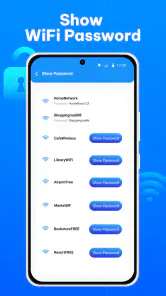
So, what's the deal with Show Wifi Password: Wifi List? This nifty little app is designed to help you view saved WiFi passwords on your Android device. It's like having a little black book of WiFi passwords right in your pocket. No more guessing or resetting routers just because you can't recall that complex string of characters!
What the app is best suited to do
Its name sets a fairly specific expectation: this is a quick reference for WiFi information already associated with your phone. It is not a way to get onto someone else’s network, and I would not install it expecting it to bypass a password or reveal credentials for a network the phone has never used. That distinction makes the app easier to judge fairly: its value is in reducing friction when a familiar network needs to be used again.
Prop studio publishes the app in the personalization category. It is free to install, has an Everyone content rating, and its current version is 1.9.1, with Android 7.0 as the minimum system requirement. Its 4.0 average rating comes from around 74,000 ratings, and it has more than 5 million installs. There are also optional in-app purchases priced at $9.99 per item. I’d check the purchase details in the app before spending anything, rather than assume a paid item is necessary for the basic task I came for.
How It Works
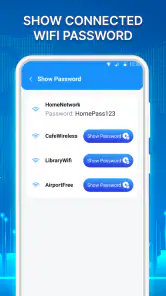
The first thing you'll notice about the app is its user-friendly interface. It's straightforward and easy to navigate, which is always a plus in my book. Once you've got it installed, the app scans your device for saved networks and displays them in a neat list. Each network shows its SSID and the password, making it super easy to retrieve and share with friends or family.
For a first visit, I’d start on the phone that has actually connected to the network in question. Open the list and match the network name carefully before relying on any displayed details. Routers can present similar names for separate networks, and a guest network is not always interchangeable with the main one. Checking the SSID first is a small step that can prevent a longer round of troubleshooting on the device you’re trying to connect.
If the list does not contain the network you expected, that is a useful clue rather than a reason to keep tapping around. Confirm that this phone has joined that network before, and make sure you are looking for the right name. If it has never connected, check the router’s own settings or ask the person who manages the network. This app is most useful when the phone already holds the information; it cannot make an unfamiliar network’s credentials appear.
You May Like

Clash of Clans Is Won Between the Battles

Android Auto Makes the Case for Quieter Car Software

MobiOffice: Transforming Mobile Productivity with Seamless Integration

EA SPORTS FC™ Mobile Soccer: Redefining Mobile Sports Gaming

How Microsoft OneDrive Became a Mobile Productivity Giant

How Google Translate Breaks Language Barriers Effortlessly
Why You Might Need It
Picture this: You're at a friend's house, and they want to connect their tablet to the WiFi. Instead of digging around for the password, you just whip out your phone, open the app, and there it is. Or perhaps you're setting up a new smart device at home and can't remember the WiFi password off the top of your head. This app saves you the hassle of resetting or looking for that tiny piece of paper you scribbled the password on ages ago.
A particularly practical moment is setting up a smart device while you still have time to pause and check details. Some setup flows ask for the network name and password before the device can finish connecting. I’d retrieve the information before beginning, verify the exact network, and keep the phone nearby rather than putting it away halfway through. That way, if the device rejects the password, I can check whether I chose the guest network or mistyped a character before assuming the router needs attention.
Privacy and Security
Now, I know what you're thinking: is this app safe to use? I had the same concern, but rest assured, it doesn't hack into networks or anything sketchy like that. It simply displays the passwords already stored on your device. However, it's always good to be cautious and make sure your device is secure, especially if you're sharing sensitive information.
For me, the more everyday security concern is not dramatic hacking but accidental exposure. A password visible on a screen can be read or copied by someone standing nearby, and handing over an unlocked phone gives the other person access to more than the WiFi details. I’d look up the password myself, then pass it along in a way that suits the situation. If the phone or router offers a built-in sharing option, that can be a more discreet choice than displaying credentials in a busy room.
What to Expect on Your First Visit
I’d approach this as a convenient reference for networks your phone already knows, not as a way to uncover a password for a nearby network or bypass its owner’s permission. That distinction matters: the useful result depends on the network having been saved on your device. If you have just installed the app and its list is empty, first check whether your phone has joined the network before; an empty result doesn’t mean the router has no password.
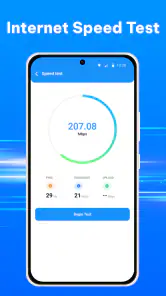
The app’s broader description also mentions WiFi analysis and internet-speed testing, but I’d treat password retrieval as the clearest reason to try it rather than assume it replaces a dedicated network troubleshooting suite. If your actual problem is that a video keeps buffering or a signal drops in one room, retrieving a password is unlikely to explain why. A speed test can give a quick sense of the connection at that moment, while deeper coverage or router problems call for tools designed around diagnosis.
Getting to a Useful Result
For a first try, install it on the Android phone that has previously connected to the network you need. Open the app and look for that network in the saved list, matching the network name carefully if your router shows several similar names. Once you have the right entry, use the displayed details only to connect a device you own or have permission to help. That simple check can prevent the familiar mistake of sharing a password for a guest network or a similarly named neighbor’s network.
A practical tip is to retrieve the details while you are still connected at home, before a visitor arrives or a new device is halfway through setup. That gives you time to verify the network name and avoid turning a quick handoff into a router-reset project. If the new device offers a built-in sharing method, that may be preferable: it can reduce the need to read a password aloud or pass your unlocked phone around. The app is most helpful when you need to see the saved credentials, not when you need a more private way to transfer them.
There is another useful habit if you have several networks saved: treat the list as a lookup tool, not as a complete household inventory. Before sharing a password, consider which network the other device actually needs. A guest connection may be more appropriate for a visitor than the network used by your own devices, while a smart-home device may need the network it was configured for. The app can help you identify the saved details, but the choice of which credentials to share still takes a moment of judgment.
Where It Fits—and Where It Doesn’t
I can see this being useful for someone who regularly adds smart-home equipment, helps relatives connect tablets, or keeps more than one familiar network saved on a phone. It is less compelling if you rarely connect new devices, already keep passwords in a trusted password manager, or need to manage a whole household’s network credentials across several phones. A router’s own label, settings page, or manufacturer app may be a better place to check credentials when your current phone has never joined the network.
Compared with the usual alternatives, this app focuses on quick access from the Android device rather than long-term organization. A password manager is generally better for storing credentials across devices and adding notes; router settings are better when you need to change the password or inspect the network itself. The trade-off is convenience versus scope: a saved-network list can save time in the moment, but it is not a substitute for managing the router or keeping a secure record for the future.
I’d also choose a different option if several people need reliable access to the same credentials from their own devices. A network password stored only on one person’s phone can become inconvenient when that phone is unavailable, replaced, or not the one being used during setup. A shared, secure password manager or a record maintained by the network owner is a better fit for that situation. In contrast, if I only need to recover a familiar password once in a while on the Android phone that already knows it, a focused list can be quicker than opening a separate system or account.
Limits Worth Keeping in Mind
Android’s handling of saved network information can vary by device and system version, so I wouldn’t plan an urgent setup around the assumption that every phone will expose every password in the same way. If the app doesn’t show the network you expect, confirm that the phone has joined it and check the network name; then try the router’s own settings or ask the network owner. Also be thoughtful about who can see your screen. A password displayed for convenience can be copied by anyone nearby, so close the app when you’re finished and avoid showing credentials in a public place.
One question people naturally have is whether the app can reveal a password for a network they have never used. That is not the job I would rely on it for: its practical purpose is to show saved network information, not grant access. Another is whether it replaces a speed-test or analyzer app. The broader tools may be useful for basic checks, but if you are diagnosing weak coverage, interference, or a router fault, a specialist utility or the router’s own controls will give you a more suitable path.
It is also worth separating a password problem from a connection problem. If the details are correct but a device still cannot get online, repeatedly copying the same password may not help. Check that the device is trying to join the intended network, and consider whether the issue is with its setup or the router rather than with remembering the credentials. The app can make the saved information easier to consult; it cannot guarantee that another device will connect or that the network itself is working well.
Who I’d Recommend It To
I’d recommend trying it if you use an Android phone as your everyday connection hub and often help with one-off setups: a relative’s tablet, a replacement phone, or a device that needs to reconnect to a familiar home network. The benefit is most noticeable when the password is long, rarely used, and not written somewhere convenient. It is less useful for someone who never adds devices or already has a dependable method for retrieving and sharing network credentials.
For a first-time user, the easiest path to a meaningful result is to begin with a network you know the phone has joined, verify its name in the list, and use the details for a device you are authorized to connect. If that works, you have seen the app’s central value without needing to explore every extra tool. If it does not, check the saved connection and the router’s own information before treating the app as a failure. That approach keeps expectations realistic and helps you choose the right fallback quickly.
Overall, Show Wifi Password: Wifi List is a handy tool to have, especially if you're someone who frequently forgets WiFi passwords or sets up devices regularly. Just remember, it's essential to use it responsibly and respect the privacy of networks you're connected to.
So, if you're tired of playing the guessing game with your WiFi passwords, give this app a try. It's simple, effective, and does exactly what it promises. Let me know if it saves you from any WiFi password headaches!
Show Wifi Password: Wifi List Frequently Asked Questions
Can I use Show Wifi Password: Wifi List to check my internet connection before downloading it?
Yes. Show Wifi Password: Wifi List is described as a Wi-Fi analyzer and internet speed-testing app, so it offers network tools alongside its saved-password list. Those features may be useful if you want to check a connection as well as manage networks already saved on your device. Keep in mind that a speed test checks the connection; it does not provide access to a network you have never joined.
Will Show Wifi Password: Wifi List work on an iPhone or iPad?
Show Wifi Password: Wifi List is listed as an Android app, with a minimum operating-system requirement of Android 7.0. That makes it relevant to Android phones and tablets that meet the requirement, rather than iOS devices. If you are using an iPhone or iPad, look for an iOS-compatible alternative instead of assuming this Android app can be installed there.
Who makes Show Wifi Password: Wifi List, and is it intended for a particular kind of user?
Prop studio develops Show Wifi Password: Wifi List, which is categorized as a personalization app. Its combination of saved Wi-Fi password tools, Wi-Fi analysis, and internet speed testing may appeal to people who want quick access to network information on an Android device. The app has an Everyone content rating, though saved credentials should still be treated as private and shared carefully.
Is Show Wifi Password: Wifi List free to download, and does it include paid features?
Show Wifi Password: Wifi List is free to download, so you can try its Wi-Fi tools without paying upfront. It also offers in-app purchases priced at $9.99 per item, which may apply to optional features or content. Check the purchase details shown in the app before confirming a transaction, especially if you only want to use its basic functions.
What is Show Wifi Password: Wifi List app?
Show Wifi Password: Wifi List is an app designed to help users retrieve and manage their saved Wi-Fi passwords on their Android devices. It provides a simple interface to view all previously connected Wi-Fi networks and their corresponding passwords, making it easier for users to share or remember their network credentials. Its store summary also describes it as a Wi-Fi analyzer and internet speed-testing app, so it combines password-list tools with basic network utilities.
Pros
- Displays saved WiFi passwords easily.
- User-friendly interface for quick navigation.
- Works offline without internet access.
- Supports multiple languages for global use.
- Lightweight app with minimal storage usage.
Cons
- Requires device root access for full features.
- May not work on all Android versions.
- Limited customer support available.
- Contains ads that may be intrusive.
- Potential security risks accessing passwords.

- Category
- Personalization
- Version
- 1.9.1












