

ShiftKey - PRN Healthcare Jobs
- 643.00
- 4.5
- Installs
- 100.00K
- Price
- Free

Screenshots




Analysis by Reviewed
Finding flexible healthcare work is rarely difficult because of a lack of motivation. The harder part is getting the right information at the right time, keeping professional details current, and deciding whether a posted opportunity actually fits your license, schedule, and travel limits. ShiftKey - PRN Healthcare Jobs is built for that specific problem. It is a free medical app from ShiftKey, LLC that focuses on connecting healthcare professionals with PRN work across nursing, therapy, and dentistry.
I approached it as a working tool rather than a casual job board. That distinction matters. A general employment app is usually designed around resumes, long applications, and permanent positions. This one is more useful when your priority is seeing flexible healthcare opportunities and acting on the ones that match your availability. My overall impression is positive, but it is not a magic shortcut: the quality of the experience depends heavily on accurate profile information, a stable connection, and how carefully you review each opportunity before committing.
Where the experience usually gets stuck
The first friction point is expectation. Someone opening this app may expect a complete healthcare career platform with extensive guidance, messaging, credential management, and long-term career planning. I would not treat it that way. Its clearest value is practical and immediate: helping eligible professionals look for PRN healthcare work. If you need continuing education, clinical reference material, payroll management, or a replacement for your employer’s scheduling system, this is the wrong category of tool.
The second sticking point is profile preparation. Flexible work still requires precise professional information. A rushed setup can make the app feel unhelpful when the real issue is that the profile does not clearly represent your role, qualifications, location, or availability. I recommend setting aside enough time to enter details carefully instead of trying to complete everything between patients or during a short break. A clean profile gives the opportunity search a better foundation and reduces avoidable back-and-forth later.
There is also a mental trap around the word “available.” A shift that appears open is not automatically suitable. You still need to consider commute time, start time, workplace expectations, your own fatigue, and whether the assignment fits your professional scope. I found the app more useful when I treated listings as leads to evaluate, not promises that should be accepted immediately.
Another common source of confusion is the difference between an app problem and a work opportunity problem. If an assignment disappears, changes status, or no longer fits your day, that does not necessarily mean the application has failed. Flexible staffing changes quickly. Refreshing repeatedly may not solve a situation that has changed outside the app itself. The better habit is to confirm the current status, review the details again, and avoid making travel arrangements until the opportunity is genuinely confirmed through the normal process.
The audience is fairly clear. Nurses, therapists, and dental professionals who want more control over when they work are the strongest candidates. It can also suit someone testing a new work pattern, supplementing regular employment, or looking for a way to compare available PRN options without relying only on word of mouth. It is less suitable for a person seeking a fixed full-time role, a detailed professional portfolio, or a broad job search outside healthcare.
More From Our News Desk

 Instagram
Instagram’s Power Comes From Its Place in Your Phone
A close look at how Instagram turns Meta’s reach, recommendation systems and everyday camera habits into durable platform power—and what that costs users.

 Gmail
GmailGmail in a Busy Inbox: Who Benefits Most?
From first account to crowded workday, Gmail earns its place through dependable search and flexible sorting—but its best fit depends on how much inbox maintenance you can tolerate.

 Prime Video
Switching to Prime Video: What Changes in Your Viewing Routine
Prime Video can make a compelling second home for streaming, but switching means learning a different catalog, rental layer, and route from browsing to playback.

 Universal TV Remote Control
Universal TV Remote Control Works Best as a Reliable Backup
A phone remote earns its place through quick setup and reliable habits. Here is how to get more from Universal TV Remote Control—and where its limits show.

 Weather - By Xiaomi
Weather by Xiaomi Review: Clear at a Glance, Less Clear Up Close
Xiaomi’s weather app makes everyday forecasts quick to scan, but its calm surface can leave useful details and recovery paths harder to find than they should be.

 X
XX Under Pressure: Can It Recover When Posting Goes Wrong?
A resilience-focused review of X, examining setup, mistaken posts, interruptions, weak connections, and the gaps that matter when recovery needs to be dependable.
Latest News



What I check before relying on a listing
Before I act on any opportunity, I read the full entry slowly rather than tapping through based on location alone. I look at the role, timing, workplace information, and any requirements shown in the app. This is especially important for clinicians who work across more than one specialty. A familiar job title can still involve a different pace, patient group, or set of responsibilities than expected.
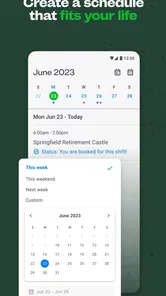
I also compare the opportunity with my real calendar, not an optimistic version of it. A short gap between commitments may look workable until travel, parking, handover time, and preparation are included. One useful approach is to keep a personal availability note outside the app with blocked periods, preferred travel boundaries, and days when you should not accept additional work. That turns browsing into a more disciplined decision instead of an impulse response to an open shift.
For professionals who use more than one device, consistency is worth checking. If you update information on one device and later view the account elsewhere, make sure the changes appear as expected before applying or relying on the new details. When something looks outdated, I would first close and reopen the app, check the connection, and sign in again if necessary. These are simple steps, but they separate temporary display trouble from a genuine account issue without wasting time.
Setup checks that prevent avoidable delays
The best setup is not the fastest setup. I would begin by making sure the app is installed on a compatible device and that the operating system meets its stated minimum of version 9. Then I would use a dependable connection and complete the account information in one focused session where possible. Interruptions can leave people unsure whether a change was saved, especially when they move quickly through several screens.
After creating or updating the account, I would review the information as if I were the person evaluating an application. Is the professional role clear? Is the location sensible? Does the availability reflect reality? Are there outdated details that could create confusion? This review is more valuable than simply confirming that a profile exists. In flexible staffing, small inaccuracies can have practical consequences because the decision window may be short.
I also recommend keeping relevant professional documents and personal notes ready before starting. I am not suggesting that the app accepts every possible document or that every role follows the same process; rather, having your information organized makes any required step less stressful. Use clear file names in your own records, keep expiration dates on a separate reminder, and avoid waiting until the moment you want a shift to discover that an important detail needs attention.
Notifications deserve a deliberate approach. If you allow every alert to interrupt your day, the app can become distracting. If you silence everything, you may miss a time-sensitive opportunity. I would choose a notification routine that matches your work style, then check the app at planned moments as well. For example, a clinician finishing a morning shift might review opportunities afterward instead of trying to evaluate them while handling patient care.
Privacy and device habits matter too. Because this is a medical employment tool, I would avoid using it on a shared device without securing the account properly. I would also avoid entering patient information into any job-related field. The app is for professional opportunities, not for discussing identifiable clinical details. That boundary is obvious, but it is worth stating because hurried users sometimes copy information into the wrong place.
Recovering when a workflow breaks
When a screen fails to load or an action seems stuck, I use a short recovery sequence. First, I check whether the internet connection is stable by switching between available networks if appropriate. Next, I close and reopen the app. If the problem continues, I sign out and back in only when I am confident I know the account credentials. I then check whether the app is current and whether the device has enough free storage for normal operation.
I avoid repeatedly tapping an application or confirmation button. Repeated actions can create uncertainty about whether the first attempt worked. Instead, I pause, look for a changed status, and review the relevant section before trying again. This is one of the most useful habits for a shift marketplace: confirm the result before repeating the action. It protects you from duplicate effort and from assuming that a technical-looking delay means nothing happened.
If a shift no longer appears, I would not immediately conclude that the account is broken. I would refresh once, revisit the search criteria, and check whether the date, role, or location filters are narrowing the results. A very specific search can naturally produce an empty screen. Widening one filter at a time is better than removing everything and losing track of what changed.
For an application that seems incomplete, I would write down the exact point where the process stopped, the opportunity involved, and the time of the attempt. That small record makes support conversations clearer if support is needed. Screenshots can also help with a technical display issue, but I would remove or avoid sharing sensitive personal information when possible. Good troubleshooting is not just restarting; it is preserving enough context to explain the problem accurately.
There is a useful distinction between recovering access and recovering a decision. If you regain access after a crash, that does not mean a previously viewed opportunity is still open. I would treat the status shown after recovery as the current source for the next step, then reread the details before proceeding. This is particularly important when arranging childcare, travel, or a second job around a potential assignment.
When the app is not the cause
Some frustrations belong to the nature of PRN work rather than the software. Availability can change quickly, facilities may adjust staffing needs, and an opportunity that suited you yesterday may not suit you today. No app can remove the need for professional judgment. If a listing is technically accessible but the commute is unrealistic or the timing leaves no safe margin, the sensible choice is still to decline or keep looking.
The app also cannot replace direct clarification when an important detail is unclear. If you need to understand a workplace expectation, arrival procedure, role-specific requirement, or other condition before accepting, use the appropriate communication route rather than guessing. Guessing is especially risky in healthcare, where a small misunderstanding can affect both your working day and the people receiving care.
Likewise, a lack of suitable results may reflect your search boundaries. A narrow location, limited availability, or specialized role can naturally reduce the number of matches. I prefer changing one factor at a time: first the date, then the time window, then the travel area. This shows whether the issue is demand, timing, or an overly restrictive search. It also helps you decide whether the app is worth keeping for your particular market.
Compared with a general job board, the advantage here is focus. You are not sorting through unrelated office roles, retail vacancies, or permanent positions before reaching healthcare work. Compared with contacting facilities individually, the app can make browsing more convenient and less dependent on knowing the right person. The trade-off is that a focused marketplace may not provide the broader career tools or employer relationship that you would get from a traditional recruiter, professional network, or direct application process.
I would also avoid comparing it with a hospital’s internal scheduling system as though they serve the same purpose. An internal system manages work after you are already part of an organization. This app is oriented toward finding flexible opportunities. If your main need is swapping established shifts with colleagues, tracking leave, or viewing a long-term rota, your employer’s system will probably be better.
Everyday scenarios where it earns its place
Imagine a therapist whose regular schedule has an unexpected gap next week. Instead of sending several separate messages and waiting for replies, the therapist can use the app to look for relevant PRN opportunities, compare the timing with the existing calendar, and decide whether the travel is worthwhile. The important point is not simply finding an open shift. It is using the app to make a bounded decision without allowing one extra booking to disrupt the rest of the week.
A nurse working a mixture of regular and flexible shifts may use it differently. Before opening the app, I would mark fixed commitments and recovery time, then search only within the remaining windows. That approach prevents the common mistake of treating every empty calendar space as work capacity. It also makes the app more useful for sustainable scheduling rather than short-term overbooking.
A dental professional exploring PRN work may benefit from comparing several possibilities before committing to the first one. In that situation, the app functions as a discovery tool. I would note which locations, times, and role descriptions repeatedly fit, then use that pattern to refine future searches. This is a more advanced use than simply accepting the nearest listing: over time, your own decisions reveal which opportunities are genuinely practical.
For someone new to flexible work, I would start conservatively. Choose an opportunity whose timing and travel are straightforward, leave a realistic buffer, and evaluate the experience afterward. Did the information match what you expected? Was the arrival process manageable? Did the assignment fit your energy level? Those personal observations are more useful than chasing every available option, and they help you build a reliable filter for future decisions.
What the current app details tell me
The app has been available since January 5, 2022, and its current release is version 1.118.0. It supports devices running Android 9 or later, which makes it accessible to many users while still giving older-device owners a practical compatibility check before installation. I would update the app when possible, particularly if a workflow problem appears after a long period without updating.
Its public reception is encouraging: it holds a 4.5 average from around 6,100 ratings, with more than 600 written reviews and over 100,000 installs. I treat those figures as a useful signal of adoption, not as proof that every clinician will have the same experience. A nurse in one region may see a very different range of opportunities from a therapist in another, and personal availability can matter more than the headline rating.
It is free to install and carries an Everyone age classification. That makes the initial barrier low, but “free” should not be confused with “cost-free” in practical terms. Your time, travel, parking, preparation, and the consequences of accepting unsuitable work still matter. I would evaluate each opportunity using the full cost of participation, not just whether the app itself requires payment.
The developer, ShiftKey, LLC, has kept the product centered on healthcare staffing rather than turning it into a general-purpose employment application. That focus is its strongest identity. It is also why users should come in with a specific purpose: finding PRN healthcare opportunities, maintaining a usable professional profile, and making careful decisions about flexible work.
Who should use it and who should choose something else
I would recommend trying it if you are a nurse, therapist, or dental professional who values schedule flexibility and wants a dedicated place to explore PRN work. It is especially appealing when your availability changes from week to week or when you want to supplement an existing role without committing to a conventional full-time search.
I would be more cautious if you need guaranteed hours, a permanent employment pathway, extensive employer research, or a single system for every part of your professional life. In those cases, a direct employer application, specialist recruiter, professional association, or internal scheduling platform may be a better primary tool. You can still use this app alongside those options, but I would not make it your only source of work.
I would also skip it if you are not currently eligible or prepared for the kind of healthcare work it presents. Browsing may be easy, but accepting an assignment requires professional readiness and honest self-assessment. The app can organize opportunities; it cannot decide whether your credentials, experience, travel tolerance, and energy make a particular shift appropriate.
My practical verdict after using it
ShiftKey - PRN Healthcare Jobs is a focused, sensible option for healthcare professionals who want to explore flexible work without navigating a generic job marketplace. I like its clear audience and the way it can support a repeatable routine: keep the profile accurate, search with realistic limits, inspect each opportunity, and confirm outcomes before making plans.
Its weaknesses are mostly connected to the nature of the task. Flexible opportunities can change, search results depend on your circumstances, and a technical recovery step cannot resolve an assignment that is no longer available. The app also demands more judgment than a simple “tap and book” tool. That is not a flaw unique to this product, but it is something new users should understand from the beginning.
My advice is to install it with a specific workflow in mind. Prepare your professional details, establish your real availability, test the search process without rushing into an acceptance, and keep a personal record of what works for you. If your goal is PRN nursing, therapy, or dentistry work, this app is worth considering. Its real strength is not replacing every employment tool; it is making flexible healthcare opportunities easier to evaluate with discipline.
ShiftKey - PRN Healthcare Jobs Frequently Asked Questions
Who develops ShiftKey, and what kind of app is it?
ShiftKey is developed by ShiftKey, LLC and is a healthcare staffing marketplace for professionals looking for flexible work. It focuses on nursing, therapy, and dentistry opportunities, bringing shift listings and related work details into an app. It may be useful if you want to explore PRN or per diem work alongside other commitments, while remembering that available roles depend on your qualifications and local demand.
Is ShiftKey free, and what devices can I use it on?
ShiftKey is free to download, so you can install it without paying an upfront app price. It is available for Android and iOS, and the Android version requires Android 9 or later. The app is rated for Everyone. Before installing, check that your device meets the operating-system requirement and that the app is available for your device through its relevant app store.
What is ShiftKey - PRN Healthcare Jobs, and who is it designed for?
ShiftKey is a healthcare staffing marketplace that connects qualified professionals with available per diem, PRN, and other flexible shifts at participating facilities. It is primarily designed for nurses, nursing assistants, therapists, and other licensed or certified healthcare workers who want more control over where and when they work. Availability depends on your profession, credentials, location, and local facility demand.
How do I create an account and apply for shifts on ShiftKey?
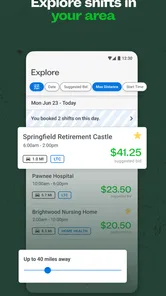
After downloading the app, you generally create a profile with your personal information, professional experience, license or certification details, and required documents. Once your credentials are reviewed and approved, you can browse available shifts using filters such as location, date, facility, and pay. You can then review the shift requirements before requesting or accepting an assignment through the app.
What types of healthcare shifts and facilities are available?
Shift availability varies by city, profession, and current staffing needs. Depending on your qualifications, you may find shifts in nursing homes, assisted living communities, hospitals, rehabilitation centers, and other healthcare facilities. Listings can include different roles, schedules, shift lengths, and care requirements, so it is important to read each posting carefully and confirm that it matches your license, experience, and availability.
Pros
- Flexible shifts let healthcare professionals choose when and where they work.
- Job listings cover multiple healthcare roles
- facilities
- and locations.
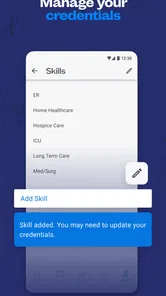
- In-app credential tracking helps organize licenses and required documents.
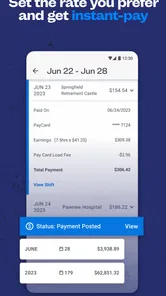
- Shift details and pay information are available before applying.
- Useful notifications can alert you to newly posted matching shifts.
Cons
- Availability may vary significantly by location and healthcare specialty.
- Some shifts require extensive credential verification before you can apply.
- Last-minute cancellations or schedule changes may affect your plans.
- The app is most useful for licensed professionals seeking PRN work.
- Pay rates and shift volume can differ widely between facilities.











