

SFST Report – Unofficial Tool
- 14.00
- 4.2
- Installs
- 10.00K
- Price
- Free

Screenshots

Analysis by Reviewed
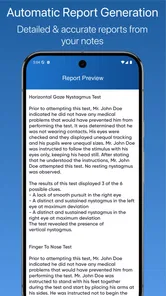
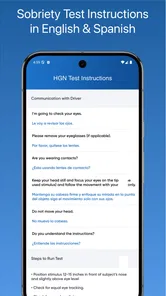
SFST Report – Unofficial Tool is a focused business app for documenting field sobriety testing and DUI-related reports. After working through its intended workflow, I came away with a clear impression: it is most useful as a structured reporting aid for people who already understand standardized field sobriety testing, not as a general-purpose note-taking app or a substitute for training, policy, or professional judgment.
That distinction matters. The app’s value is not entertainment or broad office productivity. Its purpose is narrow, and that narrowness is also its main strength. Instead of forcing a user to build a report from a blank document, it centers the kind of observations and test details that matter in an SFST context. For the right user, that can make documentation more orderly and easier to review later.
What the app does well in real reporting situations
The app comes from Bonsaisoft LLC and sits in the business category. It is free to install, with optional purchases ranging from around two dollars to around thirty dollars per item. That makes it relatively easy to try without committing to a paid subscription up front, although anyone planning regular use should check which parts of the workflow require an additional purchase before relying on it operationally.
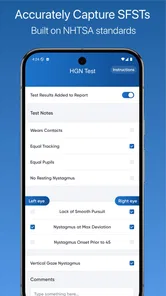
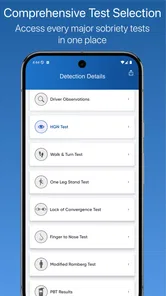
The central idea is simple: guide the user through a report connected to standardized field sobriety testing. The NHTSA-based focus gives the app a more specific purpose than a generic incident journal. In practice, that means the useful question is not “Can this replace all my paperwork?” but “Can this help me capture relevant observations in a consistent order while the event is still fresh?”
I found that distinction especially important when thinking about a realistic roadside scenario. An officer may need to document what was observed before, during, and after a series of tests, then preserve enough detail for later review. A structured tool can reduce the temptation to write vague notes such as “appeared impaired.” The better workflow is to record observable behavior, test instructions, responses, conditions, and other relevant circumstances while keeping conclusions separate from what was actually seen.
That is where this app has practical value. It encourages a report-centered mindset rather than a loose collection of phone notes. I would still review every entry before treating it as complete, but the framework can help prevent a hurried report from becoming a memory exercise later in the shift.
A useful workflow for careful documentation
The strongest way to use the app is to treat it as a contemporaneous documentation tool. Before starting, I would make sure the phone is ready, the screen can be read comfortably, and the user knows the relevant agency or departmental procedure. During the encounter, I would enter facts as soon as doing so is safe and appropriate. Immediately afterward, I would reread the report and correct omissions while the sequence is still clear.
More From Our News Desk

 Gmail
GmailGmail in a Busy Inbox: Who Benefits Most?
From first account to crowded workday, Gmail earns its place through dependable search and flexible sorting—but its best fit depends on how much inbox maintenance you can tolerate.

 Prime Video
Switching to Prime Video: What Changes in Your Viewing Routine
Prime Video can make a compelling second home for streaming, but switching means learning a different catalog, rental layer, and route from browsing to playback.

 Universal TV Remote Control
Universal TV Remote Control Works Best as a Reliable Backup
A phone remote earns its place through quick setup and reliable habits. Here is how to get more from Universal TV Remote Control—and where its limits show.

 Weather - By Xiaomi
Weather by Xiaomi Review: Clear at a Glance, Less Clear Up Close
Xiaomi’s weather app makes everyday forecasts quick to scan, but its calm surface can leave useful details and recovery paths harder to find than they should be.

 X
XX Under Pressure: Can It Recover When Posting Goes Wrong?
A resilience-focused review of X, examining setup, mistaken posts, interruptions, weak connections, and the gaps that matter when recovery needs to be dependable.

 Clash of Clans
Clash of Clans Is Won Between the Battles
Its raids are quick; its community is a long-term project of coordination, teaching, rivalry, and shared responsibility—with all the friction that entails.
Latest News



One non-obvious benefit of that approach is separation of observation from interpretation. A good report should make it possible for another person to understand what happened without relying entirely on the writer’s conclusion. When using an app built around test documentation, I would deliberately record the exact behavior or response first, then use any conclusion field or narrative area only after the factual account is complete.
A second useful habit is to capture context, not just test outcomes. Surface conditions, lighting, footwear, weather, traffic, nearby distractions, medical or physical limitations, and the person’s ability to understand instructions can affect how a test is interpreted. The app does not remove the need for that judgment. Its best role is to give the user a place to organize the report so those contextual points are less likely to disappear from the final account.
A third insight is that a structured report should be reviewed for internal consistency. If the narrative says an instruction was repeated, the timing and sequence should make sense. If a test was stopped, the reason should be clear. If a condition affected performance, it should not be buried in an unrelated note. I would use the app as a checklist for that review rather than assuming that completing every visible field automatically creates a complete report.
Why the NHTSA-based focus matters
The NHTSA reference gives the app a recognizable foundation, but it should not be mistaken for universal legal authority. Field sobriety testing practices can be shaped by jurisdiction, agency policy, training, court decisions, and the circumstances of a particular encounter. A report that looks organized can still be inadequate if it does not follow the rules that apply to the person using it.
For that reason, I would not recommend downloading this app and treating it as a self-teaching course. Someone unfamiliar with SFST procedure may see the report structure as an instruction manual, but documentation is not the same thing as qualification. The app is better suited to a trained user who wants a mobile way to record information than to a beginner trying to learn the tests from a phone.
This is also where the “unofficial” part of the name deserves attention. I would regard the app as an aid, not an official government system, evidence-management platform, or automatic compliance guarantee. Before introducing it into a formal workflow, a department or organization should decide whether its use fits local policy and whether the resulting records can be handled in the required way.
The everyday strengths beyond a blank notes app
Compared with the usual alternative of typing into a generic notes application, a dedicated SFST report tool has a meaningful advantage: it keeps the user thinking about the structure of the event. A blank note may be faster for the first few seconds, but it also makes omissions and inconsistent wording more likely. A specialized form can prompt a more disciplined sequence.
Compared with a paper form, the phone-based approach can be more convenient when carrying extra paperwork is awkward. It may also make it easier to prepare a report soon after the encounter rather than reconstructing it from scattered handwritten notes. The trade-off is that a phone is a more complex device than paper. Battery status, screen visibility, accidental navigation, and the need to handle the device safely all become part of the workflow.
Compared with a full records-management system, this app is more approachable for an individual user who needs a focused reporting aid. However, a broader system may be the better choice for teams that require centralized storage, standardized agency workflows, audit trails, evidence controls, or integration with existing records. I would not choose this app because I expected it to replace an organization’s entire reporting infrastructure.
The app’s current version is 1.11, and it supports devices running Android 6.0 or later. That broad compatibility is helpful for users with older Android hardware, but compatibility alone should not decide whether it belongs in a professional workflow. The important test is whether the device, operating environment, and local procedures support safe and dependable use in the field.
Where the experience needs caution
The biggest weakness is not that the app has a narrow purpose; it is that a narrow tool can create false confidence. A completed form may look thorough while still missing a crucial observation or failing to reflect the conditions of the encounter. I would never treat the app’s prompts as proof that a report is legally sufficient.
There is also a practical friction in using a phone during a stressful or safety-sensitive situation. Data entry can compete with attention, communication, and observation. If the user is expected to monitor a person, surroundings, traffic, or other risks, the app should not become the priority. In my view, the safest workflow is to use it only when the situation allows, then complete or review the documentation as soon as possible afterward.
Another limitation is the risk of over-standardizing a complicated event. Standardized tests have defined procedures, but real encounters include interruptions, medical concerns, language barriers, environmental problems, and unusual behavior. A form can organize those details, yet it cannot decide how much they matter or whether a test result is reliable under the circumstances. Users must be prepared to add a clear narrative rather than forcing every situation into a tidy pattern.
The free price is appealing for evaluation, but the presence of in-app purchases means the complete experience may not be identical for every user. I would test the exact report path needed for regular work before recommending it to a team. A free download is not automatically a free end-to-end professional solution, and a department should understand the purchase model before standardizing on it.
Privacy and record handling also deserve deliberate attention. DUI-related reports can contain sensitive personal and incident information. I would avoid entering real case material during an informal trial, establish who may access the device, and follow the organization’s rules for storing, exporting, retaining, and deleting records. The app can help create documentation, but the surrounding device and records process still determine how responsibly that information is handled.
Who should use it, and who should skip it
I think the best audience is a trained professional who regularly needs to document field sobriety testing and wants a focused mobile form rather than a blank note page. It may also suit a small organization evaluating a lightweight reporting aid, provided the workflow is checked against local policy and the app’s purchase requirements are understood.
It is less suitable for someone who only occasionally encounters DUI-related documentation and would be better served by an approved paper or agency form. It is also a poor fit for a user looking for a broad business app, general case-management platform, or secure team database. The category label may place it among business tools, but its usefulness is highly specialized.
Students and newly trained users should be cautious as well. The report structure may help them understand what kinds of observations need attention, but it should supplement supervised instruction, not replace it. If the goal is to learn the testing process itself, a formal course and current official materials are more appropriate than relying on a mobile form.
The app is rated for Everyone, which makes it broadly accessible from an age-rating perspective. That does not mean every user is an appropriate professional user. The relevant qualification here is knowledge of the procedure and responsibility for the resulting documentation, not the content rating shown in the app store.
My practical recommendation before relying on it
I would begin with a dry run using a fictional scenario. Walk through the report from start to finish and check whether the sequence matches the way you actually work. Pay attention to how easily you can record environmental factors, unusual circumstances, interruptions, and a concise narrative. If the workflow feels too rigid, that is useful information before real-world use.
Next, compare a completed sample with the form or reporting standard already used by your organization. Look for gaps rather than visual similarity. Ask whether another reviewer could understand the timeline, instructions, responses, conditions, and reasons for any deviation. This comparison is more valuable than simply confirming that the app contains familiar test names.
Finally, decide where the app fits in the process. For one person, it may be the primary drafting aid. For a department, it may be only an initial capture tool before information is transferred into an approved system. That second arrangement can be sensible, but it introduces another review step, so users should plan for it rather than assuming the mobile report is the final record.
Final verdict for SFST Report
My overall view is favorable but deliberately limited. SFST Report is strongest when used as a focused checklist and documentation aid by someone who already knows the SFST process. It gives a more purposeful structure than ordinary notes and can encourage better attention to sequence, observations, and context.
Its weaknesses are just as important. It does not replace training, local policy, professional judgment, or a full records system. Phone-based reporting can introduce operational friction, and the optional purchase model means users should verify the workflow they actually need before depending on it. The app’s unofficial status also makes it something to evaluate carefully rather than adopt automatically.
With those boundaries in mind, I would recommend trying it to trained Android users who want a specialized SFST report workflow and are willing to review every entry critically. I would skip it if I needed team-wide case management, formal evidence controls, or a legally approved replacement for an existing reporting system. Its average rating is 4.2 from around thirty-five ratings, with around fourteen written reviews and over ten thousand installs, which suggests a modest but real user base rather than a universally established standard.
For me, the deciding question is simple: do you need a structured way to document field sobriety testing, or do you need a complete professional records platform? If it is the first, this free business app is worth a careful trial. If it is the second, a dedicated organizational system will be the safer and more complete choice.
SFST Report – Unofficial Tool Frequently Asked Questions
What does SFST stand for, and who is this app intended for?
SFST refers to standardized field sobriety testing, and SFST Report – Unofficial Tool is a business app focused on DUI reporting and field sobriety test documentation. Its NHTSA-based focus may make it relevant to people who work with these reports, but users should check that its tools suit their role and local procedures. It is not a substitute for required training or official guidance.
What is SFST Report – Unofficial Tool used for?
SFST Report – Unofficial Tool is designed to help users access and organize information related to SFST reports in a more convenient digital format. It may provide reference tools, report-related details, or shortcuts to commonly needed resources, depending on the available version. Because it is unofficial, users should treat it as a convenience tool rather than an authoritative replacement for official documentation or government services.
Is SFST Report – Unofficial Tool an official government application?
No. The word “Unofficial” is important: this application is not necessarily created, operated, endorsed, or maintained by the official agency associated with SFST reports. Before relying on any information shown in the app, compare it with the relevant official website, department, or documentation. This is especially important when dealing with legal, administrative, identification, or compliance-related matters.
Does the app require personal information or sensitive permissions?
The permissions and data requirements can vary according to the app version and your device. Before installing, review the Google Play Store or App Store listing and check whether the application requests access to contacts, files, location, camera, or other sensitive features. Avoid entering confidential information unless it is clearly necessary, properly explained, and protected by a trustworthy privacy policy.
Is the app free to download, and are there in-app purchases?
SFST Report – Unofficial Tool is free to download, with in-app purchases offered at different price points. Before making a purchase, review the available options in the relevant app store and make sure they match what you need. You can also check your device’s purchase settings to help prevent unintended spending, particularly if other people can access your account.
Pros
- Quickly checks SFST-related information from a mobile device.
- Simple interface makes core functions easy to locate.
- Useful companion for users already familiar with SFST procedures.
- Lightweight design should work well on older Android devices.
- Can save time compared with searching through official resources manually.
Cons
- Unofficial status means information may not be authoritative or current.
- Coverage can depend on the developer’s updates and available data.
- May be confusing for users unfamiliar with SFST terminology.
- Limited value if you rarely need SFST-related reports or tools.
- Privacy and data-handling details should be checked before submitting information.











