

Sense Home
- 488.00
- 3.9
- Installs
- 100.00K
- Price
- Free

Screenshots


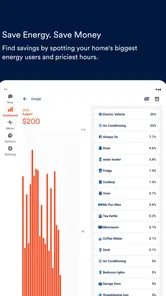

Analysis by Reviewed
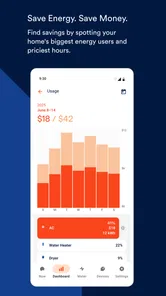
I like household apps that turn a vague worry into something I can actually investigate. Electricity is a good example: a high bill, a device that seems to run all night, or a sudden concern that something was left switched on can be difficult to understand from the bill alone. Sense Home, from Sense Labs, Inc., is built around making that information easier to see. It is a free House & Home app for monitoring household electricity use, spotting activity, and helping you make more informed decisions about what is happening at home.
After spending time with it, I see the app as most useful when it becomes part of a household routine rather than a screen I open once and forget. It can help one person investigate unusual consumption, but it becomes more interesting in a shared home where several people need a common picture of what is running. The important distinction is that it is a monitoring tool, not a replacement for a qualified electrician, a smart-home control system, or a complete budgeting service.
How Sense Home fits into a shared household
Imagine a home where one person pays the electricity bill, another works from home, and someone else regularly uses the laundry appliances, kitchen equipment, or workshop tools. When the bill changes, everyone may have a theory, but nobody necessarily has the same information. A monitoring app can give the conversation a more useful starting point: what was active, when activity appeared, and whether a pattern is normal for that home.
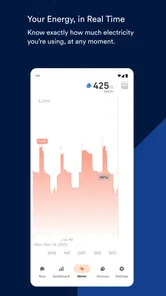
That shared-device scenario is where I think Sense Home has a practical advantage over simply checking a monthly bill. A bill tells me the result after the fact. The app is intended to help me look at usage while it is happening or review patterns afterward. That makes it easier to connect an event with a likely cause. If consumption rises during a particular part of the day, I can ask whether that matches cooking, heating, laundry, office equipment, or another regular activity instead of blaming the first appliance that comes to mind.
There is also a useful household habit here: treat the app as a shared observation tool, not as evidence for policing other people. In a family or shared apartment, one resident may notice an unusual pattern while another knows what was operating at the time. A short conversation can turn an unexplained spike into a normal explanation. That approach is more productive than using an energy screen to accuse someone of wasting power.
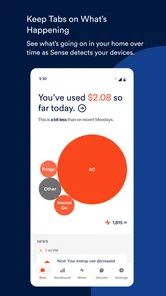
For a realistic example, picture a weekend morning when several people are home. The oven is on, laundry is running, a computer is being used for work, and someone has left a television or game console in standby. If the home seems to be using more electricity than expected, Sense Home can help organize the investigation. I would first compare the timing with the household routine, then look for equipment that stays active when nobody thinks they are using it. The value is not simply seeing a large number; it is learning which behaviors create a repeatable pattern.
That makes the app especially appealing to people who want to reduce waste without turning energy saving into guesswork. It can also help when a household is preparing for a change, such as adding a large appliance or adjusting work-from-home schedules. I would not expect it to make every decision automatically, but it can provide a more grounded basis for deciding what deserves attention first.
More From Our News Desk

 Instagram
Instagram’s Power Comes From Its Place in Your Phone
A close look at how Instagram turns Meta’s reach, recommendation systems and everyday camera habits into durable platform power—and what that costs users.

 Gmail
GmailGmail in a Busy Inbox: Who Benefits Most?
From first account to crowded workday, Gmail earns its place through dependable search and flexible sorting—but its best fit depends on how much inbox maintenance you can tolerate.

 Prime Video
Switching to Prime Video: What Changes in Your Viewing Routine
Prime Video can make a compelling second home for streaming, but switching means learning a different catalog, rental layer, and route from browsing to playback.

 Universal TV Remote Control
Universal TV Remote Control Works Best as a Reliable Backup
A phone remote earns its place through quick setup and reliable habits. Here is how to get more from Universal TV Remote Control—and where its limits show.

 Weather - By Xiaomi
Weather by Xiaomi Review: Clear at a Glance, Less Clear Up Close
Xiaomi’s weather app makes everyday forecasts quick to scan, but its calm surface can leave useful details and recovery paths harder to find than they should be.

 X
XX Under Pressure: Can It Recover When Posting Goes Wrong?
A resilience-focused review of X, examining setup, mistaken posts, interruptions, weak connections, and the gaps that matter when recovery needs to be dependable.
Latest News



What I would clarify before sharing access
Household use raises an important question: whose account is connected, and who is expected to interpret what it shows? Before installing it for several people, I would agree on one primary account holder and decide who genuinely needs access. That avoids the common problem of multiple people making separate assumptions about the same home data.
I would also explain the difference between viewing information and changing anything in the home. Sense Home is useful for observing electricity activity, but seeing that something is running does not automatically mean the app can switch it off or correct the cause. If a family member notices a worrying pattern, the next step may still be checking the appliance, the circuit, or the electrical installation in person.
This boundary matters with shared devices. A tablet in the kitchen may be convenient for checking household activity, but it can also expose information about when people are home, when appliances are used, or when the house is unusually quiet. I would place the device somewhere appropriate and use a screen lock on personal phones. That is not a criticism of this particular app; it is sensible handling for any tool that reveals routines inside a home.
Another practical boundary is interpretation. Energy monitoring can suggest that a device is active, but suggestions should not be treated as a technical diagnosis. If a circuit behaves strangely, an appliance becomes hot, or there are signs of an electrical fault, I would stop investigating through the app and deal with the physical safety issue directly. The app can support awareness, but it should not encourage anyone to open electrical equipment or attempt repairs.
People also ask whether a monitoring app is worth using if they are not highly technical. In my view, yes, provided they are willing to spend a little time learning the household’s normal patterns. The first useful outcome may not be immediate savings. It may simply be recognizing that a supposedly occasional device is active far more often than expected, or discovering that a high-use period is completely normal because of a predictable routine.
Turning observations into household coordination
The strongest use case is coordination. One person can review the app, but the household benefits when observations become small, agreed actions. For example, if everyone sees that a particular routine creates unnecessary use, the solution might be moving a laundry cycle, turning off equipment at the end of the workday, or checking whether a device is staying active overnight. The app provides context; the people in the home decide what to do with it.
I would keep that process simple. Instead of trying to change everything at once, I would choose one repeated pattern and watch it for several days. A change is more convincing when it can be compared with the household’s usual schedule. If the home has guests, unusual weather, or a different work routine, I would note that before drawing conclusions. Otherwise, a temporary change can look like a permanent improvement or problem.
A less obvious benefit is that the app can help settle disagreements about timing. Shared homes often have different memories of what happened: one person remembers turning something off, while another notices that the home still appears active later. Looking at the activity pattern can narrow down when the issue occurred. It does not replace a conversation, but it can make that conversation less speculative.
I also like the idea of using it during a move or a change in occupancy. When someone starts working from home, a student returns for a break, or a roommate leaves, electricity habits can shift without anyone noticing immediately. Reviewing the home’s patterns before and after the change can help separate a genuine change in consumption from an assumption based on a single bill.
There is a trade-off, though. A household can become too focused on the dashboard and lose sight of comfort, convenience, and time. Saving electricity is worthwhile, but not every small fluctuation deserves a family discussion. I would use Sense Home to identify meaningful patterns, not to make everyone justify ordinary appliance use.
For households with more than one adult, I would establish a simple rule: whoever notices something unusual should describe it as an observation, not a conclusion. “The home was active later than expected” is more useful than “you left everything on.” That small change in language protects trust and makes the monitoring process feel collaborative.
Age, trust, and appropriate access
The app has an Everyone content rating, which makes it suitable in an age-context sense for ordinary household use. Still, an age label does not answer every question about responsibility. Younger users may be able to look at energy information, but an adult should decide how the information is used and what actions are safe. I would not ask a child to investigate an electrical problem physically, even if the app makes the issue look clear.
For teenagers, it could be a useful way to discuss how household habits affect energy use, especially when the conversation focuses on learning rather than blame. They might help identify which daily routines coincide with higher activity, while an adult handles decisions involving appliances, wiring, or changes to the home. This gives the app an educational role without pretending it is a supervised family-management system.
Trust is just as important with roommates and partners. Not everyone needs the same level of visibility, and not every person will want household activity discussed in detail. I would agree in advance about who can view the account, what kinds of observations are worth sharing, and how long the household wants to keep using the app. Clear expectations prevent a monitoring tool from becoming a source of tension.
I would also avoid using it to infer personal behavior too confidently. Electricity patterns can overlap. A rise in activity might come from several appliances, a change in weather, or a different schedule. Even when the app helps identify what appears to be running, it should not be treated as a precise record of a person’s actions. That is a key limitation for anyone considering it as a household oversight tool.
The same principle applies to older relatives or guests. If someone else is using the home, I would explain what the app is for and avoid presenting it as a way to watch them. The most respectful approach is to use the information for maintenance, planning, and shared savings rather than personal surveillance.
Setup expectations and where friction appears
Sense Home is not the kind of app whose full value comes from downloading it and immediately browsing a complete history. Its usefulness depends on the home’s monitoring arrangement and on giving the information enough context to become meaningful. That means I would approach setup as a household project, not as a quick phone installation.
The first step is deciding whether the person setting it up can manage the electrical and account responsibilities involved. If that is not clear, I would involve the homeowner, landlord, or a qualified professional as appropriate. Renters may find that the practical limits of their property matter more than the app itself. An app cannot remove restrictions on electrical access or authorize changes to a building.
Once the household is ready to use it, I would spend time establishing a baseline. Run the home normally, note major routines, and avoid changing every habit on the first day. This is one of the most useful non-obvious tips: a baseline makes later observations much easier to interpret. Without one, people tend to react to isolated moments and may waste effort chasing normal activity.
I would also label household routines mentally, even if the app presents activity in a way that needs interpretation. Cooking, laundry, heating or cooling, office work, and entertainment can overlap. If several things happen at once, it may be difficult to assign every part of the usage to one cause. That is a real trade-off compared with a simple plug-level monitor, which can be very clear about one device but tells me little about the rest of the home.
Another limitation is that whole-home awareness can be less satisfying for someone who wants exact control over individual appliances. A plug-in meter or smart plug may be better for a single refrigerator, computer, heater, or media setup when the goal is a precise device-level experiment. Sense Home makes more sense when I want a broader view of the home and am prepared to interpret patterns rather than expect perfect certainty for every appliance.
It is also worth keeping expectations realistic about savings. Monitoring can reveal opportunities, but it does not reduce consumption by itself. The household still has to change a routine, replace equipment, adjust settings, or accept a different level of convenience. I prefer this honest framing because it prevents disappointment: the app is a feedback tool, not an automatic bill-lowering switch.
How it compares with ordinary alternatives
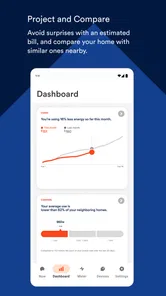
The simplest alternative is the electricity bill. Bills are easy to understand and require no new monitoring habit, but they are slow and broad. They can tell me that consumption changed, not necessarily which household routine deserves investigation. Sense Home is more useful when I want to connect activity with time and behavior.
Another alternative is a smart plug or a small plug-in energy meter. Those tools are often better for testing one appliance with a clear before-and-after comparison. If I want to know whether a particular desk setup draws power overnight, a device-level meter may be more direct. Sense Home is the better fit when the question is broader: what is happening across the home, and which patterns should I examine first?
Smart-home platforms can also be more suitable for people who want automation. If the main goal is to schedule lights, control thermostats, or switch compatible equipment remotely, a home-automation app may offer more direct control. Sense Home’s appeal is its monitoring perspective. I would choose it for understanding household electricity activity, not for building a large collection of automated routines.
Finally, some people will prefer a manual approach: reading the bill, checking appliance labels, and changing habits one at a time. That can work well for a small home with predictable routines. The app earns its place when the household is curious, consumption is difficult to explain, or several people need a shared view. If nobody intends to review the information or act on it, a manual method may be less distracting.
The app has been available since August 31, 2016, and its current version is 2026.11, with support for operating systems from version 10 onward. Those details matter if an older phone or tablet is being considered for a shared household screen. I would check the device before planning a dedicated setup, especially if the home keeps an old tablet in the kitchen or utility area.
Who should use it, and who should skip it?
I would recommend Sense Home to homeowners and technically comfortable households that want a broad view of electricity activity and are willing to learn their normal patterns. It is particularly suitable for people investigating unexpectedly high usage, trying to reduce waste, or coordinating routines among several residents.
It can also suit a curious renter if the monitoring arrangement is appropriate and the property owner’s boundaries are respected. In that situation, I would focus on observation and habit changes rather than expecting to modify the electrical installation. The app can still be useful for understanding a home, but the practical setup may be more constrained.
I would skip it if I only want a quick monthly estimate, if I need guaranteed appliance-by-appliance precision, or if I expect automatic controls. I would also avoid making it the center of household life. People who find dashboards stressful may get more value from one simple change, such as reducing standby use or adjusting a regular schedule, than from constantly reviewing activity.
Its reception is reasonably mixed rather than universally enthusiastic: it holds a 3.9 average from around 1.8 thousand ratings, with about 488 written reviews and over 100 thousand installs. I read that as a sign that the concept is useful to many people but may involve expectations and setup conditions that do not suit everyone. The free price lowers the barrier to trying it, while the time needed to interpret household patterns remains the more important commitment.
My household verdict
Sense Home is a thoughtful choice for turning household electricity from an invisible monthly result into something people can discuss and investigate. I like it most when one account holder sets clear boundaries, the household agrees on how to use the information, and everyone treats the app as a guide rather than a judge. That approach makes it useful for shared homes without turning monitoring into surveillance.
Its best contribution is not a dramatic promise of instant savings. It is the ability to ask better questions: what changed, when did it change, does that match our routine, and what small action is worth testing? The baseline habit, the comparison with device-level meters, and the need to separate observation from diagnosis are all important to getting value from it.
Sense Labs, Inc. has made a free House & Home app that is accessible to a wide audience, including households using an older supported device and families looking for an age-appropriate way to discuss energy habits. I would recommend Sense Home to people who want whole-home visibility and are prepared to participate in the learning process.
My final view is positive but measured: it is strongest as a shared household awareness tool, not as an electrical repair guide or automatic control center. If that matches what you need, it can become a genuinely useful part of home planning. If you need exact readings from one appliance or hands-off automation, another type of tool will probably serve you better.
Sense Home Frequently Asked Questions
Is Sense Home still maintained, and should I expect updates?
Sense Home is a free House & Home app from Sense Labs, Inc., with a current version listed as 2026.11. Its release history and ongoing availability can influence how well it works with newer devices, so check the app store page on your phone before installing. User feedback can also help you judge whether the current experience suits your needs.
What information can I see with Sense Home?
Sense Home is intended to help you monitor electric use, see what is running, and avoid disaster. The app’s usefulness depends on having the compatible Sense setup needed to collect and present that information; it is not simply a general-purpose home-screen tool. Consider whether energy monitoring is what you need before downloading, and review the app’s compatibility details in the store.
What is Sense Home and what does it do?
Sense Home is a mobile launcher and personalization app designed to make your Android phone easier to use. It can organize applications, provide quick access to frequently used tools, show contextual information, and offer a customized home-screen experience. Depending on your device and Android version, available features may vary, so it is worth checking compatibility before downloading.
Does Sense Home replace my phone’s default launcher?
Yes, Sense Home may function as a replacement for the standard Android home screen, particularly on compatible HTC devices or versions of Android that support it. After installation, you may need to select it as the default launcher. You can usually switch back to your original launcher through Android settings, although the exact menu names can differ between manufacturers and operating-system versions.
Is Sense Home free to download and use?
Sense Home is free to download. However, availability, included services, advertisements, and update support may depend on the version obtained and the device being used. Downloading it from an official app store is recommended to avoid modified packages or unsafe third-party files.
Pros
- Clear overview of app usage and device activity
- Helpful tools for identifying battery-draining apps
- Simple interface that is easy to navigate
- Useful insights for spotting unusual phone behavior
- Can support better digital habits and device management
Cons
- Some features may require extra permissions to work fully
- Insights can be limited on devices with restricted background access
- May use additional battery while monitoring phone activity
- Not all recommendations will be relevant to every user
- Privacy-conscious users may dislike its level of data access







