

Seizure Alert – My Medic Watch
- 40.00
- 2.6
- Installs
- 10.00K
- Price
- Free

Screenshots
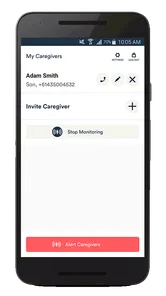
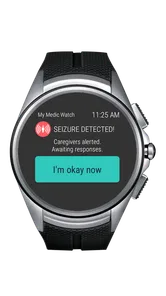
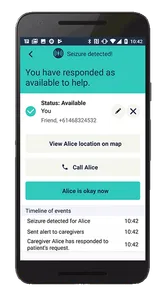
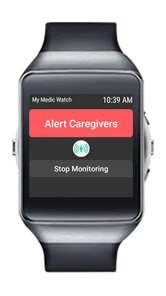
Analysis by Reviewed
Seizures can happen without warning, which makes any attempt to recognize one automatically worth examining carefully. Seizure Alert – My Medic Watch is a medical app built around that single, important idea: automatic seizure detection. I approached it less like a general wellness tool and more like a possible safety layer for someone whose seizures may occur when another person is not nearby.
My overall impression is cautious but interested. The concept is meaningful, and the app’s purpose is much more specific than a typical health tracker. At the same time, an alert system connected to a serious medical event has to be judged by its limits, not just by its most reassuring promise. I would consider it a supporting tool for a carefully planned safety routine, never a replacement for prescribed treatment, clinical advice, supervision, or an emergency plan.
Automatic detection is the whole reason to consider it
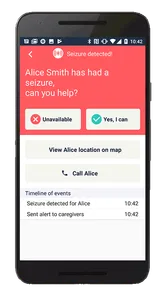
The strongest part of this app is also the simplest to explain. Rather than asking the user to notice a seizure and manually contact someone, it is designed to identify seizure activity automatically and provide a seizure alert. That changes the practical question from “Will I remember to use the app?” to “Can this tool add another route to help when I cannot act for myself?”
That distinction matters for people who experience events during sleep, when alone, or with symptoms that affect awareness and movement. A manual panic button can be useful only when the person is conscious, able to reach the phone, and able to decide what is happening. Automatic detection targets a different gap. It is intended for the moments when those assumptions fail.
I also think the narrow focus is preferable to pretending that one app can manage every part of epilepsy care. This is not something I would use to replace a seizure diary, medication reminders, a neurologist’s advice, or a personal response plan. Its value is in the alert pathway. If that pathway is useful in your circumstances, the app has a clear purpose; if you need broad condition management, it will not be enough on its own.
The app comes from My Medic Watch and sits in the medical category rather than entertainment, fitness, or general lifestyle software. That positioning sets the right expectation: the important question is not whether it feels polished or fun, but whether it fits safely into the user’s existing care routine.
Why automatic alerts can matter more than manual check-ins
A manual check-in usually depends on a predictable schedule. Someone sends a message, the user responds, and a missed response may trigger concern. That can work well for planned support, but it leaves a blind spot between check-ins. An automatic seizure alert aims to cover that unplanned interval.
More From Our News Desk

 Gmail
GmailGmail in a Busy Inbox: Who Benefits Most?
From first account to crowded workday, Gmail earns its place through dependable search and flexible sorting—but its best fit depends on how much inbox maintenance you can tolerate.

 Prime Video
Switching to Prime Video: What Changes in Your Viewing Routine
Prime Video can make a compelling second home for streaming, but switching means learning a different catalog, rental layer, and route from browsing to playback.

 Universal TV Remote Control
Universal TV Remote Control Works Best as a Reliable Backup
A phone remote earns its place through quick setup and reliable habits. Here is how to get more from Universal TV Remote Control—and where its limits show.

 Weather - By Xiaomi
Weather by Xiaomi Review: Clear at a Glance, Less Clear Up Close
Xiaomi’s weather app makes everyday forecasts quick to scan, but its calm surface can leave useful details and recovery paths harder to find than they should be.

 X
XX Under Pressure: Can It Recover When Posting Goes Wrong?
A resilience-focused review of X, examining setup, mistaken posts, interruptions, weak connections, and the gaps that matter when recovery needs to be dependable.

 Clash of Clans
Clash of Clans Is Won Between the Battles
Its raids are quick; its community is a long-term project of coordination, teaching, rivalry, and shared responsibility—with all the friction that entails.
Latest News



In my view, the most useful way to think about it is as a second pair of eyes, not as an authority that decides what happened. A detected event should lead to a person following an agreed response plan. That might mean checking the user, contacting a caregiver, or seeking urgent help depending on the situation. The app can potentially start that chain, but people still need to decide what the chain should be.
This is also why expectations should stay realistic. Automatic recognition can be valuable without being perfect, and a false alarm can be inconvenient or upsetting. A missed event would be more serious. Anyone considering the app should discuss those possibilities with a healthcare professional and the people who may receive or respond to alerts.
What using it in everyday life actually involves
The first practical step is not simply installing the app and assuming the problem is solved. I would begin by deciding who needs to know about it, what an alert should mean, and what action should follow. A caregiver who receives a notification but does not know whether to call, visit, or escalate may lose valuable time. The app works best when the human part of the process is prepared in advance.
I would also test the routine when everyone is calm. That means checking whether the intended person notices an alert, understands its meaning, and knows how to reach the user. A test of communication is not proof that detection will work in every situation, but it can reveal practical friction before a real event occurs.
The current version is S-2.2.11, so users should keep an eye on the app’s update behavior and make sure the installed version remains current. I would not treat an update as a reason to change medical decisions, but I would make app maintenance part of the safety routine. A tool that is installed but ignored for months is much less useful than one that is periodically checked.
Another sensible habit is to keep the phone and any related setup consistent with normal daily use. If a person removes or changes the equipment involved, changes their routine, or stops carrying the device, the alert pathway may no longer match the situation it was meant to cover. The app should be considered part of a system, not an isolated icon on a screen.
A realistic evening scenario
Imagine someone who is prone to seizures at night and lives alone. Their usual plan may include informing a family member, keeping emergency instructions accessible, and using Seizure Alert as an additional way to draw attention to an event. If an automatic alert is generated while the person cannot respond, the family member has a reason to check in rather than waiting for the next scheduled message.
The useful detail here is not the notification by itself. The benefit comes from the complete sequence: the alert is noticed, the recipient knows the person’s normal pattern, the recipient can assess the situation, and the escalation plan is clear. Without those surrounding steps, an alert can simply create uncertainty.
For this scenario, I would make sure the family member knows that an alert is a prompt to follow the agreed plan, not a diagnosis. I would also keep ordinary communication available, because no single app should be the only route to assistance. That layered approach is more reassuring than relying on automatic detection alone.
Questions I would settle before relying on it
A common concern is whether the app can recognize every kind of seizure. I would not assume that. Seizures differ widely, and an automatic detection system may be more relevant to some patterns than others. The right question for a prospective user is whether the person’s known seizure type and circumstances are appropriate for this kind of monitoring, something a clinician or specialist care team can help assess.
Another question is whether an alert guarantees immediate help. It does not. An alert is only useful if it reaches someone who can respond. Before using the app as part of a safety plan, I would identify the recipient, confirm that they are willing to take that role, and agree on what happens if they cannot be reached.
People may also wonder whether this replaces a medical alert service. I would compare them by function rather than choosing one automatically. A dedicated medical alert arrangement may be better for someone who needs broader emergency support, voice communication, or a service designed around continuous human response. Seizure Alert may be more appealing when automatic seizure-focused detection is the central need and the user already has trusted people available to act.
There is also the question of cost. The app is free to install, while in-app purchases range from $2.99 to $139.99 per item. I would look closely at what any optional purchase provides before committing, especially if the app becomes part of a long-term care budget. A free starting point is helpful, but the real value depends on the functions available in the setup a person actually needs.
The trade-offs are serious because the purpose is serious
The app’s average rating is 2.6 from around 153 ratings, with around 40 written reviews. I would not use that figure as a medical verdict, because ratings can reflect different phones, expectations, support experiences, and use cases. Still, it is a reason to approach the app with care rather than assuming that the concept alone guarantees a smooth experience.
The install base is over 10K, which suggests that it has reached a real group of users but remains a relatively small tool compared with mainstream health apps. That can matter when deciding how much independent troubleshooting information or community experience will be available. I would be more comfortable trying it gradually, with another safety method in place, than making it the only protection from the first day.
The mature age rating of 17+ is another practical consideration for families. A younger person may need an adult to manage the wider safety plan, and the app’s age classification means parents or guardians should review whether it is suitable for their situation rather than assuming that a medical purpose makes it appropriate for every age.
False alerts are one of the clearest trade-offs. An alert that happens during ordinary movement, unusual sleep, or another non-seizure situation could disturb caregivers and gradually reduce their confidence in the system. That does not make alerts useless, but it means the response plan should include calm verification instead of treating every notification as a confirmed diagnosis.
Missed alerts are the more difficult limitation to think about. No automatic tool should be presented to a user as infallible. If a person faces a high risk of severe injury, prolonged seizure, breathing problems, or other urgent complications, they need professional guidance about additional safeguards. The app may fit into that plan, but it should not be asked to carry more responsibility than it can safely bear.
Daily friction can matter as much as technical performance. If the user forgets the phone, leaves it without power, changes their normal setup, or stops checking whether the alert recipient is available, the system becomes weaker. My practical advice would be to connect its use to an existing habit, such as preparing for sleep or leaving the house, rather than expecting perfect attention every day.
How it compares with familiar alternatives
Compared with a seizure diary, this app serves a completely different moment. A diary helps record what happened afterward, identify patterns, and prepare useful information for medical appointments. It does not normally provide the same automatic alert purpose. I would use a diary for reflection and clinical conversations, while viewing Seizure Alert as a possible real-time safety layer.
Compared with a manual emergency button, the advantage is that the user may not need to press anything during the event. The disadvantage is that automatic detection may be less predictable than a deliberate action in situations where the user is fully conscious and able to respond. A manual button can therefore remain valuable even for someone who uses automatic monitoring.
Compared with a general smartwatch health feature, this app’s appeal is its focused medical purpose rather than a broad collection of exercise, sleep, or wellness tools. A watch or phone ecosystem may be a better choice for someone who wants one device for many everyday health tasks. Seizure Alert is easier to justify when automatic seizure detection is the priority and extra fitness functions would only distract from that goal.
Compared with a professional monitoring service, the app may offer a more personal arrangement built around family or trusted contacts. A professional service can be preferable for someone without a dependable caregiver network. The trade-off is that a personal contact may know the user better, while a formal service may have a more defined response structure. The best option depends on the person’s risks, budget, and available support.
Who is most likely to gain from it
I see the clearest fit for a person whose seizures can occur unexpectedly, who may be alone at times, and who has a reliable person prepared to respond to an alert. It may also be useful for families trying to add a focused detection layer without turning the user’s entire phone into a complicated medical dashboard.
It could be particularly practical during periods when a caregiver cannot remain physically present, such as overnight or during short trips outside the home. The key is that the user and caregiver should agree on the arrangement before depending on it. The app is not a substitute for knowing the person’s seizure pattern or emergency instructions.
I would be less enthusiastic for someone who needs broad emergency assistance, has no available responder, or expects the app to manage treatment decisions. I would also hesitate if the person’s seizure activity does not align well with automatic detection, if alerts would cause severe anxiety, or if maintaining the required setup would be difficult. In those cases, a clinician-recommended device or service may be a better direction.
For caregivers, the app can provide reassurance only when used with discipline. I would keep a written response plan, confirm contact details, review the arrangement occasionally, and avoid telling the user that the app makes them fully safe. That wording matters. A safety tool should support confidence without encouraging risky independence.
For the person using it, I would judge success by whether it fits naturally into life. If it makes the user feel watched every minute, creates repeated confusion, or becomes another source of stress, the emotional cost deserves attention. A technically promising idea is not automatically the right personal choice.
My final view after weighing the real use
Seizure Alert – My Medic Watch has a valuable, sharply defined purpose: automatic seizure detection that may help start a response when the user cannot do so manually. That is more meaningful than a generic health notification, especially for someone who spends time alone or experiences events during sleep.
My recommendation is measured rather than unconditional. I would try it only as part of a broader plan, with a clinician’s input where appropriate, a dependable alert recipient, and another way to seek help. I would test the communication workflow, review any optional in-app purchase carefully, and keep expectations grounded in the difference between detecting a possible event and confirming a medical emergency.
The app’s real strength is not that it promises to solve seizure safety; it is that it may close one specific gap in a person’s existing support system. If that gap is the inability to call for help during an event, this focused medical app is worth investigating. If the main need is treatment tracking, comprehensive emergency response, or support without a trusted caregiver, I would choose a different tool or use this only alongside one.
In short, I see it as a potentially useful safety layer for the right user, but not a standalone guarantee. Its value depends on matching the detection approach to the person’s seizure pattern and building a human response around every alert. That careful, realistic setup is what makes the app worth considering.
Seizure Alert – My Medic Watch Frequently Asked Questions
Is Seizure Alert – My Medic Watch free to download, and are there extra costs?
The app is free to download, but it also offers in-app purchases ranging from $2.99 to $139.99 per item. Before using paid options, review the purchase details shown in the app store and consider whether the available features fit your needs. As a medical support tool, its usefulness should be considered alongside the equipment, setup, and care plan you already use.
Who is Seizure Alert – My Medic Watch intended for?
Seizure Alert – My Medic Watch is a medical app for people who may benefit from seizure monitoring and for caregivers or selected contacts who may need to receive alerts. Its suitability depends on the person’s seizure patterns, device setup, and support needs. Anyone considering it should discuss its role with a healthcare professional and make sure everyone involved understands that an alert app cannot replace a medical care plan.
What is Seizure Alert – My Medic Watch designed to do?
Seizure Alert – My Medic Watch is designed to help monitor certain seizure-related events and notify selected contacts when assistance may be needed. The app works with compatible wearable technology and uses movement or other sensor information to identify possible episodes. It is intended as a support and alert tool, not as a replacement for medical diagnosis, professional supervision, or an emergency response service.
Does Seizure Alert – My Medic Watch detect every type of seizure?
No. The app should not be expected to recognize every seizure type or every individual episode. Detection can depend on the person’s symptoms, movement patterns, device placement, battery level, connectivity, and configured settings. Some seizures may produce little or no detectable movement, while other activities may cause false alerts. Users should discuss the app’s suitability with a healthcare professional before relying on it.
What equipment and permissions are required to use the app?
Depending on the available features and setup, Seizure Alert – My Medic Watch may require a compatible smartwatch or wearable device, a supported smartphone, Bluetooth access, notifications, location services, and an internet or mobile connection. The app may also request permission to run in the background and access relevant health or sensor data. Requirements can vary by device, operating system, and region, so check compatibility before downloading.
Pros
- Can alert nominated contacts when a possible seizure is detected.
- Designed for hands-free use during an emergency.
- May provide reassurance for users living alone or at risk of seizures.
- Companion support can help carers monitor alerts remotely.
- Useful as an additional safety tool alongside a medical care plan.
Cons
- Detection may produce false alarms or miss some seizure types.
- Requires a compatible smartwatch or phone setup for full functionality.
- Battery life and Bluetooth connectivity can affect alert reliability.
- Emergency features may require a paid subscription or supported plan.
- It should not replace medical supervision or professional emergency services.












