

Fall Alert – My Medic Watch
- 22.00
- 3.1
- Installs
- 10.00K
- Price
- Free
Screenshots
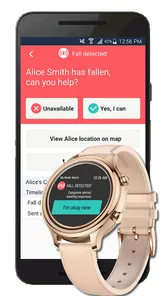
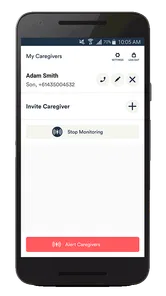
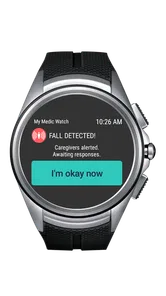
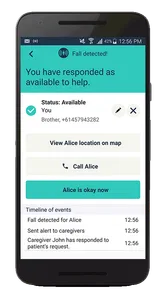
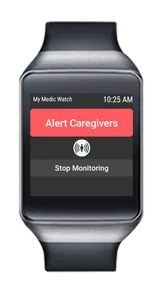
Analysis by Reviewed
Fall Alert – My Medic Watch is the kind of medical app I would judge less by how impressive it looks and more by whether it can fit quietly into a person’s daily safety routine. Its purpose is straightforward: it is designed around automatic fall detection and a fall alert, giving people another way to seek attention after an accident. I see real value here for someone who lives alone, has a history of falls, or wants family members to feel more reassured during ordinary routines.
My overall view is positive but careful. This is a useful safety layer, not a replacement for supervision, emergency planning, or medical equipment. The distinction matters because fall detection is only helpful when the phone or wearable setup is appropriate, the app is configured correctly, and the person can rely on the system in the place where a fall might actually happen.
How Fall Alert fits into everyday safety
My Medic Watch is the developer behind this free medical app, which is aimed at an Everyone audience. It has been available since April 8, 2019, and the current version is F-2.2.11. The app has passed the early-experiment stage, with over ten thousand installs, although its average rating of 3.1 from around seventy-seven ratings suggests that the experience has not been equally smooth for everyone.
I would not interpret that rating as proof that the idea fails. Safety apps often depend on a combination of phone model, wearable hardware, movement patterns, permissions, connectivity, and the user’s own setup habits. Still, it is a useful warning: I would test Fall Alert carefully before trusting it as the only way to summon help.
The central appeal is obvious. A person who falls may be confused, injured, unconscious, or unable to reach a phone. A manually operated emergency button is not always practical in that moment. Automatic detection tries to reduce that dependence on deliberate action. That makes the app particularly relevant to older adults, people recovering from surgery, users with balance problems, and anyone whose family worries about accidents at home.
There is also a psychological benefit that is easy to overlook. A person may avoid wearing a conspicuous medical device because it makes them feel dependent or unwell. A phone-based app can feel more familiar and less stigmatizing. That does not make it universally better, but it can make a safety routine easier to accept and maintain.
What I found most valuable in the concept
The strongest part of Fall Alert is its focus on the moment after an incident rather than on general wellness tracking. Many health apps fill their screens with exercise summaries, reminders, or measurements. This one addresses a narrower problem: how to raise an alert when a fall may prevent the user from responding normally.
More From Our News Desk

 Gmail
GmailGmail in a Busy Inbox: Who Benefits Most?
From first account to crowded workday, Gmail earns its place through dependable search and flexible sorting—but its best fit depends on how much inbox maintenance you can tolerate.

 Prime Video
Switching to Prime Video: What Changes in Your Viewing Routine
Prime Video can make a compelling second home for streaming, but switching means learning a different catalog, rental layer, and route from browsing to playback.

 Universal TV Remote Control
Universal TV Remote Control Works Best as a Reliable Backup
A phone remote earns its place through quick setup and reliable habits. Here is how to get more from Universal TV Remote Control—and where its limits show.

 Weather - By Xiaomi
Weather by Xiaomi Review: Clear at a Glance, Less Clear Up Close
Xiaomi’s weather app makes everyday forecasts quick to scan, but its calm surface can leave useful details and recovery paths harder to find than they should be.

 X
XX Under Pressure: Can It Recover When Posting Goes Wrong?
A resilience-focused review of X, examining setup, mistaken posts, interruptions, weak connections, and the gaps that matter when recovery needs to be dependable.

 Clash of Clans
Clash of Clans Is Won Between the Battles
Its raids are quick; its community is a long-term project of coordination, teaching, rivalry, and shared responsibility—with all the friction that entails.
Latest News



That narrow focus can make it easier to explain to a family member. Instead of asking someone to learn a complex health dashboard, I would describe it as a dedicated safety tool that should be prepared before an emergency happens. The best results will come from treating installation as a small household project, not something to download and forget.
My first practical tip would be to decide in advance where the app matters most. A fall in a bedroom, bathroom, kitchen, garden, or driveway creates different conditions. A phone left charging in one room may be useless in another. Before relying on the app, I would walk through the user’s normal day and check whether the device is carried or worn during the periods when a fall is most likely.
A second useful habit is to involve the person who may respond to an alert. They should know what an alert from Fall Alert means, how they are expected to contact the user, and when they should escalate the situation. An automatic notification without a clear human response plan can create uncertainty at exactly the wrong time.
I would also test the routine in a controlled, harmless way. Do not stage a dangerous fall. Instead, confirm that the user understands the alert process and knows what to do if the app reacts unexpectedly. The purpose of testing is not to prove that every possible accident will be detected; it is to uncover practical friction before a real emergency.
The limitations that deserve serious attention
Automatic fall detection is inherently difficult. Human movement is unpredictable, and not every fall looks the same. A slow slide from a chair, a collapse against furniture, or a fall onto a soft surface may behave differently from a sudden impact. Conversely, dropping a phone, making a sharp movement, or taking part in an activity could potentially resemble an accident. I would therefore avoid thinking of the app as an infallible sensor.
The phone’s position is another important trade-off. If it is in a pocket or attached in a consistent way, detection may be more meaningful than if it is lying on a table. Yet the most comfortable carrying method is not always the most reliable one, and a person may forget the device when moving around the home. This is why I would consider adherence more important than a technically attractive setup that the user will not maintain.
False alerts can be inconvenient, especially for a family member who receives them repeatedly. They may also cause the user to stop taking the system seriously. On the other hand, a missed alert is much more consequential than a minor interruption. The right balance depends on the individual, their fall risk, and the availability of someone who can respond.
There is a financial detail worth keeping in mind. The app itself is free, while in-app purchases range from around three dollars to around one hundred thirty dollars per item. That broad range means I would inspect the purchase screen carefully before committing to any paid option. A family should understand exactly what a purchase adds, whether it is needed for their intended setup, and whether the ongoing arrangement fits their budget.
I would also be cautious about confusing an app with a monitored medical alert service. Fall Alert can be part of a response plan, but the app alone does not automatically mean that trained staff, relatives, or emergency services are watching continuously. Anyone choosing it should establish who receives an alert and what happens if the user does not answer.
Who is likely to benefit most
I think Fall Alert is best suited to someone who already carries a compatible mobile device consistently and is comfortable following a simple safety routine. It may be especially helpful for an older adult living independently, provided a trusted person is available to respond. It can also make sense for a user recovering from an injury who wants an extra safeguard while moving around the home.
Consider a realistic example: an older parent spends the morning alone, moves between the kitchen and laundry area, and sometimes feels unsteady when standing up. Their adult child cannot be present every day but can agree on a response plan. In that situation, installing Fall Alert, deciding how the phone will be carried, and practicing what to do after an alert could provide useful reassurance without requiring the parent to press a button during a crisis.
The app may also suit a person who dislikes dedicated medical pendants. Familiar technology can be easier to accept, and the free entry point lowers the barrier to trying the idea. I would still make the decision based on consistent use rather than on reluctance to wear specialized equipment.
It is less suitable for someone who regularly leaves the phone behind, has severe cognitive impairment without a caregiver managing the setup, or spends much of the day in places where the device cannot be kept reliably nearby. It is also not my first choice for a person at very high risk who needs guaranteed professional monitoring. In that case, a dedicated medical alert system with an emergency response center may be the safer alternative, even if it costs more and feels less convenient.
For a person who mainly wants to contact help manually, a standard phone emergency feature or a wearable with a clearly accessible button may be preferable. Manual systems have their own weakness, since the user must be able to activate them, but they can be easier to understand and verify. Fall Alert’s advantage is the attempt to reduce that manual step; its weakness is the uncertainty that comes with automated interpretation.
How I would set it up for a real household
I would begin with the user’s routine rather than the app’s settings. Who is at home during the day? Which rooms are used most? Is the phone normally carried, worn, or left nearby? Who can respond quickly? These questions reveal whether the app is addressing a real gap or merely adding another icon to a device that is rarely within reach.
Next, I would explain the limits in plain language. The user should know that an alert system is a backup, not permission to take unnecessary risks. They should continue using walking aids, keeping pathways clear, and following medical advice. This conversation is especially important when family members assume that installing an app has solved the entire safety problem.
I would then create a simple response script. The recipient of an alert should try to contact the user, check whether the message may be accidental, and know when to seek urgent assistance. Keeping that process short reduces hesitation. It is also sensible to tell more than one trusted person if the household’s circumstances allow it, so one missed call does not end the response.
Another non-obvious point is that convenience can become a safety weakness. If charging the phone requires leaving it across the room overnight, the device may not be available when it is needed. I would choose a charging location that supports the user’s actual habits, then check that the phone is returned to its normal position afterward. A safety tool that is frequently forgotten is not a dependable safety tool.
I would review the arrangement after changes in mobility, medication, living situation, or daily schedule. A setup that made sense during recovery may be unnecessary later, while a new health issue may require a more robust solution. Fall Alert should be treated as part of an evolving plan rather than a one-time installation.
What the rating and purchase model mean for a decision
The public response is mixed: Fall Alert holds a 3.1 average, with around twenty-two written reviews. I would read that as a reason to approach it with realistic expectations, not as a reason to dismiss it immediately. The app addresses a meaningful problem, but personal safety software has a higher standard than ordinary convenience apps. Reliability, clarity, and ease of recovery from mistakes matter more than visual polish.
The purchase model also deserves a deliberate look. Free access makes experimentation easier, but the range of optional prices means users should avoid assuming that every useful part of the experience is included without cost. I would only pay after identifying the exact need, testing the basic workflow, and discussing the expense with whoever is responsible for the safety plan.
Its Everyone age rating makes it approachable for households that want to involve relatives of different ages, but that rating should not be mistaken for a guarantee that the app fits every medical situation. The important question is whether the intended user can keep the device available and whether another person can respond meaningfully.
My verdict after weighing convenience against certainty
I see Fall Alert – My Medic Watch as a focused extra layer for people who want automatic fall detection without immediately committing to a dedicated alert service. Its biggest strength is practical: it aims at a moment when a person may not be able to operate a phone normally. Its biggest weakness is equally practical: detection and response depend heavily on carrying habits, device placement, setup, and the people around the user.
I would recommend trying it for a low-risk household that can test the routine, define a response plan, and accept that an app cannot promise perfect detection. I would be more cautious for someone whose safety depends on immediate professional intervention or who cannot reliably keep the device close. For that audience, a purpose-built medical alert system is likely the better investment.
My final recommendation is therefore conditional but clear. If you want a free starting point for a fall-safety routine, Fall Alert is worth examining, especially when a family member can help manage the setup. Just do not install it and assume the job is finished. Its real value comes from the complete routine around it: carrying the device, testing the process, assigning a responder, and knowing when a more specialized service is necessary.
Fall Alert – My Medic Watch Frequently Asked Questions
Is Fall Alert – My Medic Watch free to download, and are there ongoing costs?
The app is free to download, but some services may involve in-app purchases. The available purchase options range from a few dollars to over a hundred dollars per item, so check the subscription or service details before relying on a particular monitoring feature. The app’s basic availability does not necessarily mean that every alert or monitoring option is included at no cost.
Who develops Fall Alert – My Medic Watch, and is it intended for general use?
Fall Alert – My Medic Watch is a medical safety app from My Medic Watch. It is suitable for a general audience, while its main purpose is to support people who want an added way to respond to a possible fall. Its average rating is around 3.1 stars, based on dozens of ratings, so it is sensible to review the setup and alert arrangements carefully before making it part of a safety plan.
What is Fall Alert – My Medic Watch, and how does it work?
Fall Alert – My Medic Watch is a personal safety app designed to help detect a possible fall and connect the user with assistance. After setup, it can work with compatible wearable devices and use sensors to identify sudden movement patterns associated with a fall. If an incident is detected, the app may prompt the user to respond and can notify selected contacts or an emergency monitoring service, depending on the plan and region.
Does Fall Alert – My Medic Watch automatically call emergency services after a fall?
Not necessarily. The response depends on your account, subscription, location, connected device, and the monitoring option you select. In many situations, the app first gives the user an opportunity to cancel a false alarm or confirm that help is needed. Before relying on it, carefully check how alerts are routed in your country and whether professional monitoring or emergency-service access requires an additional subscription.
What devices and permissions are required to use the app?
The exact requirements can vary by version and supported service, but Fall Alert – My Medic Watch generally needs a compatible Android or iPhone and, where applicable, a supported wearable or medical alert device. You may need to allow Bluetooth, motion or activity access, notifications, location, microphone, phone, and background operation. Keeping these permissions enabled is important because restrictions can delay detection or notifications.
Pros
- Automatic fall detection can alert contacts when you cannot reach your phone.
- Designed for older adults and people living independently.
- Can provide reassurance to family members and caregivers.
- Wearable support may work more reliably than relying on a phone alone.
- Useful for users with mobility concerns or a history of falls.
Cons
- Fall detection may produce false alarms during sudden movements or exercise.
- Requires compatible wearable hardware for its full safety functionality.
- Battery charging and device maintenance are necessary for continuous protection.
- Emergency response features may depend on cellular or internet coverage.
- Subscription or hardware costs may apply to access key monitoring services.












