

Seed to Spoon - Garden Planner
- 2.71K
- 4.4
- Installs
- 100.00K
- Price
- Free

Screenshots
Analysis by Reviewed
I like gardening apps most when they help me make a decision at the exact moment I need one: what to plant, where to put it, when to check it, or how to recognize a problem. Seed to Spoon - Garden Planner is built around that practical rhythm. It combines garden planning, plant tracking, growing guidance, and plant identification in one place, so I can move from an idea to an actual bed without constantly switching between notebooks, search results, and separate reference apps.
From Seed to Spoon develops this free House & Home app, and it is aimed at ordinary gardeners rather than only experienced growers. I found the tone and structure more approachable than a dense horticulture reference, especially when I wanted a quick starting point. At the same time, it is not simply a digital seed catalog. Its real value appears when I use several parts together: planning the layout, checking a plant guide, recording progress, and using identification help when something in the garden looks unfamiliar.
The app has a 4.4 average from around 6,300 ratings and more than 100,000 installs, which gives it a reassuring amount of real-world use. It is free to install, rated for Everyone, and runs on Android 7.0 or later. Optional purchases range from about five dollars to nearly forty-seven dollars per item, so I would treat the free version as a way to test the workflow before deciding whether the extra material fits my gardening habits.
How the current experience works in a real garden
I find the app most useful once a garden moves from a shared idea to a set of real tasks: deciding what fits, checking plant guidance, and keeping a record that everyone can understand. In this section, I’ll focus on how that connected workflow can help in an ordinary garden, while keeping the plan flexible enough for changes that only become clear outdoors.
Planning before buying seeds
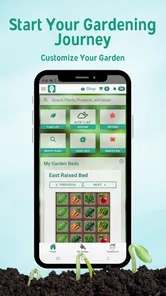
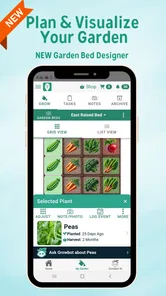
The visual planner is the strongest reason I would suggest trying this app. I can think through the garden as a space instead of keeping a vague list of plants in my head. That distinction matters. A list may tell me that I want tomatoes, herbs, lettuce, and flowers, but a layout forces me to consider where those plants belong and how the whole area will work together.
I would use it before visiting a garden center. Rather than buying whatever catches my eye, I can start with the available growing area, sketch out the intended arrangement, and then compare that plan with the plants I am considering. This makes the app useful for a first garden, but also for returning gardeners who tend to overbuy in spring and discover later that there is no sensible space left.
The visual approach is especially helpful when I am planning several small areas instead of one large plot. A patio container, a raised bed, and a few spots near the house can be considered as parts of the same project. That is more useful to me than a traditional paper diagram when I am still changing my mind, because digital planning makes revisions less annoying.
More From Our News Desk

 Instagram
Instagram’s Power Comes From Its Place in Your Phone
A close look at how Instagram turns Meta’s reach, recommendation systems and everyday camera habits into durable platform power—and what that costs users.

 Gmail
GmailGmail in a Busy Inbox: Who Benefits Most?
From first account to crowded workday, Gmail earns its place through dependable search and flexible sorting—but its best fit depends on how much inbox maintenance you can tolerate.

 Prime Video
Switching to Prime Video: What Changes in Your Viewing Routine
Prime Video can make a compelling second home for streaming, but switching means learning a different catalog, rental layer, and route from browsing to playback.

 Universal TV Remote Control
Universal TV Remote Control Works Best as a Reliable Backup
A phone remote earns its place through quick setup and reliable habits. Here is how to get more from Universal TV Remote Control—and where its limits show.

 Weather - By Xiaomi
Weather by Xiaomi Review: Clear at a Glance, Less Clear Up Close
Xiaomi’s weather app makes everyday forecasts quick to scan, but its calm surface can leave useful details and recovery paths harder to find than they should be.

 X
XX Under Pressure: Can It Recover When Posting Goes Wrong?
A resilience-focused review of X, examining setup, mistaken posts, interruptions, weak connections, and the gaps that matter when recovery needs to be dependable.
Latest News



There is also a trade-off. A planner can make a garden look orderly before real conditions intervene. Sun exposure, drainage, mature plant size, access to water, and the time needed to maintain each section still require personal judgment. I would not treat the layout as a substitute for observing the site. I use it to organize decisions, not to make every decision automatically.
Turning guides into a routine
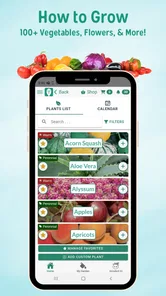
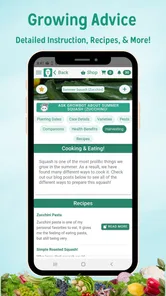
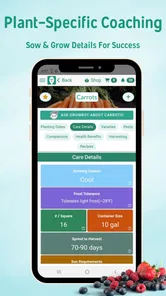
The growing guides are most useful when I read them as a sequence of actions rather than as a one-time article. A new gardener often knows the broad goal—grow carrots, keep basil alive, start vegetables—but gets stuck on the next small step. Having guidance connected to the plants in the plan reduces that friction.
My preferred workflow would be to choose a manageable group of plants, read the relevant guidance before planting, and then return to the app during the season. That prevents the common mistake of treating planting day as the end of planning. The garden needs attention afterward, and a reference that stays connected to the project is more practical than a web page I may never find again.
I also appreciate the idea of combining general guidance with personal tracking. A guide can explain what a plant usually needs, while a record of my own garden tells me what actually happened in my conditions. Those are different kinds of knowledge. If a crop struggles, my notes can help me remember whether the problem followed a late planting, an unusually dry period, or a poor location.
One useful tip is to keep entries honest and simple. I would record observations soon after doing the work instead of trying to reconstruct the season from memory. Short notes such as “moved container,” “first flowers,” or “leaves looked stressed” can be more valuable later than a long entry written weeks afterward. The tracking feature becomes a learning tool only when I use it consistently.
Plant identification when the garden surprises you
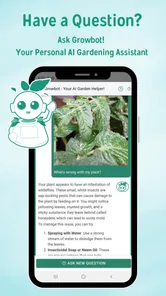
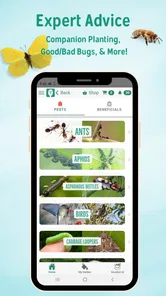
Plant identification is a welcome companion to the planner because gardens rarely remain perfectly labeled. A seedling may appear where I did not expect it, a volunteer plant may return from last season, or a weed may resemble something I intentionally planted. Having identification included means I can investigate the mystery without leaving the gardening workflow.
I would still use identification as a first step, not as final proof in a high-stakes situation. If I were checking whether a plant was safe to eat, confirming a serious disease, or deciding how to treat a valuable tree, I would compare the result with a trusted local source or an experienced gardener. Visual identification can narrow the possibilities, but a photograph or a similar-looking leaf does not remove the need for caution.
The feature is particularly handy for beginners who do not yet know the vocabulary needed to search effectively. Instead of trying to describe leaf shape, growth habit, or flower structure in the right terms, I can begin with what I see. That lowers the barrier to learning, and over time the identification process can teach me how to notice useful details.
A realistic week with the app
Imagine I have a small backyard bed and two containers. At the start of the week, I check the plan and see which plants I intended to grow in each area. Before doing any work, I review the growing guidance for the plants that need attention. After watering, thinning, or moving a container, I add a brief note so the garden has a history rather than being only a diagram.
Later, I notice a plant in the bed that I cannot recognize. I use the identification tool to form a likely answer, then compare it with the plants already shown in my plan. If it does not belong there, I can make a more informed decision about whether to keep it, move it, or remove it. This is a small scenario, but it shows why the combination matters: planning, reference material, tracking, and identification support one another.
On the weekend, I review what changed instead of starting from scratch. That can make a garden feel less chaotic, especially during a busy season. The app does not eliminate the physical work, but it can reduce the mental load of remembering what I planted and why.
What has changed over the product’s life
The app was released on December 7, 2017, and its current version is 80020. That history suggests an established product rather than a brand-new experiment. I see the version information as useful context: the app has had time to develop beyond the basic idea of displaying plant information, and its identity now rests on bringing planning and ongoing garden care into the same experience.
For existing users, the important point is that the current product should be judged as a connected gardening workspace, not merely as a collection of articles. The version number by itself does not tell me that every part will suit every gardener, but it does make the app feel like something intended for repeated seasonal use. I would expect returning users to get more value from maintaining a garden record than from opening it only once to identify a plant.
New users should also understand that product evolution does not automatically mean a perfect fit. An established app may have a broader feature set, but a broader set can require more setup and more attention. I would spend a little time learning the planner and deciding how much tracking I genuinely want. If I create an elaborate system that I will not maintain, the extra structure becomes a burden instead of a benefit.
Where it fits beside familiar alternatives
The usual alternative is a paper notebook. A notebook is flexible, private, and usable without learning an interface. It is also excellent for sketches and personal observations. Seed to Spoon has the advantage when I want plant guidance and identification alongside the plan, because I do not have to remember which notebook page contains a planting note or which website explained the next step.
Another alternative is using a general notes app with browser searches. That approach can work well for someone who already has a reliable system, but it tends to scatter information. One note may contain a shopping list, another may hold a rough layout, and useful guidance may remain buried in browser history. This app is better for gardeners who want those activities to feel like one project.
Dedicated specialist references may still be preferable for advanced growers who need highly technical information, regional precision, or a narrow focus on one type of crop. I would also choose a simpler solution if I only wanted a blank garden journal. The strength here is the combination, not the claim that one app can replace every horticultural resource.
Small details that improve the workflow
One non-obvious advantage is that the planner can help me notice logistical problems before they become gardening problems. When I place plants in relation to one another, I can think about whether I will still be able to reach the back of the bed, whether a container is too far from the watering point, and whether the arrangement encourages me to neglect a corner. A plan is not only about aesthetics; it can expose maintenance decisions.
A second useful habit is to use identification for learning, not just emergency answers. When I encounter an unfamiliar plant, I can check the result and then compare the visual clues with the guide. That gradually improves my own recognition skills. The app becomes less of a guessing shortcut and more of a bridge toward understanding plant characteristics.
A third trade-off concerns tracking detail. Recording everything may sound appealing, but it can turn garden care into administration. I would track events that change future decisions: planting, transplanting, unusual weather observations, pest symptoms, harvest timing, and changes in location. I would skip repetitive notes that add no insight. This selective approach makes the history easier to use next season.
A fourth tip is to plan for uncertainty rather than filling every space. I would leave room for replacements, succession planting, or a crop that performs better than expected. A digital planner makes it tempting to use every available area on day one, but a little flexibility is valuable. The garden will teach me things that were impossible to know when I first made the layout.
Limitations I would consider before installing
The first limitation is that the app can only organize the information I give it. If I do not update the plan after moving a plant or changing a container, the digital garden quickly becomes less trustworthy than the real one. That is not a flaw unique to this app, but it matters here because the value of its connected workflow depends on keeping the record current.
The second is the balance between free access and optional purchases. The app is free, which makes it easy to try, but in-app items cost from around five dollars to nearly forty-seven dollars each. I would check what is available without paying and decide whether the additional content serves my actual garden. Someone who wants a completely free, minimal journal may prefer a notebook or a basic notes tool.
The third limitation is that identification and general growing guidance should not be treated as local expertise. Gardening depends heavily on climate, soil, exposure, pests, and timing. I would use the app to prepare better questions and build a record, then adapt its guidance to my own conditions. Gardeners who expect automatic, location-perfect instructions may find the experience less satisfying.
There is also a learning curve caused by having several connected functions. A single-purpose app can feel quicker because it asks less of me. Here, the payoff comes after I establish a plan and return to it. If I only want a rapid answer about one plant, the broader structure may feel unnecessary.
Who should use it, and who should skip it?
I think it is a strong match for beginners who want more guidance than a blank notebook provides, families sharing a garden project, and returning gardeners who want to remember what happened from one season to the next. It is also useful for people who think visually and find a layout easier to understand than a long written list.
I would recommend it to a gardener who often buys plants impulsively and then struggles to fit them into the available space. The planning stage can encourage more deliberate choices. I would also suggest it to someone who enjoys learning by observation, because tracking turns successes and failures into information that can improve future decisions.
I would skip it if I already have a detailed system that I enjoy using, especially one built around specialized local advice. I would also hesitate if I dislike recording activities or if my only need is a simple reminder. In those cases, the extra planning and reference features may be more structure than I want.
What I would watch during continued use
For a long-term user, I would watch how well the app supports the transition from first plan to repeatable seasonal routine. The most important test is not whether I can create an attractive layout, but whether I can return months later and understand what I did, what changed, and what I should do differently.
I would also pay attention to how comfortably the guidance, tracking, and identification tools work together in everyday use. If I have to repeatedly re-enter information or search through unrelated sections, the combined concept loses some of its appeal. If the parts remain easy to connect, the app can become a dependable garden companion rather than an app I open only at planting time.
Because the current version is 80020, I would keep an eye on future updates for refinements to that workflow, while separating hope from evidence. I would welcome improvements that make seasonal records easier to review, plans easier to adjust, and identification results easier to evaluate. Those are sensible areas to watch, but I would not assume a particular change is coming.
My recommendation after using the whole approach
Seed to Spoon - Garden Planner works best when I treat it as a practical gardening notebook with extra intelligence, not as a magic answer machine. Its visual planning is useful before I spend money on plants, its guides give structure to unfamiliar tasks, its tracking can preserve lessons from the season, and identification helps me investigate surprises in the garden.
The free entry point makes it reasonable to try, and the Everyone rating makes it suitable for a household gardening project. I would begin with one small bed or a couple of containers, add only the plants I genuinely intend to grow, and test whether I return to the tracking tools after the initial setup. That experiment will tell me more than browsing feature descriptions.
My honest view is that this app is most valuable for gardeners who want a connected system and are willing to maintain it. It is less suitable for someone seeking a highly specialized reference or a completely effortless reminder tool. Used thoughtfully, though, it can turn scattered gardening intentions into a clearer plan and help me make better decisions as the season unfolds.
Seed to Spoon - Garden Planner Frequently Asked Questions
Can I use Seed to Spoon to identify plants in my garden?
The app’s store summary includes plant identification alongside garden planning, plant tracking, and growing guides. This can make it useful when you want to learn more about a plant as you organize your garden. Plant identification is best treated as a helpful starting point: compare the result with the plant’s visible features and growing conditions before making decisions about care or whether something is edible.
Who develops Seed to Spoon, and is it suitable for new gardeners?
Seed to Spoon is developed by From Seed to Spoon and is aimed at people who want practical help with growing edible plants at home. Its planting guidance, crop information, and planning tools can be approachable for beginners, while experienced gardeners may appreciate having schedules and garden notes together. The app is rated for Everyone, so it is presented for a broad audience, though younger users may still benefit from an adult’s help with garden tasks.
What is Seed to Spoon - Garden Planner?
Seed to Spoon - Garden Planner is a gardening app designed to help you plan, organize, and manage a home vegetable garden. It provides planting guidance, crop information, garden layout tools, and reminders for tasks such as sowing, watering, and harvesting. It can be useful for beginners who need step-by-step help as well as experienced gardeners who want to keep their plans and schedules in one place.
Can Seed to Spoon help me decide when to plant vegetables?
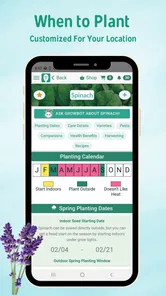
Yes. The app uses information such as your location and local growing conditions to provide planting recommendations for many vegetables, herbs, and other edible plants. It can help you identify suitable planting windows, understand succession planting, and plan crops for different seasons. However, gardening conditions can vary between neighborhoods, so you should still consider your exact microclimate, weather forecasts, soil quality, and local frost dates.
Does the app include a garden layout or planning tool?
Seed to Spoon includes planning features intended to help you organize where crops will be grown and how much space they may need. You can use the information to create a more structured garden plan instead of planting randomly. The app is particularly helpful for visualizing a vegetable garden before buying seeds. Actual results may depend on your available space, container size, sunlight, soil, and the growth habits of each plant.
Pros
- Clear planting guidance helps beginners choose crops and planting times.
- Garden planning tools make it easier to organize multiple beds and containers.
- Useful crop information covers growing requirements
- care
- and harvesting.
- Seasonal reminders can support more consistent garden maintenance.
- Works well for planning vegetables
- herbs
- and other edible plants.
Cons
- Some features or content may require in-app purchases or a subscription.
- Planting advice may not perfectly match every local climate or microclimate.
- The large crop database can feel overwhelming when first exploring the app.
- Accurate planning depends on entering your location and garden details correctly.
- Users seeking ornamental flower planning may find the focus too food-oriented.







